
Active installs
100+
Subscription includes
Support
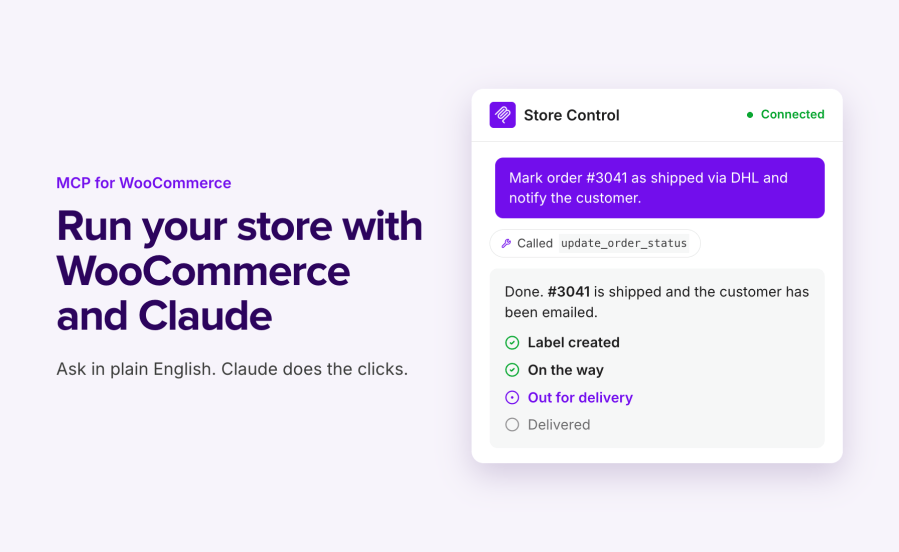
MCP for WooCommerce by W7S connects your store to AI assistants through the Model Context Protocol (MCP), the open standard for letting tools like Claude and ChatGPT work with outside systems. Ask your AI app or client to pull up an order, update a product price, find a customer, or issue a refund, and it acts on your live store. You set what the assistant can reach and what it is allowed to change.
WooCommerce’s own MCP support covers a narrow set of product and order operations, and from WooCommerce 11.3 it needs an Application Password and manual setup. MCP for WooCommerce runs its own MCP server through the free MCP Adapter plugin and builds it out: a connector form for Claude.ai, a downloadable bundle for Claude Desktop, guided setup for ChatGPT, and a wide set of store operations across orders, products, customers, coupons, refunds, tax, shipping, reports, and more. You stay in control of access through your WooCommerce API keys.
MCP for WooCommerce adds a settings screen at WooCommerce → Settings → MCP and a set of store operations your assistant can call.
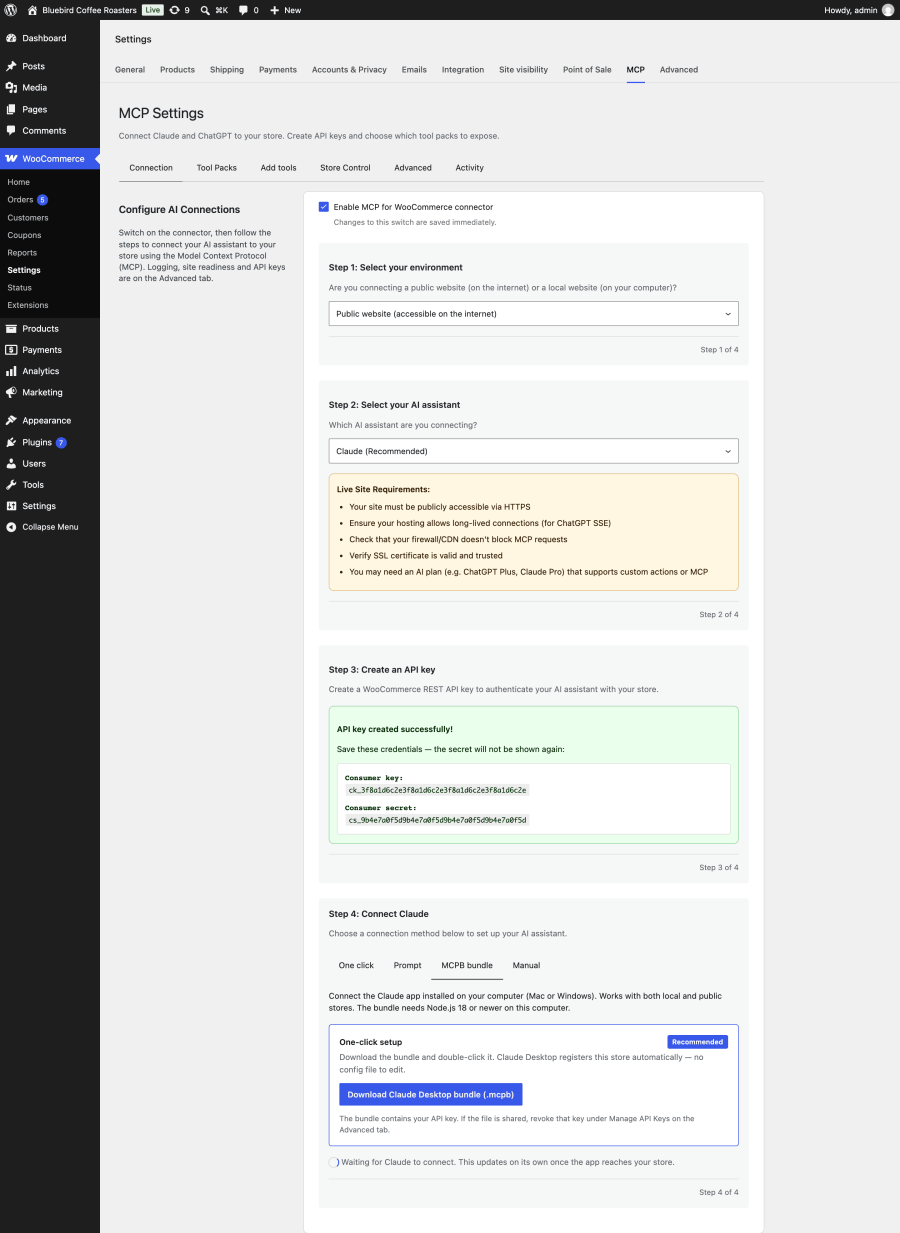
Copy your store’s MCP endpoint, generate WooCommerce API keys, and connect. The Connection tab gives you a one-click Claude Desktop bundle, a connector URL for Claude.ai and the ChatGPT app, and step-by-step ChatGPT setup, plus a Connected indicator that confirms the first authenticated request using that key has reached the store. Finish setup with a simple store lookup to check the whole connection. If the MCP Adapter is missing, the tab offers to install or activate the free plugin. Site readiness on the Advanced tab identifies the adapter in use and checks the server.
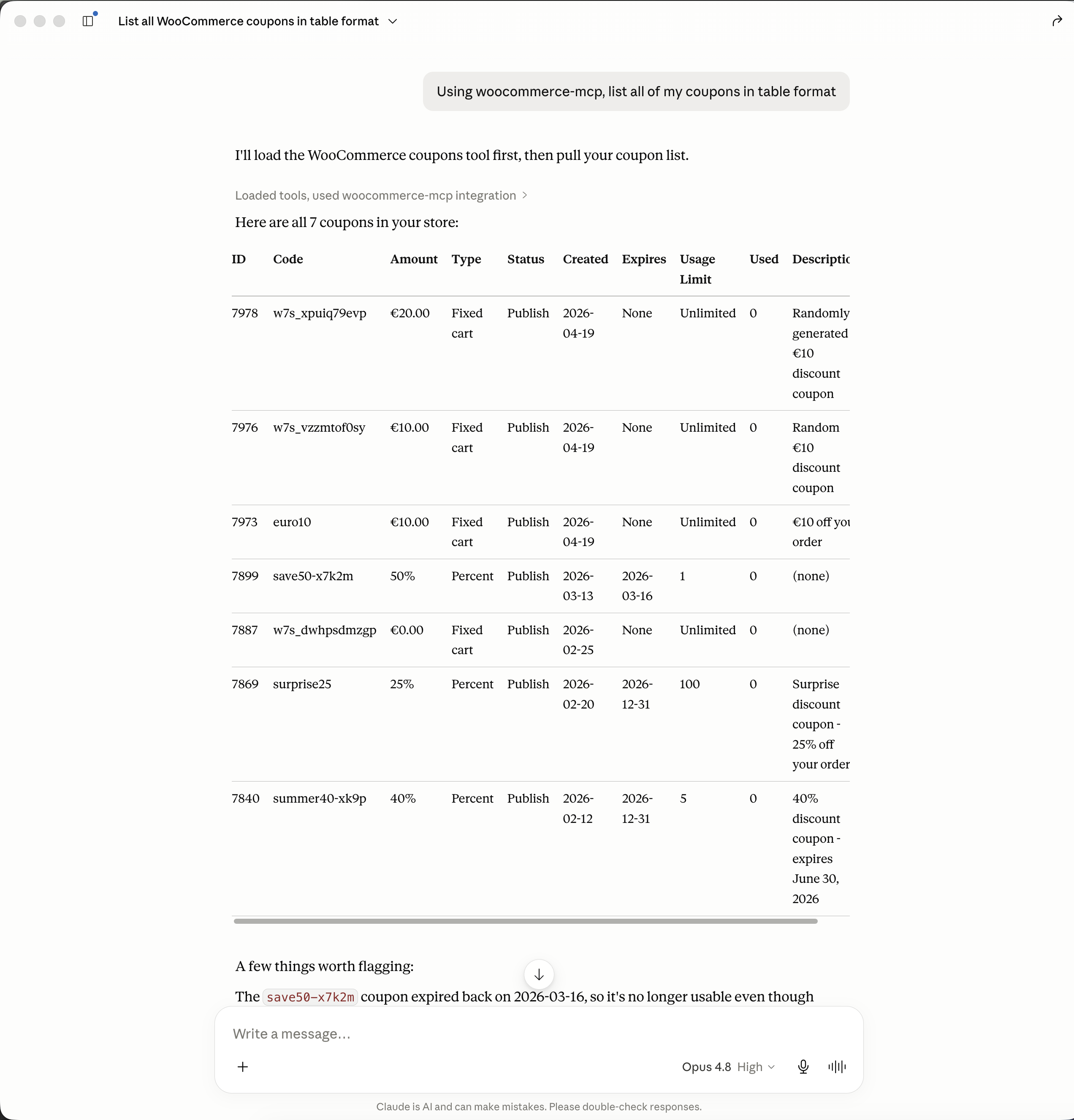
Ask questions about your store using the WooCommerce MCP
Once connected, the assistant can work with:
When you run WooCommerce Subscriptions, Bookings, or Memberships, the matching operations become available too, so the assistant can work with subscriptions, bookings, and membership plans as well.
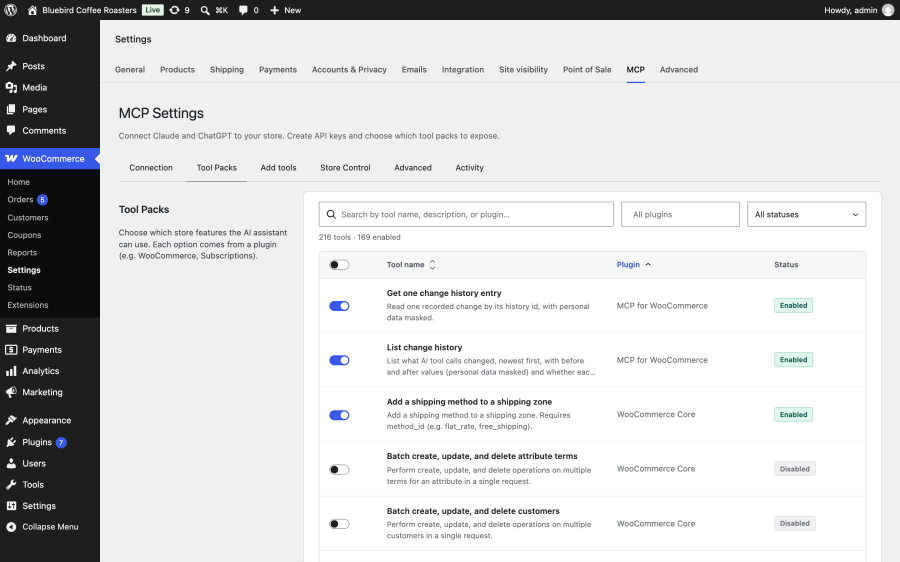
Switch optional groups of operations on or off. The nine core product and order tools are always available while the connector is enabled; use a read-only key to prevent writes through those tools. A pack that is switched off is not offered to the AI app, and the limit is enforced when a tool runs, not just hidden from the list. Packs from compatible extensions, such as WooCommerce Subscriptions, appear here when those extensions are active. WooCommerce’s own built-in abilities are available as an optional pack, off by default, so your assistant does not see two tools for the same job.
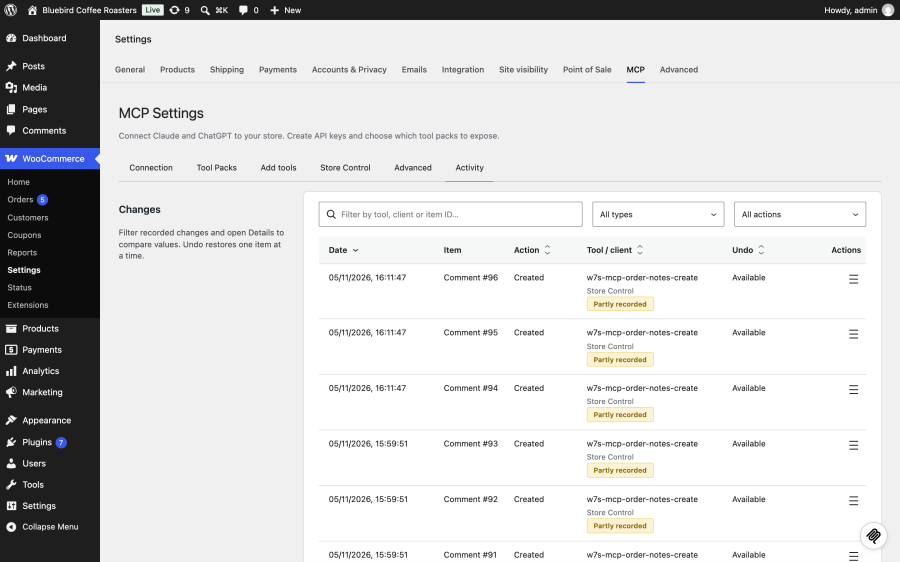
Turn on logging to record each tool call with its date, action, and the user or key behind it. Choose how long entries are kept, clear them on demand, and keep personal-data masking on to redact customer details before they are stored.
Once connected, you just ask. A few examples of what store owners run every day:
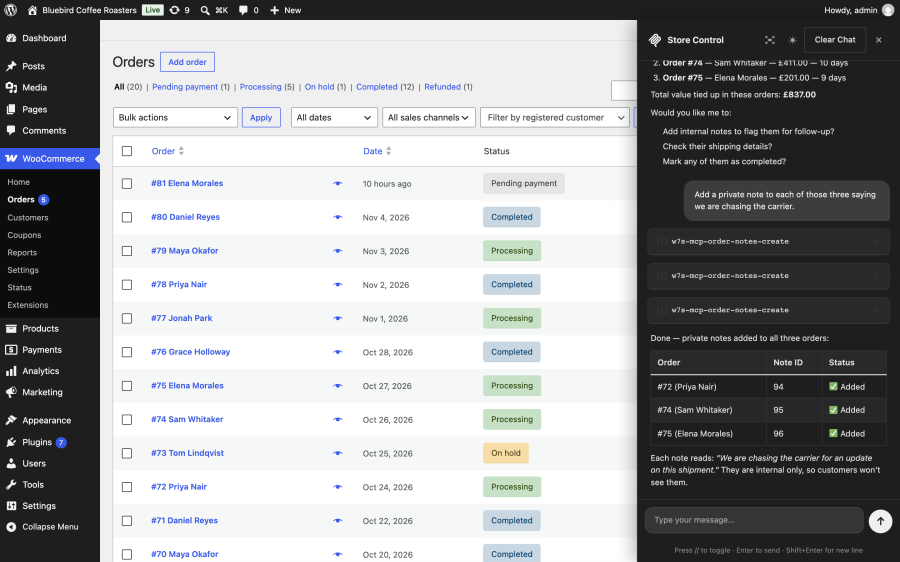
Run MCP tools straight from WP Admin through Store Control, a built-in chat using your own Claude or OpenAI provider key. Open it with the floating button or the // shortcut. It follows the signed-in user’s permissions and enabled tool packs, with settings for when to ask for confirmation. Provider API usage is billed separately by your provider.
See what an assistant changed, with before and after values kept separately from the tool-call log. Open a change’s details on the Activity tab and undo supported edits yourself. If someone has edited the same fields since, the plugin asks before overwriting them. Assistants can read the masked history but cannot run Undo.
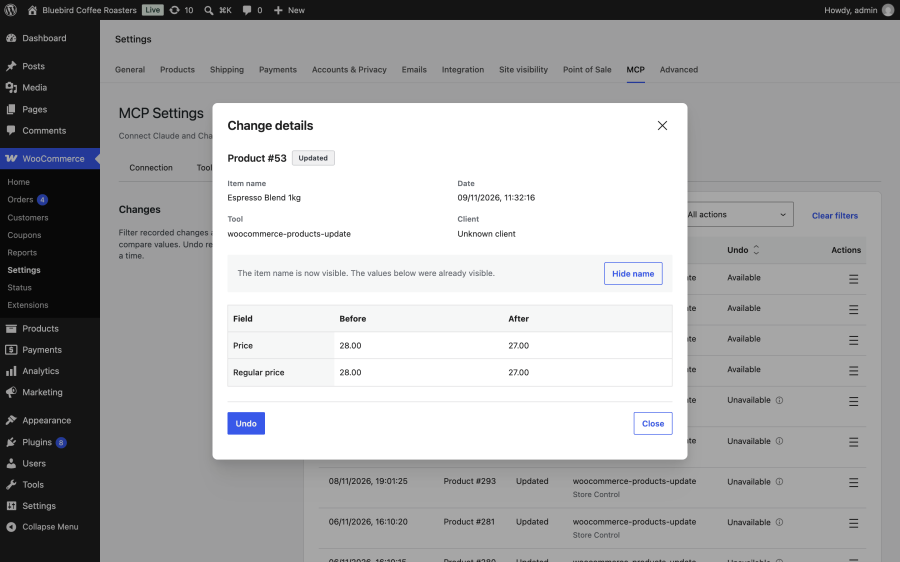
Undo is available for supported recorded changes, not every action: it cannot reverse a payment refund, recall an email, or restore permanently deleted data. History is encrypted when the server supports encryption, and retained for 30 days by default, with retention settings of 1 to 365 days.
Yes. WordPress and WooCommerce are moving AI connections to the free MCP Adapter plugin: from WooCommerce 11.3, WooCommerce removes its own MCP endpoint, the address every earlier version of this extension connected through, and the copy of the adapter it bundled. Version 2.0.0 adapts to that change. It runs its own MCP server through the MCP Adapter plugin, so your store keeps answering your AI assistants through WooCommerce 11.3 and later.
Several plugins now connect WordPress or WooCommerce to AI assistants. They differ in whether they are built for WooCommerce, whether they can create and edit orders, how you sign in, and how much they ask you to set up.
| Capability | MCP for WooCommerce | WooCommerce built-in abilities (11.3+) | Royal MCP | Easy MCP AI | AI Engine Pro |
|---|---|---|---|---|---|
| Built specifically for WooCommerce | Yes | Yes, part of WooCommerce | No, WooCommerce is one integration among many | No, WooCommerce is one integration among many | No, WooCommerce is one integration among many |
| Create orders | Yes | No | Yes | Yes | No |
| Edit orders beyond status and notes | Yes | No, status changes and notes only | Yes | No | No |
| WooCommerce coverage | 211+ tools: Orders, products, customers, coupons, refunds, tax, shipping, payments, webhooks, reports, plus Subscriptions, Bookings, and Memberships when active | Products (query, create, update, delete); orders (query, status, notes) | 29 tools: products, variations, attributes, coupons, orders and notes, customers, store statistics | 47 tools: products, variations, attributes, orders, customers, coupons, webhooks | Products, orders, inventory, customers |
| How you sign in | WooCommerce REST API key, or a connector URL tied to that key | WordPress Application Password | OAuth or API key | OAuth or API token | OAuth or bearer token |
| Read-only access | Yes, with a read-only API key | Scoped by the WordPress user’s capabilities; no per-password read-only setting | Yes | Yes, per token or OAuth grant | Yes |
| Setup for Claude and ChatGPT | One-click Claude Desktop bundle; connector URL for Claude.ai and the ChatGPT app | MCP Adapter plugin; remote stores run a Node.js proxy | OAuth sign-in, no proxy | OAuth sign-in, no relay | OAuth sign-in |
| Action log | Yes, with personal data masked by default | No | Yes | Yes | Yes |
| Coverage beyond WooCommerce (content, SEO, other plugins) | WordPress content tools and abilities other plugins register | Other plugins’ abilities through the MCP Adapter | Yes, WordPress core plus many plugin integrations | Yes, WordPress content | Yes, WordPress content and additional plugin tools |
WooCommerce store owners have several choices: WooCommerce’s built-in abilities are free and maintained by the WooCommerce team. Royal MCP and Easy MCP AI have free versions, offer OAuth sign-in, and reach WordPress content and other plugins. MCP for WooCommerce uses WooCommerce API keys rather than OAuth. AI Engine adds a chatbot and content tools alongside its MCP server. A read-only connector is a lower-risk choice if you only ever want the assistant to look and never touch. MCP for WooCommerce is built for stores that want broad WooCommerce coverage, order creation and full order edits, access you scope with WooCommerce’s own API keys, and connections that carry over to WooCommerce 11.3 untouched.
Giving an assistant access to your store should never mean giving it the keys to everything.
Claude and ChatGPT, with one-click config for Claude Desktop and guided setup for ChatGPT. It uses the standard Model Context Protocol, so other MCP-compatible clients can connect as well.
Yes. Each connection runs under a WooCommerce API key, and the key's permission is enforced on every call. A read-only key can search, list, and view but cannot create, update, or delete. You'll want to create the least-privileged key that does the job.
Action logging is optional, and when it is on, personally identifiable information such as emails, addresses, and phone numbers are masked before storage by default. You choose how long entries are kept, and you can clear them any time.
Operations for WooCommerce Subscriptions, Bookings, and Memberships become available when those extensions are installed and active. The extension also supports tool packs registered by other compatible plugins.
The extension caps list-response sizes and sends compact tool listings so remote assistants get manageable payloads. A live Claude session holds an open connection for the length of the session, so on constrained shared hosting, size your PHP workers with that in mind.
Only if you let it. Permissions come from the WooCommerce API key you create: with a read-only key the assistant can analyse and report but cannot change anything, and the restriction is enforced on every request. You can also switch off entire groups of operations, and disabled operations are never offered to the assistant at all. Many merchants start read-only and open up write access later.
Your store talks directly to the AI client you connect, and nothing passes through us. The optional action log stays in your own database, with personal data such as emails, addresses and phone numbers masked before storage.
Categories
Extension information
Quality Checks
Countries