


Subscription includes
Support
Customers who use your store search already know what they want. If the search bar shows nothing useful, they leave. TH Smart Product Search replaces the basic WooCommerce search with a fast, intelligent live search that shows the right products from the very first keystroke.
Results appear instantly in a clean dropdown with product images, prices, SKU, stock status, and an add-to-cart button.
Shoppers can search by voice, make spelling mistakes, or use their own words for a product, and still find exactly what they are looking for.
You control which products rank first, and you get clear reports on what customers search for so you can stock what they want.
The standard WooCommerce search was built for simple keyword matching. It reloads the page for every search, gives no live suggestions, does not forgive typos, does not understand that “pants” and “trousers” mean the same thing, and gives you no idea what customers searched for.
Every failed search is a lost sale. TH Smart Product Search fixes all of this in one lightweight plugin that runs entirely on your own site.
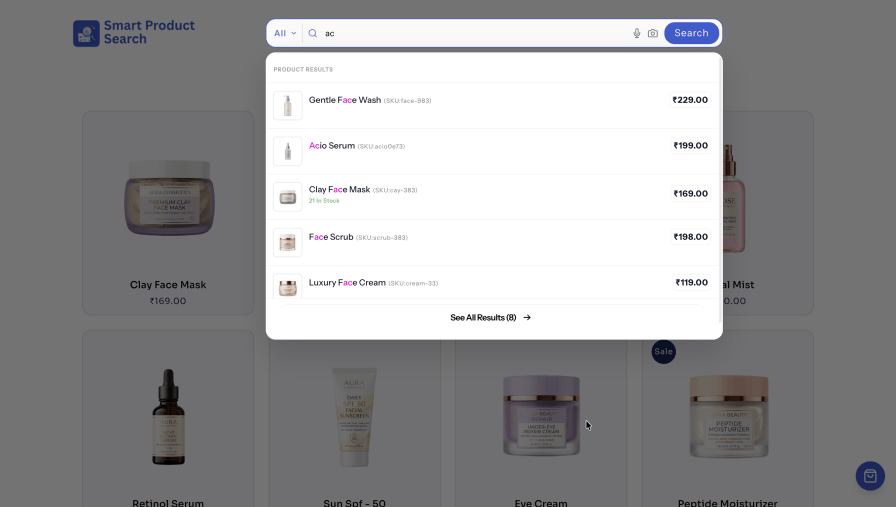
Make product discovery effortless with real-time search suggestions. Customers can spot matching products and keywords instantly without interrupting their shopping experience.
Make product searches easier with voice search. A microphone button appears inside the search bar, allowing customers to speak their queries instead of typing. It offers a faster, more convenient, and accessible shopping experience, especially on mobile devices.
Shoppers don’t always spell product names correctly or use the exact words listed in your store. Fuzzy search helps them find the right products even with typos, while adjustable sensitivity lets you control how closely search terms must match.
With custom synonyms, you can connect related terms so different words lead to the same relevant products, making product discovery easier for every shopper.
Many shoppers search by part number, model code or brand rather than product name. TH Smart Product Search looks across all the product data that matters.
An “All” category dropdown sits inside the search bar, letting shoppers narrow results to one department before they search. Stores with many categories get cleaner, more relevant results.
Give priority to the products that matter most. Customize the weight of different search matches to control result rankings, then boost selected products to increase their visibility and help drive more sales.
Your best sellers and top rated, available products rise to the top, which means more clicks and more completed orders.
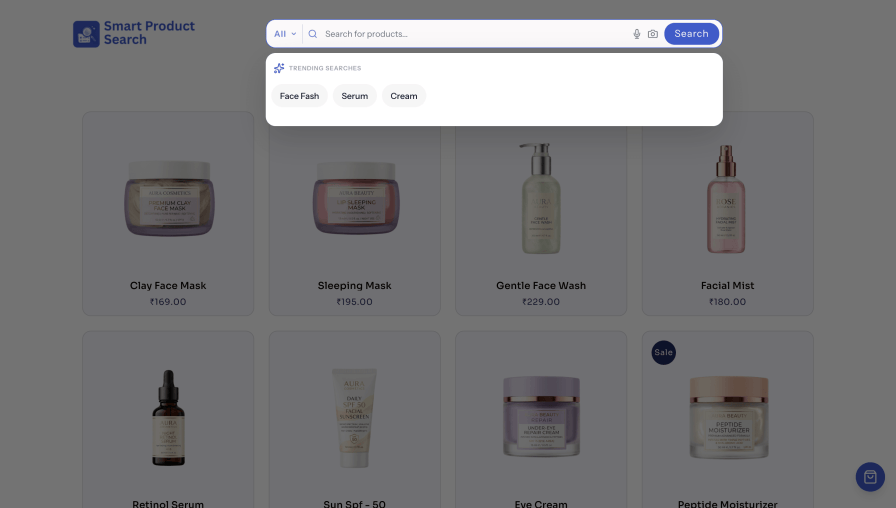
Help shoppers discover popular searches before they start typing. Display trending search terms as clickable chips when the search box opens. Choose how many terms to show and customize the heading to match your store.
Rich results with three Search styles
Show exactly the information your customers need in every result, and match the search bar to your store design without writing code.
TH Smart Product Search uses a dedicated product search index to deliver fast results, even for WooCommerce stores with thousands of products.
Rebuild the index with one click and adjust the batch size to balance indexing speed and server performance. Your data stays on your server.
Product and search data are never sent to external search services, giving you full control over your store’s search data.
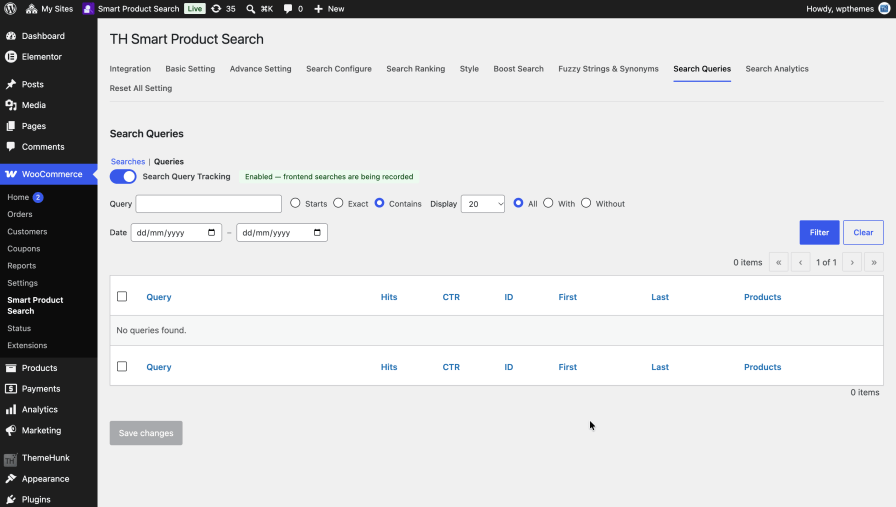
Your search bar is the best market research tool in your store. Search query tracking records every frontend search so you can see exactly what customers look for.
Searches that return no results reveal products you should stock, synonyms you should add, and product titles you should improve.
Send search events to Google Analytics with a single line of code, and analyze search behavior alongside the rest of your store traffic and conversions.
Install, activate, build the search index, and your new search is ready. Place the search bar anywhere using the method that suits you.
[th_smart_product_search][th_smart_product_search layout="bar_style"]<?php echo do_shortcode('[th_smart_product_search]'); ?>Yes. Add the search bar with the shortcode or PHP template tag wherever you want it, such as your header, and it delivers live results in place of the standard search.
Yes. SKU search is built in, and the SKU can be shown next to each result. You can also set how heavily SKU matches count in the ranking.
Product title, SKU, categories, tags, attributes and brand. You can also include blog posts and pages in results.
Yes. Fuzzy search finds the right products even when the search has typos; for example, “skrit” finds “skirt”. You can adjust the matching sensitivity.
Yes. Turn on voice search and a microphone button appears in the search bar so customers can speak their search.
Yes. Choose from Default, Traditional and Modern styles, and adjust border radius, colors, width, placeholder text and button label. A live preview in the dashboard shows changes instantly.
No. Search and indexing run on your own WordPress site. Your product and search data stays on your server.
It works with any properly optimised WordPress theme. If you notice a styling conflict, contact our support team, and we’ll help.
See our documentation for setup guides, or contact our support team through WooCommerce.com
Extension information
Quality Checks
Countries







