Product Icon

QR Code Tickets & Check-in for WooCommerce

AI-powered ticketing for WooCommerce: generate unique QR tickets, email them beautifully, & scan check-ins. Best for events, tours & venues.
Choose a billing option
$39
Save 20%
$78 $62.40

Product comparison

Subscription includes

  • Product updates and improvements
  • Customer support
  • 30-day money-back guarantee

Turn your WooCommerce store into a complete event ticketing platform

Selling tickets shouldn’t mean juggling three platforms, paying 10% commissions, or hiring a developer. QR Code Tickets & Check-in for WooCommerce lets you sell, deliver, and validate tickets entirely from your existing WooCommerce store — no third-party platforms, no per-ticket fees, no code required.

Whether you’re running a music festival with 5,000 attendees, a workshop with 20 seats, a museum tour, or a gym membership program, this plugin gives you everything you need: automated QR ticket generation, branded email delivery with PDF attachments, mobile check-in with camera scanning, and real-time attendance analytics — all inside the WordPress dashboard you already know.

Why event organizers are moving away from third-party ticketing platforms

If you’ve ever sold tickets through Eventbrite, Ticketmaster, or similar platforms, you already know the pain: commission fees that eat 5–10% of every sale, limited control over branding, and customer data that belongs to someone else.

Here’s what switching to self-hosted WooCommerce ticketing looks like:

  • Commission fees on a $40 ticket — Eventbrite takes approximately $4.50–$6.50 per ticket. WooCommerce ticketing takes $0.
  • Annual events — selling 5,000 tickets at $40 each means $22,500–$32,500 paid in platform fees every single year.
  • Customer data — third-party platforms own your attendee list. With WooCommerce, you own 100% of the data — emails, purchase history, and attendance records.
  • Branding control — your tickets, your email templates, your domain. No “Powered by [Platform]” branding.
  • Setup time — most organizers go live within 30 minutes of installing the plugin.

Everything you need to run ticketed events — in one plugin

Unlike single-purpose ticketing tools, QR Code Tickets & Check-in is built for the full event lifecycle. From the moment a customer clicks “Buy Ticket” to the moment they walk through your gate — this plugin handles every step, and now includes AI-powered ticket management for the future of event operations.

Core Capabilities

  • Automated QR Ticket Generation — every ticket gets a unique, cryptographically-generated QR code the moment an order completes
  • 4 Check-in Types — Single Entry, Single Entry with Exit, Multiple Entry, Multiple Entry with Exit
  • 2 Generation Modes — Per Product (each product gets its own ticket) or Per Order (one ticket covers the whole order)
  • 12 Professional Templates — from elegant theatre playbills to neon concert tickets, plus custom HTML templates
  • Mobile QR Scanner — validate tickets using any smartphone camera, no dedicated hardware
  • PDF Attachment — automatically attach a downloadable PDF ticket to every email
  • Manual Ticket Creation — issue tickets without checkout for VIPs, sponsors, cash payments, or staff
  • Ticket Transfer — let customers send tickets to someone else from their account
  • Mini Printer Support — print compact thermal tickets on 58mm and 80mm paper
  • REST API & Webhooks — integrate with CRMs, marketing tools, and custom apps
  • AI Abilities (MCP) — AI assistants can list, check in, and analyze tickets through the WordPress Abilities API

Recently added — the features our users asked for most

We’ve been listening. Here’s what’s new in the latest release:

🆕 Manual Ticket Creation

Issue tickets directly from the admin without creating an order. Perfect for:

  • Complimentary tickets for speakers, sponsors, and press
  • Cash payments at the venue
  • VIP guest additions at the last minute
  • Staff and volunteer passes

Enter the attendee’s name and email, select the event, choose the status and quantity, and click “Generate Tickets.” The QR code is ready in seconds — with an optional email delivered to the recipient.

🆕 PDF Ticket Attachment

Every ticket email now includes a downloadable PDF attachment. The PDF uses the same template you’ve selected for print — so your tickets look consistent across every touchpoint. Attendees can print the PDF, save it to their phone, or bring it to the event as a backup.

🆕 Bulk Actions for Ticket Management

Managing hundreds of tickets no longer means clicking through them one at a time. Select multiple tickets from the listing and act on them in bulk — delete old tickets after an event, re-export attendee lists, or perform bulk check-ins. The same familiar bulk-action pattern WooCommerce uses on the Orders page.

🆕 AI Abilities & MCP Support

The plugin now registers WordPress Abilities — a standardized interface that lets AI assistants and automation tools interact with your ticketing system. Through the WordPress Abilities API and Model Context Protocol (MCP), AI can:

  • List tickets with filters (product, status, date range, customer name)
  • Get ticket details by code
  • Check in tickets — single or bulk
  • View statistics — total, used, valid, expired, check-in rate, today’s activity
  • Export tickets as CSV

If you’re building the future of agentic event operations, this is where it starts.

🆕 Expanded REST API

The REST API now exposes 30+ endpoints covering everything from ticket creation to statistics to webhooks. Developers can build custom dashboards, integrate with CRMs like HubSpot or Salesforce, or connect to mobile apps. Full documentation is available in the plugin’s FAQ tab.


Feature deep dive — how each piece works

Automatic Ticket Generation

Tickets are generated the moment an order reaches the status you choose — usually “Completed.” Each quantity in the cart creates its own unique ticket with its own QR code. Order 3 tickets, get 3 unique tickets, each individually checkable.

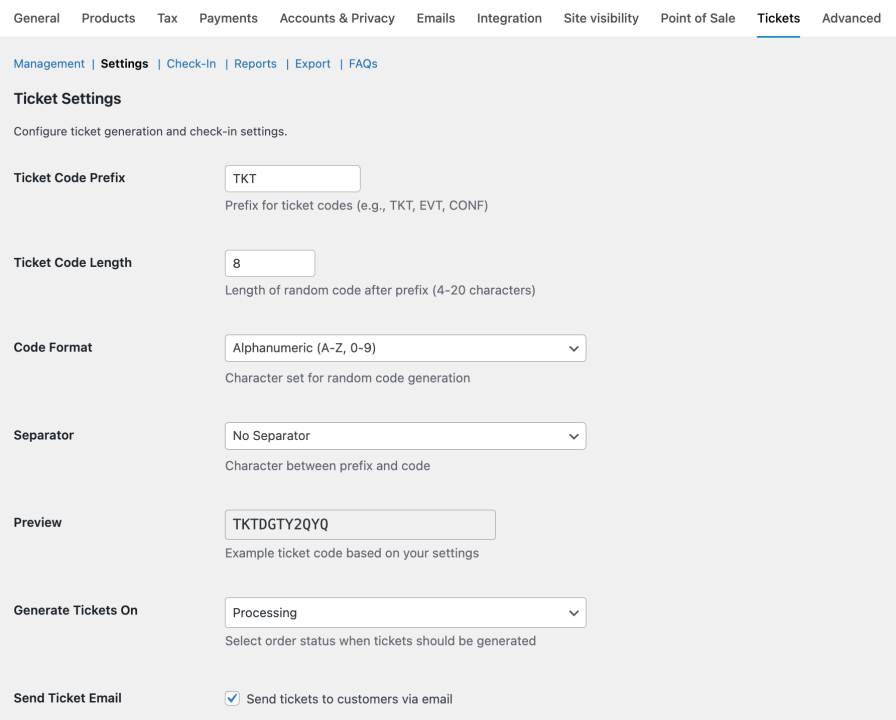
You control the format entirely: prefix, suffix, length (4–20 characters), character set (alphanumeric, letters only, numbers only, or hex), and separator. Want tickets that look like FEST-A7K92026? That’s one field change.

QR-Code-Tickets-and-Checkin-for-WooCommerce-Ticket-Code-Settings

Check-in Types — four ways to control entry

Different events need different entry rules. The plugin gives you four check-in types, configurable globally or per product:

  • Single Entry — one check-in, no check-out required. Best for one-time events like concerts, conferences, or workshops.
  • Single Entry with Exit — one check-in and one check-out. Best for events where you need to track who’s still inside (evening events, bar licensing requirements).
  • Multiple Entry — multiple check-ins allowed. Best for multi-day festivals or gym membership blocks. Set max entries to control how many times a ticket can be used.
  • Multiple Entry with Exit — full in/out cycle tracking. Best for venues where attendees may leave and return during the event.

Professional Ticket Templates

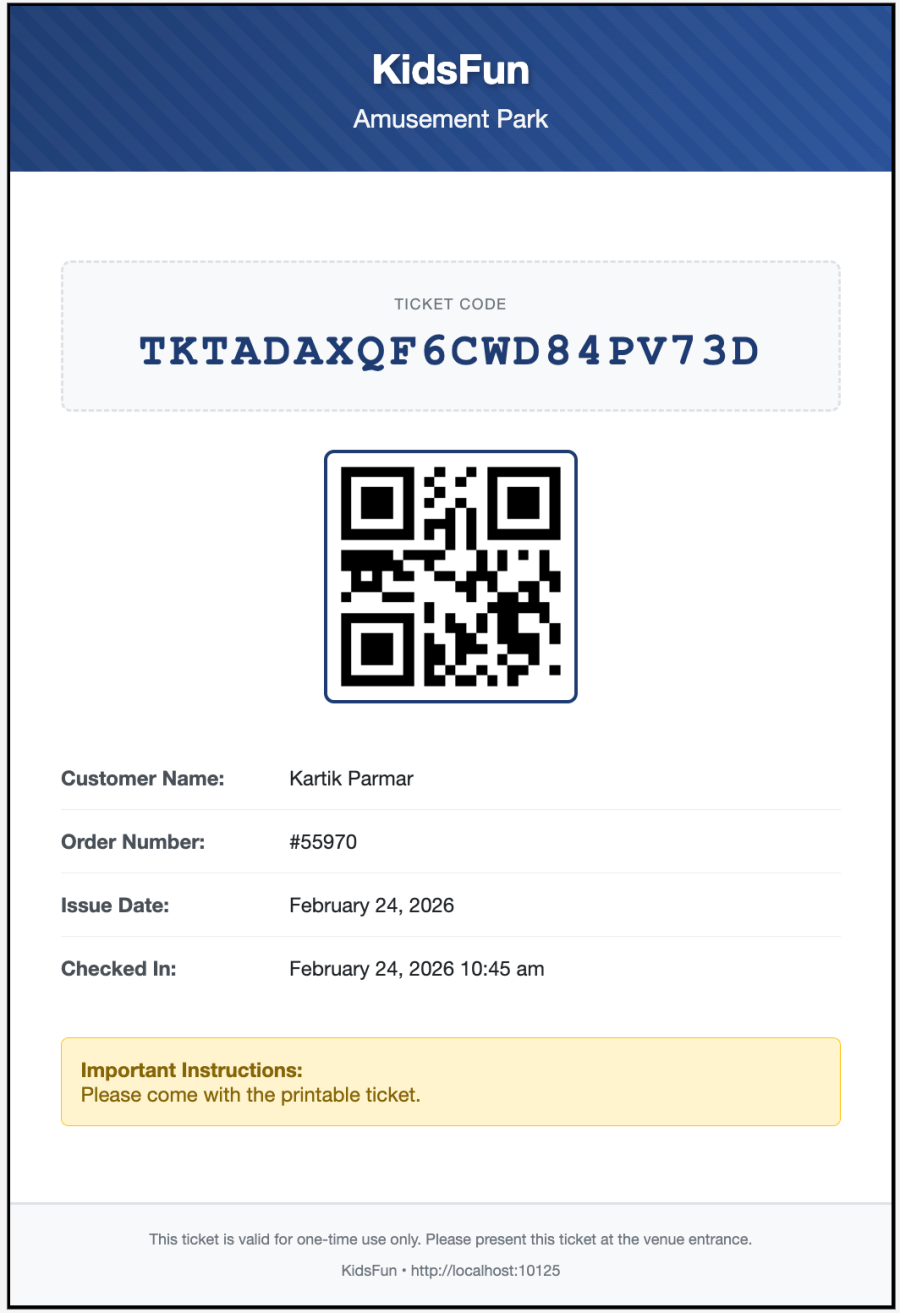
Your tickets are often the first physical artifact your attendees receive. They shouldn’t look like a default WordPress page.

The plugin includes 12 hand-designed ticket templates, each crafted for a specific event type:

  • Default (Professional) — clean, structured layout suitable for any event
  • Modern (Minimal) — contemporary with gradient header and generous whitespace
  • Elegant (Formal) — refined design for galas, weddings, and fine dining
  • Vibrant (Colorful) — bold, energetic design for festivals and carnivals
  • Vintage (Retro) — classic ticket-stub design for heritage events
  • Minimalist (Black & White) — ultra-clean, printer-friendly
  • Professional (Dark Edition) — polished dark theme with tear-line divider
  • Classic Stub (Gold Accent) — traditional physical-ticket look with detachable stub
  • Jungle Safari (Nature Edition) — deep forest green for safaris and nature reserves
  • Adventure Park (Thrill Edition) — electric gradient for amusement parks
  • Concert Night (Neon Edition) — neon pink and cyan for music events
  • Theatre (Grand Playbill) — ornate crimson and gold for stage performances

Plus a Custom Template option that lets you write your own HTML/CSS using merge codes like {{ticket_code}}, {{qr_code}}, {{customer_name}}, and {{site_logo}}. If you can design it in HTML, you can make it a ticket.

Email Delivery with PDF Attachment

When an order completes, the plugin sends a branded HTML email with the QR code embedded directly in the email body — plus a downloadable PDF attached. Your customer can show the QR code on their phone at the door or print the PDF as a backup.

The email uses WooCommerce’s native email system, so it inherits your existing styling, header, and footer. If you want the email to use the same design as your printed tickets, enable the “Use Printed Template in Email” option — the email will render the exact same ticket design your attendees see when they print.

Mobile QR Scanner & Check-in

No dedicated hardware required. Any smartphone or tablet with a camera becomes a ticket scanner. Staff open a check-in page on their device, point the camera at a QR code, and the system validates the ticket in under 3 seconds.

The check-in interface shows:

  • Success state — green checkmark, attendee name, action label
  • Error state — red cross, reason (already used, expired, invalid)
  • Entry progress — “1 of 2” for multiple-entry tickets
  • Current status — Inside / Outside for exit-enabled tickets
  • Time inside — automatic duration tracking on check-out

Multiple Check-in Methods

Different events need different check-in workflows. The plugin supports four:

  • QR Code Camera Scanning — the fastest method. Point, scan, done.
  • Manual Code Entry — for phones without cameras, or when a QR code won’t scan.
  • Bulk Check-in — paste a list of ticket codes and check them all in at once. Ideal for VIP entries or staff check-in at the start of a shift.
  • Frontend Check-in Page — use the [ticket_checkin_form] or [ticket_scanner] shortcode to embed a check-in page anywhere on your site. Door staff can access it from a dedicated URL without any WordPress admin access.

Manual Ticket Creation

Sometimes a ticket needs to be issued outside the normal checkout flow. The “Create Manual Ticket” button opens a modal where you can:

  • Enter the attendee’s name and email
  • Search and select the ticket product (with variation support)
  • Set quantity (up to 50 tickets per action)
  • Choose ticket status — Valid, Used, or Invalid
  • Set a custom expiry date (optional)
  • Link the ticket to an existing order (optional)
  • Add internal notes (e.g., “VIP guest,” “Cash payment”)
  • Send the ticket email to the attendee automatically

QR-Code-Tickets-and-Checkin-for-WooCommerce-Manual-Ticket

Ticket Transfer

Plans change. A customer buys a ticket, then can’t attend — but their friend can. Instead of forcing a refund, let them transfer the ticket.

From their My Account page, the customer clicks “Transfer Ticket,” enters the recipient’s name and email, and sends. The recipient gets an email with accept/decline links. Once accepted, the ticket is transferred and a new QR code is generated (optional) so the old code is invalidated.

You control the rules: max transfers per ticket, deadline before the event, which products allow transfers, and whether to regenerate the QR code on transfer.

Mini Printer Support

For on-site ticket printing at the box office, the plugin supports 58mm and 80mm thermal printers. Six mini-ticket layouts are available — Classic, Minimalist, Brand-Focused, Event-Focused, GST Invoice Style, and Sales Invoice with QR — so you can print walk-up tickets, receipts, and vouchers without a full-size printer.

Reporting & Analytics

The Reports tab gives you a real-time view of your event:

  • Total tickets sold
  • Used tickets (check-in rate as a percentage)
  • Valid tickets still available for entry
  • Expired tickets
  • Invalid tickets
  • Daily check-in activity for the last 30 days
  • Top products by ticket sales with usage rate

Export any report to CSV for external analysis, or use the built-in dashboard widget for a quick overview.

Bulk Settings Management

Running 50 ticketed products? You don’t want to configure each one individually. The Bulk Settings tab lets you apply ticket settings across all products, specific categories, or hand-picked items. Choose only the settings you want to overwrite — everything else stays unchanged.

Per-Product Ticket Customization

Every product can have its own ticket settings: check-in type, max entries, expiry mode, ticket code format, template, instructions, allowed check-in roles, and transfer permissions. This means a multi-day festival product can use “Multiple Entry” while a single-day workshop product uses “Single Entry” — all from the same plugin.

Security & Access Control

Staff who scan tickets don’t need — and shouldn’t have — admin access. The plugin includes a dedicated Ticket Checker role that can only access the check-in interface. No orders, no settings, no customer data.

You can further restrict check-in access per product by selecting specific WordPress roles. And every check-in action is logged with timestamp, staff name, IP address, and device — providing a complete audit trail.

Ticket Management Table

The Management tab is the command center for every ticket in your store. It includes:

  • Search by ticket code, customer email, or order ID
  • Filter by status (Valid, Used, Expired, Invalid)
  • Filter by date range
  • Sort by ticket code, order ID, or creation date
  • Individual actions: Check In, Mark Invalid, Print, Email, Edit, Delete
  • Export filtered tickets to CSV

Audit Trail & Logs

Every ticket action is logged: creation, check-in, check-out, email sent, transfer, edit, deletion, and invalidation. The Logs tab shows who did what, when, from which IP, and on which device. Filter by action type, user, or date range for full accountability.

REST API & Webhooks

For developers building on top of the plugin, the REST API exposes endpoints for:

  • Tickets — create, read, update, delete, list with filters
  • Check-in — validate, check-in, check-out, bulk, undo
  • Statistics — overall, product-specific, real-time, daily
  • Orders — get order tickets, regenerate
  • Customers — get tickets by email, current user tickets
  • Email — send ticket, bulk send
  • Export — CSV, JSON, XML
  • Webhooks — register, list, delete
  • Transfers — initiate, cancel
  • System — API status, documentation

Webhooks fire on ticket creation, check-in, and invalidation — perfect for triggering actions in Zapier, Make, or your own systems.

AI Abilities (MCP)

The plugin registers seven AI abilities through the WordPress Abilities API. AI assistants (Claude, ChatGPT, and others via MCP) can discover and execute these abilities to manage your ticketing system:

  • ticket-checkin/list-tickets — retrieve tickets with filters
  • ticket-checkin/get-ticket — fetch full details of a specific ticket
  • ticket-checkin/ticket-stats — get overall statistics
  • ticket-checkin/checkin-ticket — check in a ticket
  • ticket-checkin/today-activity — today’s check-in summary
  • ticket-checkin/bulk-checkin — check in multiple tickets
  • ticket-checkin/export-tickets — export ticket data as CSV

Every ability respects your existing permission model, so AI agents can only perform actions the current user is authorized for.


Built for every kind of ticketed event

Concerts & Music Festivals

Sell General Admission, VIP, and Backstage Pass tickets. Use multiple-entry tickets for multi-day festivals. Deploy scanners at multiple gates and track attendance across stages in real time.

Recommended settings: Multiple Entry (max = number of days), Concert Night template, QR scanner shortcode on check-in page.

Conferences & Summits

Sell day passes and full-conference passes. Use ticket categories for speakers, sponsors, and general attendees. Issue complimentary tickets manually for speakers and press. Track session attendance with different check-in stations.

Recommended settings: Single Entry or Multiple Entry, Professional template, Manual Ticket Creation for VIPs.

Workshops & Training Sessions

Sell tickets for recurring workshops. Use rolling expiry so tickets are valid for a set number of days after purchase. Allow multiple entries for multi-session courses. Issue certificates based on check-in data.

Recommended settings: Rolling expiry (30 days), Multiple Entry, Modern template.

Theatres & Performing Arts

Sell tickets for specific showtimes. Use fixed expiry dates so all tickets expire after the final performance. Print tickets at the box office with thermal printers. Track attendance by performance.

Recommended settings: Fixed Date expiry, Theatre template, Mini Printer enabled.

Museums & Attractions

Sell timed-entry tickets for daily tours. Use rolling expiry so tickets are valid from purchase. Track visitor flow across exhibits with multiple check-in stations.

Recommended settings: Rolling expiry (1 day), Single Entry, Adventure template.

Gyms & Fitness Studios

Sell membership blocks. Use multiple-entry tickets with max entries set to the number of sessions. Allow customers to transfer unused sessions. Track usage in real time.

Recommended settings: Multiple Entry (max = block size), Ticket Transfer enabled.

Food & Drink Vouchers

Sell voucher books for events. Use multiple-entry tickets for food and drink redemptions. Issue vouchers manually to speakers, volunteers, and staff. Track redemption counts in real time.

Recommended settings: Multiple Entry (max = voucher count), Hidden catalog visibility, Manual Ticket Creation.

Tours & Excursions

Sell tickets for specific departure times. Use fixed expiry for each day’s tours. Issue guide passes manually. Track attendance per departure.

Recommended settings: Fixed Date expiry, Single Entry, Mini Printer for guide passes.


How it works — from purchase to gate in four steps

  1. Customer purchases a ticket — through your existing WooCommerce checkout, using your existing payment gateways.
  2. QR ticket is generated automatically — the moment the order reaches your configured status (usually “Completed”).
  3. Email + PDF delivered instantly — the customer receives a branded email with the QR code embedded and a downloadable PDF attached.
  4. Scan at the door — staff open the check-in page on any smartphone, scan the QR code, and the ticket is validated in under 3 seconds.


Everything included — full feature list

Ticket Generation

  • Automatic generation when order reaches configured status
  • Per Product mode — each product gets its own ticket
  • Per Order mode — one ticket covers the entire order
  • One ticket per item quantity
  • Configurable ticket code prefix, suffix, length, format, and separator
  • Per-product code format overrides
  • Unique, cryptographically-generated codes
  • Works with Simple and Variable products

Check-in Types

  • Single Entry
  • Single Entry with Exit
  • Multiple Entry (with configurable max entries)
  • Multiple Entry with Exit
  • Global default + per-product override

Ticket Templates

  • 12 professionally designed templates
  • Custom HTML/CSS template editor
  • Merge codes for dynamic data (ticket code, QR code, customer name, product, order ID, expiry date, site logo, and more)
  • Live preview in settings
  • Per-product template override
  • Sample template download

Email Delivery

  • Automated HTML email with embedded QR code
  • Downloadable PDF ticket attached to email
  • “Use Printed Template in Email” option for design consistency
  • Per-product featured image in email
  • Manual resend from order page or ticket listing
  • Email delivery logged per ticket

Check-in & Validation

  • Mobile QR scanner (camera-based, no app required)
  • Manual code entry
  • Bulk check-in via pasted codes
  • Frontend check-in page via shortcode
  • Real-time duplicate detection
  • Entry progress tracking (X of Y)
  • Inside/Outside status for exit-enabled tickets
  • Time-inside calculation on check-out
  • Role-based access control (Ticket Checker role)
  • Per-product allowed roles

Manual Ticket Creation

  • Create tickets without checkout
  • Product search with Select2 (handles thousands of products)
  • Variable product / variation support
  • Quantity up to 50 per action
  • Status selection (Valid, Used, Invalid)
  • Custom expiry date override
  • Link to existing order
  • Internal notes field
  • Optional email delivery to attendee

Ticket Transfer

  • Customer-to-customer transfer from My Account
  • Email notification with accept/decline links
  • Optional QR code regeneration on transfer
  • Configurable max transfers per ticket
  • Transfer deadline (hours before expiry)
  • Per-product transfer enable/disable
  • Full audit log of all transfers

Mini Printer Support

  • 58mm and 80mm thermal printer support
  • 6 mini-ticket layouts (Classic, Minimalist, Brand, Event, GST Invoice, Sales Invoice)
  • Print from admin ticket listing, order page, product meta box, or My Account
  • Configurable footer text, store name, and expiry display

My Account Integration

  • “My Tickets” tab in WooCommerce My Account
  • View all purchased tickets
  • Print tickets from account page
  • Email tickets to self or others
  • Initiate ticket transfers
  • View ticket status (Valid, Used, Expired, Invalid)

Admin Management

  • Ticket listing with search, filter, and sort
  • Individual actions: Check In, Mark Invalid, Print, Email, Edit, Delete
  • Bulk actions: Delete, Check In, Email, Export
  • Ticket editing (customer name, email, expiry, max entries, check-in type, notes)
  • Per-ticket audit log

Bulk Settings Management

  • Apply settings to all products, specific categories, or hand-picked items
  • Choose which settings to overwrite (others stay unchanged)
  • Batch apply ticket code format, check-in type, expiry, template, and more

Reporting & Analytics

  • Dashboard widget with key stats
  • Reports tab with total, used, valid, expired, and invalid ticket counts
  • Check-in rate percentage
  • Daily check-in activity (last 30 days)
  • Top products by ticket sales with usage rate
  • Export to CSV, JSON, or XML

Logs & Audit Trail

  • Every action logged with timestamp, user, IP, and device
  • Filter by action type, user, or date range
  • Search by ticket code, email, or IP address
  • Clear logs option (admin only)

REST API

  • 30+ endpoints across tickets, check-in, statistics, orders, customers, email, export, webhooks, transfers, and system
  • Basic Auth and Application Password support
  • Full documentation in the plugin FAQ tab
  • Permission callbacks on every endpoint

Webhooks

  • Ticket Created webhook
  • Ticket Checked In webhook
  • Ticket Invalid webhook
  • WooCommerce native webhook system integration
  • Retry and logging support

AI Abilities (MCP)

  • 7 registered abilities via WordPress Abilities API
  • MCP (Model Context Protocol) compatible
  • List tickets, get details, check in, bulk check in, view stats, today’s activity, export CSV
  • Respects existing permission model
  • Discoverable by AI agents and automation tools

Security & Permissions

  • Dedicated “Ticket Checker” role with minimal permissions
  • Per-product allowed check-in roles
  • Nonce verification on all actions
  • Capability checks on all admin functions
  • Prepared SQL statements throughout
  • Full audit trail of all actions

Compatibility

  • WooCommerce 5.0+
  • WordPress 5.0+
  • PHP 7.4+
  • WooCommerce High-Performance Order Storage (HPOS)
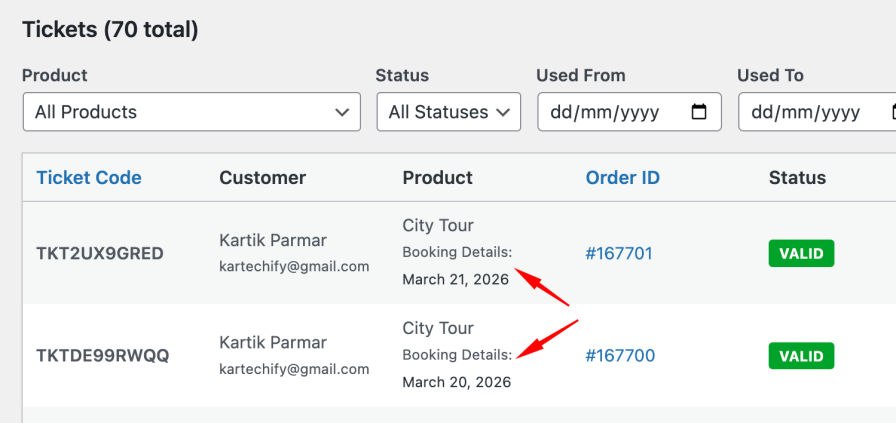
  • WooCommerce Bookings integration (booking details on tickets)
  • All standard WooCommerce themes
  • Translation-ready (POT file included)

See it in action

1. Ticket Settings — configure once, apply everywhere

QR Code Ticket Settings panel in WooCommerce product edit page

2. Ticket Design Template — 12 professional designs

QR-Code-Tickets-and-Checkin-for-WooCommerce-Ticket-Design-Template-Preview-1.png

3. Check-in Station — mobile-first ticket validation

4. Create Manual Ticket — issue tickets without checkout

5. Ticket Listing — search, filter, and manage all tickets

6. Reports & Analytics — real-time event insights

7. Mini Printer — compact thermal tickets


Frequently asked questions

General

What is QR Code Tickets & Check-in for WooCommerce?
It’s a WooCommerce extension that turns any product into a ticketed event. It generates unique QR code tickets automatically, delivers them via email (with PDF attachment), and provides mobile check-in tools to validate tickets at the door.

Do I need a separate ticketing platform?
No. Everything runs inside your existing WooCommerce store. You use the same checkout, same payment gateways, and same customer accounts you already have.

Are there any commission fees?
No. You pay only for the plugin and your standard payment processor fees. Unlike Eventbrite or similar platforms, there are no per-ticket commissions.

Does it work with my theme?
Yes. The plugin uses WooCommerce’s native template system and works with all standard WooCommerce themes. Admin pages use standard WordPress UI.

Is it compatible with WooCommerce HPOS?
Yes. The plugin declares compatibility with WooCommerce’s High-Performance Order Storage (HPOS) system.

Ticket Generation

When are tickets generated?
Tickets are generated when an order reaches the status you configure in Settings — usually “Completed.” You can change this to “Processing” or any other status.

Can I generate one ticket per product and one per order?
Yes. The “Ticket Generation Mode” setting lets you choose between Per Product (each product gets its own ticket) or Per Order (one ticket covers the entire order).

What happens if a customer orders 3 tickets?
If “Ticket Per Quantity” is enabled, the customer receives 3 unique tickets, each with its own QR code and check-in status. If disabled, they receive 1 ticket covering all 3 entries.

Can I customize the ticket code format?
Yes. You can set the prefix, suffix, length (4–20 characters), character set (alphanumeric, letters, numbers, hex), and separator. You can also override these per product.

Check-in

What devices can I use for check-in?
Any smartphone or tablet with a camera and a browser. No dedicated hardware or app installation required.

Can staff check in tickets without admin access?
Yes. The plugin includes a dedicated “Ticket Checker” role that can only access the check-in interface — no orders, no settings, no customer data. You can also embed the check-in form on a frontend page using a shortcode.

What happens if a ticket is scanned twice?
The system flags it as “Already Used” and shows a warning. The original ticket holder always gets in; the second scan is rejected.

Can I check in the same ticket multiple times?
Yes, if the ticket is configured as “Multiple Entry.” Set the max entries to the number of allowed check-ins (e.g., 3 for a 3-day festival).

Does the plugin support check-out tracking?
Yes. Use “Single Entry with Exit” or “Multiple Entry with Exit” to track who is currently inside the venue. The system shows “Inside” status and calculates time inside on check-out.

Manual Tickets

Can I issue tickets without a checkout?
Yes. The “Create Manual Ticket” button opens a modal where you can enter attendee details, select the product, set quantity and status, and generate tickets instantly. You can also email the ticket to the attendee.

Can I link a manual ticket to an existing order?
Yes. The “Link to Existing Order” checkbox lets you associate a manual ticket with an existing order ID for record-keeping.

Can I issue tickets for variable products?
Yes. When you select a variable product in the manual ticket modal, a variation dropdown appears so you can choose the specific variation.

Email & PDF

Can I attach a PDF to the ticket email?
Yes. Enable “Attach PDF Ticket to Email” in the plugin settings. The PDF uses the same template as your printed tickets and is attached to order emails and ticket emails.

Can the email use the same design as the printed ticket?
Yes. Enable “Use Printed Template in Email” to make the email use the same template you’ve selected for print. Note: some templates use advanced CSS that may not render perfectly in all email clients.

Can I include the product featured image in the email?
Yes. This is included in the ticket email by default.

Analytics & Reporting

What statistics does the plugin track?
Total tickets, used tickets, valid tickets, expired tickets, invalid tickets, check-in rate, daily check-in activity, and top products by ticket sales.

Can I export ticket data?
Yes. Export to CSV, JSON, or XML with filters for status, date range, and product.

Can I see who checked in a ticket?
Yes. Every check-in is logged with the staff member’s name, timestamp, IP address, and device.

Developers

Is there a REST API?
Yes. The plugin exposes 30+ REST API endpoints covering tickets, check-in, statistics, orders, customers, email, export, webhooks, transfers, and system status.

Does it support webhooks?
Yes. Webhooks fire on ticket creation, check-in, and invalidation. They integrate with WooCommerce’s native webhook system.

What is the AI Abilities (MCP) feature?
It registers WordPress Abilities that let AI assistants and automation tools interact with your ticketing system — listing tickets, checking in attendees, viewing stats, and exporting data. This uses the WordPress Abilities API and is compatible with MCP (Model Context Protocol).

Can I extend the plugin?
Yes. The plugin uses standard WordPress and WooCommerce hooks, filters, and template overrides throughout. Developers can customize templates by copying them to their theme.


Stop losing revenue to third-party ticketing platforms

Every ticket you sell through a marketplace is a ticket you’re paying 5–10% commission on. Every event you run with manual check-in is an event where attendees queue longer than they should.

QR Code Tickets & Check-in for WooCommerce gives you back control — over your revenue, your customer data, your branding, and your check-in experience.

  • Automated QR ticket generation with fully customizable code formats
  • 12 professional templates plus custom HTML support
  • PDF tickets attached to every email
  • Mobile QR scanning — no dedicated hardware
  • Manual ticket creation for VIPs, sponsors, and cash payments
  • Ticket transfer for customer-to-customer handoffs
  • Mini printer support for on-site printing
  • Full REST API, webhooks, and AI Abilities
  • Role-based access control with a dedicated Ticket Checker role
  • Real-time reporting and CSV export
  • HPOS compatible and WooCommerce Bookings integrated
  • No commission fees — keep 100% of your ticket revenue

A smart investment for every event organizer

Whether you’re running your first workshop or your fiftieth festival, QR Code Tickets & Check-in scales with you. Configure it in 30 minutes. Sell tickets in an hour. Run your first event this weekend.

Buy QR Code Tickets & Check-in for WooCommerce

Need another reason to choose us? QR Code Tickets & Check-in is developed by Kartechify, a trusted WooCommerce extension developer known for delivering reliable solutions backed by dedicated customer support.

Check out our other best-selling and popular plugins on WooCommerce.


Frequently asked questions

Do I need any third-party services?

No! Everything runs on your WooCommerce Store. No external APIs, no monthly fees, no third-party dependencies.

Can customers print their tickets?

Yes! Tickets are available as downloadable on the customer's account page. They can be printed at home or displayed on mobile devices.

Can i configure the tickets per product?

Yes, Ticket can be configured at global as well as product level. The option that are present at the global level, same option are available to use at the product level as well.

Can I customize the ticket design?

Absolutely! You can modify templates, change colors, add your logo, and customize all text and fields.

Does it work with variable products?

Yes! The plugin works fine with the variable product type.

Can I use it for free events?

Yes! Set product price to $0 for free tickets. Customers still get QR codes for check-in.

Is there a limit on ticket quantity?

No limits! Generate unlimited tickets for unlimited orders.

Can I refund tickets after they're used?

You control refund policies. The plugin marks tickets as used after check-in, but you decide whether to allow refunds.

Does it work on mobile devices?

Yes! The check-in interface works perfectly on smartphones and tablets. Customers can also view tickets on mobile.

What happens if someone loses their ticket?

Customers can always access their tickets from My Account → My Tickets. Admins can also resend tickets from the order page.

Extension information

  • PHP version required: 7.4
  • Tested with WordPress: 7.1
  • Tested with WooCommerce: 11.2.0
  • Requires at least WordPress: 5.0
  • Requires at least WooCommerce: 5.0

Countries

  • Worldwide

Customer reviews

Average rating 5

3 reviews from verified users

5 stars, 100% of reviews
4 stars, 0% of reviews
3 stars, 0% of reviews
2 stars, 0% of reviews
1 star, 0% of reviews

Click to rate

  • Rated 5 out of 5
    contact421a0970f0NetherlandsAug 8, 2026
    Great plugin and excellent support. The plugin is easy to use, works very well, and offers everything needed for ticket sales and check-in. The support was incredibly fast, professional, and helpful. Communication was clear and the whole experience was very positive. I’m very happy with the plugin and I plan to use it on websites for more of my clients in the future. Highly recommended!
  • Rated 5 out of 5
    adminc172bac01aRomaniaAug 8, 2026
    A very useful and reliable plugin, with plenty of features. The support team is also very responsive and helped us customize one of the plugin’s functions to better fit our needs. Highly recommended!
  • Rated 5 out of 5
    runawayreallyac06803279FranceApr 7, 2026
    This is a very good tool to easily generate QR Code tickets. It's affordable for small businesses like ours but also very serious in term of service. The support is incredibly reactive and helpful. For the price it's probably amongst the best ticket generation solutions around.

Related Products

Price $279 annually
Rated 3.9 out of 5 stars
Price $79 annually
Rated 3.4 out of 5 stars
Price $59 annually
Rated 3.1 out of 5 stars
Price $109 annually
Rated 2.7 out of 5 stars
Price $49 annually
Rated 4.1 out of 5 stars
Price $109 annually
Rated 2 out of 5 stars
Price $109 annually
Rated 2.3 out of 5 stars
Price $39 annually
Rated 2.8 out of 5 stars
Price $109 annually
Rated 2.6 out of 5 stars
Use of your personal data
We and our partners process your personal data (such as browsing data, IP Addresses, cookie information, and other unique identifiers) based on your consent and/or our legitimate interest to optimize our website, marketing activities, and your user experience.