

Product Icon

Zapier Connector for WooCommerce

Every new order, status change, and stock alert, straight to your Zaps. Zaps write back too, and failed deliveries retry on their own.
Choose a billing option
$89
Save 20%
$178 $142.40

Subscription includes

  • Product updates and improvements
  • Customer support
  • 30-day money-back guarantee

Connect WooCommerce to Zapier, and see every delivery

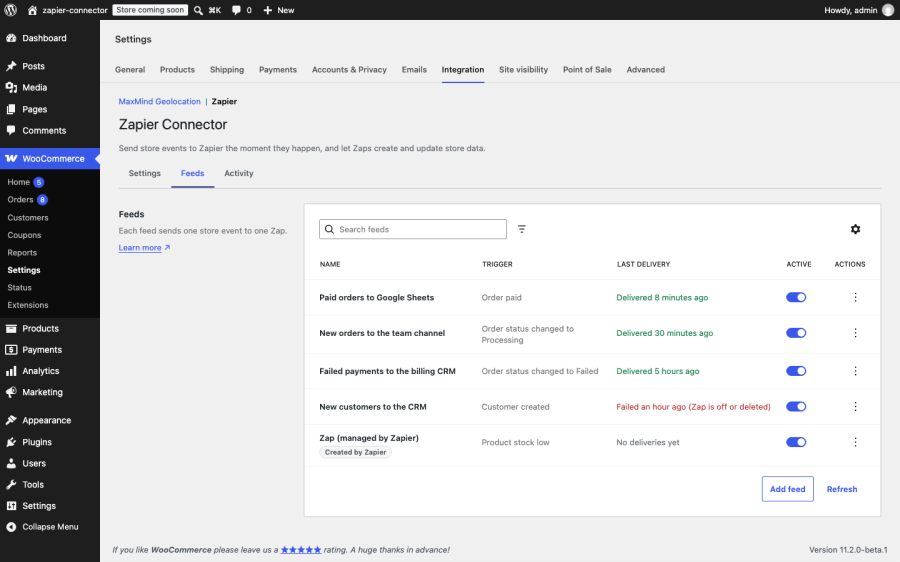
Zapier Connector for WooCommerce is a two-way Zapier integration for WooCommerce stores. Store events such as a paid order, a failed subscription renewal, or a product running low on stock reach your Zaps as they happen. Zaps can create, update, and look up orders, products, customers, coupons, and notes in return. Every delivery and every change Zapier makes is recorded in an activity log inside WooCommerce, with automatic retries and a resend button, so when a Zap goes quiet you can find out why in a minute instead of guessing.
What do you get with Zapier Connector for WooCommerce?

  • Know every event reached Zapier. The activity log records each delivery with its status, timing, and the exact data sent, searchable by order number.
  • Recover from a broken Zap without losing orders. Resend any delivery, or a batch of up to 100, with the data exactly as it was first sent.
  • Stop chasing temporary outages. Deliveries that fail because Zapier was unreachable or returned a server error retry on their own after 5 minutes, 30 minutes, and 2 hours.
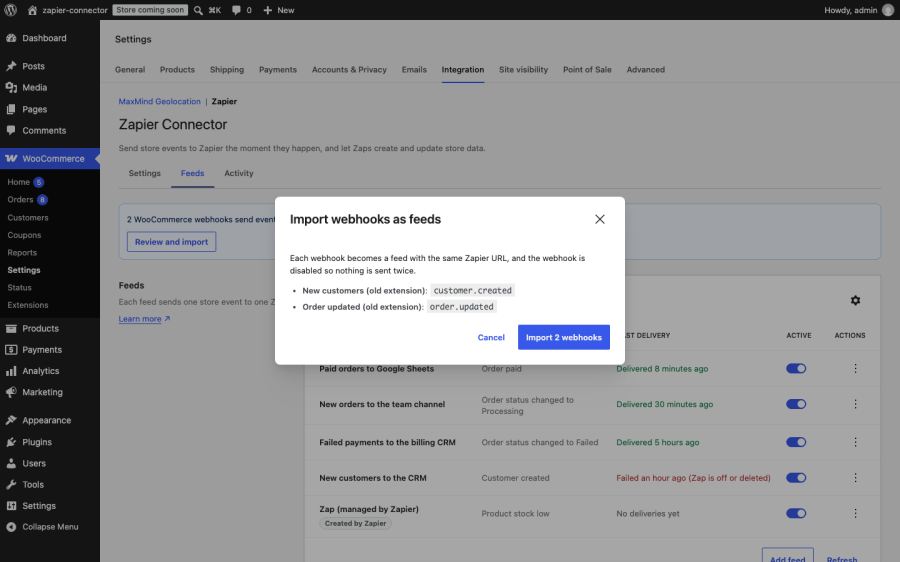
  • Switch from another Zapier extension without rebuilding your Zaps. The importer turns your existing Zapier webhooks into feeds that deliver to the same Zapier URLs.
  • Let Zaps do store work for you. Create coupons, update order statuses, add order notes, and find customers by email from any Zap.
  • Keep checkout fast. Deliveries run in the WooCommerce queue in the background, so a slow Zap never slows a sale.

Features

Real-time triggers for the whole store

Each event is queued the moment it happens and sent through the WooCommerce queue, with no polling interval to wait for. Triggers cover:

  • Orders: created, updated, paid, deleted, restored, and status changed, plus one trigger for each order status on your store, including custom statuses added by other plugins.
  • Products and variations: created, updated, deleted, restored, stock low, and stock status changed, plus one trigger per stock status.
  • Customers and coupons: created, updated, and deleted, plus restored for coupons.
  • Order notes: created and deleted.
  • WooCommerce Subscriptions: created, updated, status changed, renewed, renewal failed, switched, deleted, and subscription notes.
  • WooCommerce Bookings: created, ordered, updated, cancelled, deleted, restored, and status changed.
  • WooCommerce Memberships: user memberships and membership plans, including status changes and transfers.

Every delivery carries the item as your store’s WooCommerce REST API describes it, so the fields you map in Zapier match the ones WooCommerce uses everywhere else.

Actions that let Zaps update your store

Zaps can create and update orders, products, customers, coupons, order notes, subscriptions, subscription notes, user memberships, membership plans, and bookings. They can find a customer by email, a product by SKU, a coupon by code, an order by number (including numbers from sequential numbering plugins), and a subscription or membership by customer. Actions use the WooCommerce REST API’s own field names, so anything the API accepts, an action accepts.

An activity log you can actually use

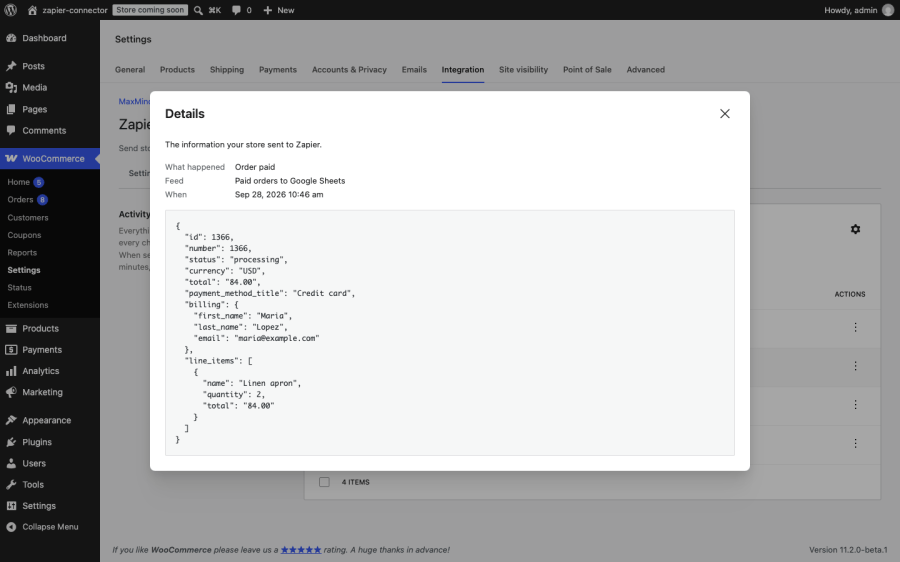
The Activity tab lists every delivery to Zapier and every change Zapier made to your store. Search by order number, event, or message. Filter by status, direction, event, feed, and date. Open any entry to see the exact data sent or received. Failures say what went wrong in plain words, such as “Zap is off or deleted” or “Zapier could not be reached”, instead of a bare error code.
Feeds that look after themselves

A feed that fails five times in a row pauses itself and records why, so your store stops calling a Zap that was deleted in Zapier. Switch it back on with one click once the Zap is fixed. A master switch pauses every outbound automation at once, for a migration or a bulk import, without deleting anything.

Two ways to connect

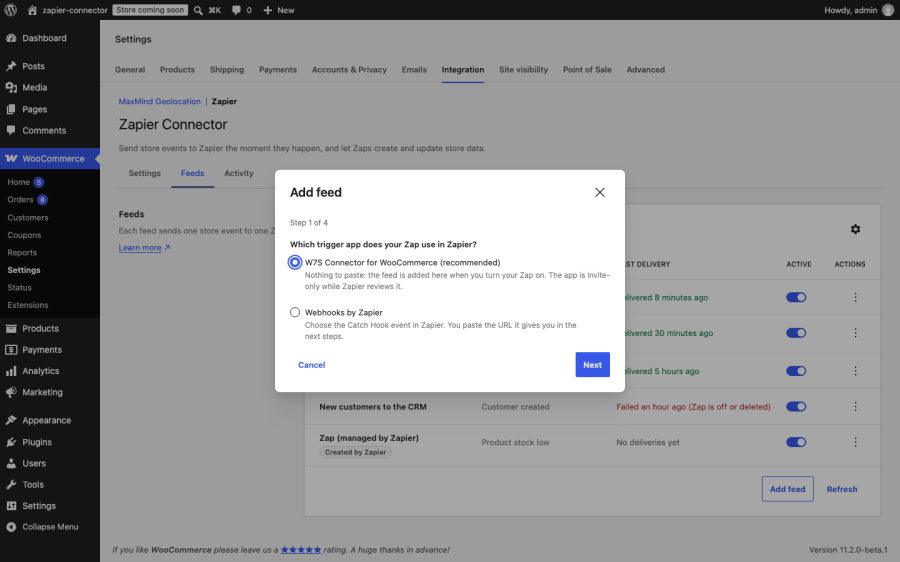
Use the W7S Connector for WooCommerce app on Zapier and there is nothing to paste: turning a Zap on adds its feed to your store, and turning it off removes it. Or use the “Webhooks by Zapier” Catch Hook trigger with the Add feed wizard, which walks you through the trigger, the URL, and a sample delivery so Zapier has real fields to map.

Sign-in handled on the settings screen

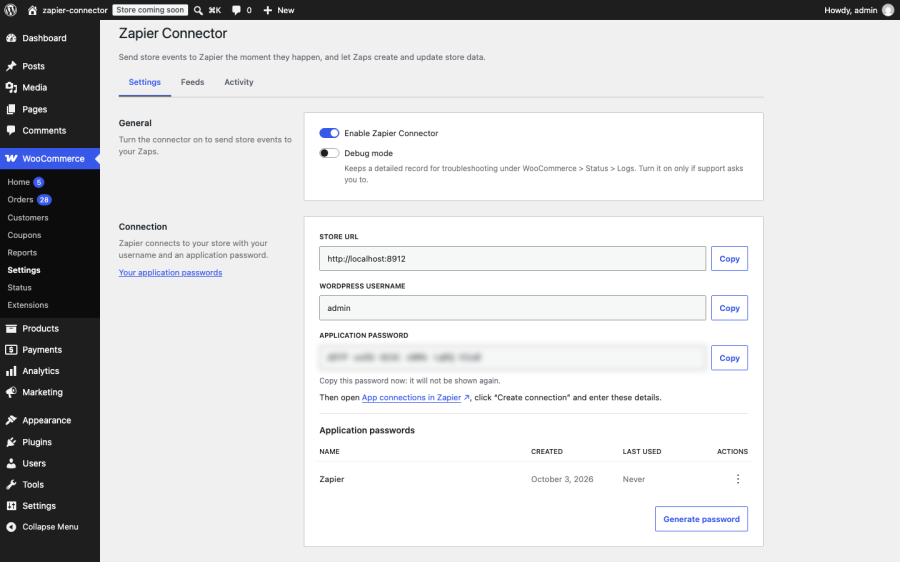
Generate the application password Zapier signs in with right on the settings screen, copy your store URL and username beside it, and revoke the password there when you no longer need it.
Tools for AI assistants

Thirteen tools are registered with the WordPress Abilities API, so an AI assistant connected through MCP for WooCommerce can answer “is Zapier working?”, find the delivery for a specific order, resend it, and manage feeds in conversation.

Who is Zapier Connector for WooCommerce for?

Stores that run on Zapier automations. If paid orders feed your accounting, your CRM, or a spreadsheet, the activity log shows every delivery and the resend button fills any gaps after an outage.

Subscription and membership businesses. With WooCommerce Subscriptions or WooCommerce Memberships active, renewals, failed payments, switches, and membership changes each have their own trigger, and Zaps can update subscriptions and memberships in return.

Stores moving from another Zapier extension. The importer carries existing Zapier webhooks across as feeds, so your triggered Zaps keep running while you switch.
Agencies managing client stores. Plain-language failure reasons, a searchable log, and a status section built for support conversations make it quicker to answer “why didn’t my Zap fire?” across several stores. Multisite networks are supported, with separate feeds and logs per site.
How does it work?

  1. Install the extension and go to WooCommerce > Settings > Integration > Zapier. Switch the connector on and save.
  2. Generate an application password on the Settings tab and connect your store in Zapier with your store URL, username, and that password.
  3. Build a Zap. With the W7S Connector for WooCommerce app, the feed appears when you turn the Zap on. With Webhooks by Zapier, add the feed with the wizard and send a sample.
  4. Events flow from that point on. Check the Activity tab any time to see what was sent, what failed, and why.

The W7S Connector for WooCommerce app on Zapier is invite-only while Zapier reviews it. The invite link is in the Add feed wizard. The Webhooks by Zapier route works without it.

How does it compare with other WooCommerce Zapier options?

There are several ways to get WooCommerce data into Zapier. The right one depends on whether you want a dedicated Zapier integration, a general WordPress automation plugin, or the free webhooks built into WooCommerce.

Zapier Connector for WooCommerce Zapier Integration for WooCommerce (Tectalic) WooCommerce built-in webhooks Uncanny Automator
What it is Dedicated two-way Zapier integration Dedicated two-way Zapier integration Webhooks in WooCommerce core General WordPress automation plugin with webhook support
How you connect to Zapier W7S Connector app on Zapier, or Webhooks by Zapier Its own public app on Zapier Webhooks by Zapier Catch Hook URL Webhooks, inside Automator recipes
Triggers Orders, products, customers, coupons, notes, Subscriptions, Bookings, and Memberships, with one trigger per status Orders, products, customers, coupons, notes, Subscriptions, Bookings, and Memberships Created, updated, deleted, and restored for orders, products, customers, and coupons WooCommerce triggers in recipes; many are Pro-only
Actions from Zapier Create, update, and find across the same resources Create, update, and find, plus dedicated price and stock updates No Limited
Delivery log in WooCommerce Searchable log with payloads, bulk resend, and plain-language failure reasons Task history screen in WooCommerce Delivery results in WooCommerce logs Recipe logs
Automatic retries Yes No No Yes
Import existing Zapier webhooks Yes No No No
AI assistant access Yes No No No

Tectalic’s Zapier Integration for WooCommerce is the established choice, with a public Zapier app and a large install base. WooCommerce’s built-in webhooks cost nothing and suit simple one-way sends. Uncanny Automator suits stores that want automations built inside WordPress and only use Zapier occasionally. Zapier Connector for WooCommerce is built for stores that want a dedicated Zapier integration with a delivery log they can search, retry from, and resend from, and an easy way to move over from the webhooks they already have.


Frequently asked questions

Is Zapier Connector for WooCommerce a two-way Zapier integration?
Yes. It sends store events to Zapier as they happen, and it lets Zaps create, update, and find orders, products, customers, coupons, notes, subscriptions, memberships, and bookings in your store.
Do I need a Zapier account?
Yes. You need a Zapier account to build Zaps. The extension itself needs no license key or separate account.
Does it work with WooCommerce Subscriptions, Bookings, and Memberships?
Yes. When any of those extensions is active, its triggers and actions appear on their own. Subscriptions adds renewals, failed renewals, switches, status changes, and subscription notes.
Can I switch from another Zapier extension without rebuilding my Zaps?
Usually, yes. If your current extension sends events through WooCommerce webhooks to Zapier, the importer turns each one into a feed with the same Zapier URL and disables the old webhook so nothing is sent twice. Zaps triggered on subscriptions are worth a quick check afterwards, because the previous extension may have sent subscriptions in an older format. The importer moves triggers; Zaps that write to your store through another Zapier app keep using that app.
What happens when Zapier is down or a Zap is turned off?
When Zapier cannot be reached or returns a server error, the delivery retries after 5 minutes, 30 minutes, and 2 hours. When a Zap is off or deleted, the log says so, and after five failed deliveries in a row the feed pauses itself. Once the Zap is back, switch the feed on and resend what was missed from the Activity tab.
Will it slow down my checkout?
No. Deliveries run in the WooCommerce queue in the background, away from the customer's request, so a slow or unreachable Zap cannot slow a sale.
Does it support custom order statuses?
Yes. Each order status registered on your store gets its own trigger, including statuses added by other plugins.
Is it compatible with HPOS and the block checkout?
Yes. Zapier Connector for WooCommerce is compatible with High-Performance Order Storage (HPOS) and the Cart and Checkout blocks.
Does it work on multisite?
Yes. Each site on a network keeps its own feeds, settings, and activity log.
Can I pause everything at once?
Yes. The master switch stops all outbound deliveries and keeps your feeds exactly as they are. Calls from Zapier into your store keep working until you revoke the application password, which you can do on the same screen.
What happens if I cancel or remove the extension?

If you deactivate it, queued deliveries are cancelled and your feeds, settings, and log are kept for when you reactivate. If you delete it, it removes its settings, feeds, log, and scheduled tasks, and revokes the application passwords it created for Zapier.

Extension information

  • PHP version required: 7.4
  • Tested with WordPress: 7.1
  • Tested with WooCommerce: 11.2.0
  • Requires at least WordPress: 6.9
  • Requires at least WooCommerce: 9.0

Countries

  • Worldwide

Related Products

Price $279 annually
Rated 3.9 out of 5 stars
Price $79 annually
Rated 3.4 out of 5 stars
Price $59 annually
Rated 3.1 out of 5 stars
Price $109 annually
Rated 2.7 out of 5 stars
Price $49 annually
Rated 4.1 out of 5 stars
Price $109 annually
Rated 2 out of 5 stars
Price $109 annually
Rated 2.3 out of 5 stars
Price $39 annually
Rated 2.8 out of 5 stars
Price $59 annually
Rated 4.1 out of 5 stars
Use of your personal data
We and our partners process your personal data (such as browsing data, IP Addresses, cookie information, and other unique identifiers) based on your consent and/or our legitimate interest to optimize our website, marketing activities, and your user experience.



