

Instalações ativas
30K+
A assinatura inclui
Suporte
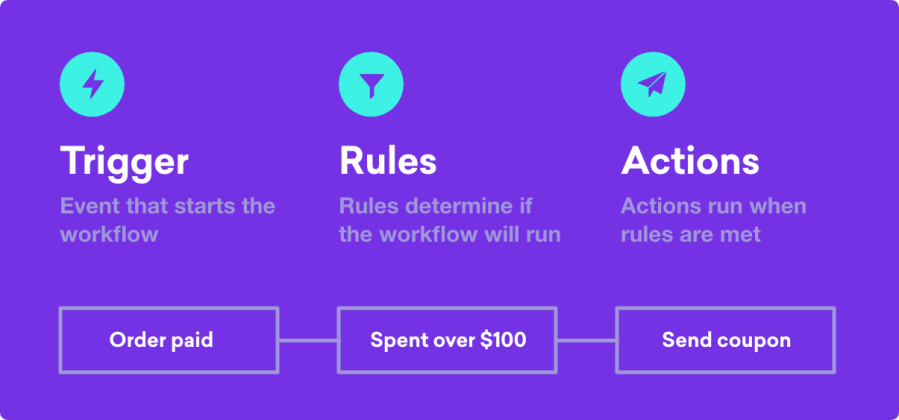
Use a automação disponível no AutomateWoo, que é avançada e repleta de funcionalidades, para criar uma gama quase infinita de fluxos de trabalho automatizados. Assim, você expande sua loja com a metade do esforço! Com o AutomateWoo, você pode criar fluxos de trabalho, que são diferentes combinações de acionadores, regras e ações no WooCommerce.
Após criar o fluxo de trabalho, é possível programá-lo para que ele seja executado praticamente a qualquer momento. Seja de imediato, após um período definido, ou até mesmo em uma determinada hora ou dia da semana.
Automatize e otimize a comunicação com os clientes, enviando belíssimos e-mails de acompanhamento.
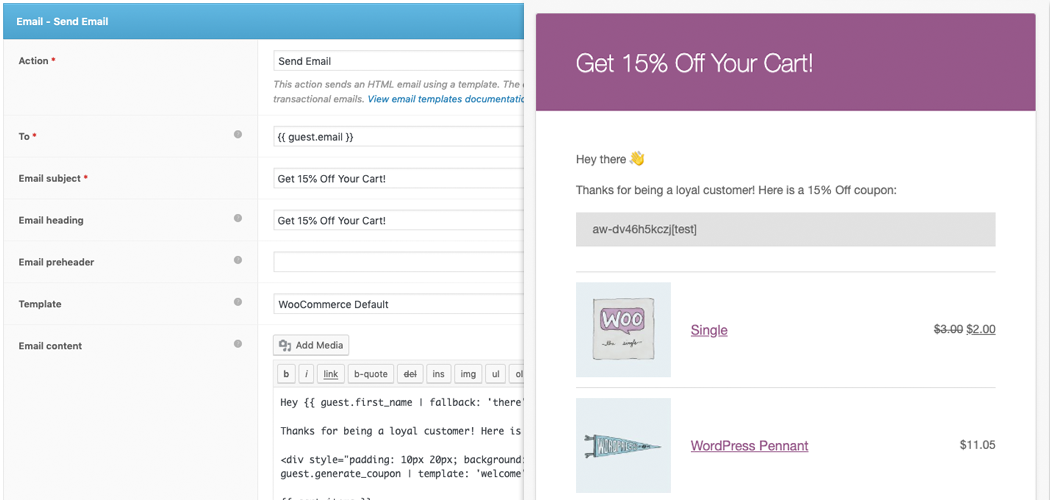
Configure e-mails sobre carrinhos abandonados para o WooCommerce. A probabilidade de recuperar uma venda perdida é de 63%, o que a torna uma das melhores formas de expandir sua loja.
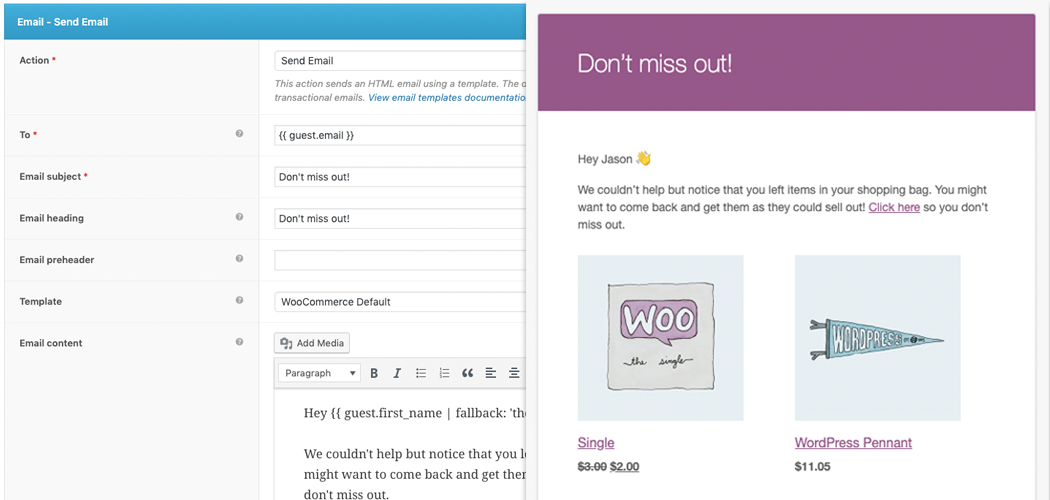
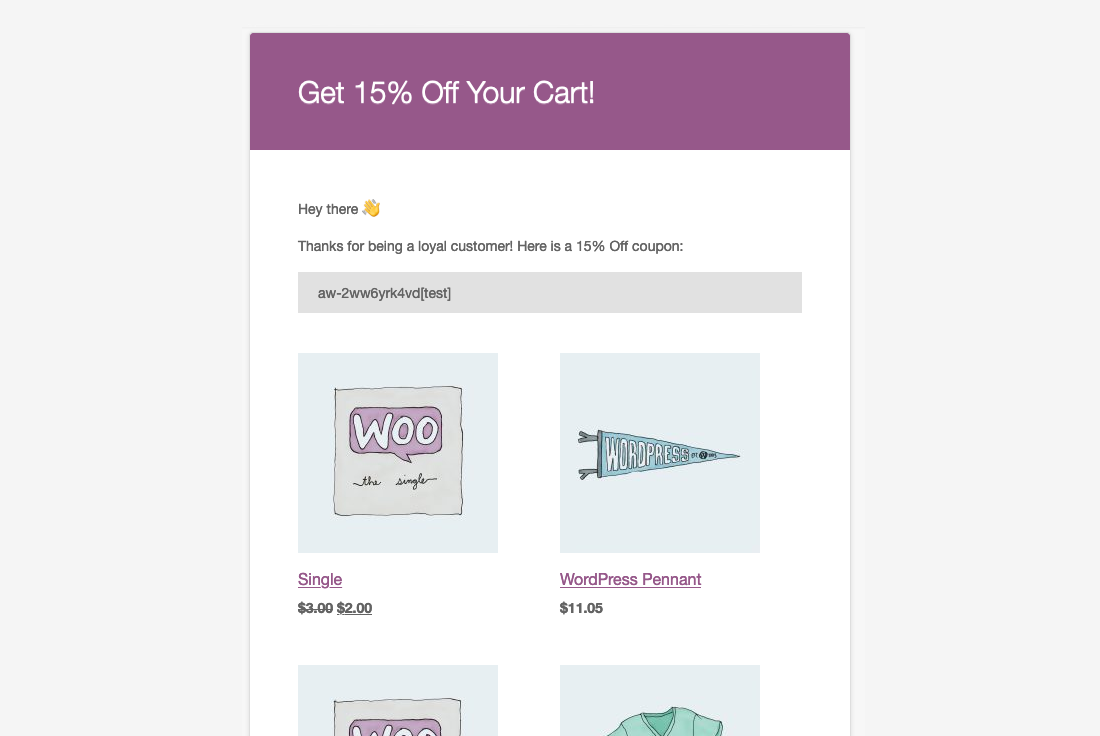
Comece a enviar e-mails de imediato, usando o modelo que já está configurado para os e-mails sobre as transações do WooCommerce. Crie e-mails no já conhecido editor do WordPress, aprimorado pelas variáveis que permitem a você inserir produtos, usando uma infinidade de opções de exibição, além de inserir conteúdos dinâmicos.
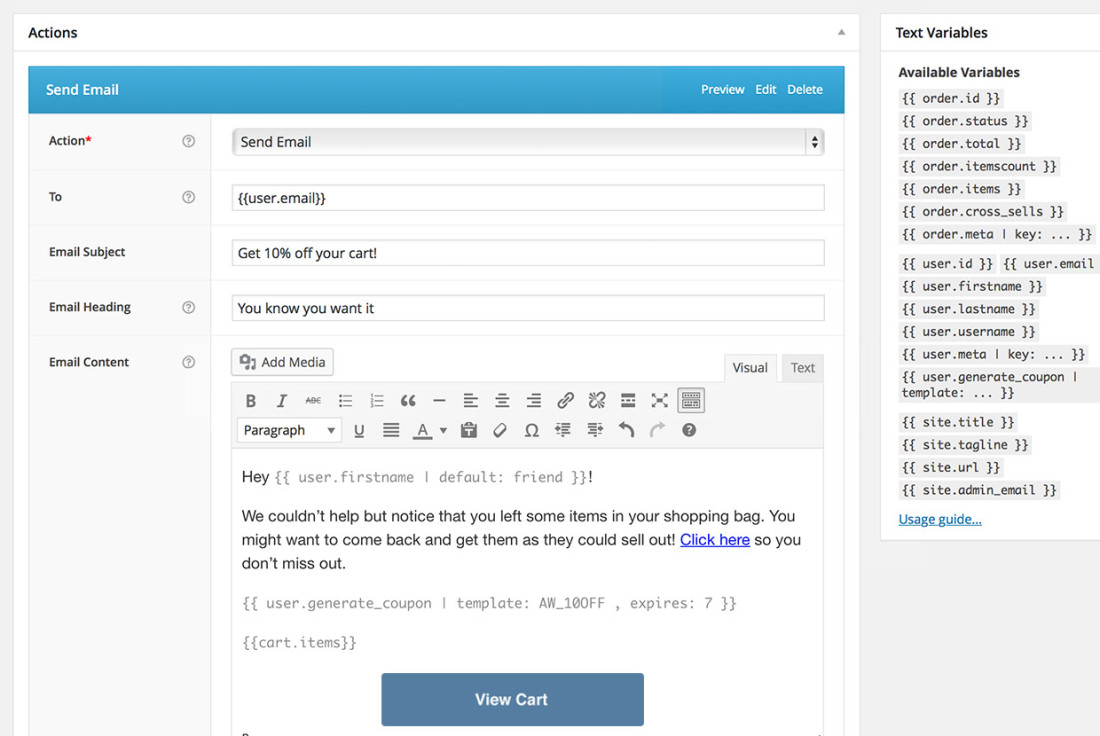
O AutomateWoo proporciona controle total sobre as campanhas. Programe e-mails diferentes, que serão enviados em intervalos ou após interações específicas do cliente, e ofereça incentivos, usando o sistema de cupons personalizados.
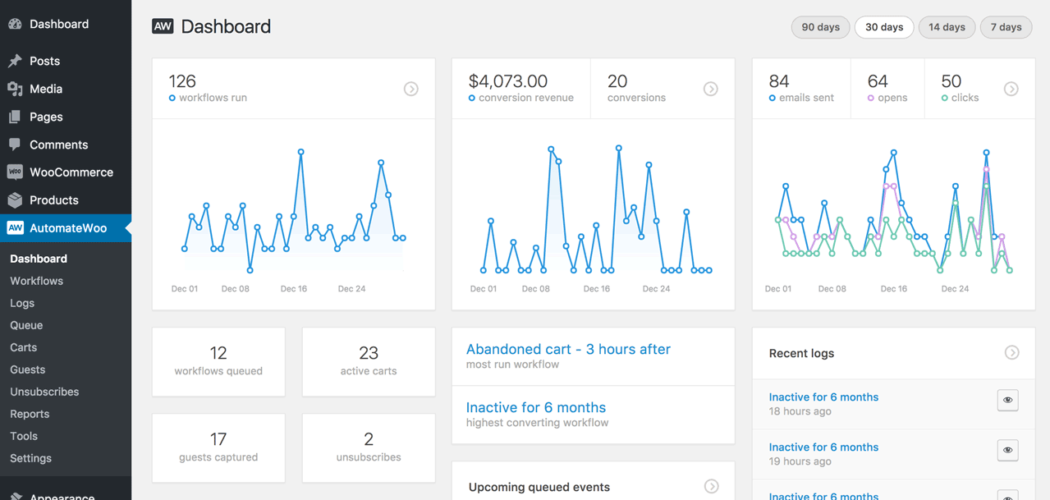
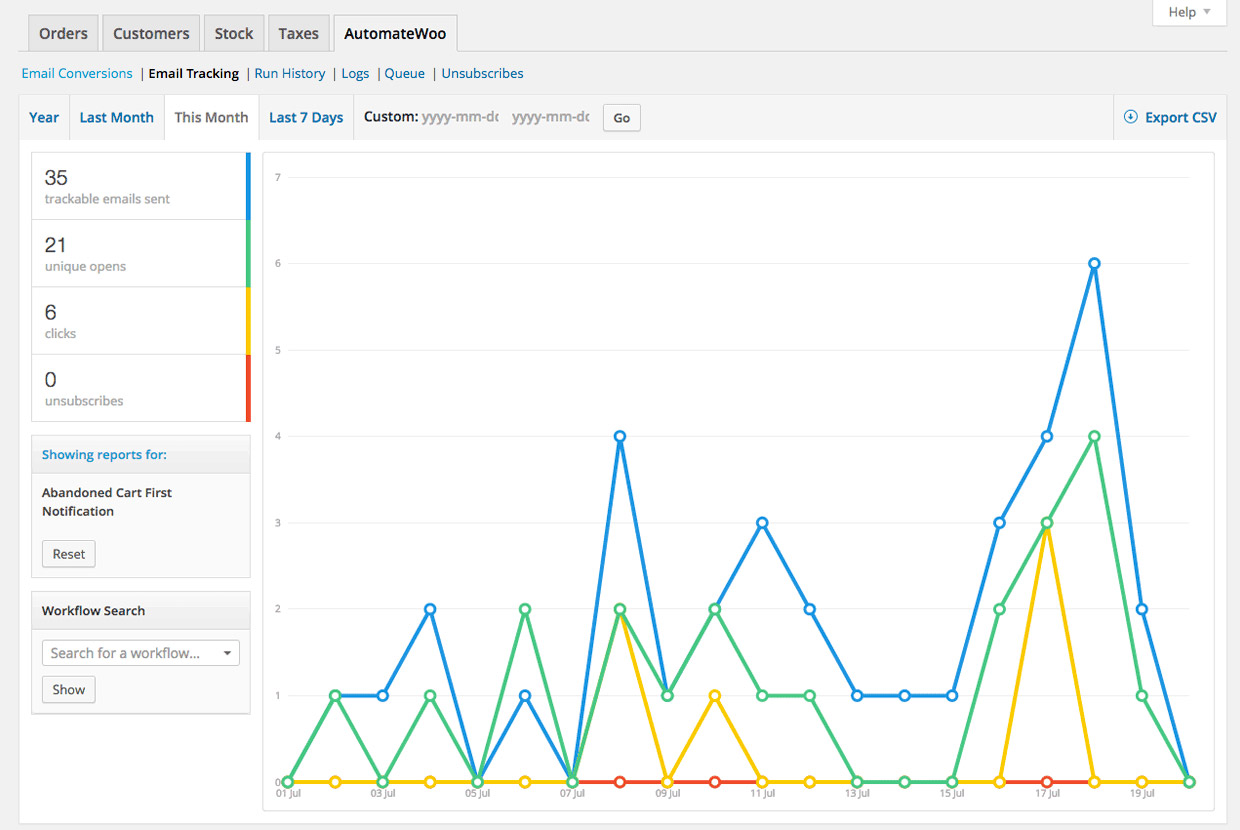
O AutomateWoo prolonga a geração de relatórios do WooCommerce: avalie o sucesso de suas campanhas, com a ajuda dos diversos relatórios incluídos no AutomateWoo. Você consegue ver também um registro detalhado de todos os e-mails enviados e as conversões registradas.
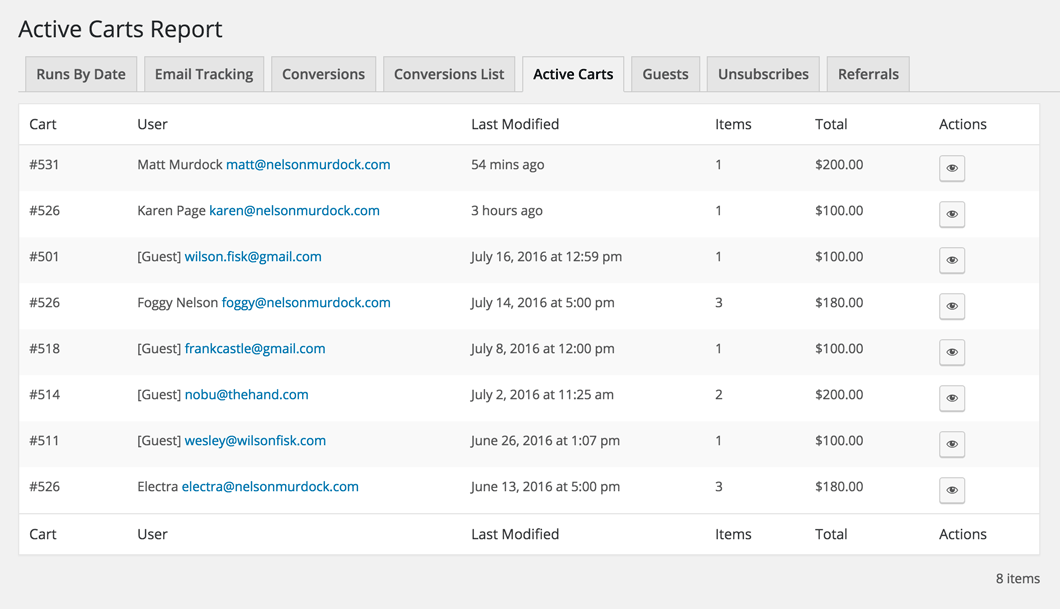
A tecnologia de rastreamento de sessão do AutomateWoo é capaz de detectar os usuários registrados mesmo antes do login e de capturar os e-mails de convidados durante o checkout, usando a técnica de envio prévio. Também é possível obter e-mails de convidados a partir de qualquer formulário do seu site, como a inscrição em newsletter.
Muitos serviços cobram com base no volume de e-mail e, com o AutomateWoo, você não precisa se preocupar se vai ultrapassar o oferecido no seu plano.
O AutomateWoo é 100% expansível e nós temos exemplos de programação na nossa documentação, para facilitar o trabalho dos desenvolvedores.
Precisa enviar e-mails em vários idiomas? O AutomateWoo conta com o suporte do famoso plugin WPML.
O AutomateWoo se integra aos seus plugins e serviços favoritos, dando a você a vantagem que precisa na questão do marketing.
[perguntas frequentes=’O plugin é compatível com plugins multilíngues? E os e-mails enviados podem estar em diferentes idiomas dependendo da escolha de idioma do cliente no meu site?’ resposta=’O AutomateWoo tem compatibilidade integrada com o WPML (exceto para várias moedas). Outros plugins multilíngues podem ser compatíveis, mas não garantimos que o AutomateWoo funcionará com eles. Ao usar o WPML, os e-mails são enviados no idioma em que o cliente vê o site.”link=’https://woocommerce.com/document/automatewoo/wpml/’]
[perguntas frequentes=”Posso executar código personalizado usando o AutomateWoo?” resposta”Sim. Você pode usar o código personalizado de algumas formas, incluindo acionadores personalizados e ações/funções personalizadas, para criar as automações do site. Observe que nossa equipe de suporte não escreve ou soluciona problemas de código personalizado, mas podemos direcioná-lo para desenvolvedores do WooCommerce confiáveis para contratação.”link=’https://woocommerce.com/document/automatewoo/triggers/custom-triggers/’]
[perguntas frequentes=”Você tem uma demonstração da extensão do AutomateWoo que podemos experimentar antes de decidir comprar?” resposta=”Não oferecemos uma demonstração do AutomateWoo. Compre a extensão, e aproveite nossa política de 30 dias de reembolso caso o AutomateWoo não atenda às suas necessidades.”link=’https://woocommerce.com/refund-policy/’]
AutomateWoo is a marketing automation extension for WooCommerce that helps you convert and retain customers without adding manual work. It runs on Workflows, which combine Triggers (when something happens, such as a completed order), Rules (conditions that narrow when a workflow runs, such as an order total over a set amount), and Actions (what happens next, such as sending an email or SMS). You can use it for follow-up emails, abandoned cart reminders, win-back campaigns, review requests, personalized coupons, and more, all managed from your WordPress dashboard.
Yes. You can use custom code in a few ways—including Custom Triggers and Custom Actions/Functions—to build out the site’s automations. Note that our support team doesn’t write or troubleshoot custom code, but we can point you to trusted WooCommerce developers for hire.
We don’t offer a demo of AutomateWoo. We encourage you to buy the extension and take advantage of our 30-day refund policy if it doesn’t meet your needs.
AutomateWoo includes abandoned cart automation that reminds shoppers who left items in their cart with a series of emails sent at intervals you choose. You can personalize each message with the customer's name and the products they left behind, and add a personalized coupon to encourage them to return. This is one of the highest-impact ways to recover sales that would otherwise slip away. For more on building an effective recovery sequence, see this guide to converting more abandoned carts.
Yes. AutomateWoo is designed to help recover sales through abandoned cart emails, win-back campaigns for inactive customers, and card expiry notifications that can reduce failed subscription payments. Its session tracking can detect registered customers before they sign in, and it can capture guest emails during checkout so you can follow up even when a shopper does not complete an order. These tools give you multiple ways to re-engage shoppers at the moments they are most likely to come back.
Yes. AutomateWoo gives you tools to build repeat business, including follow-up emails that suggest related products, win-back campaigns for customers who have not ordered in a while, automatic VIP status for your best customers, and review reward coupons. You can also send personalized coupons to encourage the next purchase. For broader ideas on keeping customers coming back, see these customer retention strategies for stores.
Yes. AutomateWoo runs your campaigns in the background using workflows, so once you set up a trigger, rules, and an action, the extension handles the sending for you. You can schedule messages to go out immediately, after a set delay, or at a specific hour or day of the week. Preset workflows for common use cases give you a starting point you can customize to fit your store.
Yes. AutomateWoo can send SMS notifications to customers or admins for any of its triggers, which is useful for order updates, reminders, and time-sensitive campaigns. SMS sending is handled through an integration with Twilio, so you will need a paid Twilio account to use this feature. Email and SMS can be combined across your workflows to reach customers on the channel they respond to best.
Yes. AutomateWoo integrates with WooCommerce Subscriptions so you can create workflows based on subscription events such as status changes, failed payments, and renewal reminders. It also offers card expiry notifications that warn customers before a saved card expires, which can help reduce failed payments and churn. This makes it a strong companion for stores that rely on recurring revenue.
Yes. AutomateWoo integrates with several WooCommerce extensions to extend what you can automate, including WooCommerce Subscriptions, WooCommerce Memberships, WooCommerce Bookings, WooCommerce Points and Rewards, and WooCommerce Wishlists. It also connects with email and messaging services such as Mailchimp, ActiveCampaign, Campaign Monitor, and Twilio for SMS. These integrations let you trigger automations from events across your store.
Yes, when paired with WooCommerce Bookings. AutomateWoo can send automated emails on booking events such as confirmations and completions, which helps improve the customer experience and can reduce no-shows and cancellations. You can also follow up after a booking to upsell related products or services.
Yes, with the AutomateWoo Refer A Friend add-on, which is a separate purchase and requires AutomateWoo to be installed and active. It lets you run coupon-based or link-based referral campaigns, where advocates share a unique coupon or link and earn store credit for successful referrals. The add-on includes built-in fraud prevention, reporting, and post-purchase share widgets to encourage word-of-mouth sales.
Yes, with the AutomateWoo Birthdays add-on, which is a separate purchase. It lets you send a special birthday email and coupon to customers on their day, which can encourage a purchase and add a personal touch to your marketing.
AutomateWoo styles its emails using the same template as your default WooCommerce transactional emails, and you can personalize content with variables that insert products, customer details, and dynamic content. It is built for automation rather than advanced email design, so if you want a feature-rich email builder with more template customization, MailPoet may be a better fit for that part of your marketing. Many stores use AutomateWoo for behavior-based automation alongside a dedicated email design tool.
AutomateWoo styles its emails using the same template as your default WooCommerce transactional emails, and you can personalize content with variables that insert products, customer details, and dynamic content. It is built for automation rather than advanced email design, so if you want a feature-rich email builder with more template customization, MailPoet may be a better fit for that part of your marketing. Many stores use AutomateWoo for behavior-based automation alongside a dedicated email design tool.
AutomateWoo is a good fit for WooCommerce store owners who want behavior-based marketing automation tied directly to store events, without moving their data to a separate platform. It is especially useful for stores selling subscriptions, memberships, or bookings, and for any store that wants to recover abandoned carts, win back inactive customers, and reward loyal shoppers. Because it offers unlimited email sending, it suits stores that want to send a high volume of automated messages without volume-based pricing.
AutomateWoo focuses on automated, event-driven workflows inside WooCommerce rather than being a full email design and broadcast newsletter platform. If your main goal is designing highly styled newsletters or managing large contact lists with advanced template editing, a dedicated email marketing tool such as MailPoet may suit you better. Some stores run AutomateWoo for automation and pair it with an email platform for campaign design.
AutomateWoo has built-in support for WPML, though this excludes multiple currencies. When WPML is active, emails are sent in the language the customer uses to view your site. Other multilingual plugins may work, but compatibility is not guaranteed.
No. AutomateWoo offers unlimited email sending, so you are not charged based on email volume the way many marketing services are. This can make it a cost-predictable choice for stores that plan to send a large number of automated emails.
AutomateWoo lets you choose opt-in or opt-out mode for your workflows and adds an unsubscribe link to the footer of every non-transactional email. In opt-in mode, customers can subscribe at checkout, during account registration, in their account area, or through the AutomateWoo signup page. Transactional workflows can be excluded from the opt-in requirement, which helps you stay aligned with customer communication preferences.
AutomateWoo is built for store owners, not only developers, and you create automations by combining a trigger, optional rules, and an action inside your WordPress dashboard. Preset workflows for common scenarios, such as a welcome email for new customers, give you a ready-made starting point you can adjust to your store. Over 80 variables let you add dynamic content like a customer's name or their recent products at the click of a button.
Yes. AutomateWoo can automatically follow up with customers after a purchase to request a review, and its Review Rewards feature can offer a discount to encourage more reviews. You can set conditions based on the number of reviews posted and the rating given, which helps you gather social proof while managing how rewards are used.
Categorias
Informações da extensão
Verificações de qualidade
Compatibilidade
Países
Requisitos











