Product Icon

Phone Validator and Formatter for WooCommerce

Ensure valid and consistent phone numbers across your store. Validate and format them seamlessly during order creation, order edits, and profile updates.
Choose a billing option
$29
Save 20%
$58 $46.40

Subscription includes

  • Product updates and improvements
  • Customer support
  • 30-day money-back guarantee

Key Features

Automatic Country Code Addition

Automatic Country Code Addition

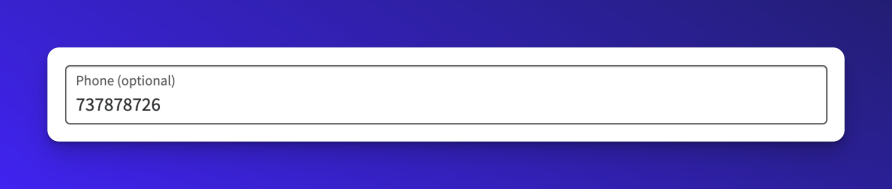
Let customers enter phone numbers their way. 99% of shoppers skip the country code when typing their number—and that’s perfectly fine. The plugin intelligently matches their phone to their selected country and adds the correct dial code behind the scenes. If customers want, they can simply type in the dial code themselves.

You get properly formatted international numbers. They get a frictionless checkout. Compatible with all WooCommerce checkout types.

Instant Error Detection & Prevention

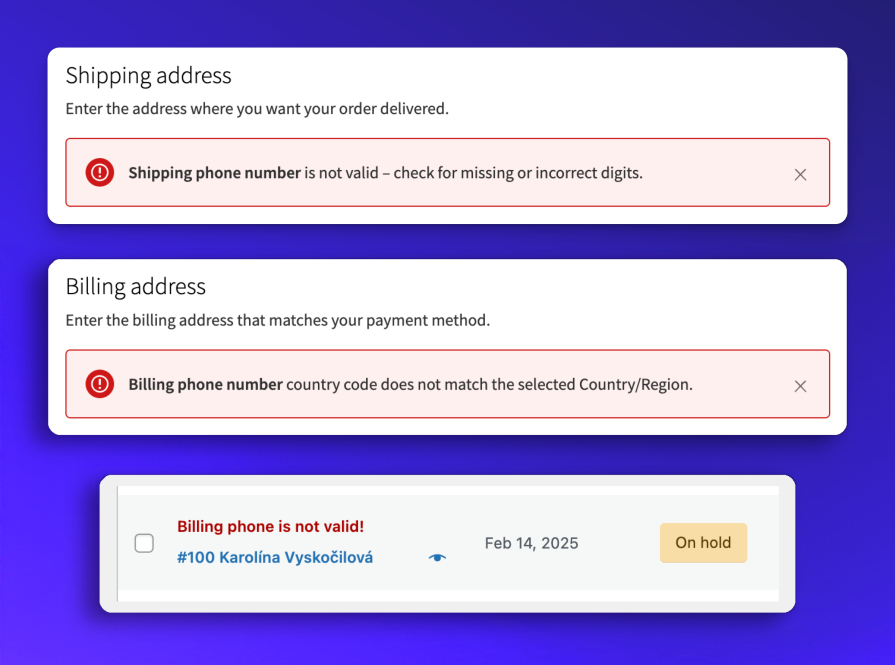
Stop bad phone data at the source. Real-time validation blocks invalid numbers during checkout while clear, contextual error messages help customers self-correct instantly. See problem orders flagged in your admin dashboard before they ship.

Reduce delivery failures. When every phone number is validated before order completion, your carriers reach customers on the first attempt. Fewer returns, lower support costs, and happier customers who actually receive their delivery notifications.

Flexible Validation Rules

Flexible Validation Rules

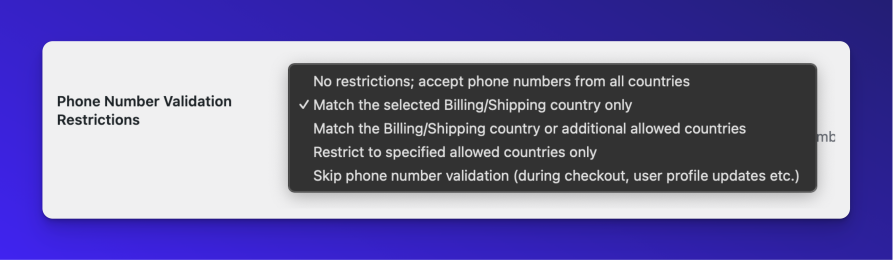
Take control of which phone numbers you accept. Whether you ship globally or serve specific regions, customize validation to match your business model. Accept numbers from all countries, restrict to billing/shipping locations only, or define your own approved country list.

Prevent fraud while keeping legitimate customers happy. Block suspicious orders from mismatched countries while giving trusted markets the flexibility they need. Perfect for businesses with region-specific operations or those wanting tighter security controls. Set it once and let the plugin enforce your rules automatically.

Smart Format Standardization

Smart Format Standardization

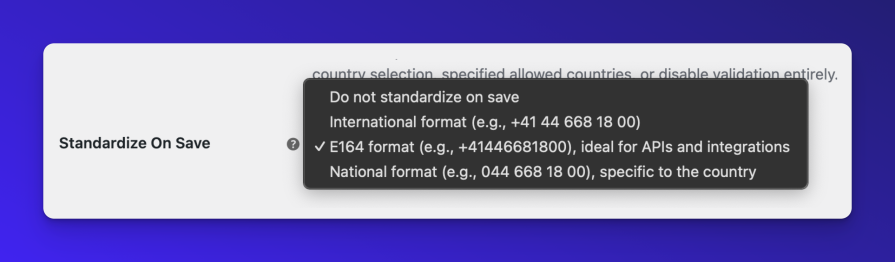
Finally, phone numbers that play nice with all your tools. Automatically standardize every phone number to your preferred format—E164 for APIs, international with spacing for readability, or local format for regional teams. Set it once and never worry about formatting again.

Cut integration headaches by 90%. Your CRM wants E164? Your SMS platform needs international? Your support team prefers local? Pick the format that matches your primary workflow, and watch data inconsistencies disappear across your entire operation.


Other features

  • Developer-Friendly: Includes filters, actions, and REST API endpoints for validation and formatting, enabling easy integration and customization.
  • Works both with Classic and Block themes.
  • Allows adding a Shipping phone to the Classic checkout.

Benefits

  • Improved Data Quality: Accurate and standardized phone numbers reduce errors in communication and logistics.
  • Enhanced User Experience: Users benefit from smooth and intuitive phone validation during input.
  • Operational Efficiency: Phone data compatible with CRMs, SMS services, and shipping platforms integrates easily.
  • Customizable to Fit Your Business: Adapt validation and formatting rules to align with your operational needs.

Frequently asked questions

Can I disable front-end validation?

If you wish to format the phone only upon saving, you can do that! Just go to WooCommerce > Settings > General and select the “Skip phone validation” option in the Phone Number Validation Restrictions select menu.

If the user submits an invalid phone number, a “Phone number is invalid!” alert will appear on the Orders listing page and the order detail page.

What happens if a customer doesn’t include a dial code in their phone number?

If a customer doesn’t provide a dial code with their phone number, the plugin assumes the phone number belongs to the same country as the one selected in the billing or shipping address. This mirrors typical behavior when entering phone numbers in real life, where users often omit the country code for local numbers.

Where are phone numbers validated and formatted, and where are they only formatted on save?

Phone numbers are validated and formatted when the order is created at Checkout and when updated on the My Account page. They are only formatted upon saving without additional validation for scenarios like order edits, manually created orders or user profile updates.

How can I report security bugs?

You can report security bugs through the Patchstack Vulnerability Disclosure Program. The Patchstack team help validate, triage and handle any security vulnerabilities. Report a security vulnerability.

Customer reviews

Average rating 5.0
6 reviews
5 stars, 100% of reviews
4 stars, 0% of reviews
3 stars, 0% of reviews
2 stars, 0% of reviews
1 star, 0% of reviews
6 reviews
  • andrewandwine
    Rated 5 out of 5
    Ease of use
    Jun 16, 2025
    Ease of use
    Great support and easy to use. Thanks Karolina
  • Simon Tomkins
    Rated 5 out of 5
    Functionality
    Jun 13, 2025
    Functionality
    This plugin has been a game-changer for keeping our client's customer phone numbers clean and consistent. Now everything gets automatically validated and formatted properly at checkout. What they really appreciate is how smart it is about handling local numbers. When customers don't include their country code, it automatically assumes they're using the same country as their billing address, which makes perfect sense. The setup was straightforward, and I really like that you can choose whether to validate on entry or just format when saving. The plugin catches invalid numbers right away and shows clear error messages, which has reduced customer service inquiries about delivery issues. But wha...
  • dudlaj4
    Rated 5 out of 5
    Ease of use
    May 28, 2025
    Ease of use
    Installed. Setup is simple - to fit your needs. Must have plugin for those who like to have correct data from the store.
  • Michal Malát
    Rated 5 out of 5
    Functionality
    May 26, 2025
    Functionality
    We're using Phone Validator because we prefer not to correct phone numbers manually. It's simple to set up and works exactly as expected. Thank you for this useful add-on!
  • Rodolfo Melogli
    Rated 5 out of 5
    Ease of use
    May 15, 2025
    Ease of use
    The plugin is exactly what I needed — simple settings, lightweight code, and it just works out of the box. No unnecessary bloat or complications. On top of that, support is fast, skilled, and clearly knows what they’re doing.

Extension information

  • WordPress version required: 6.2
  • WooCommerce version required: 8.3.0
  • PHP version required: 8.1
  • Tested with WordPress: 6.9
  • Tested with WooCommerce: 10.6.1
  • Requires at least WordPress: 6.2
  • Requires at least WooCommerce: 8.2.0

Compatibility

  • Block editor
  • Cart & checkout blocks
  • High performance order storage (HPOS)
  • Product editor

Countries

  • Worldwide

Languages

Czech, English (United States), Slovak

Requirements

  • WooCommerce 8.2+
  • WordPress 6.2+

Related Products

Price $79 annually
Rated 3.4 out of 5 stars
Price $59 annually
Rated 3.1 out of 5 stars
Price $279 annually
Rated 3.2 out of 5 stars
Price $109 annually
Rated 2.8 out of 5 stars
Price $49 annually
Rated 4.1 out of 5 stars
Price $109 annually
Rated 2 out of 5 stars
Price $109 annually
Rated 2.3 out of 5 stars
Price $109 annually
Rated 2.6 out of 5 stars
Price $109 annually
Rated 2 out of 5 stars
Use of your personal data
We and our partners process your personal data (such as browsing data, IP Addresses, cookie information, and other unique identifiers) based on your consent and/or our legitimate interest to optimize our website, marketing activities, and your user experience.