
Phone Validator and Formatter allows your WooCommerce store to validate and format phone numbers seamlessly, ensuring accurate, consistent, and reliable customer contact data across all entry points.
Installation
↑ Back to top- Download the .zip file from your WooCommerce account.
- Go to: WordPress Admin > Plugins > Add New > Upload and select the ZIP file you just downloaded.
- Install Now and Activate the extension.
More information at: Install and Activate Plugins/Extensions.
Setup and Configuration
↑ Back to top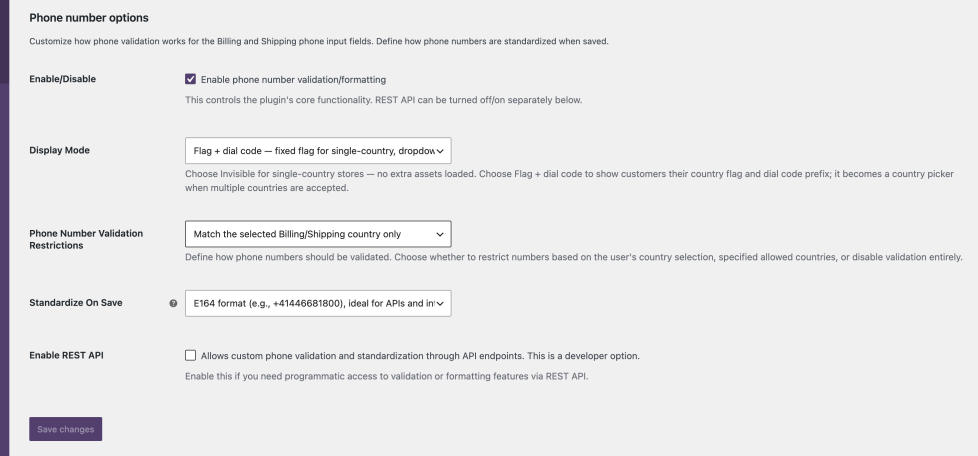
- Go to: WooCommerce > Settings > General and scroll down to the bottom section named Phone number options.
- Tick the checkbox to Enable the integration. This controls the plugin’s core functionality — validation and formatting.
- Choose the Display Mode: Invisible (default) keeps the phone field exactly as it is and adds no extra assets, while Flag + dial code shows a country flag selector at the checkout and My Account phone fields. See Country flag & dial code selector below.
- Select (if you want to) the phone number country restriction (Phone Number Validation Restrictions): accept all countries, Match the selected Billing/Shipping country only (the most used), match the Billing/Shipping country or additional allowed countries, restrict to specified allowed countries only, or Skip phone number validation to only format numbers without blocking checkout — invalid numbers are then flagged in the orders list instead.
- If you picked a restriction mode that uses them, select the Allowed Countries. When Restrict to specified allowed countries only is chosen with an empty list, the settings page warns you on save.
- Select (if you want to) the format in which you want to save the phone number (Standardize On Save): E.164 (e.g.
+41446681800, the most used — ideal for SMS gateways, APIs, and integrations), International (e.g.+41 44 668 18 00), or National (e.g.044 668 18 00). - If your developers plan to use the REST API for other validation, you can also enable it here (Enable REST API).
- On the classic (shortcode) checkout, tick Add Shipping Phone to add an optional shipping phone field — validated and formatted like every other phone in your store. The block checkout ships its own shipping phone field, so this option is not shown there.
Country flag & dial code selector
↑ Back to topSwitch Display Mode to Flag + dial code and the phone field shows a country flag with the dial code — on the classic checkout, the block checkout, and the My Account address forms. There is nothing extra to configure: the initial flag and the country list are derived from your validation settings.
- The dropdown mirrors your validation rules. Customers are only ever offered countries your restrictions accept. When the phone is matched to the billing/shipping country, the flag follows the address and swaps automatically when it changes.
- Built for Core Web Vitals. Assets load only on the checkout and the My Account address form. When your rules resolve to a single country, or the flag simply follows the address, a lightweight static mode renders the flag with roughly 3 kB of JavaScript; the full selector library is fetched lazily and never blocks rendering.
- No CDN, no third-party requests. All assets ship with the plugin and are served from your own site.
- Localized. The selector speaks your customer’s language and supports right-to-left scripts.
Usage
↑ Back to top- Checkout – both billing and shipping phones are validated and formatted. It works both for block checkout and classic checkout.
- My Account – both billing and shipping phones are validated and formatted.
- WooCommerce Order edit – phone numbers are formatted.
- WordPress Profile edit – phone numbers are formatted.
- Orders list & order edit – orders whose phone number failed validation are flagged with a notice (works with both HPOS and legacy order storage). The flag clears automatically once the number is corrected.
Developers
↑ Back to topFor parsing, formatting, and validating international phone numbers this plugin leverages PHP library giggsey/libphonenumber-for-php based on Google’s libphonenumber library. If you want to take advantage of it in your customizations, its classes are scoped with PhoneValidatorAndFormatterDeps (eg. PhoneValidatorAndFormatterDeps\libphonenumber).
Filters
↑ Back to topThe Phone Validator and Formatter plugin provides a set of hooks (filters) to allow developers to modify its behavior according to specific requirements. Below is the list of available filters and their purpose.
Check permissions
Filter: phone_validator_and_formatter/api/check_permissions/{route}
Description: Modify the permissions required to call a specific REST API endpoint.
Parameters:
bool $permissions(Default:true) – Current permissions for calling the endpoint.
Allowed countries
Filter: phone_validator_and_formatter/validator/allowed_countries
Description: Modify the list of countries that allow phone number validation.
Parameters:
array $allowed– Current list of allowed countries.string $group– The group of the phone number (billingorshipping).string $country– The country selected in the address related to the phone number.
Limit countries
Filter: phone_validator_and_formatter/validator/limit_countries
Description:
Modify the country restriction settings for phone validation.
Parameters:
string $limit_country(Default:no_limit) – Current limit countries setting value.string $group– The group of the phone number (billingorshipping).string $country– The country associated with the phone number.
Abilities check permissions
Filter: phone_validator_and_formatter/abilities/check_permissions
Description: Modify the default permissions for invoking the plugin’s abilities (see AI agents & the Abilities API). Runs for both abilities, before the per-ability filter below. Open by default — both abilities are read-only. Since 1.5.0.
Parameters:
bool $permissions(Default:true) – Whether the current user can invoke the abilities.
Per-ability check permissions
Filter: phone_validator_and_formatter/abilities/check_permissions/{ability-name}
Description: Modify the permissions for invoking a specific ability. {ability-name} is the full ability name, e.g. phone-validator-and-formatter/validate or phone-validator-and-formatter/standardize. Receives the result of the shared filter above. Since 1.5.0.
Parameters:
bool $permissions– Whether the current user can invoke the ability (result of the shared filter).
Flag selector static country
Filter: phone_validator_and_formatter/flag_selector/static_country
Description: Modify the single-country detection used by the flag selector’s lightweight static mode — useful when the allowed countries are filtered dynamically. Return a two-letter country code to force static mode, or an empty string to disable it; any other value disables it as well (the result is sanitized). Since 1.5.0.
Parameters:
string $country– The detected single country (''disables static mode).
Functions
↑ Back to topIf you need to leverage the plugin’s functionality in your code, you can use the following functions:
| <?php | |
| $phone = "555555555"; // The phone number. | |
| $country = "us_US"; // The country selected in the address related to the phone number. | |
| $group = "billing"; // The group of the phone number (billing, shipping). | |
| $wc_validate_phone = true; // If WooCommerce phone validation should be used in addition. | |
| $format = "standardize_e164"; // Standardize setting: standardize_international, no_standardize, standardize_national, standardize_e164). | |
| $validator = \phone_validator_and_formatter()->validator();// Get validator. | |
| $phone_is_valid = $validator->is_valid($phone, $country, $group, $wc_validate_phone); | |
| $phone_standardized = \phone_validator_and_formatter()->standardize($phone, $country, $format) |
REST API endpoints
↑ Back to topIf you need to leverage the plugin’s functionality in JS, you can use the following endpoints. Please enable them at first at the setting (WooCommerce > Settings > General, the setting Enable REST API):
- for validation and standardization (POST
/wp-json/phone-validator-and-formatter/v1/validate) , with the following parameters:phone(string) Phone number to validate and format.country(string) Country code.group(string, optional) Validate asbillingorshippinggroup (defaultbilling).format(string, optional) Chosen formatting (standardize_international,no_standardize,standardize_national,standardize_e164)
- for standardization only (POST
/wp-json/phone-validator-and-formatter/v1/standardize)phone(string) Phone number to validate and format.country(string) Country code.format(string, optional) Chosen formatting (standardize_international,no_standardize,standardize_national,standardize_e164)
AI agents & the Abilities API
↑ Back to topOn WordPress 6.9+ the plugin registers its two core features as abilities via the WordPress Abilities API, so AI agents and automation tooling can discover and call them out of the box — for example through MCP. The abilities are always available when the Abilities API exists; they are independent of the Enable REST API setting. Both are read-only and idempotent — they never modify your store data.
phone-validator-and-formatter/validate— validates (and standardizes) a phone number. Input:phone(required),country(required, two-letter code),group(billing/shipping, defaultbilling),format(optional). Output:valid(boolean),standardized(string),errors(object).phone-validator-and-formatter/standardize— formats a phone number. Input:phone(required),country(required),format(optional). Output: the standardized number as a string.
Permissions are open by default and can be restricted with the abilities permission filters above.
Languages
↑ Back to topThe plugin ships in nine languages across 23 locales, including regional and formal variants: Czech, Dutch, English, French, German, Italian, Portuguese, Slovak, and Spanish. It is fully translation-ready, and the country flag selector supports right-to-left languages.
Questions and Feedback
↑ Back to topHave a question before you buy? Please fill out this pre-sales form. Have you already purchased and need some assistance? Get in touch with us via the Help Desk.

