Let users save multiple shipping and billing addresses to their personal address book under their "My Account". They can manage and select them instantly during checkout, to complete purchases faster, thus increasing conversions.
Simplify checkout with a smart address book of saved addresses
Nobody enjoys typing the same address over and over. It’s tedious, error-prone, and a major friction point — especially on mobile. And if it bothers you, it’s costing your customers.
Browser autofill helps, but what about multiple addresses? Sometimes you’re ordering to your home, other times to your office. And when it’s a birthday or the holidays, you’re sending gifts to your parents, kids, or friends — each with a different address.
Customers want convenience. They expect to see their saved addresses during checkout — just like they do on Amazon. It builds trust, saves time, and helps them complete the purchase without hesitation.
If saved addresses are a major conversion booster for Amazon, why not for your WooCommerce store?
That’s exactly what Saved Addresses, our simple WooCommerce address book plugin delivers! Logged-in users can add, edit, or pick from their previously saved multiple shipping and billing addresses during checkout.
No more retyping. No more copy-pasting addresses. Just a smoother, faster checkout experience that keeps them coming back!
A checkout flow your customers will love, thanks to Saved Addresses for WooCommerce!Customers can manage their Saved Addresses from the My Account area
All the address book features your customers need
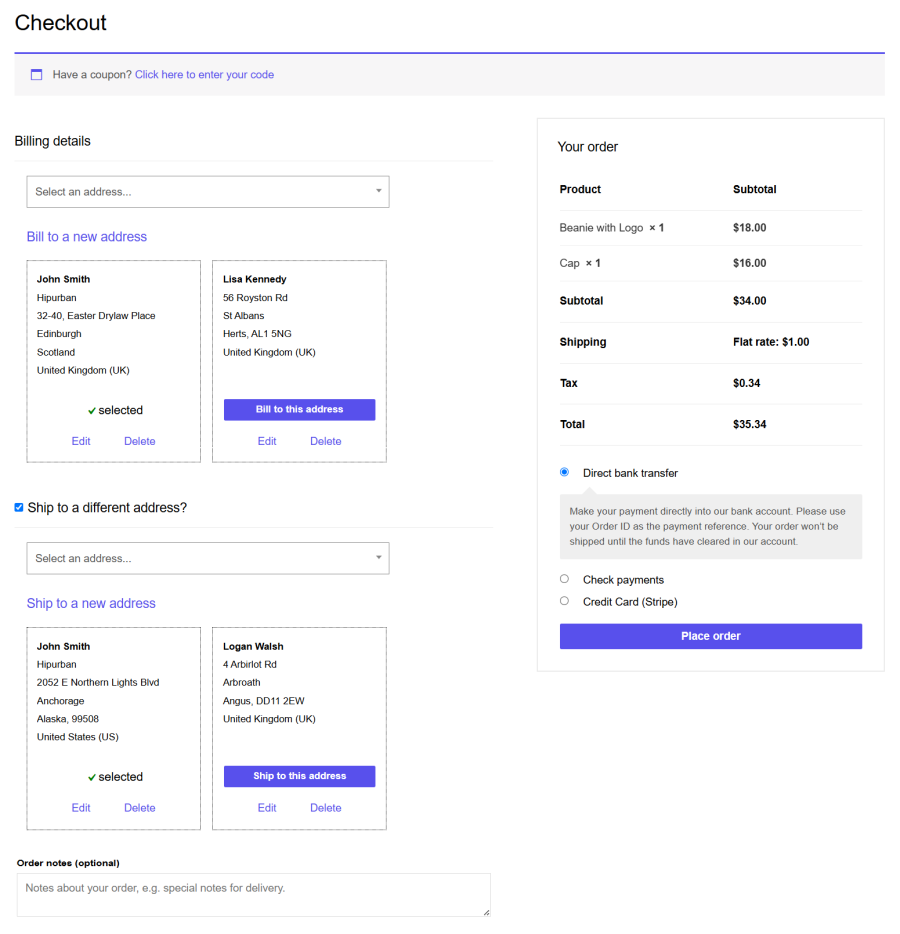
Pick and manage addresses during checkout: Users can switch to any saved addresses during checkout instantly. They can also add, edit/modify or delete addresses directly from the checkout page.
A personal address book under “My Account”: Customers get a dedicated Addresses section (like an address book) in their “My Account” area to view, manage, or remove saved addresses anytime.
Fully mobile-optimized: No distorted fields. Users can manage addresses quickly and with ease on any device, without any disruption in their experience on the checkout page.
Default address: Since 80% of people use the same address 80% of the time, customers can mark a default address. It auto-fills during checkout to save even more time.
Save unlimited addresses: Home, office, friends, family, temporary stays — users can save as many addresses as they need. 3, 5, 12…no limits!
Reduced cart abandonment: Less typing means less friction. And that means more completed checkouts and higher sales.
Code-free, hassle-free setup: Works out of the box. No manual configuration, no coding, no headaches.
Real world scenarios – Perfect for gifting, food delivery, travel, and more
Any online shopper will find saved addresses convenient, but it is more beneficial for:
People during night outs or get-togethers at different locations want food delivered to their current location.
Traveling professionals can get essentials delivered at any location – hotel, client site, or co-working space.
Busy individuals can send groceries or packages to a neighbor’s address if they’re running late or not home.
Students living away from home can save multiple addresses — home, hostel, campus — and receive deliveries wherever they are.
Suppliers can deliver products to multiple warehouses or locations based on the day or need.
Send gifts to loved ones who live far away.
For elderly or non-tech-savvy individuals, a family member can save and manage their address to ensure timely deliveries.
For mobile shoppers, selecting a saved address is far easier than typing on a small screen.
Roadmap
Customize how addresses look on the checkout page.
Address tagging — e.g., Home, Work, etc.
More admin controls, so admins can view all saved addresses for a customer or update an address in a pending order if the customer changes their mind.
Never compromise customer convenience — even for price
Saved addresses may appear small, but make a huge difference for your customers. It removes friction, saves time, and creates a smoother checkout your customers will appreciate — leading to more sales for you!
And with StoreApps — the team behind popular plugins like Smart Coupons and Affiliate for WooCommerce — you’re backed by one of the most trusted names in WooCommerce. Reliable product. Exceptional support. No compromises.
I have been searching for a seamless way to display addresses on woocommerce and tried several plugins already. Until I found this one by StoreApps. This one checks all the boxes. It displays the address boxes very neatly in address book and checkout pages. It's very customizable too. It didnt take me much time to make it blend with my theme. But probably above everything, the support is insanely good! I was attended by Joshua who was very helpful along the way. We discussed some idea for improvements and the responses were blazingly quick. I use a lot of premium plugins and sometimes the support can be really disappointing and frustrating so I really appreciate when developers are serious a...
Raymond Brigleb
Rated 3 out of 5
Jun 29, 2022
Poor coding and design thinking
The plugin does what it says on the tin, but it does it poorly. It claims to be mobile-friendly, but if a customer adds more than two addresses, a drop-down appears that is hard-coded to be 500px wide. So you can’t fix that with CSS, you’d have to edit the plugin to fix it. There’s also a ton of CSS that’s just poorly written. It might work fine with the default Storefront theme or something, but as soon as you put it in your custom design in the real world, you end up having to fix a bunch of poorly-considered decisions by the developers. Plugins like this are the reason WooCommerce shops end up looking poorly-designed. If a little more time and thought were put into the development, it cou...
EpimedCreative
Rated 2 out of 5
Jan 26, 2022
Good Idea...Needs Work
Support is very slow and available via email only. They are helpful but egregiously slow to respond. Need to make updates to their my-address.php template in the child theme but it continues to call the file from the parent plugin folder instead. Asked for help weeks ago...documented thoroughly the things I've tried. I followed their template instructions. Still doesn't work. Also, users can't actually select from all saved addresses at checkout. Here is what they said about that on 2021-12-28: "Sorry it is not possible as of now to show all addresses but it is in our plan to give provision for the same. I'll let you know once we add it to the plugin." The plugin needs work...idea is great,...
Christoph Walter
Rated 1 out of 5
Jul 12, 2021
UPDATE 12th July 2021: Again/still problems that in some cases the wrong shipping address is used (there was a bug in a previous version, which apparently somehow stored addresses with the wrong IDs/links in the database). Obviously this is an absolute deal breaker of the ONE AND ONLY main feature of the plugin, saving different addresses. The worst part: After a detailed explanation I didn't even hear back in over 2 months. The bug seems to be fixed, but all addresses that were created during this time are still broken. And it looks like it was at least for nearly 2 months, from: 2020-12-11 - version 2.2.0 to: 2021-02-05 - version 2.2.1 Also: It is a shame that this review isn't shown publi...
danieleff5d96304f
Rated 5 out of 5
Jun 1, 2021
Great plugin and responsive support!
Not only is this an intuitive plugin, but the developers are fantastic. We had some issues with the UI early on and they changed the plugin in response to our feedback and gave us the requested changes. Great team!
We and our partners process your personal data (such as browsing data, IP Addresses, cookie information, and other unique identifiers) based on your consent and/or our legitimate interest to optimize our website, marketing activities, and your user experience.