

Subscription includes
Support
Customer Analytics for WooCommerce extends WooCommerce analytics with advanced customer metrics that uncover patterns in your customer data.
While WooCommerce provides basic sales reports, store owners need deeper insights to make strategic decisions about customer retention, marketing spend, and product performance. Customer Analytics for WooCommerce bridges that gap by adding dedicated reports for customer lifetime value, repeat purchase rate, churn rate, and geographic performance — all within the native WooCommerce Admin interface.
Unlike traffic analytics tools, Customer Analytics for WooCommerce reveals customer behavior patterns through advanced metrics designed for retention analysis and WooCommerce customer analytics. It extends your existing WooCommerce Analytics dashboard without requiring external services or third-party data sharing.
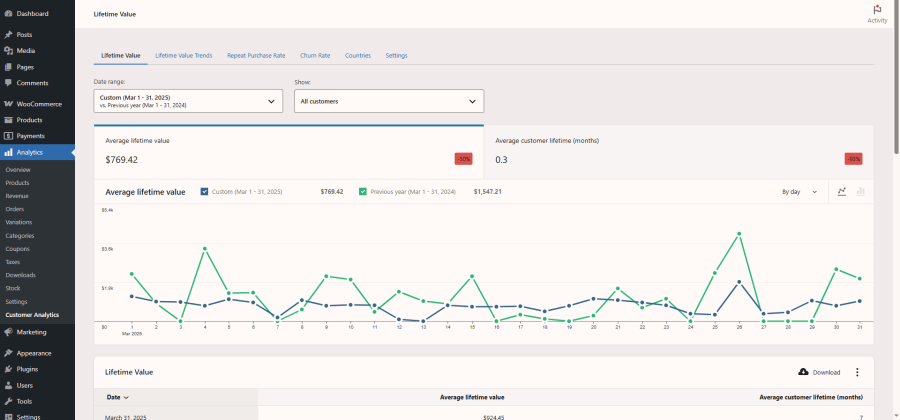
Track average revenue per customer across your entire store, segmented by time periods and customer behavior patterns. The customer lifetime value WooCommerce report helps you understand the long-term profitability of different customer segments.
Key Features:
Example: If your average customer lifetime value is $200 and acquisition costs $50, you have a 4x return on marketing investment — data that informs confident scaling decisions.
Monitor how customer value evolves over time with historical trend analysis. This report provides cumulative lifetime value calculations with configurable lookback periods.
Key Features:
Example: Use trend data to correlate changes in customer lifetime value with marketing campaigns, product launches, or seasonal patterns.
Track the percentage of customers who return for additional purchases across customizable time periods. The repeat purchase rate WooCommerce report helps identify whether customer retention efforts are working.
Key Features:
Example: A rising repeat purchase rate indicates improving customer retention without additional acquisition costs.
Monitor customer attrition with configurable detection periods tailored to your business cycle. The WooCommerce churn rate report identifies when customers stop purchasing so you can act on that data.
Churn Detection Periods:
Example: Tracking churn rate over time lets you measure whether retention campaigns are reducing customer attrition.
Analyze geographic performance with detailed country-level metrics that go beyond basic location reports.
Key Metrics by Country:
Example: Identify top-performing products by country to optimize inventory allocation and marketing for each market.
The plugin integrates directly with your WooCommerce Admin dashboard:
Built to WordPress coding standards and optimized for WooCommerce’s High-Performance Order Storage (HPOS) system. The plugin is HPOS compatible and designed for stores running modern infrastructure.
Requirements:
Performance Features:
Works with existing data – Analyzes your historical orders immediately upon installation. No migration needed.
Complete privacy – All data stays on your server. No external services or data sharing.
Scales with your business – Optimized for stores with extensive order history using MySQL 8.0 features and configurable lookback periods.
No coding required – If you can use WooCommerce, you can use Customer Analytics.
Export report data – Download any report as CSV for external analysis.
Subscription orders from WooCommerce Subscriptions are included in the calculations like regular orders.
A customer is churned if they haven’t made a purchase within your configured churn period (default 90 days).
Reports use current data from your WooCommerce database.
Extension information
Quality Checks
Countries






