
Product Icon

Bespoke Product Options for WooCommerce

Add personalised options to any product: engraving, gift wrap, swatches, uploads and dates, priced live.
Choose a billing option
$69
Save 20%
$138 $110.40

Product comparison

Subscription includes

  • Product updates and improvements
  • Customer support
  • 30-day money-back guarantee

  • Options on the product page: engraving text, gift wrap, swatches, uploads, dates, and quantities, each with its own price, inside the add-to-cart form.
  • Priced live: a subtotal with options updates as the customer types, picks, and ticks, before anything reaches the cart.
  • Eleven field types: Multiple Choice, Single Checkbox, Short Text, Long Text, Quantity, Dimensions, Date Picker, Date Range, File Upload, Customer Defined Price and Heading.
  • Six price types: flat fee, per unit, per character, percentage of the product price, by area, and per day. Negative prices work as discounts.
  • Conditional logic: show or hide a field based on another answer, with rules built from dropdowns.
  • Checked before the cart: required fields, character limits, selection limits and file rules, on the page and again on the server.
  • Build once, attach anywhere: option groups for the whole catalogue, categories, tags, brands, single products or user roles, plus per-product fields on the product edit screen.
  • Follows the order: every choice shows in the cart, at checkout, in order emails and on the order screen, where staff can edit it or add options to manual orders.
  • Works with the Cart and Checkout blocks and the classic shortcodes, with High-Performance Order Storage, WooCommerce Brands, WooPayments Multi-currency and Tiered Pricing Table.

Let Customers Personalise and See the Price as They Go

Options live inside the add-to-cart form, styled to match the theme. Each one shows its price next to the label, and a subtotal with options updates the moment a customer types a name, picks a colour or ticks gift wrap. No surprises in the cart.
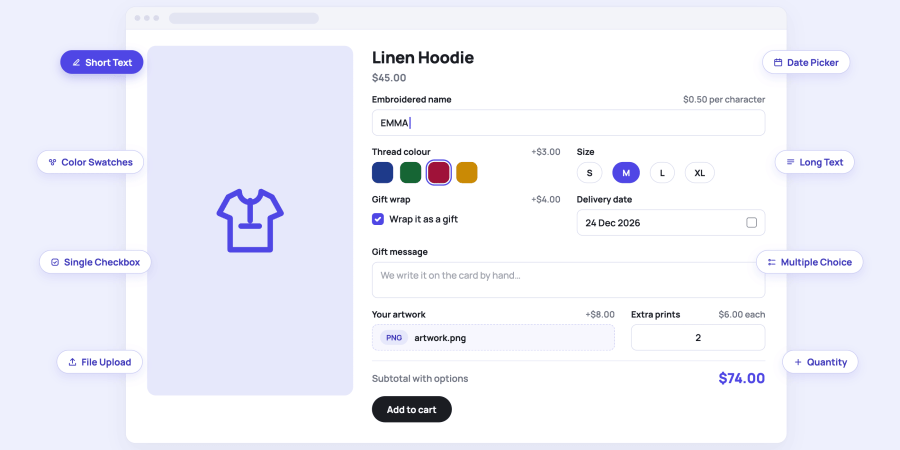
  • Live subtotal: the product price plus every chosen option, recalculated on each change and on quantity changes.
  • Price hints: each field and choice shows its own price, for example +$4.00 or $0.50 per character.
  • Variable products: options react to the selected variation and can be limited to specific variations.
  • Description and placeholder: optional helper text under any field, so customers know what to enter.
A product page form with an embroidered name field, four thread colour swatches, a gift wrap checkbox and a live subtotal of $54.00, next to a breakdown of how the total is built

Eleven Field Types, One Builder

Every kind of input a product might need, from a one-line name to an uploaded file or a rental period, added from one Add Field button.
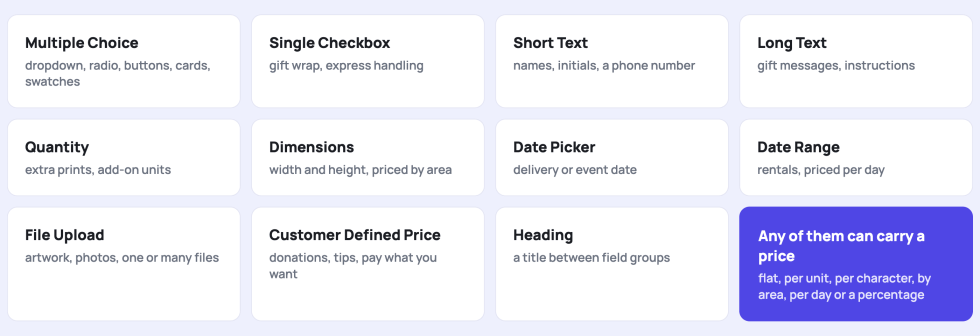
  • Multiple Choice: a list of choices shown as a dropdown, radio buttons, checkboxes, buttons, cards, image swatches, or colour swatches.
  • Single Checkbox: one yes or no choice such as gift wrap or express handling.
  • Short Text and Long Text: names, initials, phone numbers, gift messages and instructions, with character limits and a live counter.
  • Quantity, Dimensions, Date Picker, Date Range: extra units, width and height priced by area, a delivery date, or a period priced per day.
  • File Upload and Customer-Defined Price: artwork or photos, one file or many, and pay what you want amounts with a minimum and maximum.
  • Heading: a title between groups of fields.
A grid of eleven field type cards: Multiple Choice, Single Checkbox, Short Text, Long Text, Quantity, Dimensions, Date Picker, Date Range, File Upload, Customer Defined Price and Heading

One Choice Field, Six Ways to Show It

Pick the display that fits the product. The choices and prices stay the same; only the look changes.
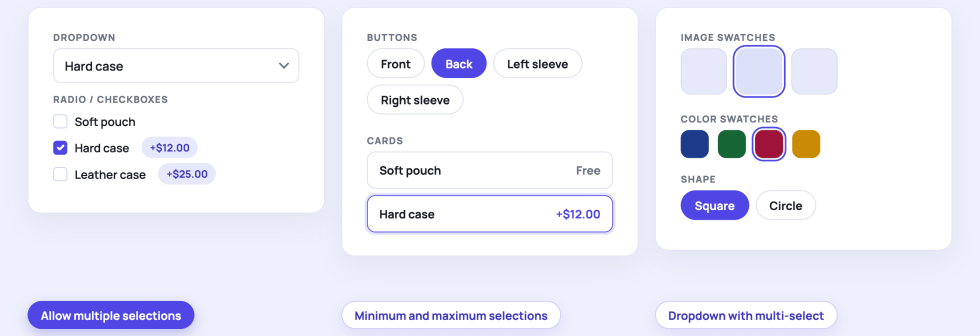
  • Dropdown, Radio / Checkboxes, Buttons, Cards: compact or spacious, with the price shown on each choice.
  • Image Swatches and Color Swatches: square or circle, with the swatch shape set per field.
  • Allow multiple selections: turns the field into a multi-select, with minimum and maximum selections if you want them.
  • Dropdown with multi-select: a dropdown-sized box that opens a checkbox list, for long lists that must stay compact.
  • Option sets: save a list of choices once and insert it into any field later.
Six previews of the same choice field: a dropdown, radio buttons, buttons, cards, image swatches and colour swatches, with chips for multiple selections, selection limits and the multi-select dropdown

Six Ways to Price an Option

Set the price type per field or per choice, so every option charges the way the product is made.
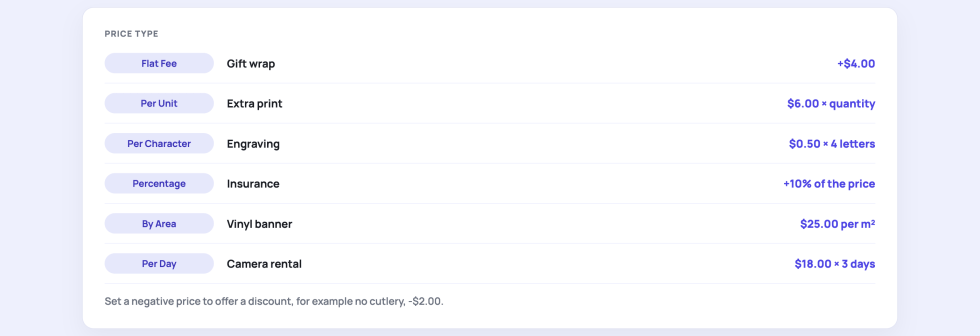
  • Flat Fee and Per Unit: a fixed amount once, or multiplied by the product quantity.
  • Per Character: engraving and embroidery priced by the letters entered.
  • Percentage: a share of the product price, variations included.
  • By Area and Per Day: banners and boards priced by square unit, rentals priced by the number of days.
  • Discounts: a negative price lowers the total, for example, no cutlery, -$2.00.
A table of six price types with an example each: Flat Fee, Per Unit, Per Character, Percentage, By Area and Per Day, and a note that a negative price is a discount

Show a Field Only When It Is Needed

Conditional logic keeps the product page short. A field appears or disappears based on another answer, and the rules are built from dropdowns.
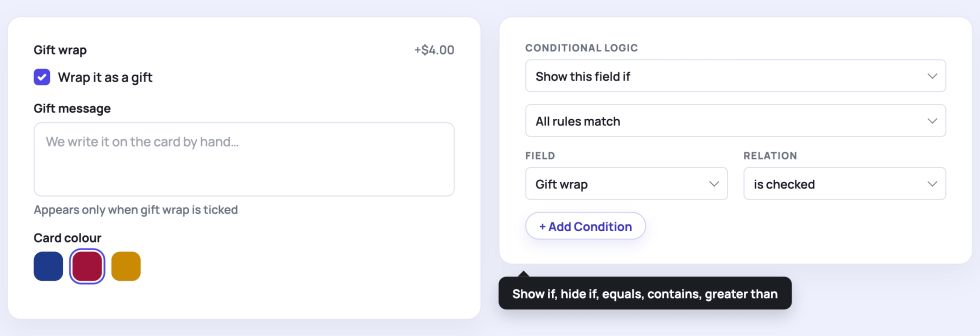
  • Show or hide: each field can be shown if, or hidden if, its rules match.
  • Relations: is checked, is not checked, equals, does not equal, contains, greater than, less than, is empty.
  • All or any: require every rule to match, or any one of them.
  • Honest totals: a hidden field is never priced or submitted, on the page and on the server.
A ticked gift wrap checkbox with a gift message field that appeared below it, next to the rule Show this field if Gift wrap is checked

Required Fields and Limits, Checked Before the Cart

Customers see what is missing or over the limit right on the product page, and the server checks the same rules again when the item is added to the cart.
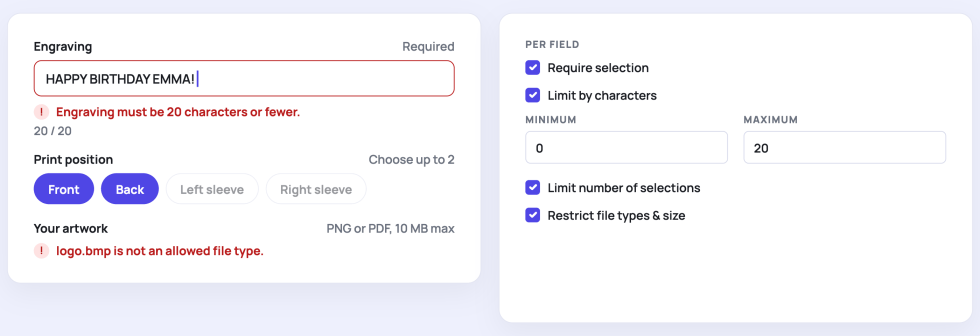
  • Require selection: per field, with a clear inline message.
  • Limit by characters: minimum and maximum, with a live counter.
  • Limit number of selections: for example, choose up to two print positions.
  • Restrict file types and size: per field, within the global upload defaults.
alignnone size-medium" src="IMAGE:validation.png" alt="An engraving field marked required with an inline error and a 20 of 20 character counter, a print position field limited to two choices, and the per-field settings for required, character limits, selection limits and file rules

Uploads, Dates, Dimensions and Quantities

The fields that turn a product into a service: artwork for printing, a delivery date, a rental period, a custom size, or extra units.
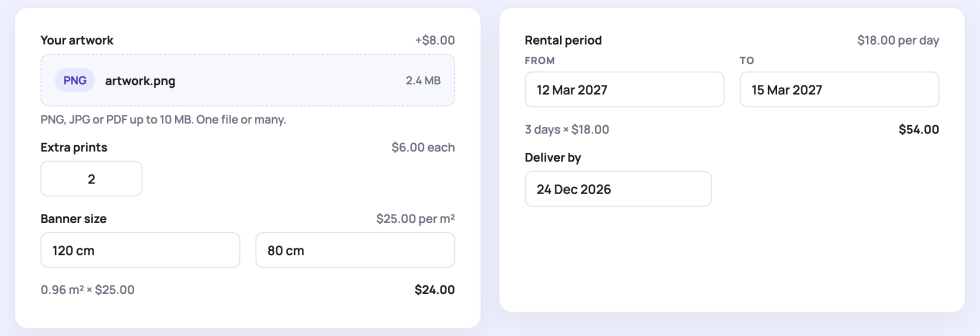
  • File Upload: one file or many, with allowed types and a size limit; files are attached to the order and kept.
  • Date Picker and Date Range: a single date, or a period priced per day with the number of days shown as the customer picks.
  • Dimensions: width and height in your unit, priced by the resulting area.
  • Quantity: extra prints, add-on units or portions, priced per unit.
alignnone size-medium" src="IMAGE:uploads-dates.png" alt="A file upload field with artwork.png attached, an extra prints quantity field, a banner size dimensions field priced by area, and a rental period from 12 to 15 March priced per day

Build a Group Once, Attach It Anywhere

A visual builder with drag-and-drop fields. Decide where each option group appears without touching a product.
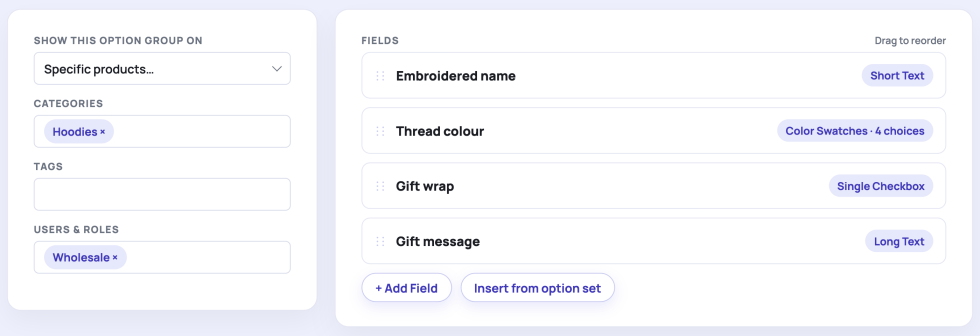
  • Targeting: all products, specific products, categories, tags or brands, in any combination.
  • Users and roles: show a group only to selected roles or customers, or hide it from some.
  • Per-product fields: add fields to one product from its own edit screen, on top of any global groups.
  • Import and export: move groups between stores, duplicate a group with one click, save choices as option sets.

Every Choice Follows the Order

What the customer picked travels with the item: cart, checkout, order emails, the customer account and the order screen in the admin.
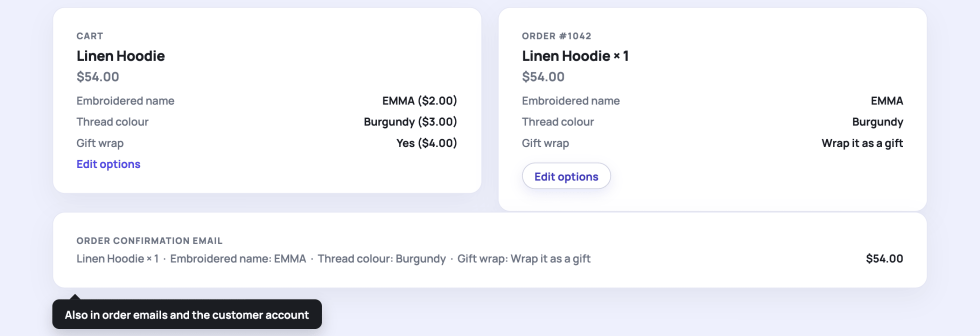
  • Cart and checkout: each option with its price under the item name, in the classic cart and in the Cart and Checkout blocks.
  • Edit options: a link in the cart sends the customer back to the product with everything pre-filled.
  • Order screen: staff can edit the options of an item, or configure options on orders created by hand.
  • Emails and account: the same options appear in order emails and in the customer account.
A cart line for Linen Hoodie listing the embroidered name, thread colour and gift wrap with prices, an order screen item with the same options and an Edit options button, and an order confirmation email line

Five Storefront Styles, or None

Pick a look in the settings and preview it live, or switch the plugin styling off and use your theme.
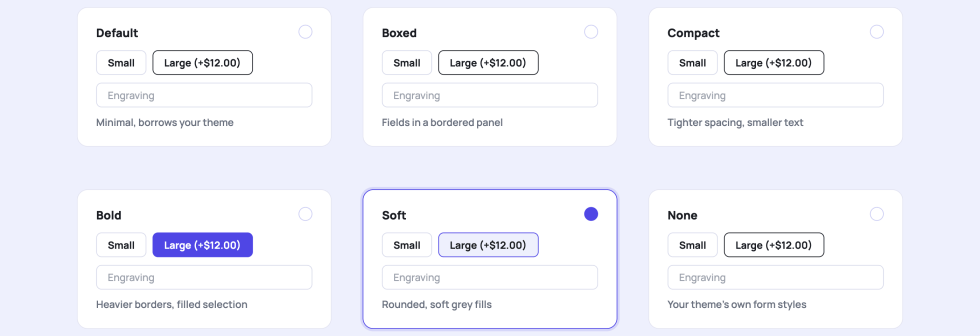
  • Default: minimal, borrows your theme colours and type, adds only hairline borders.
  • Boxed, Compact, Bold, Soft: a bordered panel, tighter spacing, heavier borders with a filled selection, or rounded corners and soft fills.
  • None: your theme form styles, with the layout rules still loaded so hidden fields stay hidden.
  • Per group: position before or after the add to cart button, one or two columns, group title, intro text and subtotal label.
Six style cards named Default, Boxed, Compact, Bold, Soft and None, each with a small preview of a size choice and an engraving field, with Soft selected

Will It Work With My Setup?

Bespoke Product Options works with classic and block themes, the classic cart and checkout and the Cart and Checkout blocks, and declares compatibility with High-Performance Order Storage.

  • Products: simple and variable products, with options limited to specific variations if needed.
  • Cart and checkout: classic shortcodes and the Cart and Checkout blocks, through the Store API.
  • Orders: High-Performance Order Storage, order emails, the customer account, manual and phone orders.
  • Brands: target groups by WooCommerce Brands.
  • Multi-currency: option prices convert with WooPayments Multi-currency, WooCommerce Multilingual, Aelia Currency Switcher, CURCY, WooCommerce Currency Switcher (FOX) and Currency Switcher for WooCommerce.
  • Translation: field labels, choices and descriptions translate with WooCommerce Multilingual (WPML).
  • Tiered Pricing Table: option prices stay in place when tiered pricing applies, and percentage options use the tier price.
  • Developers: hooks for every price, template and admin step, a REST API and overridable templates.

Perfect for: personalised gifts and apparel, engraving and embroidery, print shops, signage and banners, bakeries and florists, rentals and bookings, custom furniture, donations and pay what you want.


Frequently asked questions

Which products can have options?

Any simple or variable product. Build an option group and attach it to all products, specific products, categories, tags or brands, or add fields to a single product from its own edit screen. On variable products you can limit a field to specific variations.

How are option prices added to the product price?

Each field or choice has a price type: Flat Fee, Per Unit, Per Character, Percentage, By Area or Per Day. The subtotal with options updates on the product page as the customer picks, and the same price is charged in the cart, at checkout, and on the order. A negative price works as a discount.

Can I show choices as swatches or buttons, and can customers pick more than one?

Yes. A Multiple Choice field has a Display As setting with Dropdown, Radio / Checkboxes, Buttons, Cards, Image Swatches and Color Swatches. Tick Allow multiple selections to let customers pick several choices, with an optional minimum and maximum. With the Dropdown display, a multiple field becomes a compact dropdown that opens a checkbox list, which suits long lists.

Can a field appear only when another field has a certain value?

Yes, with conditional logic on any field. Choose Show this field if or Hide this field if, add one or more rules such as Gift wrap is checked or Size equals Large, and decide whether all rules or any rule must match. A hidden field is never priced or submitted.

Are required fields and limits checked before the order is placed?

Yes, twice. On the product page, the customer sees an inline message for a missing required field, a text over the character limit, too many selections, or a file that is not allowed. When the item is added to the cart the server checks the same rules again, so nothing invalid reaches the order.

How do file uploads work and where are the files stored?

A File Upload field accepts one file or many, with allowed types and a size limit that you can set globally and tighten per field. Files are stored in a protected directory inside your uploads folder, attached to the order and kept. Uploads from carts that never became an order are deleted after the number of days you set in the settings.

Where do the chosen options appear after the customer adds to cart?

Under the item in the cart and at checkout, in the order emails, in the customer account, and on the order screen in the admin, where staff can edit them or configure options on orders created by hand. In the cart, an Edit options link sends the customer back to the product with everything pre-filled. Options are stored as order item meta, so they also reach invoices and packing slips that print item meta.

Does it work with the Cart and Checkout blocks, multi-currency and translation plugins?

Yes. Options are validated and added through the Store API, so the Cart and Checkout blocks show and charge them the same way as the classic shortcodes, and the plugin declares compatibility with High-Performance Order Storage. Option prices convert with WooPayments Multi-currency, WooCommerce Multilingual, Aelia Currency Switcher, CURCY, WooCommerce Currency Switcher (FOX), and Currency Switcher for WooCommerce, and labels, choices and descriptions are translatable with WooCommerce Multilingual (WPML).

Extension information

  • PHP version required: 7.4
  • Tested with WordPress: 7.2
  • Tested with WooCommerce: 11.3
  • Requires at least WordPress: 6.5
  • Requires at least WooCommerce: 8.0

Countries

  • Worldwide

Related Products

Price $279 annually
Rated 3.9 out of 5 stars
Price $79 annually
Rated 3.4 out of 5 stars
Price $59 annually
Rated 3.1 out of 5 stars
Price $109 annually
Rated 2.8 out of 5 stars
Price $109 annually
Rated 2 out of 5 stars
Price $49 annually
Rated 4.1 out of 5 stars
Price $109 annually
Rated 2.5 out of 5 stars
Price $39 annually
Rated 2.8 out of 5 stars
Price $199 annually
Rated 4 out of 5 stars
Use of your personal data
We and our partners process your personal data (such as browsing data, IP Addresses, cookie information, and other unique identifiers) based on your consent and/or our legitimate interest to optimize our website, marketing activities, and your user experience.