Google has over 200 ranking factors and vague guidelines about its ranking systems. AI search is newer, and its signals are less documented. For a new store, most of the noise can wait, and a handful of basics will do more for your visibility than anything else. That’s what this guide covers.
Begin with your product pages
↑ Back to topGood product page copy does three things at once: helps readers (and bots) understand what the page is about, answers questions customers actually have, and sells. Aim for 150–300 words. Cover what matters for your category, what’s included, and anything a customer might wonder before buying — condition, compatibility, what to expect when it arrives.
If someone searches “Miles Davis Kind of Blue original pressing” and your page has only a photo and a price, you’ll lose to a competitor who went deeper. That buyer wants a specific artifact, and is interested in knowing about things like pressing details, deadwax matrix, condition, and what’s in the sleeve. Write a description that makes them trust that your product is for them.
The same answers that earn customer trust are what search engines and AI tools use to decide whether your page is worth recommending.
Keywords and search intent
↑ Back to topYour most important keywords are your product names, your categories, the problems your products solve.
The intent behind the keyword is important. Someone searching “vinyl records” might be curious, researching, or ready to buy. Someone searching “buy classic jazz vinyl records online” is ready to purchase. Same topic, completely different page.
Here’s how intent breaks down:
| Search intent | Example keyword | What the searcher wants | Page type |
| Informational | “how to clean vinyl records” | Learn or solve a problem | Blog or guide |
| Commercial | “best turntable under $200” or “jazz vinyl records” | Browsing and/or comparing options before buying | A comparison or category page |
| Transactional | “Miles Davis Kind of Blue vinyl” | Make a purchase now | Product page |
| Navigational | “[Your brand] return policy” | Reach a specific brand or page | The specific page the searcher is looking for, like a login page, a returns policy, or a homepage. |
Find keywords that big stores aren’t chasing
Major retailers like Amazon dominate broad searches like “vinyl records.” You won’t outrank them, but you don’t need to.
Longtail keywords, such as “collectible Blue Note jazz vinyl records,” have lower search volume but much higher purchase intent. The person typing that knows exactly what they want.
The fastest way to find longtail keywords is free: type your product into Google’s search bar and watch what autofills. Those suggestions appear because enough real people have typed them. Each one is a potential page worth building.
Six places to use your keywords
↑ Back to topOnce you know which keyword a page is targeting, here’s where it goes:
- Page title: This is the blue link that shows up in search results. Put your primary keyword in the title tag, but keep it under 60 characters. Use this free character count tool to check it.
- Meta descriptions: The summary under the title in search results that should be about 155 characters. It doesn’t directly affect ranking, but it affects whether someone clicks. Make it useful and specific..
- URLs: Make the slug (or last part of the URL) short, clean, keyword-first. /shop/jazz-vinyl-records/ is better than /shop/category/music/records/jazz-subcategory/
- Headings (H1 and H2): The H1 clearly names the product or category. H2s organize the description and answer common questions. Include your keyword naturally in both.
- Body copy: Write a human-first description. Keywords emerge from a genuine product write-up rather than being forced into one. If a keyword feels forced, the description probably needs more substance, not more keywords.
- Image alt text: Alt text describes the image for screen readers and image search. “Miles Davis Kind of Blue vinyl” is helpful; “product image 3” is not.
Site structure: Give everything a logical home
↑ Back to topA clear site structure helps shoppers find what they want. It also helps search engines understand how your pages relate to each other, which is what gets individual pages ranked.
Someone should be able to reach any product within three clicks of your homepage. That means having navigational “breadcrumbs” that often look like:
Vinyl Records → Jazz Records → Miles Davis Records → Kind of Blue
This trail helps visitors find their way back and tells Google that your Miles Davis page is specifically about jazz records, not just any records. That context is what helps product pages rank for specific searches.
Products buried under four or five layers of subcategories are harder for shoppers to find and harder for Google to prioritize.
Prioritize the mobile shopping experience
↑ Back to topPull up your store on your phone. If buttons are hard to tap, text is too small to read comfortably, or images are cropped in awkward places, fix them ASAP. Google ranks the mobile version of your site — not the desktop one — and more than 70% of ecommerce purchases happen on mobile.
Keep these mobile best practices in mind: Use at least 16–20px font size, buttons that are at least 24x24px, and compressed WebP or AVIF images.
Help search engines find your store
↑ Back to topIf you just launched or migrated your site, check one thing first: go to Settings → Reading in your WordPress dashboard and make sure “Discourage search engines from indexing this site” is unchecked. It’s easy to forget, and it will quietly keep Google out until you fix it.
From there, Google Search Console is where you want to be. It’s a free tool that shows you how Google sees your site — what’s been indexed, what hasn’t, and why. Three things to do there:
- Find or create an XML sitemap. This is a structured outline of your site that helps search engines understand your content. Your default WordPress sitemap lives at yoursite.com/wp-sitemap.xml. For a more detailed version, go to Yoast settings, find the Technical SEO section, and toggle XML sitemaps on.
- Submit your sitemap to Google. In Search Console, add your sitemap URL under the Sitemaps tab. Expect indexing to take a couple of weeks.
- Check which pages got indexed. The most common issue beginners run into is a “submitted URL not found” error — usually it means a product page was deleted or its URL changed. You can either restore the page or remove it from your sitemap.
When to start a blog
↑ Back to topOnce your product pages are in good shape, a blog is how you reach people who don’t yet know they need what you sell.
A store selling vinyl records can answer “how do I know if a record is warped?” and link to a record cleaning kit. Or “what’s the difference between 180g and standard vinyl?” and link to a category of audiophile pressings. The blog attracts people who are one good answer away from becoming customers.
A product page targets someone who already knows what they want. A blog post targets someone earlier in that journey. They may be curious, comparing, or trying to solve a problem. When your blog post answers their question and links to a relevant product, you’ve built a path from discovery to purchase that search engines can follow and reward.
It builds over time, too. Each post you publish is another entry point into your store. A post that ranks for “how to store vinyl records properly” brings in readers who probably own records and might need storage sleeves, cleaning kits, or a better turntable.
Be picky about what you publish. What goes on your blog represents your store and your taste. Write posts that are valuable or interesting to the people you’re trying to reach.
Here’s how Tiny Wood Stove went from blog to million-dollar business
Help AI tools understand your store with AEO
↑ Back to topBeyond traditional Google search, people are increasingly using AI tools such as ChatGPT, Gemini, and Claude to get recommendations and research products before they purchase. Google also displays AI Overviews near the top of search results.
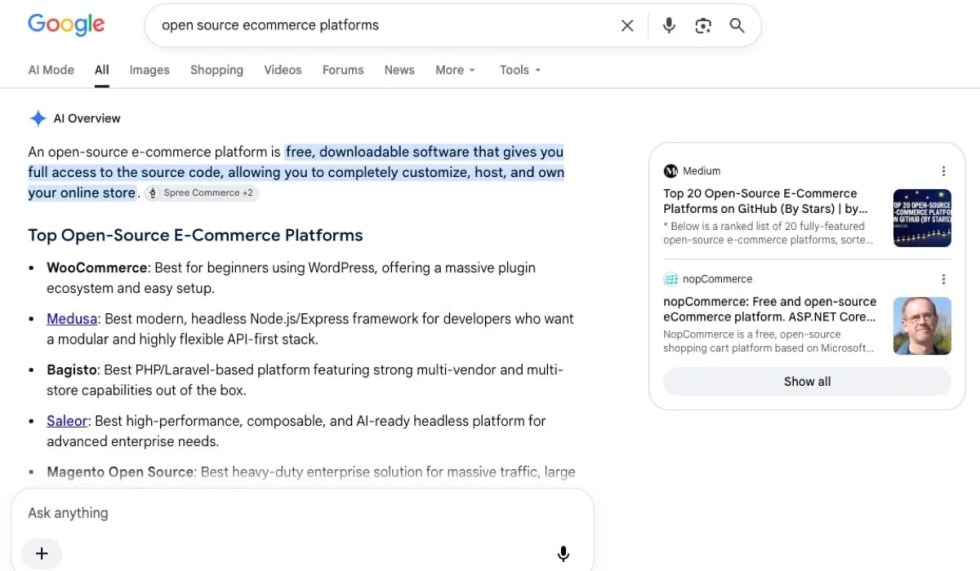
Answer engine optimization (AEO) helps AI tools surface your content as a direct answer, including in AI-powered search experiences like Google’s AI Overviews. Start with the questions that potential customers ask about your products, shipping, and returns. Then make those answers clear and easy to find on your website.
Someone shopping for vintage vinyl might ask, “Will this used record skip?” The store could explain how it grades the condition of records and whether they play-test used albums. Put those kinds of relevant details on the product pages where they apply. Specific answers both help shoppers decide and give search tools useful information to draw from.
For AEO, organizing product information in clearly-labeled sections helps AI tools find the right information. Structured data, also called schema markup, labels details such as a product’s price, availability, and review rating in a format that search engines can read. Those details should match what shoppers see on the page.
Many of the SEO basics covered here also support AEO. Clear product details, useful answers, and a well-organized site give search engines and AI tools a stronger foundation for understanding your store.
Start here, this week
↑ Back to topSEO compounds. A product page you optimize today keeps working for you a year from now. A blog post that ranks for the right question brings in a new customer every week without any additional effort. The earlier you build the foundation, the more it pays off.
Here’s where to start:
- Identify your most important products, brainstorm keywords for each, note the intent behind each one, and check search volume and competition using Google Keyword Planner. Make sure product pages target commercial or transactional searches.
- Add your keywords to each page in the six places covered above. A tool like Yoast can guide you through it.
- Pick your five best-selling products and strengthen their descriptions — more specific details, materials, who it’s for, what questions it answers. You don’t need to start from scratch, just make them more detailed than they are now.
- Set up Google Search Console and submit your sitemap. This is how Google officially learns your store exists, and it’s free.


About