
With billing date alignment enabled on a subscription product, you can align renewal payments for all subscribers to a specific day. This guide explains the process for creating or editing subscription products to align renewal dates, along with important information about how billing date alignment interacts with sign-up fees, free trials, coupons, and order statuses.
For general information about billing date alignment, including how to configure the First billing behavior setting and other global options, see the Guide to Billing Date Alignment.
Creating an Aligned Subscription Product
↑ Back to topYou can choose to align the renewal schedule to a specific day for a subscription product set to renew weekly, monthly, or yearly. Follow these instructions to create a new aligned subscription product or edit an existing one:
- Go to Products.
- Create a new subscription product or click Edit on the subscription product you want to modify.
- For Simple Subscription products, in the Product Data box, select a day in the Align billing drop-down on the General tab.
For Variable, this setting is available in the Variations tab when editing an individual variation.
For a non-subscription product with the subscription purchase option enabled, the Align renewal setting is located within the subscription plan created for the product. - Click the Publish button to save the product.
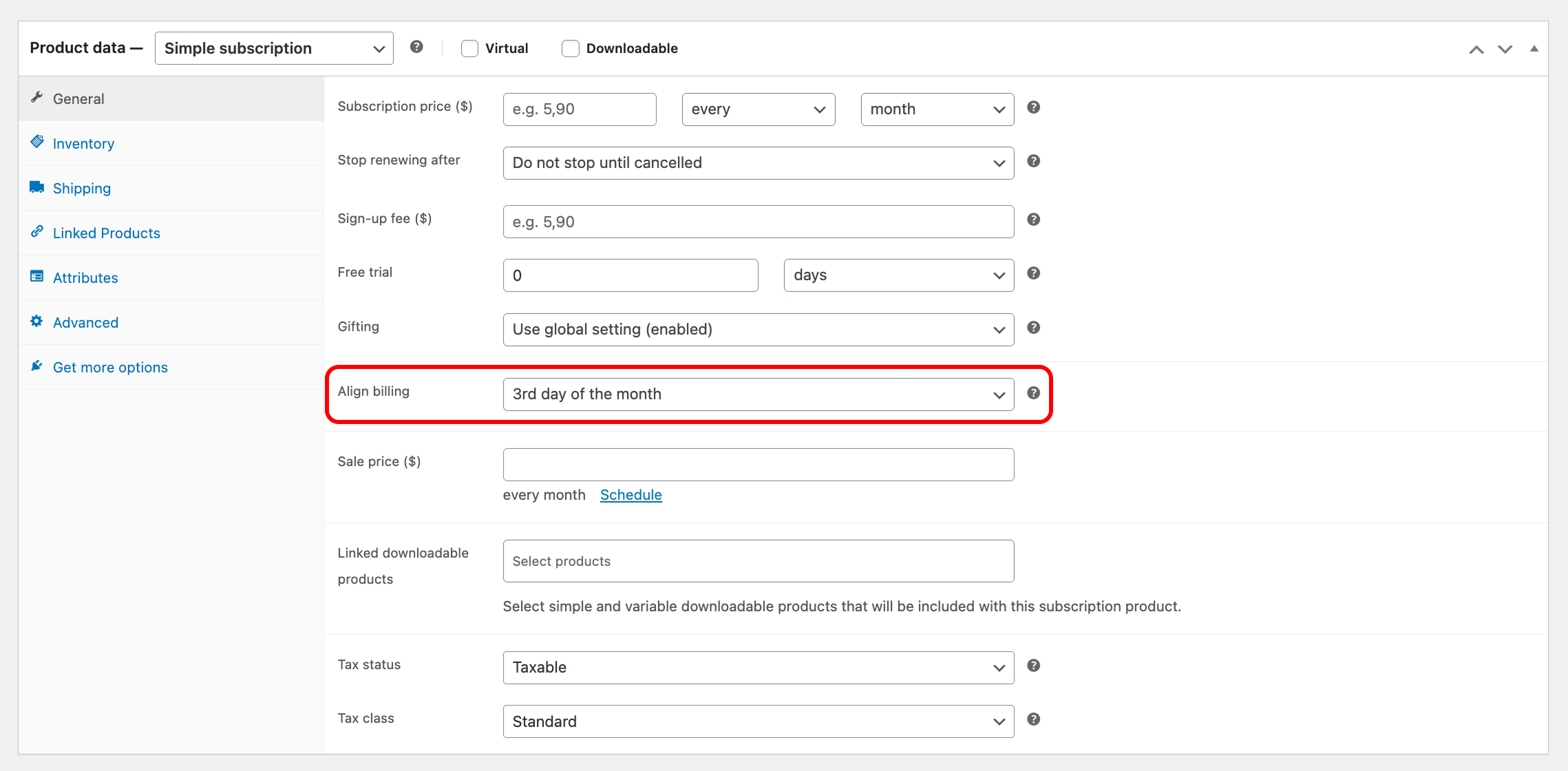
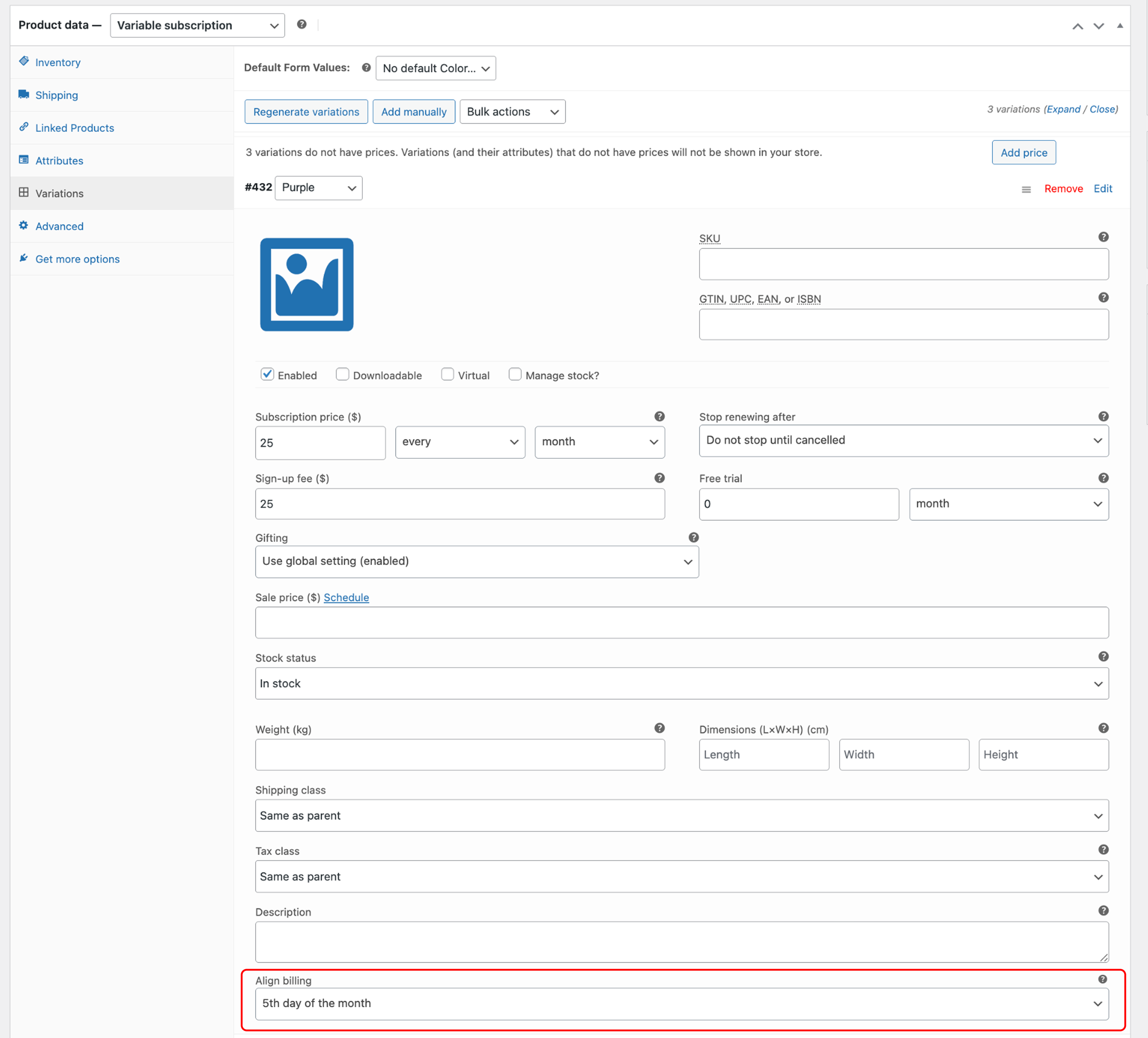
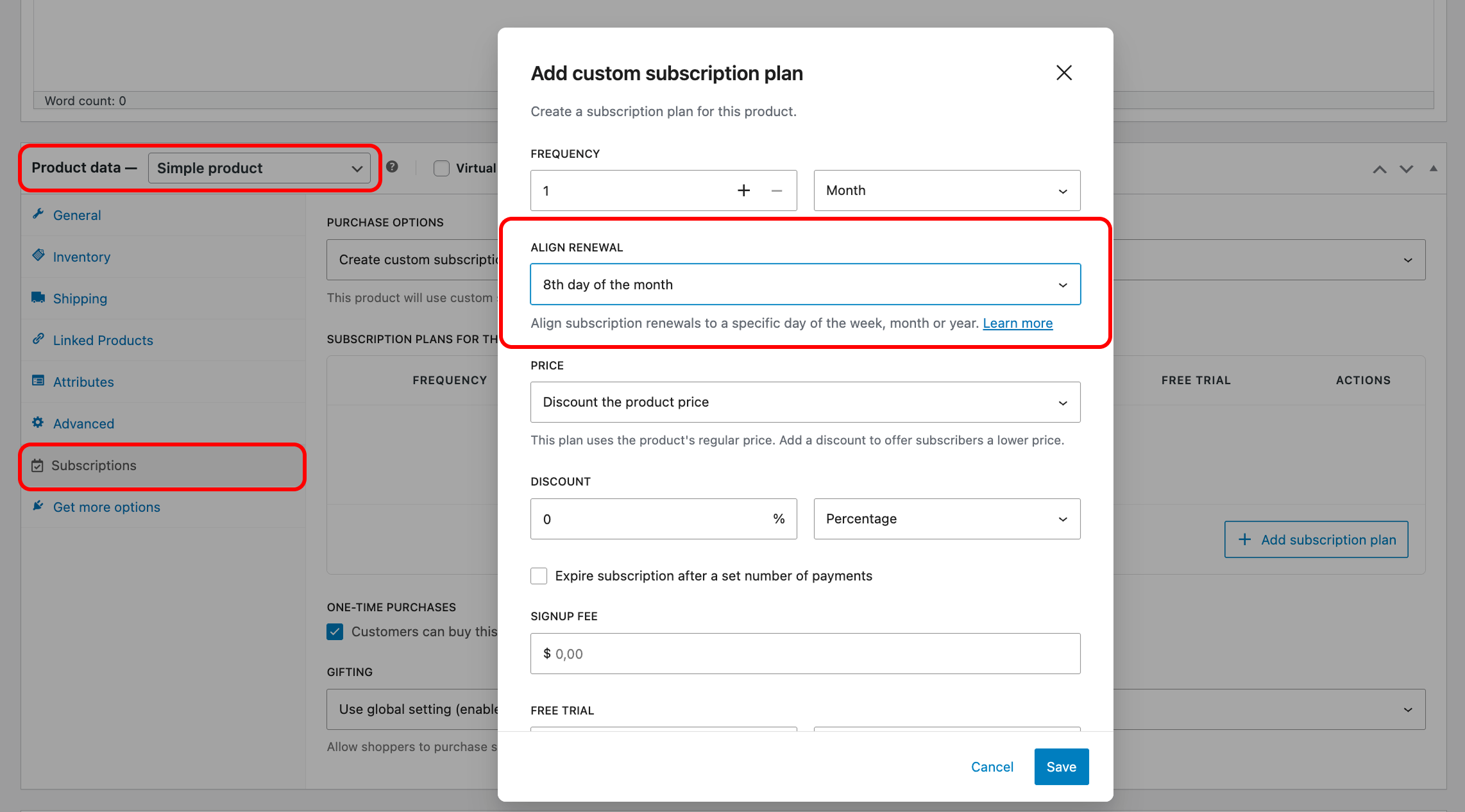
Renewal options for different billing intervals
The options displayed in the Align billing drop-down depend on the billing interval of the subscription product:
- Weekly: You can pick any day of the week, like Monday or Sunday.
- Monthly: You can pick a specific day of the month from the 1st to the 27th, or set renewals to process on the last day of the month, which varies: the 28th, 30th, or 31st, depending on the month.
- Yearly: You can pick a specific day of the year, like January 18 or May 22.
How does the sign-up date affect alignment for longer billing intervals?
↑ Back to topWhen customers sign up for subscriptions with billing intervals greater than every week, month, or year, two important things occur:
WooCommerce Subscriptions ignores the longer interval when setting the first aligned date. It always uses the next occurring alignment date, regardless of the billing interval. Here’s an example:
- Subscription: $30 every three months, aligned to the 1st of the month
- Customer signs up: April 6
- First renewal date: May 1 (not July 1)
In this example, WooCommerce Subscriptions ignores the billing interval and makes the first renewal payment on the next available alignment date (the 1st of the next month). This may seem counterintuitive at first, but it ensures consistency across billing intervals. Here’s why:
Monthly intervals are straightforward. For a subscription aligned to the 1st, the next renewal is on the 1st of the following month. Weekly or biweekly intervals are more complex. It’s unclear whether to start from the first week of the year, the current month, or the next month when calculating the alignment date. By always using the next alignment date, the system avoids these complexities and maintains a predictable schedule.
Note: If you want subscriptions to consider longer intervals when setting renewal dates, vote for the Renew on set dates feature idea.
Note:
If you want subscriptions to consider longer intervals when setting renewal dates, vote for the “renew on set dates” feature idea.
Purchasing an Aligned Subscription
↑ Back to topCustomers purchase aligned subscription products the same way they purchase any other subscription product in your store. To differentiate aligned subscriptions, WooCommerce Subscriptions displays the renewal day in the subscription’s price on the product page and in the totals on the cart and checkout pages.
Here are some examples of how different billing intervals display with and without billing date alignment:
| Billing Period | Price without Alignment | Price with Alignment |
| Weekly | $12.00 / week | $12.00 every Wednesday |
| Fortnightly | $12.00 every 2 weeks | $12.00 every 2 weeks on Monday |
| Monthly | $5.00 / month | $5.00 on the 1st of each month |
| Quarterly | $5.00 every 3 months | $5.00 on the last day of every 3rd month |
| Yearly | $25.00 / year | $25.00 on January 1st each year |
The first payment date displays in the following locations:
- On the Product page for Simple Subscription products. For Variable Subscription products, the first payment date displays once a customer selects a variation, since each variation can have different billing intervals and alignment settings.
- On the Cart page, below the cart total.
- On the Checkout page, below the order total.
Order status for an aligned subscription
↑ Back to topBy default, if an order records the purchase of a non-prorated aligned subscription and does not contain any other non-aligned products, the order total will be $0. In this case, the order status changes to Completed, regardless of whether the subscription is for a physical item. This is because the order is a record of the customer signing up to receive the product on the alignment date.
How coupons work for aligned subscriptions
↑ Back to topCoupons apply to aligned subscriptions much the same way as they apply to standard purchases. The key difference is that cart, product, and sign-up fee coupons will only be applied if one or both of the following conditions are met:
- The subscription has a sign-up fee.
- The subscription has a prorated payment charged at sign-up.
These coupons only apply to an initial payment. When there is no sign-up fee or prorated gap payment, the coupon won’t apply.
When are sign-up fees charged for aligned subscriptions?
WooCommerce Subscriptions always charges sign-up fees when a customer signs up for a subscription, regardless of whether they sign up on the renewal date.
Let’s look at a few examples of how this works in different aligned subscription scenarios:
- No Sign-Up Fee:
- If there’s no sign-up fee and the subscription charges $10 on the 1st day of each month, a customer signing up on January 20 pays nothing initially. Their first payment of $10 will be on February 1.
- With Sign-Up Fee:
- If there’s a $50 sign-up fee along with the $10 monthly charge, a customer signing up on January 20 pays $50 immediately and then $10 on February 1.
- Same Day Sign-Up:
- If a customer signs up on the 1st day of the month when the subscription charges $10 and has a $10 sign-up fee, they pay $20 up front.
- Prorated First Payment:
- For prorated subscriptions charging $30 monthly with no sign-up fee, a customer signing up on January 20 pays $10.65 initially (the prorated amount). With a $50 sign-up fee, the initial payment on January 20 is $60.65, followed by $30 on February 1.
How do free trials apply to aligned subscriptions?
Free trials delay the first payment date for aligned subscriptions. WooCommerce Subscriptions calculates the first payment from the end of the free trial period.
Here’s a typical example of how this works:
- Subscription: $10/month, aligned to the 1st of each month
- Free trial: two weeks
- Sign-up date: January 20
- Free trial ends: February 3
- First payment: March 1
Since the free trial ended on February 3 (after the 1st), the first aligned payment is the 1st of the following month, or March 1.
Prorated subscriptions after a free trial
Customers will not pay prorated amounts after a free trial ends. This would require a three-tier pricing structure:
- Free trial period
- Prorated amount post-trial
- Regular recurring amount
Currently, WooCommerce Subscriptions doesn’t support a three-tier pricing system by default. However, there are ways to configure it using limited subscriptions payment coupons. If you want to implement a more complex system of price changes, you may want to use AutomateWoo as it has add/remove coupon and add/remove product functionalities that better support a complex pricing system.
Questions and support
↑ Back to topSomething missing from this documentation? Still have questions and need assistance?
- If you have a question about a specific extension or theme you’d like to purchase, contact us to get answers.
- If you already purchased this product and need some assistance, get in touch with a Happiness Engineer via our support page and select this product’s name from the Product dropdown.

