
This guide provides general information about aligning subscription billing dates with the WooCommerce Subscriptions extension. If you already have billing date alignment configured on your store and are ready to create an aligned subscription product read: Creating an Aligned Subscription Product.
If you’re new to WooCommerce Subscriptions and haven’t read about how the subscription renewal process works, we suggest reading that first to make the information on this page easier to understand.
What is Billing Date Alignment
↑ Back to topBilling date alignment aligns all subscribers to the same renewal date, regardless of when they sign up. By default, WooCommerce Subscriptions sets each subscriber’s renewal based on their sign-up date. However, some businesses need all renewals to occur on the same day.
Consider a monthly gift box service that ships on the 1st of each month. Without billing date alignment, a customer who signs up on January 20th would renew on February 20th, which is earlier than the shipment date for the product. With billing date alignment, this customer’s first renewal shifts to February 1st, aligning with the shipping date of the monthly gift box.
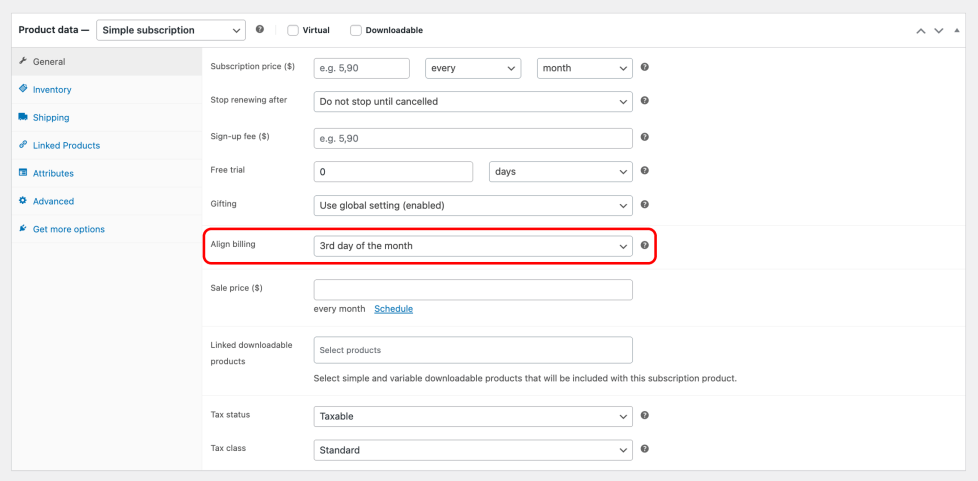
When editing a Simple Subscription product, an Align billing drop-down is available in the product’s General tab, allowing you to select a specific renewal day.
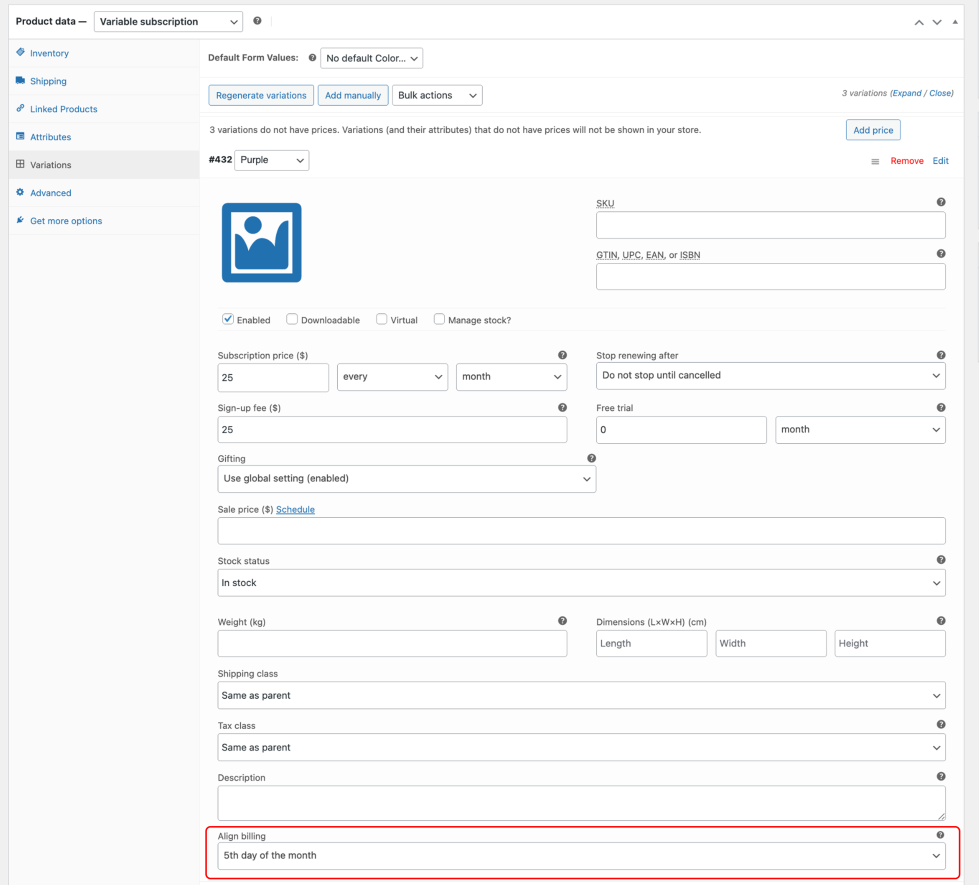
For Variable Subscription products, this setting is available in the Variations tab when editing an individual variation.
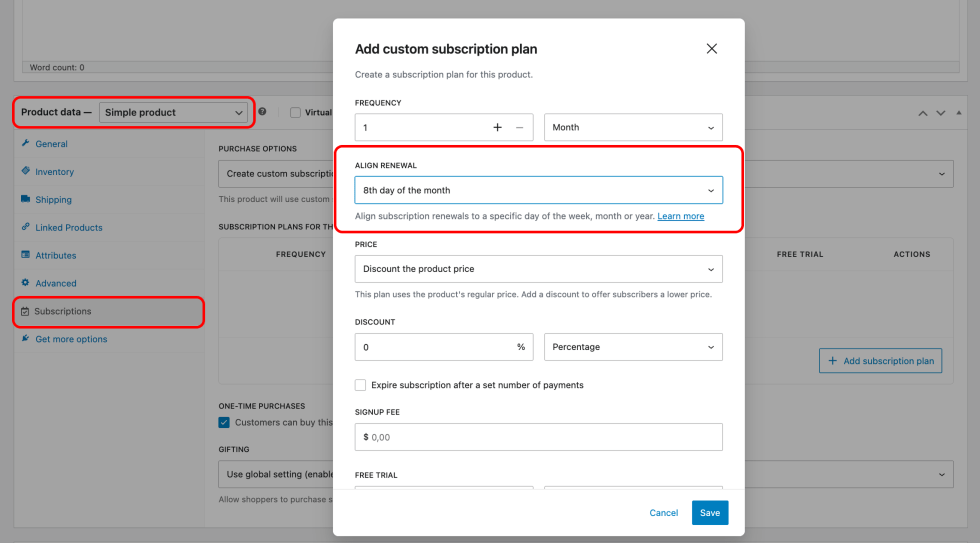
When editing a subscription plan for a supported non-subscription product, this setting is available within the plan settings for both storewide and custom subscription plans.
The options depend on the product’s billing interval:
| Billing interval | Align billing options | Example |
|---|---|---|
| Weekly | Day of the week | Monday each week |
| Monthly | Day of the month (1–28) | 1st day of the month |
| Yearly | Month of the year | January each year |
Daily subscriptions do not support billing date alignment, as they already renew every day.
Each product defaults to Do Not Align. To enable billing date alignment for a product, select the desired renewal day from the Align billing dropdown.
Time of Day Renewals Are Processed
↑ Back to topAligned renewals are scheduled to run at 3:00 a.m. in your site’s time zone. You can set your site’s time zone on the WordPress General Settings administration screen.
Additionally, the 3:00 a.m. schedule applies to the first renewal only. Subsequent renewals are based on when the last renewal was processed. This becomes important when your store is processing a large number of subscriptions. For example:
On January 15, you start selling a new monthly subscription aligned to the first day of the month. You have 1,200 new subscribers sign up between January 15 and January 31. At 3:00 a.m. on February 1, WooCommerce Subscriptions begins processing renewals. However, it’s not possible to process all 1,200 renewals instantly. Instead, Subscriptions processes them as a queue, meaning the renewal for the thousandth subscriber might not be processed until 4:00 a.m. After it is processed, the renewal for March 1 will be scheduled for 4:00 a.m. rather than 3:00 a.m.
This design helps stagger renewals on stores managing a large queue, which reduces server load.
Enabling Billing Date Alignment with Existing Subscriptions
↑ Back to topWhen you enable billing date alignment on a subscription product that already has active subscribers, the existing subscriptions’ next payment dates will not be affected. Only new subscribers will have their renewal schedule aligned.
If you wish to realign the payment dates of existing subscriptions to match the new schedule, you need to manually change their next payment dates to reflect the aligned billing date.
Manually Changing a Subscription’s Payment Date
↑ Back to topIf a store manager manually changes the next payment date for a single subscription, future payments will be processed based on the new payment date selected.
For example, changing a weekly subscription aligned to Mondays to have the next payment processed on Wednesday will mean all future payments are processed on Wednesday. This is because future payments are calculated based on the last renewal payment, and billing date alignment is only calculated and applied to the first payment.
If you wish to realign the payment dates, you need to change the next payment date again after a payment has been processed out of sync.
First Billing Behavior
↑ Back to topWhen a customer subscribes to a product with an aligned billing date, the sign-up date usually won’t fall on the renewal day. The First billing behavior setting determines how customers are charged when they subscribe to products with aligned billing dates.
This setting is found under WooCommerce > Settings > Subscriptions, in the Billing Date Alignment section.
There are three options:
Charge Full Amount at Sign-up
↑ Back to topCustomers are charged the full recurring amount when they subscribe.
For example, if a customer subscribes to a $30/month product on March 15 and the billing date is aligned to the 1st of the month, they pay $30 at sign-up. Their next charge of $30 occurs on April 1.
This is the default setting.
Sign-up cutoff window
When Charge full amount at sign-up is selected, an additional field appears: Sign-up cutoff window. This lets you specify a number of days before the billing date during which customers will not be charged until the next billing date. Set to zero to disable.
The cutoff window prevents charging customers who sign up close to the renewal date. This is particularly useful for physical subscription boxes. Here’s an example:
- Product: Monthly subscription box, renewal/shipping date on the 1st of each month
- Billing: Full subscription cost charged at sign-up, with a 15-day cutoff window
How it affects customers:
- Customer A subscribes on the 10th: They are charged immediately and receive the current month’s box.
- Customer B subscribes on the 20th: They are not charged until the 1st of next month and receive next month’s box.
This approach ensures timely shipping for most of the month while preventing late-month orders from creating fulfillment challenges or customer disappointment.
Charge on the Next Billing Date
↑ Back to topCustomers are not charged when they subscribe. Their first recurring charge occurs on the next billing date.
For example, if a customer subscribes to a $30/month product on March 15 and the billing date is aligned to the 1st of the month, they pay nothing at sign-up. Their first charge of $30 occurs on April 1.
Prorate Until the Next Billing Date
↑ Back to topCustomers are charged a prorated amount when they subscribe based on the days remaining until the next billing date. The full recurring amount is charged on the next billing date.
How proration is calculated
Proration adjusts the first payment based on the time left in the current billing period. The calculation is:
- Find the daily price of the subscription.
- Multiply it by the days remaining until the next renewal date.
Here are two examples using a $100/year subscription aligned to January 1:
Mid-year sign-up:
- Customer signs up: July 1
- Days remaining until January 1: 184
- Prorated charge: $50.41 (184 days at $0.27 per day)
Late-year sign-up:
- Customer signs up: November 15
- Days remaining until January 1: 47
- Prorated charge: $12.87 (47 days at $0.27 per day)
Apply proration to
When Prorate until the next billing date is selected, an additional field appears: Apply proration to. This lets you choose which product types are prorated:
- Virtual subscription products—Prorates digital or virtual subscriptions (checked by default).
- Physical subscription products—Prorates subscriptions that involve shipping a physical product.
At least one product type must be selected. Product types not selected will be charged on the next billing date instead.
Comparison
↑ Back to topThe following example shows how each option works for a $30/month subscription aligned to the 1st of the month, when a customer subscribes on March 15:
| Option | Charge at sign-up | Charge on April 1st |
|---|---|---|
| Charge full amount at sign-up | $30.00 | $30.00 |
| Charge on the next billing date | $0.00 | $30.00 |
| Prorate until the next billing date | ~$15.48 | $30.00 |
Questions and support
↑ Back to topSomething missing from this documentation? Still have questions and need assistance?
- If you have a question about a specific extension or theme you’d like to purchase, contact us to get answers.
- If you already purchased this product and need some assistance, get in touch with a Happiness Engineer via our support page and select this product’s name from the Product dropdown.

