
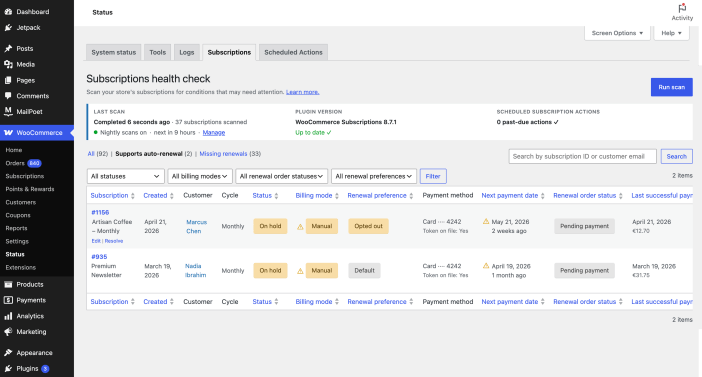
The Subscriptions Health Check tool scans your store for subscriptions that may need attention. For example: subscriptions set to manual renewal when they could be renewing automatically based on your customer’s payment method, or subscriptions with missing or overdue renewal dates.
The tool identifies subscriptions for your review. It never changes a subscription on its own — every fix is applied only when you click Resolve and confirm.
Where to find it
↑ Back to topGo to WooCommerce → Status in your WordPress admin, then click the Subscriptions tab.
Direct URL: /wp-admin/admin.php?page=wc-status&tab=wcs-health-check
The tool automatically runs a nightly scan if enabled in WooCommerce > Settings > Subscriptions. You can also trigger a manual scan at any time using the Run scan button.

Understanding your results
↑ Back to topSummary cards
↑ Back to top
At the top of the page, three cards provide a quick overview:
- Last scan—when the most recent scan completed, how many subscriptions were scanned, and a nightly scan status line showing whether nightly scans are enabled and when the next one is due.
While a scan is running, this card shows live progress (e.g., “120 of 500 subscriptions scanned”) that updates in the background without reloading the page. A Manage link opens the scan schedule settings in WooCommerce > Settings > Subscriptions. - Plugin version—your current WooCommerce Subscriptions version, with a prompt to update if a newer version is available.
- Scheduled actions—whether any subscription-related scheduled actions are past due. If actions are overdue, the card shows the count and links to the Scheduled Actions screen and to the Background Processing settings.
Tabs
↑ Back to top
The table has three filter views:
| Tab | What it shows |
|---|---|
| Supports auto-renewal (default) | Subscriptions flagged for manual renewal that have a valid saved payment token on a gateway that supports automatic renewal |
| Missing renewals | Active or on-hold subscriptions whose next payment is missing (no scheduled date, though a renewal is still due) or overdue (scheduled date more than ~a day in the past), excluding any with a payment retry already pending. |
| All | Every subscription in your store |
Columns
↑ Back to top| Column | What it means |
|---|---|
| Subscription | Subscription ID and product name, linked to the edit screen |
| Created | Date the subscription was created |
| Customer | Customer name, linked to their user profile |
| Cycle | Billing frequency (e.g. Monthly, Every 3 months) |
| Status | Current subscription status (Active, On hold, Pending cancel, etc.) |
| Billing mode | Whether the subscription is set to Manual or Automatic renewal |
| Renewal preference | Whether the customer turned off automatic renewal via My Account (Opted out) or not (Default). |
| Payment method | Gateway name and last four digits of the saved payment token |
| Next payment date | Scheduled date of the next renewal, or a ⚠— badge if no date is set |
| Renewal order status | Status of the most recent renewal order |
| Last successful payment | Date and amount of the last completed automatic renewal |
You can show or hide columns using the Screen Options drawer at the top right of the page.
Badges
↑ Back to topStatus:
Shows the current subscription status (Active, On hold, Pending cancellation, Expired, Canceled). Labels are color-coded to match the main Subscriptions list for quick visual scanning.
Billing mode:
- Manual — subscription is currently set to manual renewal
- Automatic — subscription is set to automatic renewal
Renewal preference:
- Opted out — the customer turned off automatic renewal from their My Account page. (A subscription a merchant switched to manual in admin shows as “Default,” not “Opted out.
- Default — no explicit opt-out on record
Next payment date:
- A future date — renewal is scheduled normally
- ⚠ — no next payment date is set. Hover to see the tooltip: “There is no scheduled payment date for this subscription. Process now to resume billing.”
- A past date — the next payment date has passed and the renewal hasn’t been processed.
What to do if subscriptions are flagged
↑ Back to topSupports auto-renewal tab
↑ Back to topThis tab shows subscriptions set to manual renewal that have a valid saved payment token — meaning they could renew automatically, but won’t until the billing mode is corrected.
Not every subscription on this list needs to be changed. Review each one before acting.
To review and correct a flagged subscription:
- Check the Renewal preference column before making changes:
- Opted out — the customer turned off automatic renewal from their My Account page. (A subscription a merchant switched to manual in admin shows as “Default,” not “Opted out.
- Default — no explicit opt-out on record
- To resolve a flagged subscription, click Resolve on its row. A dialog opens with a recommended action for that signal:
Supports auto-renewal → Switch billing mode dialog; Switch to automatic renewal changes the subscription from manual to automatic using the saved payment method.
The fix applies on confirm, the dialog closes, the row updates in place, and a notice appears at the top — no manual edits needed.
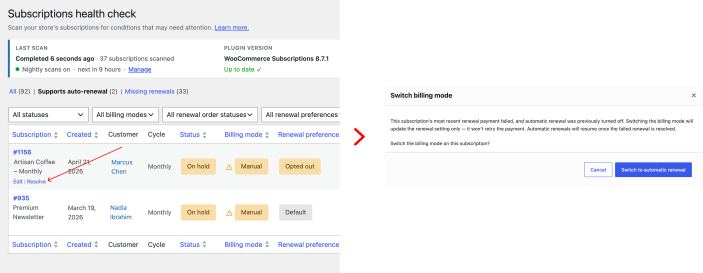
Changing billing mode to Automatic doesn’t trigger an immediate charge — the subscription will attempt automatic renewal on its next scheduled renewal date.
If the subscription no longer matches the original scan result (for example, it was already corrected in a different tab), the tool shows an info notice and removes the row.
A note on customers with manual renewal subscriptions:
When a subscription is set to manual renewal, customers receive a renewal invoice email when their renewal date arrives (enabled by default in WooCommerce Subscriptions). If they didn’t complete that payment, their subscription may have lapsed. It’s worth reaching out directly — they may not know why access stopped.
Missing renewals tab
↑ Back to topThis tab shows subscriptions where the next payment date is missing or past due without a matching renewal order. These may indicate subscriptions stuck in an incomplete state. Common causes include plugin or custom code conflicts, server or migration issues, and scheduled actions not running correctly on your store.
To resolve a flagged subscription:
- Click the Resolve button on the row. A Process renewal modal opens with details about the subscription’s current state.
- Review the modal. The recommended action depends on the subscription’s billing mode:
Automatic renewal—the tool charges the customer’s saved payment method.
Manual renewal—the tool sends a renewal invoice to the customer. - Click Process renewal now to apply the fix. The modal closes, a notice appears at the top of the page, and the subscription’s next payment date is restored once the renewal order is successfully processed.
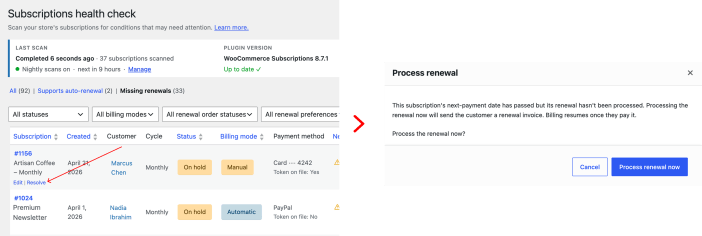
If you prefer to investigate manually, you can click the subscription ID to open its edit screen and review the subscription’s history and status before taking action.
Scanning controls
↑ Back to topRun scan—triggers an immediate scan. Useful after making corrections when you want a fresh view. While a scan is running, the button switches to Cancel scan. Scan progress updates in the background without reloading the page.
Cancel scan—stops a running scan. Any subscriptions already scanned are preserved in the results table so you can review partial results. The Last scan card shows how many subscriptions were scanned before the cancellation.
Nightly scans—to enable or disable scheduled nightly scans, go to WooCommerce > Settings > Subscriptions. The Health Check page shows the nightly scan status (on/off and when the next scan is due) in the Last scan card with a Manage link to the settings.
Frequently asked questions
↑ Back to topWhat if I have a lot of subscriptions flagged?
Review a sample first to understand the pattern. Some may be legitimately manual — imported subscriptions, customers who opted out, or subscriptions on gateways that don’t support tokenization. Focus on the Supports auto-renewal tab with Renewal preference = Default, as those are the highest-confidence candidates.
Will changing billing mode to Automatic charge my customers right away?
No. It means the subscription will attempt automatic renewal on its next scheduled renewal date. Past missed payments are not charged retroactively.
My store has “Turn off automatic payments” enabled — what happens?
If your store has this setting enabled, all subscriptions are intentionally set to manual renewal. The tool will display a notice and pause scanning. To use the tool, disable that setting first under WooCommerce → Settings → Subscriptions.
Where can I get help?
If you’re unsure whether a subscription should be corrected, or you’re seeing unexpected results, contact WooCommerce Support.