Product Icon

Google AutoFill Customer Addresses for WooCommerce

Allow address autocomplete for billing and shipping address fields - Autofill address on checkout, account, and orders page.
Choose a billing option
$49
Save 20%
$98 $78.40

Subscription includes

  • Product updates and improvements
  • Customer support
  • 30-day money-back guarantee

WooCommerce address autocomplete plugin helps you save your customers valuable time by automatically filling in address details during checkout. It reduces the chances of incomplete or inaccurate order details. This plugin enables you to auto-fill customer address details to the checkout form with the help of a Google map location detector. 

Whenever a customer enters address information on the checkout form, this plugin fills out the customer’s address details in the provided fields. It saves customers time by filling out the whole checkout form automatically. This also minimizes the chances of incorrect address details and streamlines the checkout process.

Features of WooCommerce Google Addresses Autocomplete Plugin

  • Uses Google API for auto-filling customer addresses
  • Auto-complete the address on the checkout page in the billing & shipping section
  • Autofill address in the order details page in the admin panel
  • Automatically fill the address in the customer’s My Account dashboard
  • Option for admin to restrict specific countries
  • Displays location on Google Maps on the checkout page
  • Multiple Google map themes for store owners
  • Compatible with WooCommerce Checkout Block Page.
This Plugin is fully compatible with HPOS(High-Performance Order Storage) and Multisite.

Autocomplete Address on the Checkout Page

Enhance your customers’ checkout experience with address autocomplete. The WooCommerce address autocomplete plugin uses Google API to automatically fetch details such as country, city, state, and zipcode. All the information is filled on the checkout page based on the location ensuring a smooth and error free checkout experience.
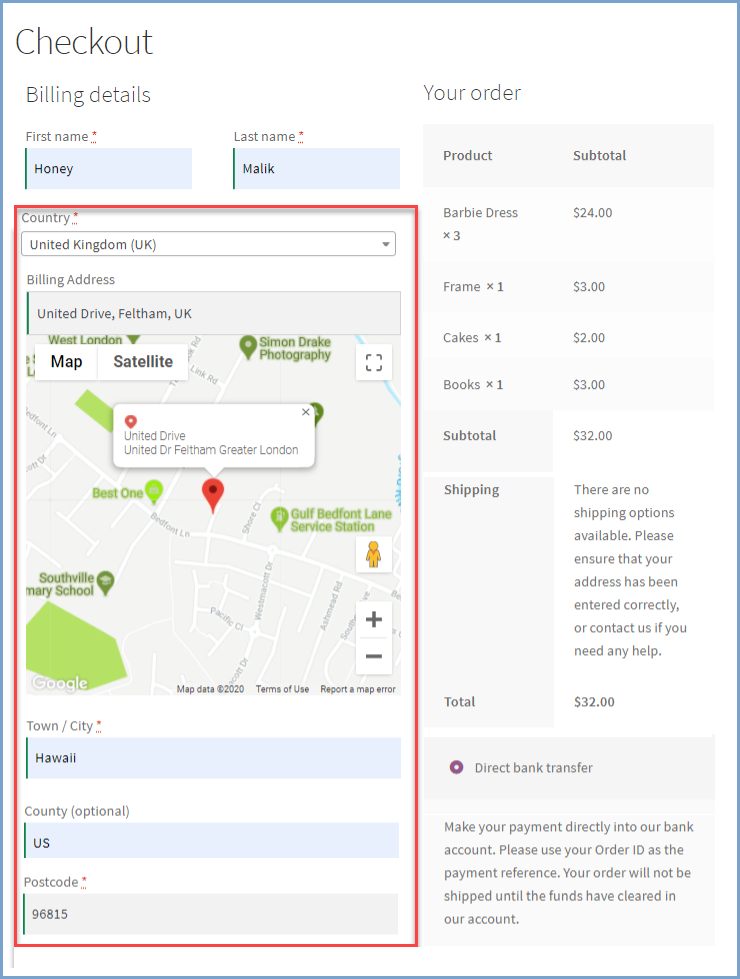
Auto Fills Address on Checkout Page

Displays Address Suggestions

As the customer begins typing an address at checkout, the Google Address Autocomplete for WooCommerce shows a drop-down list with relevant address suggestions, making it easier and faster to select the correct one.
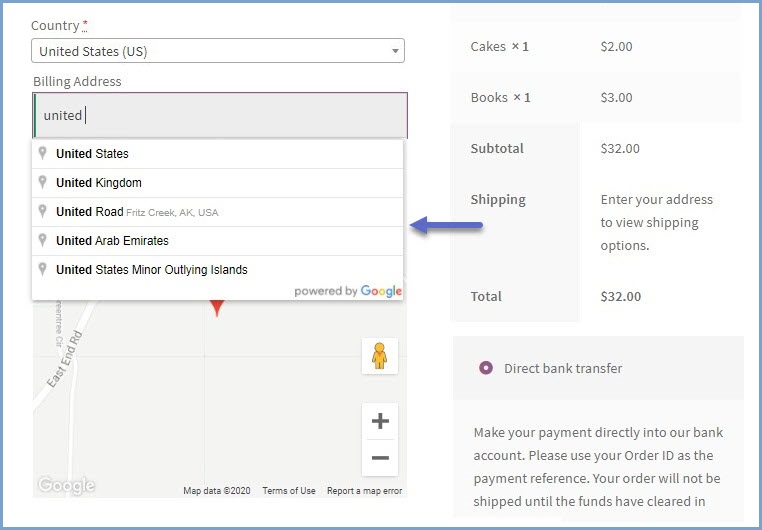
Displays Address Suggestions

Autocomplete Address on the Order Details Page

Google Address Autocomplete for WooCommerce also auto-fills customer addresses on the order details page in the admin panel, making it easier and faster for the store admin to manage orders.
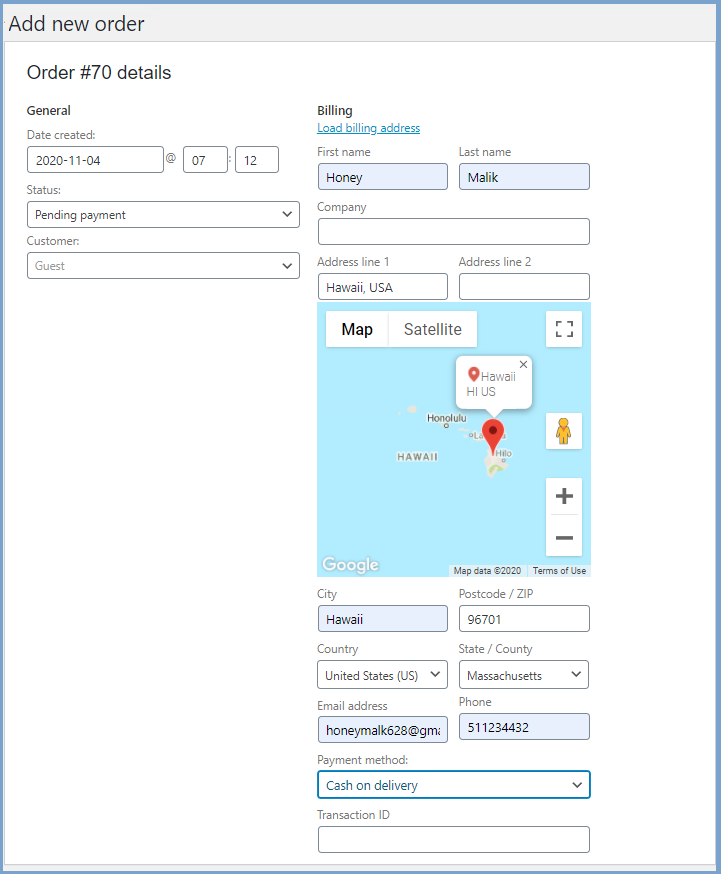
Autocomplete address in Order Details Page

Autofill Address in Customer’s My Account Page

The WooCommerce Autofill Address plugin automatically completes and displays the customer’s address on their My Account page, ensuring accurate and hassle-free address management.
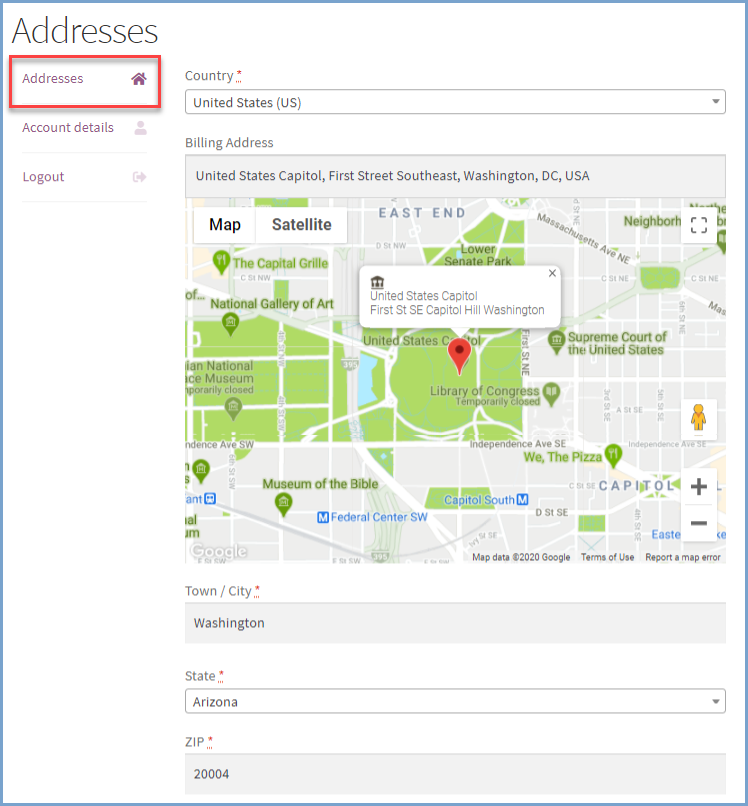
Autofill Address in Customer's My Account Page

Select Countries To Restrict Address AutoComplete

Control where the address autocomplete feature is available by restricting it to specific countries. With this option, you can limit Google Maps functionality to selected regions, ensuring the map and suggestions only appear for customers in allowed countries.
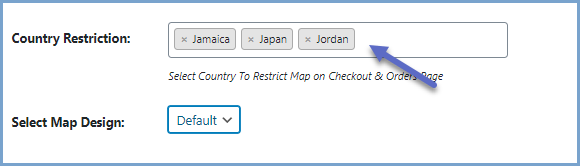
Map Restriction for Specific Countries 

Use Map Market to Choose an Address

Customers can simply drag the map marker to their desired delivery location. Using the Google API, the WooCommerce Autocomplete Address plugin instantly fills in address details in real-time, making the checkout process faster and more accurate.
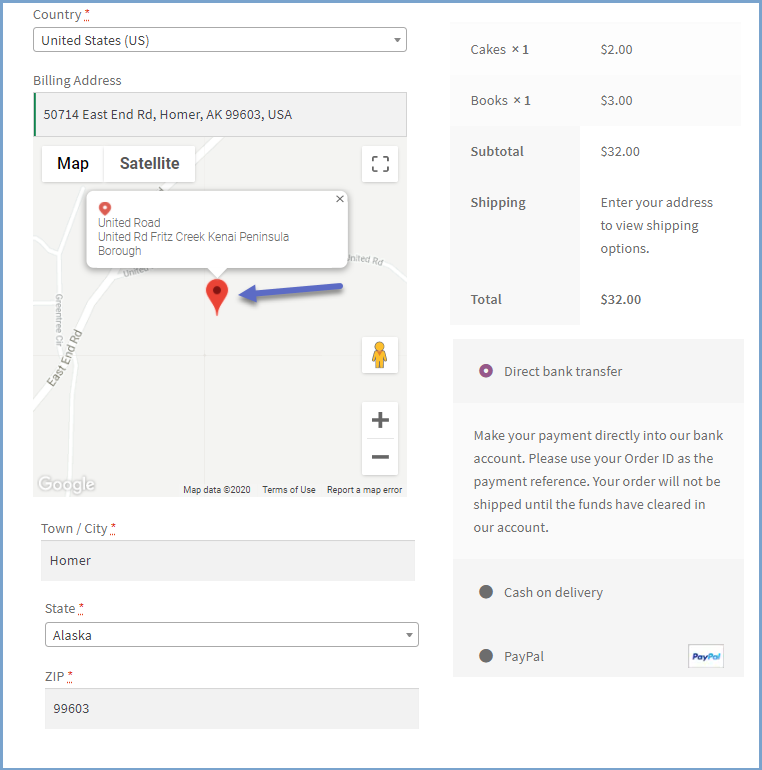
Customers can Choose Address with Map Marker

Choose Between 5 Different Map Layouts

Choose from 5 map views and layouts to match your website’s design. These customizable layouts enhance the visual appeal of your store and provide a smoother, more user-friendly checkout experience.
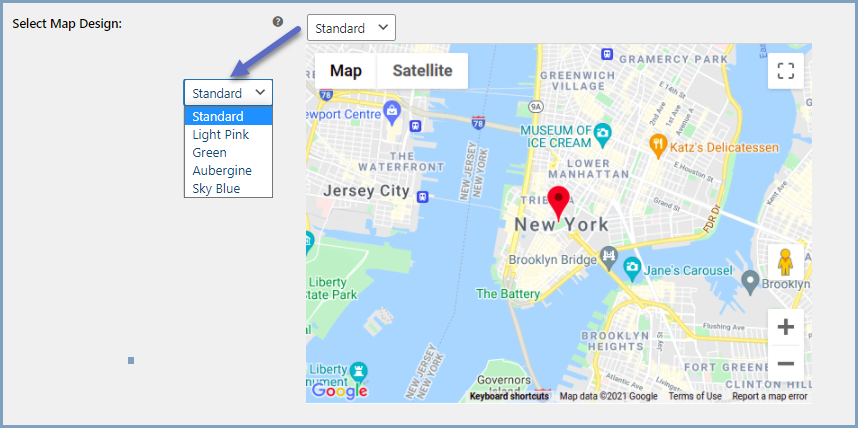
WooCommerce google autofill - 5 Different Map Layouts


Compatibility

Our plugins are designed to be highly versatile and also compatible with the most commonly used themes, browsers, builders, and mobile views. We understand the importance of flexibility and integration when it comes to enhancing your website’s functionality. Our plugins can effortlessly integrate with the following:

Themes Compatibility

  • Store Front
  • Avada
  • Flatsome
  • Porto
  • Woodmart
  • WooCommerce default theme
  • Divi

Also Compatible with

  • PHP 8
  • Mobile Layouts

How to Get Started

  1. Purchase Google AutoFill Customer Addresses from WooCommerce.com
  2. Download and install the extension
  3. Activate the extension
  4. Go to WooCommerce > Settings > Google Address Autocomplete on the Checkout  tab to enable and configure the settings
  5. Read the full installation guide here


Frequently asked questions

How does this plugin improve the checkout experience and boost sales?

By automatically filling in address details, the plugin reduces checkout time, minimizes errors, and ensures accurate order information. A faster and hassle-free checkout improves user experience, increases trust, and reduces cart abandonment, leading to higher conversion rates.

How does the WooCommerce address autocomplete feature work?

When a customer starts typing their address, the plugin uses Google API to display address suggestions in a drop-down menu. Customers can select the correct address, and the plugin will automatically fill in the Country, City, State, Zipcode, and other details.

Can customers select their address using a map?

Yes, customers can use the Google Map marker to pinpoint their exact delivery location. The plugin will then auto-fill the address fields based on their selection.

Does the plugin work on both billing and shipping address fields?

Yes, the address autocomplete works for both billing and shipping sections at checkout, ensuring a smooth and error-free ordering process.

How does this plugin help reduce order errors and returns?

By autofilling accurate addresses, the plugin reduces manual input errors, ensuring correct shipping details. This minimizes the chances of missed deliveries, returns, and customer complaints.

Does the plugin autofill addresses in the WooCommerce admin panel?

Yes, customer address details are automatically filled in the Order Details Page in the WooCommerce admin panel, making it easier for store owners to process orders efficiently.

Customer reviews

Average rating 4.1
22 reviews
5 stars, 71% of reviews
4 stars, 10% of reviews
3 stars, 0% of reviews
2 stars, 0% of reviews
1 star, 19% of reviews
22 reviews
  • infod89d34450b5
    Rated 5 out of 5
    Support
    Aug 28, 2025
    Support
    The Support Team was really fast and implemented all our needs perfectly. The Plugin works exactly as expected and now, it also works with our Swiss Post Plugin.
    • FmeAddons
      Aug 29, 2025
      Thank you for your feedback !!
  • admin10e12307f7
    Rated 5 out of 5
    Support
    Apr 30, 2025
    Support
    Support Team is good, plugin does not work perfectly with AVADA theme checkout elements. Support gave a temp code fix. And have said they will follow up with a permanent fix.
    • FmeAddons
      Apr 30, 2025
      Thank you for your feedback !!
  • theneighbourhoodheroes
    Rated 5 out of 5
    Support
    Mar 18, 2025
    Support
    Support was fast and useful, highly recommend.
    • FmeAddons
      Mar 18, 2025
      Thank you for your feedback !!
  • armand pretorius
    Rated 4 out of 5
    Functionality
    Feb 26, 2025
    Functionality
    we are now working with the support team to fix the issue we have. the support team fixed the problem for us on any desk so the plug in is working now .
    • FmeAddons
      Feb 24, 2025
      Dear User, Thank you for choosing FMEAddons as your trusted provider of the WooCommerce plugin. We sincerely apologize for any inconvenience caused by our plugin. Upon reviewing our records, we noticed that you initially contacted us on January 14th, and we responded, but we haven’t heard back from you since then. You can reach us anytime at support@fmeaddons.com, and we’ll resolve your issue as soon as possible. We have also replied to your original email again and hope to hear from you soon so we can work on your case promptly. Best regards, Customer Support Team
  • anonymized-5908797
    Rated 5 out of 5
    Support
    Jun 28, 2024
    Support
    Fast and clear assistance. The plugin works fine and they helped me with the Google API configuration.
    • FmeAddons
      Jun 28, 2024
      Thank you for your feedback !!

Extension information

  • WordPress version required: 4.6
  • WooCommerce version required: 2.6.0

Countries

  • Worldwide

Languages

English (United States)

Related Products

Price $279 annually
Rated 3.2 out of 5 stars
Price $29 annually
Rated 3.5 out of 5 stars
Price $99 annually
Rated 4.7 out of 5 stars
Price $79 annually
Rated 3.4 out of 5 stars
Price $59 annually
Rated 3.1 out of 5 stars
Price $109 annually
Rated 2.8 out of 5 stars
Price $49 annually
Rated 4.1 out of 5 stars
Price $109 annually
Rated 2 out of 5 stars
Price $109 annually
Rated 2.3 out of 5 stars



