



This post covers what MCP is, how it works, and how to get started with the built-in Abilities. For more on AI, commerce, and how to use AI to manage your store, visit our Agentic Commerce page.
I’ve been deep diving into something really exciting in WooCommerce: the Model Context Protocol integration (MCP). MCP first shipped as a beta in 10.3 and has been maturing across releases. Now, with WooCommerce 10.9 and WordPress 7.1+, the stack is solid enough to build some seriously useful things on top of it. So, I went ahead and did exactly that.
Picture this: we’re chatting with an AI assistant, and we say something like “Show me my low-stock products” or “Create a product called Winter Hoodie for $39.99.” Our WooCommerce store responds, does the work, and gives back the results. No clicking through the WordPress Dashboard, no manual REST API calls. Just natural conversation turning into real store actions.
That’s what MCP enables. Throughout this post, I’ll be using Claude Code as the AI assistant, but MCP works with any compatible client: Cursor, VS Code, or anything else that speaks the MCP protocol. Use whatever works best for you.
Let’s explore it together!
What is MCP?
↑ Back to topThink of MCP as a universal translator between AI tools and our WooCommerce store. Normally, if we want AI to interact with our store, we’d need to:
- Build custom REST API integrations.
- Handle authentication ourselves.
- Write a bunch of code to parse responses.
MCP changes all that. It’s an open-source standard that lets AI assistants like Claude, Cursor, or VS Code talk directly to systems like WooCommerce using natural language.
With MCP:
- AI can discover what our store can do.
- AI can perform those actions safely.
- Everything works within our existing permissions.
So when we say, “List all products under $20 USD,” MCP translates that into something WooCommerce understands, runs it securely, and brings back the results.
How does WooCommerce MCP work?
↑ Back to topTwo pieces work together to make this happen, and they both build on existing WooCommerce security.
The building blocks
WordPress Abilities API
The WordPress Abilities API is a way for WordPress plugins to register “Abilities”, basically things they can do. Think of it like a menu: WooCommerce tells WordPress, “Here’s everything I can do”, and AI assistants can read that menu and pick what they need. Each ability has a name like:
woocommerce/products-query: list all productswoocommerce/orders-query: fetch orders
The Abilities API shipped in WordPress 6.9 as a core feature. It provides a standardized registry that any plugin can hook into, so WooCommerce no longer needs to bundle it separately. For those building Custom Abilities, they’re registered on the wp_abilities_api_init hook.
WordPress MCP Adapter
The MCP Adapter is the translator. It takes MCP messages from AI assistants and converts them into something WordPress understands. Think of it as the middleman that speaks both “AI protocol” and “WordPress.”
The flow of communication
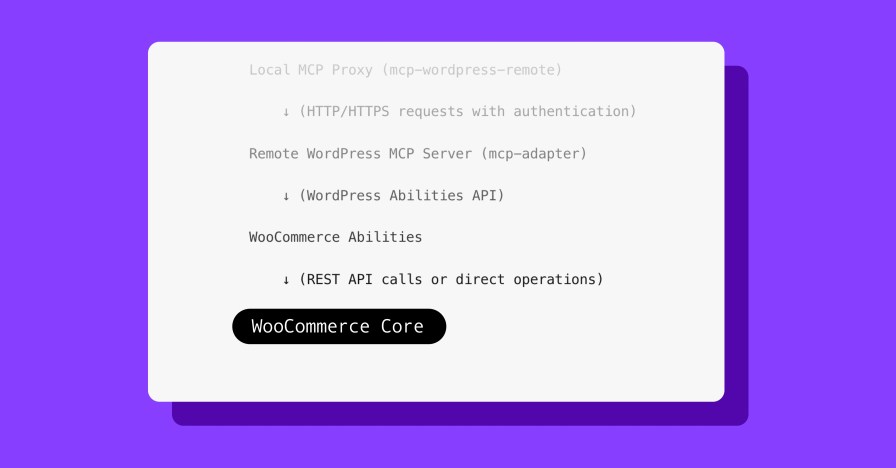
When we type “list all products” in Claude Code, here’s what happens step by step:
AI Client (Claude, etc.)

    ↓ (MCP protocol over stdio/JSON-RPC)

Local MCP Proxy (mcp-wordpress-remote)

    ↓ (HTTP/HTTPS requests with authentication)

Remote WordPress MCP Server (mcp-adapter)

    ↓ (WordPress Abilities API)

WooCommerce Abilities

    ↓ (direct operations)

WooCommerce Core
In plain terms, Claude Code sends a message to a small proxy tool running on our machine. The proxy converts it to a secure web request and sends it to our WordPress site’s MCP endpoint. The MCP Adapter looks up which ability to run, the ability’s callback executes (querying orders, products, etc.), and the result flows back the same way.
The local proxy (@automattic/mcp-wordpress-remote) is a small Node.js tool we install once during setup and then forget about. Its job is to translate between the way AI clients communicate (stdio) and the way WordPress works (HTTP).
Where things stand today
↑ Back to topMCP landed as a beta in WooCommerce 10.3 with product and order Abilities. The update since then was the MCP Adapter v0.3.0 migration in 10.4, which updated the transport layer. Since then, the MCP surface has been stable since 10.9 and beyond, which is what we’re building on.
MCP is still in developer preview, so the built-in Abilities are limited to product and order CRUD (create, read, update, delete). But the foundation is solid, and that’s where Custom Abilities come in.
What can we do with WooCommerce MCP right now?
↑ Back to topOut of the box, WooCommerce ships with nine MCP Abilities:
Products:
woocommerce/products-queryproduct-createproduct-updateproduct-delete
Orders:
woocommerce/orders-queryorder-notes-queryorder-createorder-update-statusorder-add-note
This is already powerful enough to build some really cool workflows. But where it gets really interesting is with Custom Abilities.
Prerequisites
- A staging site (WooCommerce MCP is in developer preview)
- WooCommerce 10.9 (or 10.3+)
- WordPress 6.9+ (for the core Abilities API)
- Node.js 22+ (required by the latest
mcp-wordpress-remote) - Application password
- An MCP client (I’ll use Claude Code). Note: Claude Code requires a Claude Pro or Max plan ($20/mo+) or Anthropic API credits. It’s not available on the free tier.
Installing MCP Adapter
Option 1: Head over to WP Admin > Plugins > Add new and search for MCP Adapter.
Option 2: Install via WP-CLI
wp plugin install --activate mcp-adapter
Setting up the connection
Create an Application Password
- In your store’s WP Admin dashboard, go to Users > Profile.
- Scroll to “Application Passwords” and select “Add Application Password”
- Save the generated password and your username.
Configure Claude Code
Open the Terminal and run:
claude mcp add \
  --env WP_API_URL=https://yourstore.com/wp-json/mcp/mcp-adapter-default-server \
  --env WP_API_USERNAME=your-username \
  --env WP_API_PASSWORD='your-application-password' \
  woocommerce_store \
  -- npx -y @automattic/mcp-wordpress-remote@latest
Important:
- Replace
yourstore.comwith the actual staging site URL. - Replace the
your-usernameandyour-application-passwordpart with the actual credentials. - Restart Claude Code to load the new configuration.
For local development with HTTP: For testing locally without HTTPS, add this filter:
add_filter( 'woocommerce_mcp_allow_insecure_transport', '__return_true' );Demo 1: Built-in WooCommerce Abilities
↑ Back to topLet’s explore the default Abilities that come with WooCommerce. These work right away with zero custom code.
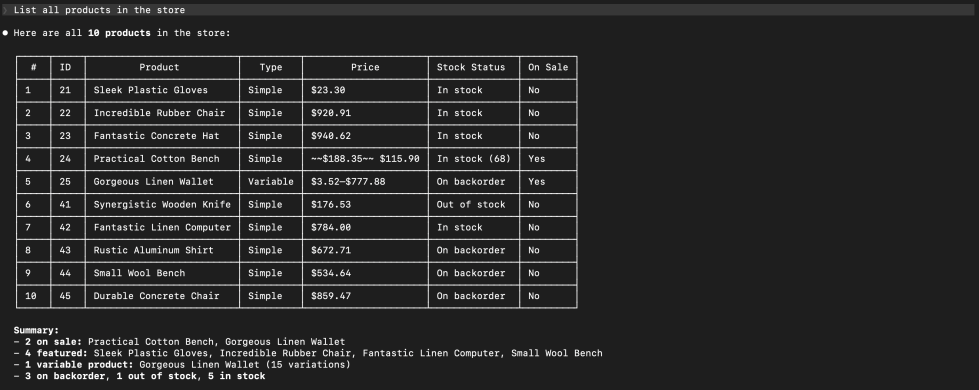
List all products
Ask AI client: “List all products in the store.”
What happens behind the scenes:
- MCP calls the ability:
woocommerce/products-list - Returns product data with names, prices, stock status, etc.
Create a product
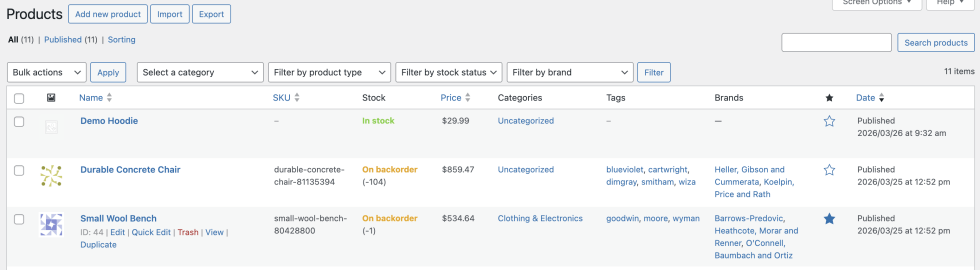
Try this: “Create a product named ‘Demo Hoodie’ priced at $29.99.”

MCP calls:
- Ability:
woocommerce/products-create - Result: A new product appears in the store!
Update a product
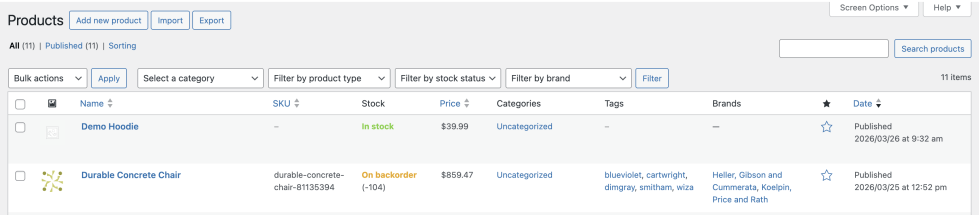
Say: “Update the Demo Hoodie price to $39.99.”
MCP calls:
- Ability:
woocommerce/products-update - The price changes instantly!
Add an order note
Try: “Add a private order note to #5631...”
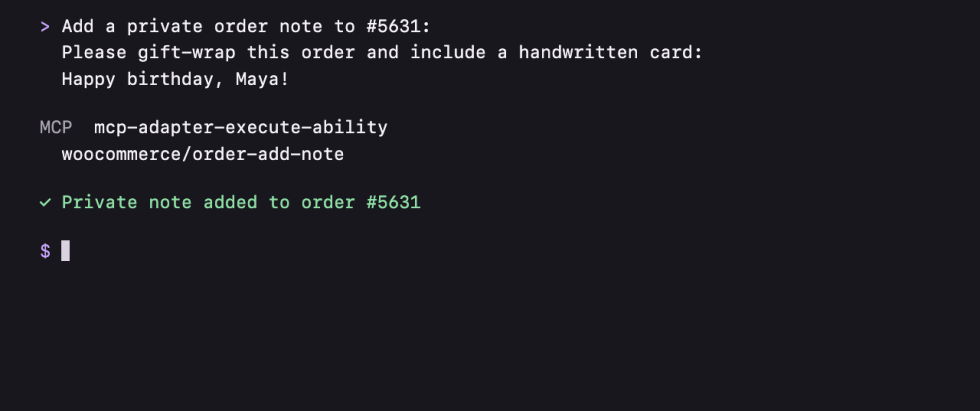
MCP calls:
- Ability:
woocommerce/order-add-note - A new order note is created!
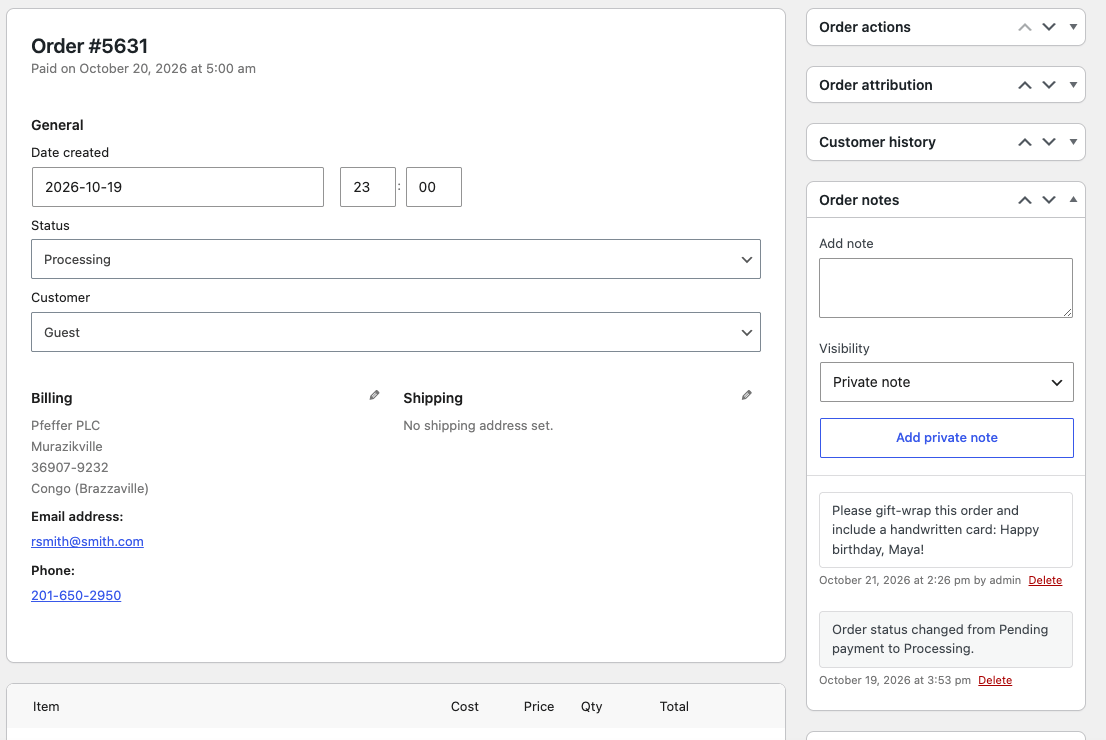
Pretty amazing, right? These built-in Abilities make AI-assisted store management feel natural.


About



Clean idea — makes store management feel way more natural. Curious how it handles complex queries and performance at scale though, especially on larger WooCommerce setups.