





Your online store should make it simple for customers to find and buy the products they want. As more people use AI to help them shop (aka agentic commerce), it’s important to give AI shopping agents enough clear information so they can show your products to potential buyers.
Getting your products recommended by AI isn’t about having a big brand or spending a lot on ads. AI assistants prefer stores that make things easy for them. If you provide clear, structured information, you have a better chance of reaching shoppers.
Let’s look at Answer Engine Optimization (AEO), which means setting up your store so AI tools can easily read and recommend your products.
What agents read
↑ Back to topIf someone asks ChatGPT for a “cast iron skillet,” the AI creates a list of options. To do this, it checks websites for information that matches the shopper’s request. If your store is on that list, you’re reaching someone who’s ready to make a purchase.
AI models ignore your website’s design and focus on your data, but they don’t treat all content the same way. There’s a kind of “confidence hierarchy,” so where you place your product details affects whether AI agents can use them.
- Structured data includes things like schema markup, Merchant Center feeds, and product data fields. This information is made for machines to read directly. For example, a Product schema field that says “compatible with: induction” helps AI agents match your product to someone searching for a cast-iron skillet.
- Structured content is information that’s organized in a way that’s easy for AI to understand, like spec tables, FAQ sections, or a “Materials and care” section with bullet points. It’s much easier for agents to read a clear table than to find details hidden in a paragraph.
- Unstructured marketing copy is the type of information AI agents trust the least, so they might ignore it. For example, if you write “Built to last generations in any kitchen,” the agent has to guess what that means and probably won’t match it to an induction-compatible skillet. Instead, use a clear spec like: “Compatible with gas, electric, and induction cooktops.”
How to rewrite your product descriptions
↑ Back to topHere’s an example showing the difference between a regular marketing description and one that’s structured for AEO.
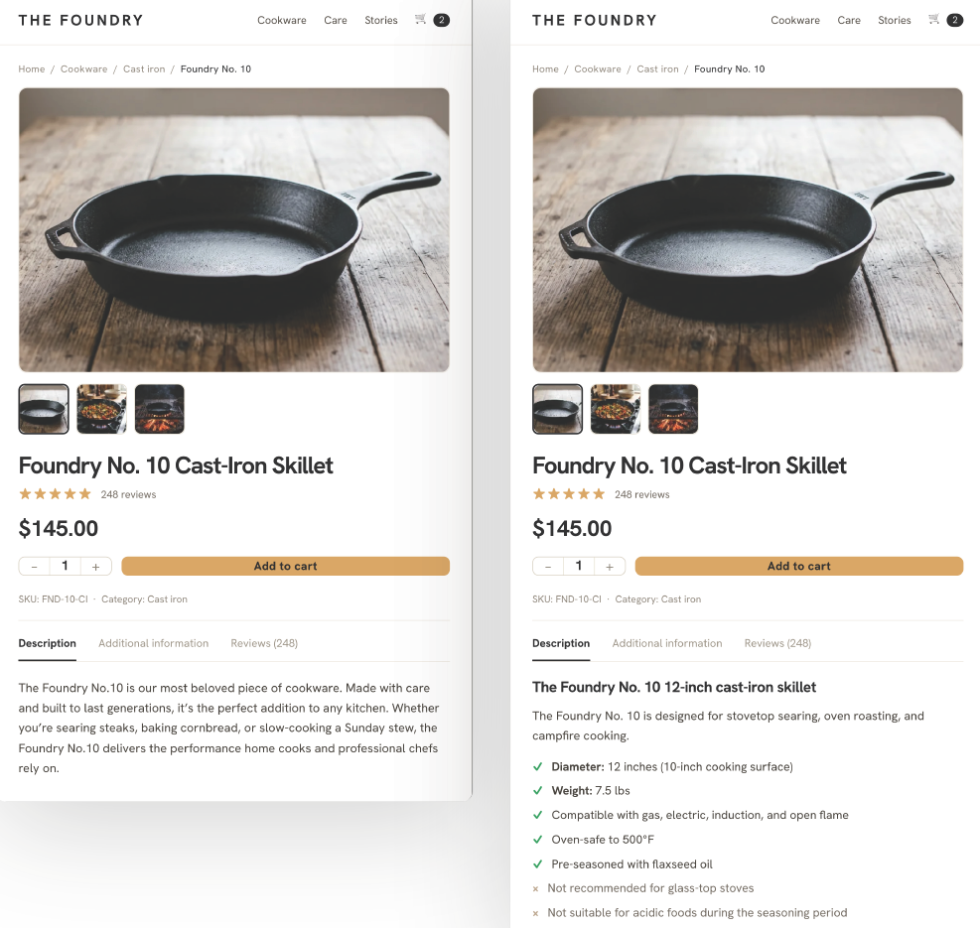
| Before | After |
| The Foundry No.10 is our most beloved piece of cookware. Made with care and built to last generations, it’s the perfect addition to any kitchen. Whether you’re searing steaks, baking cornbread, or slow-cooking a Sunday stew, the Foundry No.10 delivers the performance home cooks and professional chefs rely on. | #H2 The Foundry No. 10 12-inch cast-iron skillet The Foundry No. 10 is designed for stovetop searing, oven roasting, and campfire cooking. – Diameter: 12 inches (10-inch cooking surface) – Weight: 7.5 lbs – Compatible with gas, electric, induction, and open flame – Oven-safe to 500°F – Pre-seasoned with flaxseed oil – Not recommended for glass-top stoves – Not suitable for acidic foods during the seasoning period |
The first version has no matchable attributes, while the second has 8. If a shopper asks for a “pre-seasoned 12-inch cast iron skillet compatible with induction,” the second version matches on 3 points, but the first doesn’t match at all.
Tips for writing product descriptions
These recommendations can really help when you’re writing product descriptions:
- Name the use case. “Designed for high-heat stovetop searing and oven-to-table cooking” rather than “Built for the modern kitchen.”
- Include negative qualifiers. “Not recommended for glass-top stoves” and “Not suitable for acidic foods during the seasoning period” help agents exclude your product from queries where it’s a bad fit.
- Specify compatibility precisely, like “compatible with gas, electric, and induction cooktops.” “Not compatible with glass-top stoves” gives an agent clear data. “Works with most cooktops” makes it guess.
- Mention who the product is for. For example, say it’s designed for home cooks switching from non-stick pans who want better heat retention for searing. More shoppers now tell AI assistants things like “I’m a beginner cook,” “I have an induction cooktop,” or “I need something oven-safe.” If your page names its audience, it gives agents additional information to match with those requests.
- The order matters. Start with the key attributes, then share the story. AI agents read the top of your description first, while people who are interested will keep reading for more details.
Beyond product pages
↑ Back to topAI agents look at your entire store. Here are some important areas to focus on:
1. Category pages
Many category pages only show product grids and don’t include helpful text. Adding a short paragraph at the top that answers a question like “What to look for in a cast iron skillet” gives AI a summary of what you offer.
In WooCommerce, you can add this in WP Admin under Products → Categories, and then edit the Category description. It doesn’t have to be long — just a short paragraph about use cases, key specs, and who the category is for.
2. Frequently Asked Question blocks
If you can’t fit all the product details into the main description, add FAQ blocks at the bottom of the page. For a cast-iron skillet, you could include questions like “Is this skillet compatible with induction cooktops?” or “How do I season it for the first time?”
3. Policy pages
Return policies, shipping times, and warranties are important trust signals for AI tools. Instead of hiding your terms in long legal documents, use clear labels and exact numbers, like “30-day return policy” or “ships within 2 business days.”
4. Add an llms.txt file
Make a file called llms.txt and put it in your site’s root directory at yourdomain.com/llms.txt. This plain Markdown file gives AI agents a summary of what your store sells and where to find your most important pages. llms.txt helps certain AI tools quickly understand your business by emphasizing pertinent categories and pages, making it easier for them to match your store to shopper queries.
Currently, Anthropic and Perplexity support reading llms.txt, but Google doesn’t, so its benefits are limited to those AI platforms for now. While there is no direct evidence yet that adding llms.txt will automatically increase how often your store is recommended by AIs, it’s a simple way to organize and clarify your information for systems that use it.
Here’s an example of what the Markdown file should look like:
# Foundry Kitchen Co.
Online retailer specializing in cast-iron cookware, carbon steel pans, and cooking accessories for home cooks and professional kitchens.

## Key pages

- [Shop all cast-iron skillets](https://example.com/cast-iron-skillets/)
- [Carbon steel cookware](https://example.com/carbon-steel/)
- [Seasoning and care guides](https://example.com/care-guides/)
- [Shipping and returns](https://example.com/shipping/)
- [About us](https://example.com/about/)
Upload the file to your root directory next to robots.txt. In WooCommerce, you can do this quickly with FTP or a file manager.
If you use Yoast SEO or Rank Math, you don’t need FTP. Both added built-in llms.txt generation in 2025, starting from Yoast SEO version 22.0 and Rank Math version 1.4.0. Make sure you are running at least these versions to access the feature.
To check your version, go to the extensions page in your WordPress dashboard. Turn on llms.txt generation in the dashboard, and it will create and update the file for you.
How to tell if it’s working
At the moment, there isn’t one perfect dashboard for tracking AI traffic, so you’ll need to do some manual checking:
1. Check your referral traffic for AI sources
In GA4, go to Acquisition, then Traffic acquisition, and filter Session source by chat.openai.com, perplexity.ai, and gemini.google.com. You might see only a few visits at first, so don’t get discouraged. Track the numbers each month and see which product pages are getting visits.
2. Test it yourself
Every month, type a shopping question into ChatGPT or Perplexity that should show your products. Check if your store is recommended, see which competitors appear, and note the reasons the AI gives for its choices.
3. Run regular schema validation
Go to search.google.com/test/rich-results, paste in a product page URL, and check which schema types it finds, if they’re valid, and if there are any errors or missing fields. You can also use Google Search Console and look under Enhancements in the left menu. If your schema is detected, you’ll see a Products report showing errors and warnings for your whole site.
Your next best step is to pick your highest-traffic product pages and view them through a machine’s eyes. If you find gaps where technical details are missing, rewrite them into a clear bulleted list. You can even have an LLM (large language model, such as ChatGPT) read through these pages and give its own recommendations, since they will be public.
Next, look at your highest-traffic product pages as if you were an AI. If you notice missing technical details, rewrite them as a clear list. You can also let an LLM review these pages and suggest improvements, since the pages are public.
What to do today
↑ Back to topBegin by reviewing your 10 most-visited product pages. For each, count how many matchable attributes it lists, such as materials, size, weight, use case, audience, compatibility, and any negative qualifiers. If there are fewer than five, AI agents may be skipping that page.
After you gather this information, plan to rewrite those product descriptions. Begin with your highest-traffic pages, check your AI referral sources after a month, and adjust as needed. When you make changes, focus on including any missing attributes such as size, material, compatibility, or recommended use. Look for ways to make compatibility details more specific or define who the product is meant for. This way, every update you make helps AI agents more effectively match your products to shoppers’ needs.
Feeling stuck with your ecommerce solution? Let’s talk.

About



Great article! As AI search continues to evolve, having well-structured and trustworthy content is becoming more important than ever. The same applies to public record resources, where users benefit from organized, accurate, and easy-to-find information. Thanks for sharing these practical AEO tips!