

Subscription includes
Support
Setting up a new WooCommerce store? Adding a new product line? Migrating from another platform? The one task every store owner dreads is the same: creating product categories one by one through the WordPress admin. It’s slow, repetitive, and completely unnecessary.
Bulk Category Creator is the only WooCommerce extension that gives you four powerful ways to build and manage your full category structure — manual bulk entry, CSV import, AI-powered generation, and now inline bulk editing — all from a single screen, in a fraction of the time.
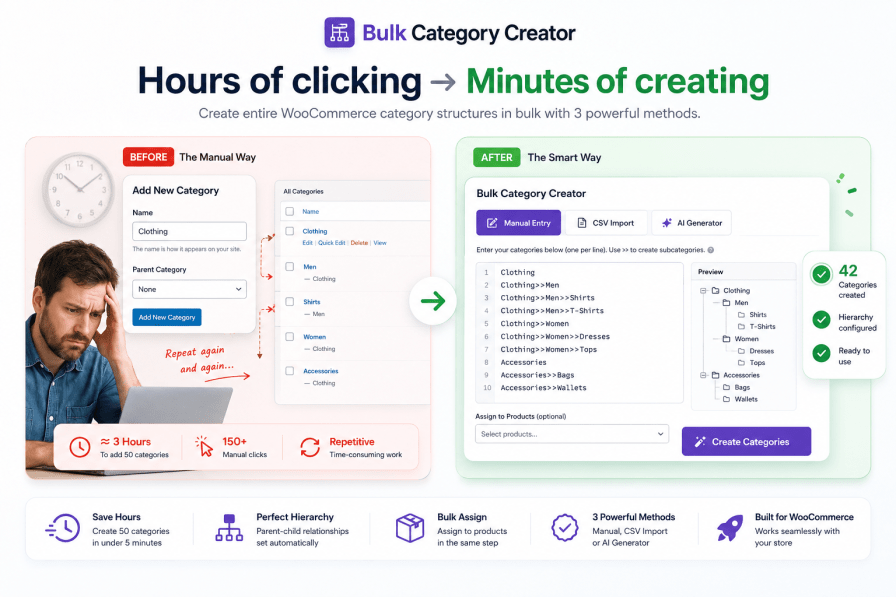
Most store owners don’t realise how much time category setup actually takes — until they’re three hours in and still only halfway done.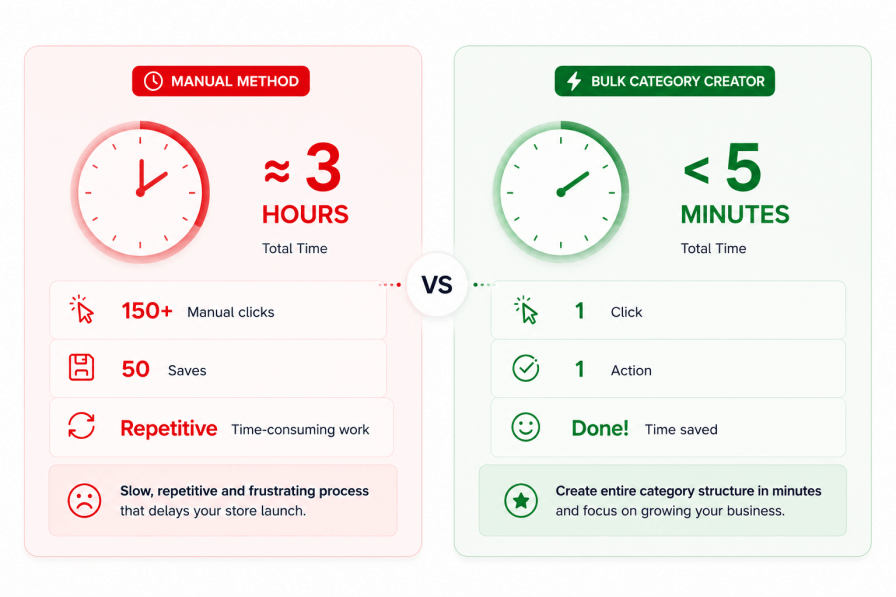
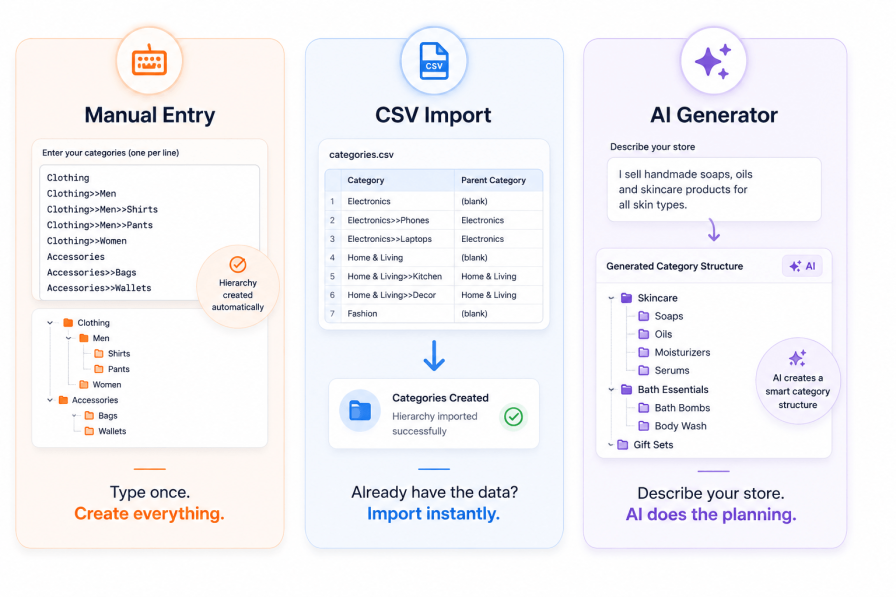
Unlike other WooCommerce category tools that offer only one method, Bulk Category Creator adapts to however you prefer to work. Whether you’re a hands-on store owner, a spreadsheet lover, or someone who’d rather just describe their store and let AI do the thinking — there’s a workflow for you. Plus, with the new Bulk Edit tab, you can manage and update existing categories just as fast as you created them.
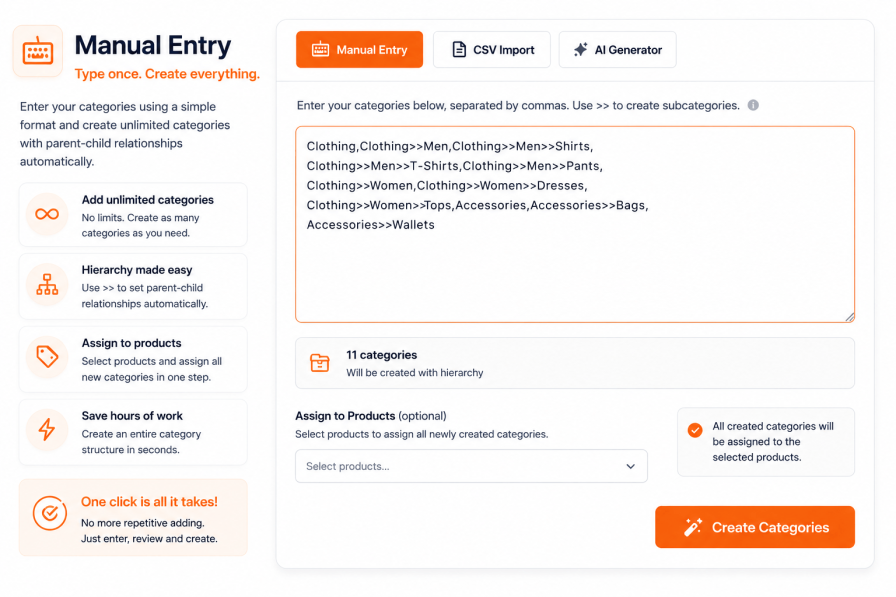
Already know your category structure? Type or paste all your categories at once using a simple hierarchy notation, hit Create, and they’re all done — with parent-child relationships set automatically.
Clothing>>Men>>ShirtsElectronics,Electronics>>Smartphones,Electronics>>Smartphones>>Android, Electronics>>Smartphones>>iOS,Electronics>>Laptops,Clothing, Clothing>>Men,Clothing>>Women,Clothing>>Kids
→ 9 perfectly structured categories, with correct parent-child relationships, created in one click.
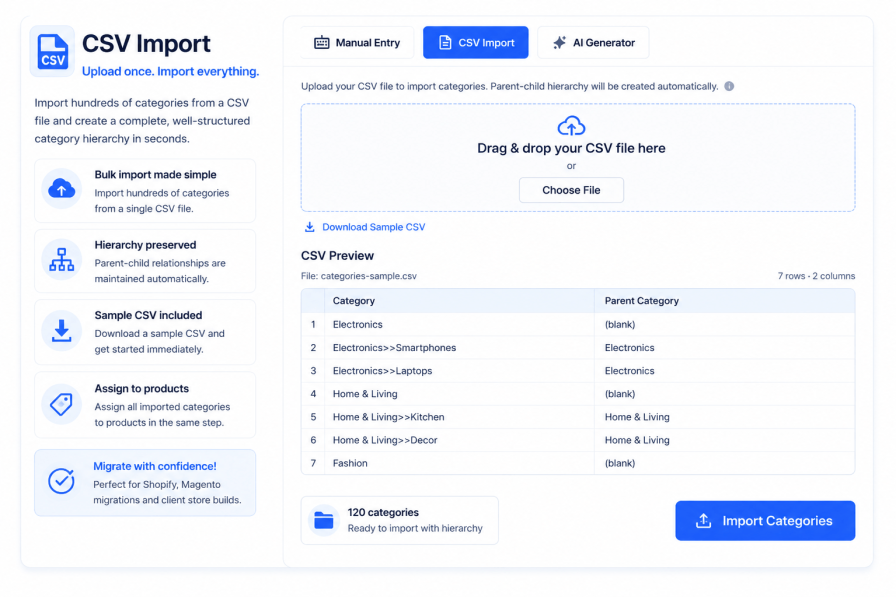
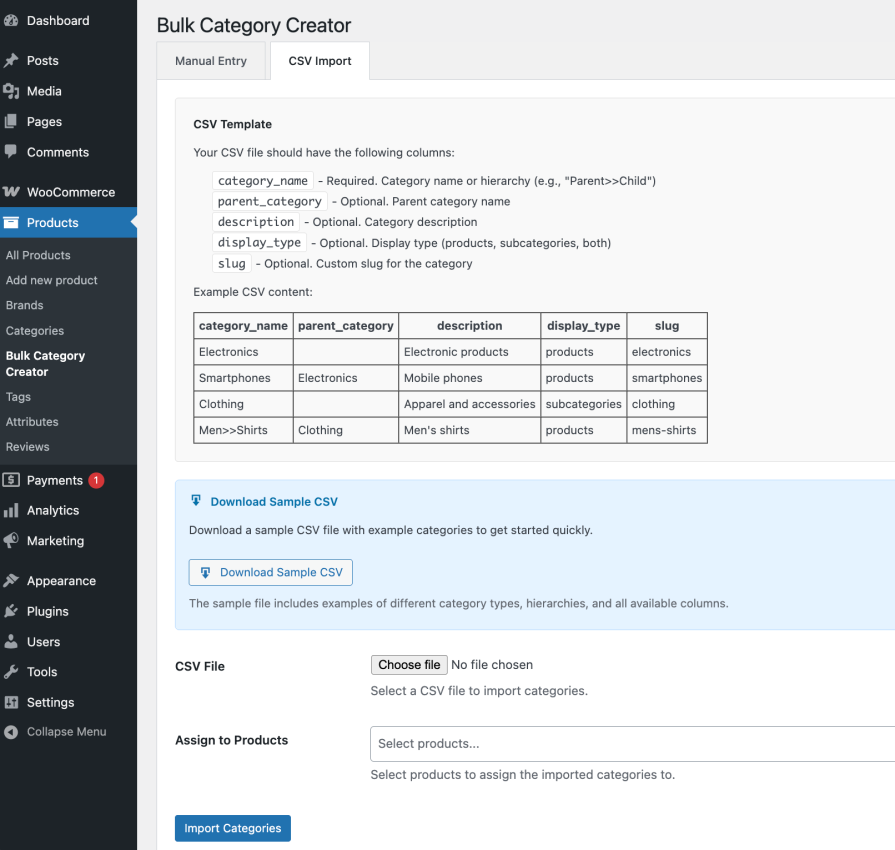
Already have your category structure in a spreadsheet — or migrating from another platform? Upload a CSV and your entire category tree is created instantly, with parent-child relationships preserved.
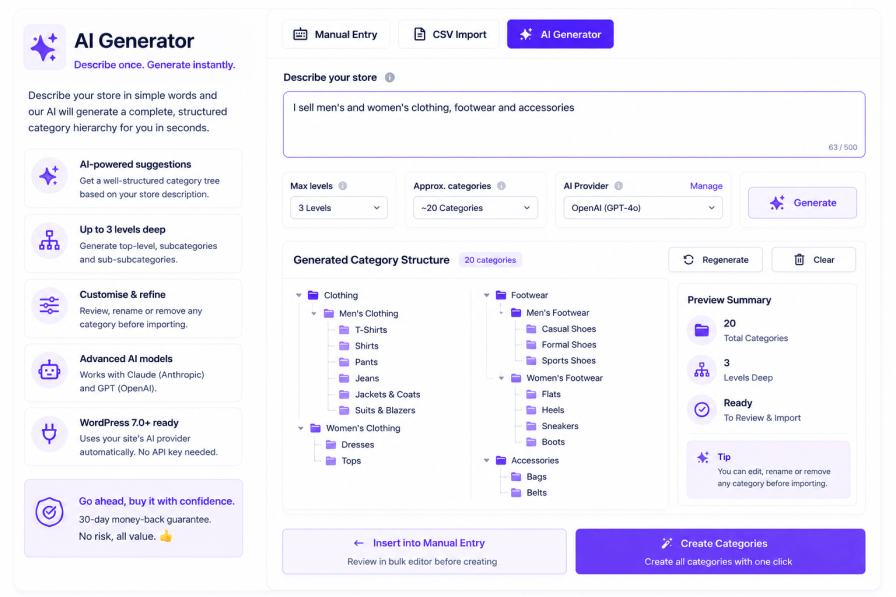
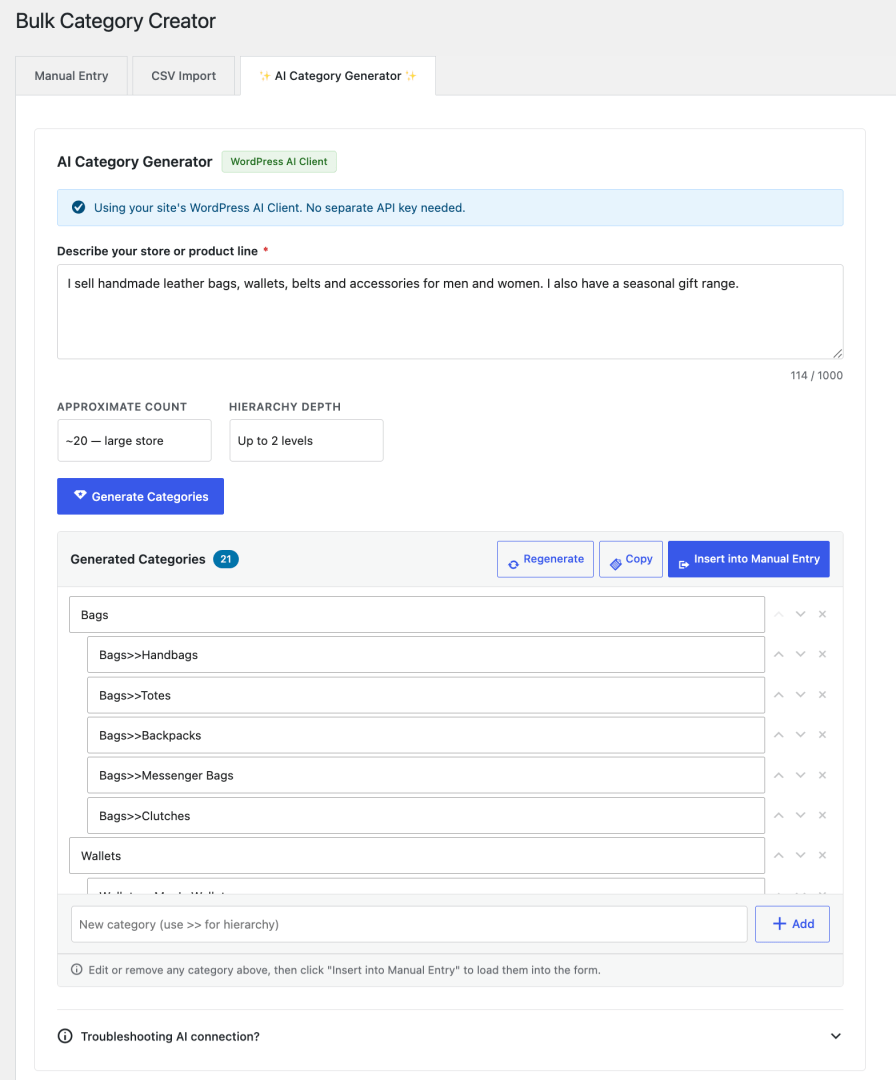
This is the feature no other WooCommerce category tool has. Instead of planning your category structure yourself, just describe your store in plain English — and the AI generates a complete, structured, ready-to-import category hierarchy in seconds.
| You type | AI generates |
|---|---|
| “I sell handmade leather bags, wallets, belts and accessories for men and women. I also have a seasonal gift range.” | Bags Bags>>Tote Bags Bags>>Shoulder Bags Bags>>Backpacks Wallets Wallets>>Men’s Wallets Wallets>>Women’s Wallets Belts Accessories Gifts>>Gift Sets Gifts>>Seasonal Collections |
Review the suggestions, edit anything you want to change, then click Insert into Manual Entry — and create them all in one click.
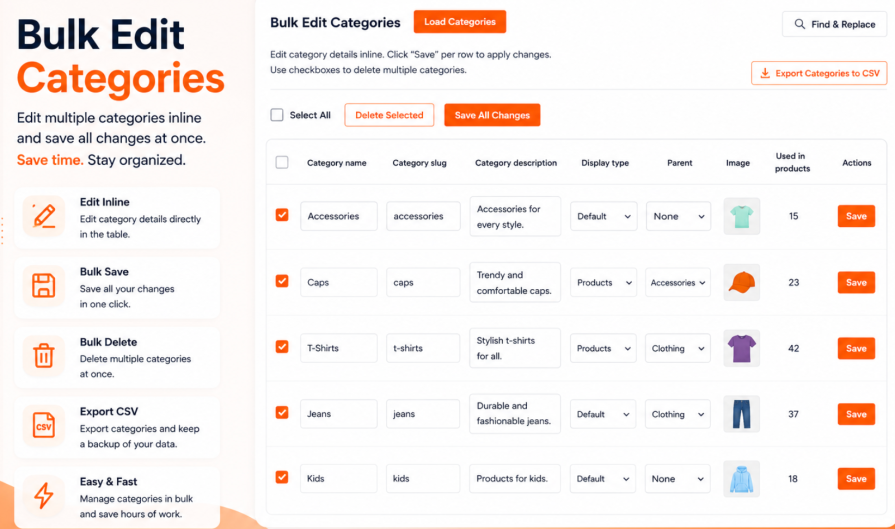
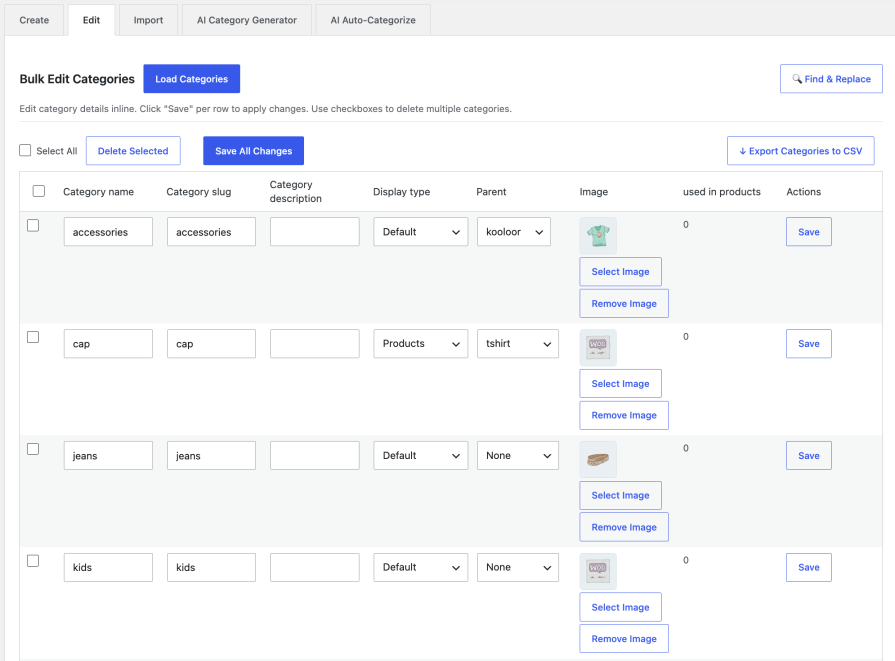
Creating categories is just the beginning. As your store grows, you’ll need to reorganise, rename, and refine your category structure. The new Bulk Edit tab puts complete control of your entire category tree at your fingertips — all from one powerful, inline-editing table.
Creating categories is only half the job. Normally, you’d then have to go through each product and manually assign it to the right categories. Bulk Category Creator eliminates that second step entirely.
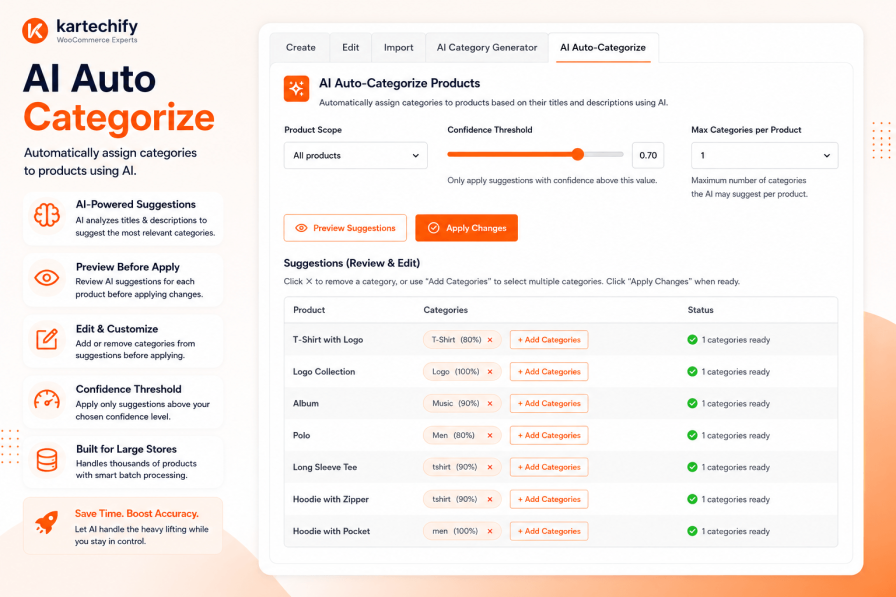
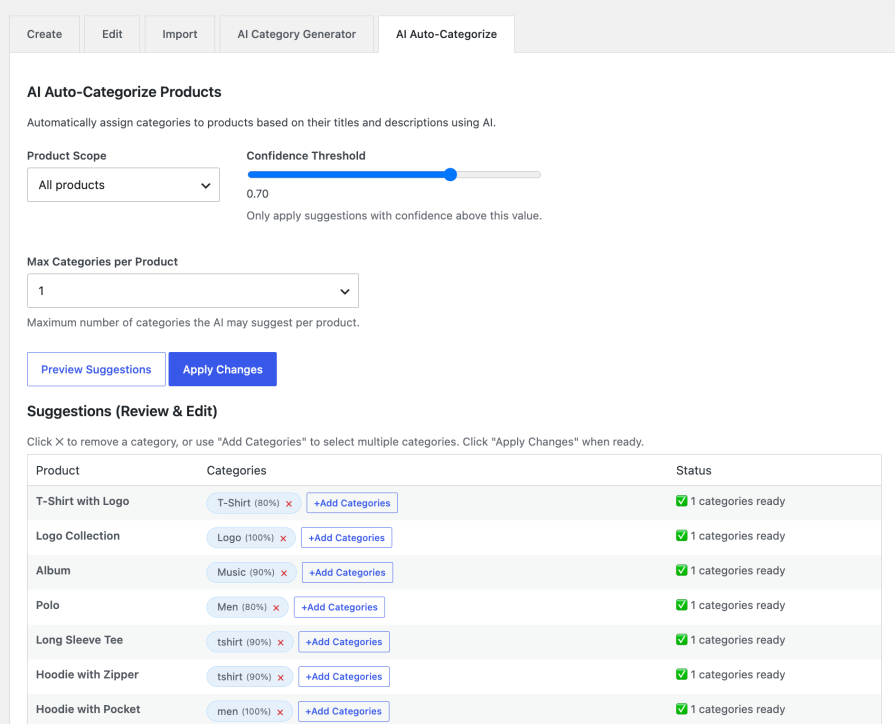
What if you never had to manually categorize a product again? AI Auto-Categorize is the game-changer that does exactly that. It analyses your product titles and descriptions, compares them against your existing category structure, and suggests — or automatically applies — the most relevant categories.
Here’s how different store owners use Bulk Category Creator from day one:
Bulk Category Creator is one of the first WooCommerce extensions to fully embrace the WordPress 7.0 AI stack. On stores running WordPress 7.0 or later with an AI provider configured:
For stores on WordPress 6.x and below, the AI Generator and Auto-Categorize work via a simple API key entered directly inside the plugin — no separate settings page, no complexity.
>> notation — up to 3 levels deepproduct_cat taxonomy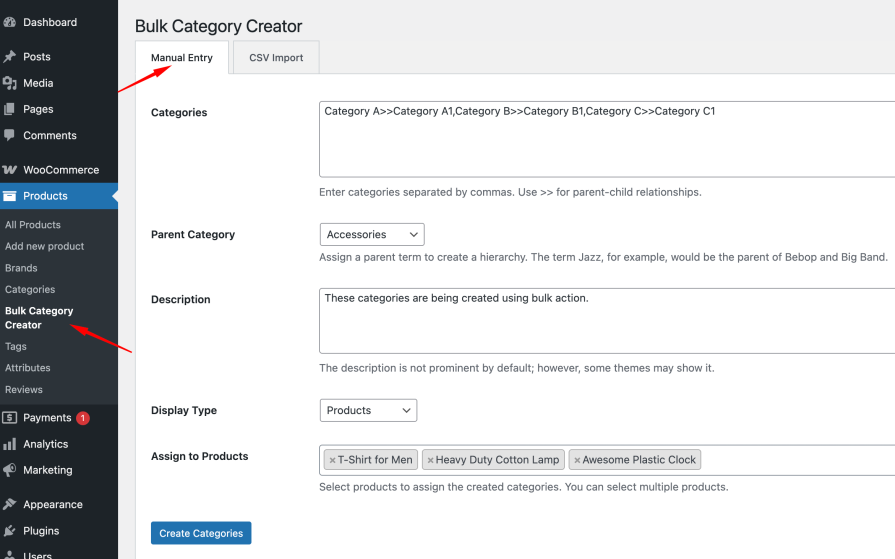
Every hour you spend manually adding product categories is an hour not spent on what actually grows your store — finding products, marketing to customers, and making sales.
Bulk Category Creator gives that time back. Whether you type, import, or let AI do the thinking — your entire category structure is done before your first coffee break.
Save hours of repetitive work by creating, organizing, and updating categories in bulk. Whether you’re launching a new store, expanding your catalog, migrating existing data, or managing a mature store, Bulk Category Creator helps you build and maintain a well-structured store faster and more efficiently.
Need another reason to choose us? Bulk Category Creator is developed by Kartechify, a trusted WooCommerce extension developer known for delivering reliable solutions backed by dedicated customer support.
Check out our other best-selling and popular plugins on WooCommerce.
For Manual Entry: Use the >> separator to create hierarchies. For example:
For CSV Import: Use the category_name column with >> separator, or use the parent_category column to specify the parent:
category_name,parent_category,description Electronics,,Electronic products Smartphones,Electronics,Mobile phones Android,Smartphones,Android devicesOr simply:
category_name,description Electronics>>Smartphones>>Android,Android mobile devicesYour CSV file should include these columns (only category_name is required):
Required:
Optional:
Example CSV:
category_name,parent_category,description,display_type,slug Electronics,,Electronic products,products,electronics Smartphones,Electronics,Mobile phones and accessories,products,smartphones Clothing,,Fashion and apparel,subcategories,clothing Men>>Shirts,Clothing,Men's shirts,products,mens-shirtsYou can download a sample CSV file from the plugin page to see the correct format.
Yes! Both methods support product assignment:
Manual Entry:
CSV Import:
Note: The plugin adds categories to products without removing their existing categories.
The plugin handles existing categories intelligently:
For Manual Entry:
For CSV Import:
Example: If "Electronics" already exists and you import "Electronics>>Tablets", the plugin will use the existing "Electronics" category and create only "Tablets" as its child.
This prevents duplicate categories and maintains your existing category structure.
Not necessarily. If your store is running WordPress 7.0 or later, the AI Category Generator automatically uses whichever AI provider you've already connected in your WordPress settings — no extra configuration needed inside the plugin. If you're on an earlier version of WordPress, you can simply enter an Anthropic Claude or OpenAI API key directly within the plugin's AI tab and you're good to go.
Categories
Extension information
Quality Checks
Countries






