
Every rule has an Offer Message — the text shoppers see describing the offer. Messages can contain placeholders in square brackets that PricePulse replaces with real values when the message is shown, so one message stays correct as the rule changes.
How Tokens Work
↑ Back to topType the token into the message exactly as written, including the square brackets. This message:
Get [discount_value] off on purchase of [category_name]
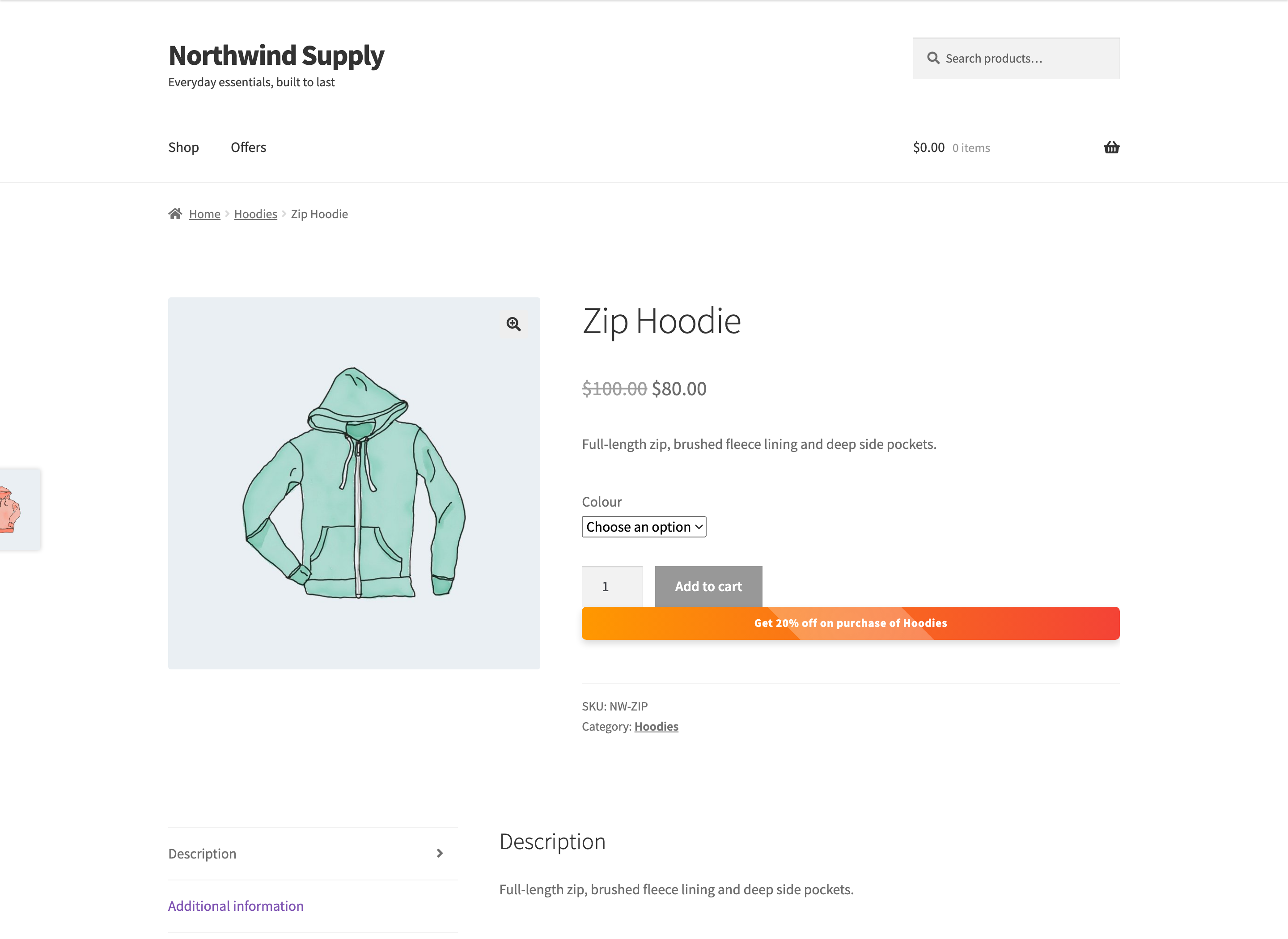
is shown to a customer as Get 20% off on purchase of Hoodies.
Each rule type supports its own set. The hint underneath the Offer Message field lists the ones available for the rule you are editing — that hint is the quickest answer, and this page is the full reference.
Two rule types have no Offer Message field at all: Tiered rule on Product and Tiered rule on Category. They are advertised by their table of quantity bands instead. See How to Set Up Bulk and Tiered Quantity Discounts.
A token that a rule type does not support is left in place, brackets and all. If a shopper reports seeing something like “[user]” in your shop, an unsupported token in an offer message is the cause.
Tokens Available to Every Rule
↑ Back to top- [discount_value] – the discount. Shown as a percentage for percentage rules, and with your currency symbol for fixed and flat ones.
- [max_discount] – the rule’s Maximum Discount, printed as an amount of money. It prints nothing at all when the rule has no ceiling.
- [from] – the rule’s start date.
- [to] – the rule’s end date.
The date tokens produce nothing useful on a rule with no dates set, so leave them out of an open-ended offer.
Advertising a Capped Discount
↑ Back to top[discount_value] prints the rate you configured, not the saving a particular shopper gets. On a rule with a Maximum Discount, an expensive product can hit the ceiling and save less than the advertised rate — a 10% rule capped at $5 takes only $5 off a $100 product, not $10.
Where that can happen, say so in the message using both tokens:
Get [discount_value] off, up to [max_discount]
A shopper reads Get 10% off, up to $5.00. On a rule with no ceiling the second token prints nothing, so the same sentence reads Get 10% off, up to — which is why it is worth writing the cap into the sentence only on rules that actually have one.
Tokens for Product, Category, Tag and Attribute Rules
↑ Back to top- [product_name] – the product’s title. Available to Specific Product, Specific Product Variation, Multiple Products, All Products and Nth Order Reward rules.
- [category_name] – the category name. Available to Specific Category and Multiple Categories rules.
- [product_tag] – the tag name. Specific Tag rules only.
- [attr_slug] – the attribute value, such as Blue. Product Attribute rules only.
Tokens for Payment and Shipping Rules
↑ Back to top- [payment_method] – the payment method’s name. Payment discount rules only.
- [shipping_method] – the shipping method’s name. Shipping discount rules only.
- [shipping_zone] – the shipping zone’s name. Shipping discount rules only.
Tokens for Customer Rules
↑ Back to top- [user] – the customer’s name. Specific Customer and Plus Member rules only.
Tokens for BOGO Rules
↑ Back to topBuy One Get One rules have their own set, because the offer has two halves:
- [quantity1] – how many must be bought.
- [the-product] – the qualifying product.
- [quantity2] – how many are given free.
- [free-product] – the free product.
- [category] – the category, when the offer is built on one rather than a named product.
The default message reads Buy [quantity1] [the-product] Get [quantity2] [free-product] free, which becomes something like Buy 2 Classic Tee Get 1 Baseball Cap free.
Tokens on the Offers Page
↑ Back to topThe offers page uses the same messages, but understands a smaller set of tokens than the cart and product pages do.
These are not replaced on the offers page and will be shown to shoppers exactly as typed: [from], [to], [shipping_zone], [user] and [category].
If you use the offers page, keep those five out of your offer messages. The safe ones everywhere are [discount_value], [product_name], [category_name], [product_tag], [attr_slug], [payment_method], [shipping_method], and the BOGO quantity and product tokens.
Dates are the usual trap. A message such as Get 20% off from [from] to [to] reads perfectly in the cart and badly on the offers page. Writing the dates out yourself, or leaving them to the offer’s schedule, avoids it.
Writing Good Offer Messages
↑ Back to top- Say what the shopper gets, not how the rule works. “Save 20% on all hoodies” beats “Category discount active”.
- Use tokens for anything you might change later, so editing the discount does not leave the message wrong.
- Keep it to one line. Messages appear in narrow places, including offer cards and cart tables.
- Check the result on the storefront after publishing. It is the fastest way to catch a token that did not resolve.

