
Overview
↑ Back to topCustomers with an account on your store can use the My account page to view orders and downloads, manage addresses and saved payment methods, and update their account details.
The sections available on this page can vary depending on your theme and any extensions installed on the store.
Dashboard
↑ Back to topCustomers who visit the My account page while logged out see a login form. If account registration is enabled under WooCommerce > Settings > Accounts & Privacy, they can also create an account from this page.
After logging in, customers see the account dashboard and its navigation menu. WooCommerce includes the following sections by default:
- Orders
- Downloads
- Addresses
- Payment methods
- Account details
- Log out
Temporary passwords and the Resend action
↑ Back to topWhen WooCommerce generates a password for a new customer and sends a password setup link, the account uses a temporary password until the customer sets their own password. Logged-in customers see a reminder in the Dashboard and Account details sections.
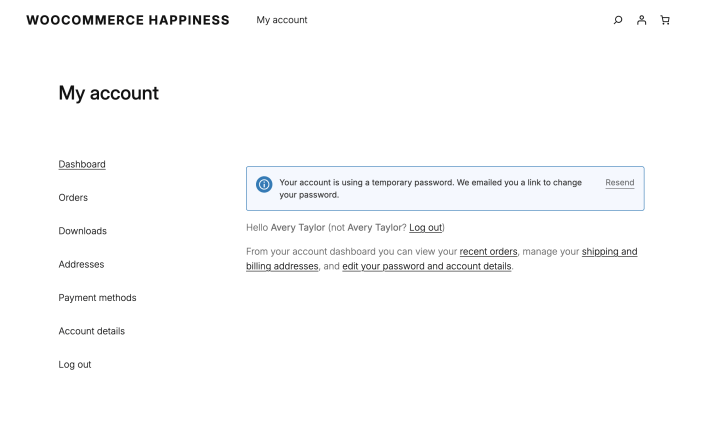
If the original email is missing or its link has expired, the customer can select Resend. WooCommerce sends a password-reset email with a fresh link to the address on the account and confirms that the email was sent.
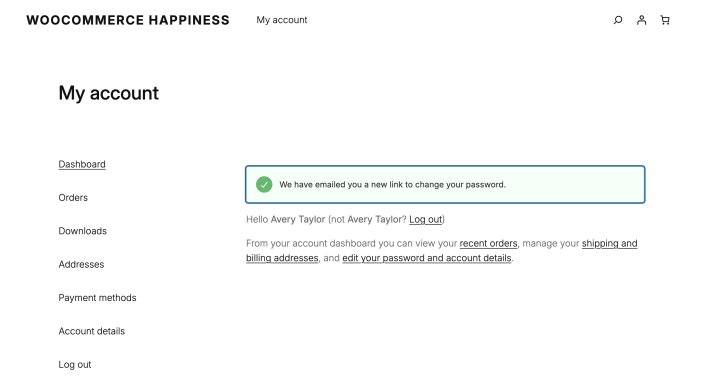
To prevent repeated emails, customers can request one new link per minute. The reminder returns after that minute if the customer has not yet set a new password. Once they set a password, the notice no longer appears.
Orders
↑ Back to topThe Orders section lists the customer’s order history, including each order’s number, date, status, total, and available actions. Customers can select an order number or View to open its details.
Confirm an email address and link guest orders
↑ Back to topAn unconfirmed customer can request a one-time confirmation link from the Orders section. After confirming their email address, matching past guest orders appear in the account. Learn more in Customer email confirmation and guest order linking.
Pay or cancel an order
↑ Back to topOrders that still need payment include a Pay action. It opens a simplified checkout page where the customer can complete payment.
Orders with a Pending payment or Failed status can also include a Cancel action. Canceling the order is immediate and cannot be undone from the account page.
Order again
↑ Back to topThe detail page for a completed order includes an Order again action. Selecting it adds the available items from that order to the cart and sends the customer to the cart, where they can make changes or continue to checkout.
Request an order withdrawal
↑ Back to topIf you’ve enabled Order Withdrawal and linked to it from your site (for example, in your footer or order emails), customers can submit a withdrawal request for an eligible order. Learn more in Customer Order Withdrawal.
Downloads
↑ Back to topThe Downloads section lists downloadable products the customer has purchased. It shows the product name, downloads remaining, expiry date, and a link to download each file.
Addresses
↑ Back to topCustomers can add or update their billing and shipping addresses in the Addresses section. These addresses are used at checkout but do not change the customer’s name or email address under Account details.
Payment methods
↑ Back to topThe Payment methods section lists saved payment methods when the store uses a payment gateway that supports saved payment methods. Depending on the gateway, customers may be able to add or remove a method and choose a default.
Note: The number of saved payment methods shown on this page uses the Blog pages show at most value under Settings > Reading in WP Admin.
Account details
↑ Back to topCustomers can update their first name, last name, display name, email address, and password under Account details. The display name is shown in the account area and in product reviews.
Log out
↑ Back to topSelecting Log out ends the customer’s session and returns them to the logged-out My account page.
Questions and support
↑ Back to topDo you still have questions and need assistance?
This documentation is about the free, core WooCommerce plugin, for which support is provided in our community forums on WordPress.org. By searching this forum, you’ll often find that your question has been asked and answered before.
If you haven’t created a WordPress.org account to use the forums, here’s how.
- If you’re looking to extend the core functionality shown here, we recommend reviewing available extensions in the WooCommerce Marketplace.
- Need ongoing advanced support or a customization built for WooCommerce? Hire a Woo Agency Partner.
- Are you a developer building your own WooCommerce integration or extension? Check our Developer Resources.
If you weren’t able to find the information you need, please use the feedback thumbs below to let us know.