
With WooCommerce Subscriptions active, customers can pay their renewals from their Elite Balance wallet. This page explains the two ways that works, what customers and staff see, what happens when a balance is too low, and the email that warns customers before a renewal their wallet will not cover.
What you need
↑ Back to top- WooCommerce Subscriptions 7.7 or later, active. Without it, nothing on this page appears and nothing else in Elite Balance changes.
- The Wallet balance payment method enabled under WooCommerce > Settings > Payments > Elite Balance Wallet. See Checkout and Wallet Payments.
- A customer account. Guest subscriptions cannot renew from a wallet.
- The subscription in your store currency. A subscription in another currency cannot renew from the wallet.
Two ways the wallet pays renewals
↑ Back to top| Paid from the wallet | Wallet first for renewals | |
|---|---|---|
| What it is | The subscription’s payment method is Wallet balance. Every renewal is charged to the wallet in full. | The subscription stays on the customer’s card. At each renewal, the wallet pays what it can and the card pays the rest. |
| Who turns it on | The customer chooses the Wallet balance payment method, at checkout or later. Staff can also set it (see What staff can do). | You allow it once for the store. Then each customer turns it on per subscription from My Account. Only the customer can turn it on. |
| When the balance is too low | The renewal fails and nothing is taken from the wallet. WooCommerce Subscriptions takes over as for any failed payment. | The wallet pays what is available and the card pays the rest. If the wallet is empty, the card pays it all. |
| Store setting | None. It is available whenever the Wallet balance payment method is enabled. | Wallet first for renewals, off by default. |
| Low-balance email | Yes, a few days before a renewal the balance will not cover. | No. The card pays whatever the wallet does not. |
Set up
↑ Back to top- Make sure WooCommerce Subscriptions is active and the Wallet balance payment method is enabled.
- Go to WooCommerce > Settings > Elite Balance > General. A Subscriptions section appears while WooCommerce Subscriptions is active.
- To let customers use Wallet first for renewals, tick Let customers pay renewals from their wallet balance first, with their card paying the rest and click Save changes. Leave it unticked if you only want subscriptions paid fully from the wallet.
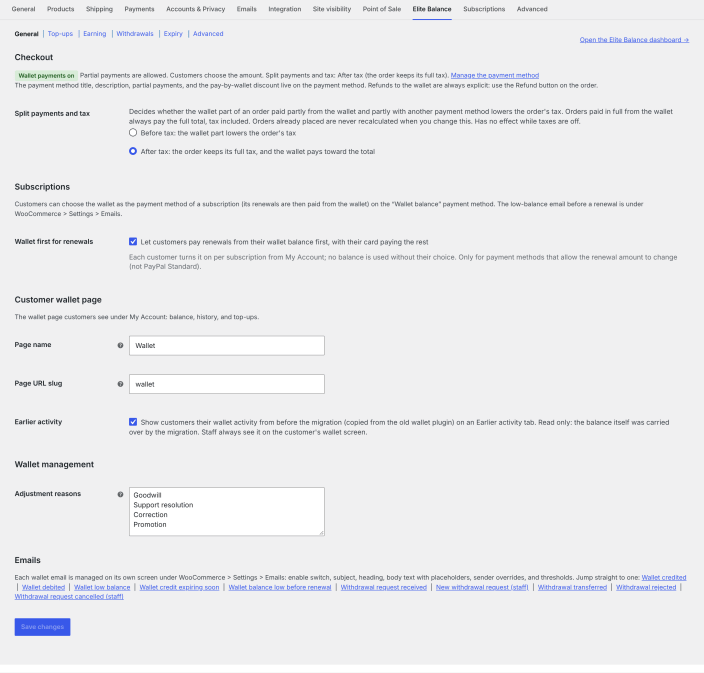
Ticking the setting moves no money by itself. No balance is used until a customer turns wallet first on for one of their subscriptions.
How customers put a subscription on the wallet
↑ Back to topAt checkout
↑ Back to topWhen a customer buys a subscription, Wallet balance is offered like any other payment method. With a subscription in the cart, its description adds “Renewals will be paid from your wallet balance.”
- When there is something to pay today, Wallet balance is offered only when the customer’s available balance covers the whole order, as for any order.
- When the total today is zero (a free trial, or a sign-up with nothing to pay now), Wallet balance is offered even with an empty wallet. The description then adds “Add funds before” the first renewal date. Only the renewals use the wallet.
- A trial with a sign-up fee follows the normal rule: the balance has to cover the fee.
Note: Ticking Use my wallet balance at checkout (a split payment) is different. It only pays toward that first order. It does not put the renewals on the wallet.
Later, from My Account
↑ Back to topOn My Account > Subscriptions, the customer opens the subscription, clicks Change payment and picks Wallet balance. Changing the payment method charges nothing. When the balance does not cover the next renewal yet, the description says to add funds before the next payment date.
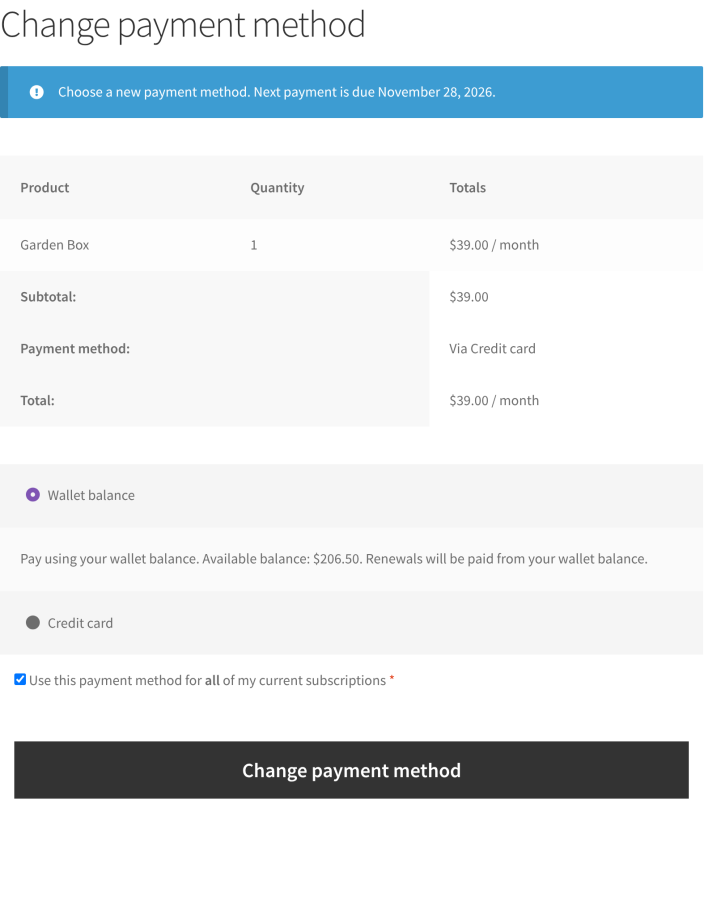
Wallet first for renewals
↑ Back to topOnce the store setting is on, customers see a Wallet balance box on the page of each eligible subscription in My Account > Subscriptions. They tick Use my wallet balance first for renewals (your card pays the rest) and click Save. The box shows the balance available now and says that each renewal uses what is available on the day it renews.
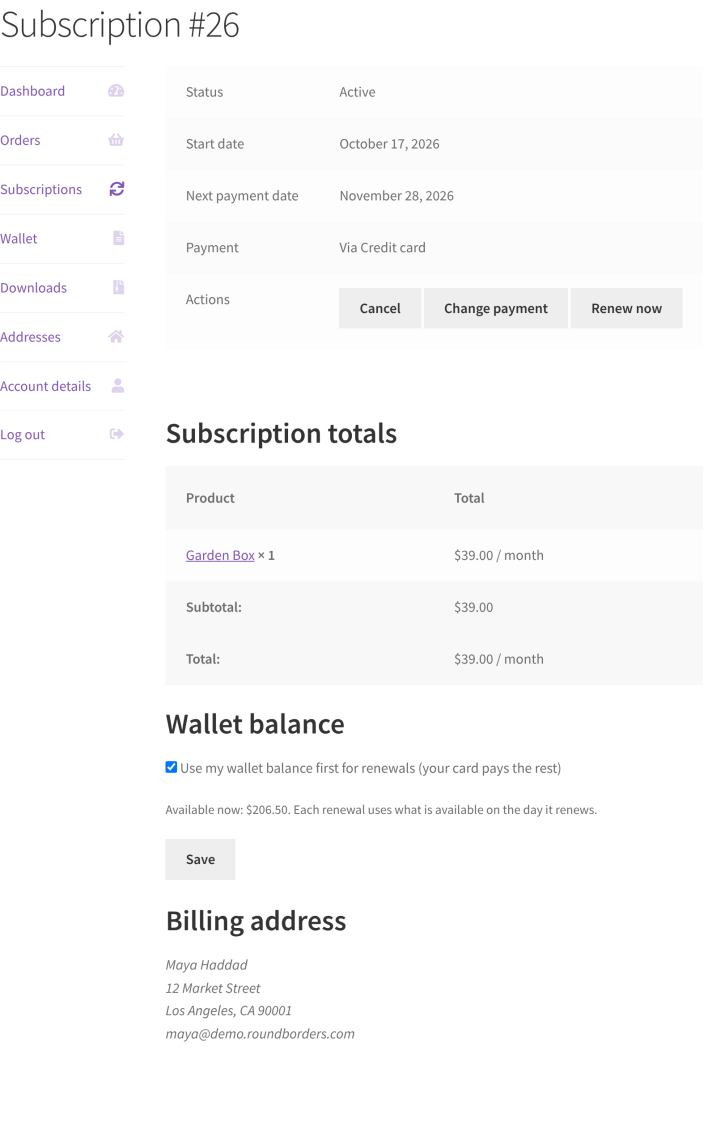
The box appears only when all of these are true:
- the store setting Wallet first for renewals is on;
- the subscription renews automatically (not a manual renewal);
- it is paid with a payment method other than Wallet balance;
- that payment method allows the amount of a renewal to change. Each payment method says so itself; WooPayments and Stripe saved cards do. PayPal Standard does not, so wallet first is not offered for it;
- the subscription belongs to a customer account and is in your store currency.
What happens at a wallet-first renewal
↑ Back to top- When the renewal order is created, the wallet part is added to it as a Wallet payment line and reserved in the wallet (a hold). The wallet part is the available balance, at most the renewal total.
- The card is charged only the rest.
- When the card payment succeeds, the reserved wallet part is taken from the wallet.
- If the card is declined, the renewal fails and the reservation is released. Nothing is taken from the wallet.
Before each new attempt to pay a failed renewal, the wallet part is worked out again. It is kept if the balance still covers it, lowered to what is available, or removed if the wallet is empty. It is never raised, even if the customer added funds since. This applies to WooCommerce Subscriptions’ automatic retries, to Retry Renewal Payment in the admin, and to the customer paying the failed renewal from My Account. If the amount changed when the customer pays it, payment stops with “Your wallet balance changed since this renewal was created, so the amount left to pay changed too. Please check it and pay again.”
Note: Renew now (an early renewal) does not use wallet first: the card is charged the full amount. If the early renewal goes through the checkout, the customer can tick Use my wallet balance there to pay part of it from the wallet. Scheduled renewals and their retries still use the wallet first.
Renewals paid from the wallet
↑ Back to topWhen a renewal is paid from the wallet, the wallet is charged the full renewal or nothing. It is never charged part of a renewal, and the balance never goes below zero.
- The balance covers it: the renewal is paid, the order note says the renewal was paid from the wallet with the new balance, and the customer’s wallet history shows an Order payment for the renewal order.
- The balance does not cover it: nothing is taken. The renewal order is set to Failed with a note such as “Elite Balance: the renewal could not be paid from the wallet: the wallet balance ($45.00 available) does not cover $59.00.” WooCommerce Subscriptions then puts the subscription on hold, sends its usual failed-renewal emails and applies its retry rules if you use them.
Retries
↑ Back to topElite Balance does not depend on WooCommerce Subscriptions’ automatic retries.
- Retries off (the WooCommerce Subscriptions default): the renewal stays Failed and the subscription stays On hold until the renewal is paid. The customer pays it from My Account with the Pay button, with Wallet balance once the balance covers it, or with another payment method. Staff can also use Retry Renewal Payment on the subscription.
- Retries on: each retry tries the wallet again, for the full amount.
The same renewal never charges twice
↑ Back to topEach renewal order can only be charged to the wallet once. If WooCommerce Subscriptions runs the same scheduled payment twice, the second run finds the renewal already paid and does nothing.
Upcoming renewals on the wallet page
↑ Back to topThe customer’s wallet page in My Account lists their upcoming renewals that use the wallet, both those paid from the wallet and those with wallet first: the subscription, the next payment date, the amount and how much of it comes from the wallet, with a line that says what will happen:
| Line | Meaning |
|---|---|
| Your wallet balance covers it. | The balance available by that date pays the renewal (or, with wallet first, all of it). |
| Add (amount) to your wallet before this date. | A renewal paid from the wallet that the balance will not cover. |
| Your wallet pays (amount) and your card (amount). | Wallet first, with the balance covering part of it. |
| Your card pays it (no wallet balance). | Wallet first, with nothing available in the wallet. |
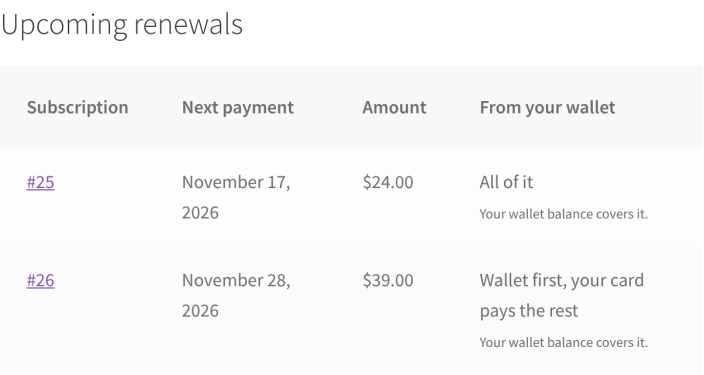
When store credit expiry is on, credit that will expire before a renewal date is not counted toward that renewal.
The low-balance email before a renewal
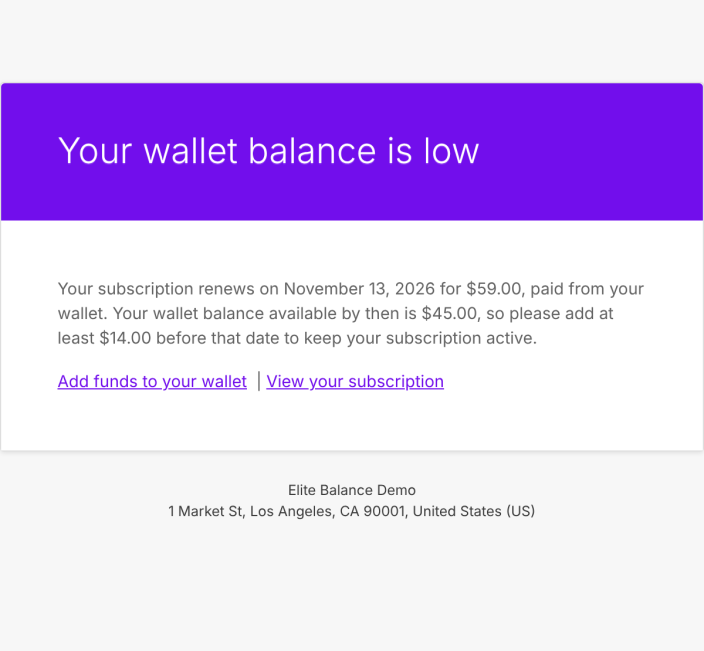
↑ Back to topThe Wallet balance low before renewal email warns a customer a few days before a renewal their wallet will not cover.
- Find it under WooCommerce > Settings > Emails > Wallet balance low before renewal. It is on by default.
- Days before sets how early it goes out: 3 days by default.
- It is only for subscriptions paid fully from the wallet. Wallet-first subscriptions never get it, because the card pays whatever the wallet does not.
- A daily check sends it once per subscription and renewal date.
- The balance it uses is the balance available by the renewal date, leaving out credit that will expire before then.
The default subject is “Add funds to your wallet before your {site_title} renewal”. The email gives the renewal date and amount, the balance available by then and how much to add, with links to add funds and to the subscription. See Wallet Emails to change it.
What staff can do
↑ Back to topSee what a subscription uses
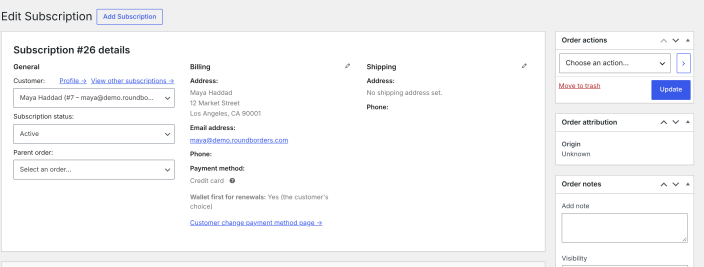
↑ Back to topOn a subscription’s edit screen in WooCommerce > Subscriptions, the billing details show Wallet first for renewals: Yes (the customer’s choice), No, or Not available for this payment method. Staff cannot turn wallet first on for a customer: it is only ever the customer’s choice, made in My Account.
Put a subscription on the wallet
↑ Back to topStaff can set a subscription’s payment method to Wallet balance on its edit screen. The same rules as for adjusting a wallet apply:
- Administrators can do it for any customer.
- Other staff, such as shop managers, can do it only for customers who are not administrators, and not for their own subscriptions. Otherwise the previous payment method stays and they are told why.
- Automatic processes with nobody signed in (scheduled tasks, or WP-CLI without
--user) cannot put a subscription on the wallet.
A subscription renews from a wallet only when its customer chose the wallet, or a staff member allowed to adjust that customer’s wallet set it. Otherwise nothing is taken from the wallet and the renewal fails, with a note on the renewal and on the subscription.
Change a subscription’s customer
↑ Back to topGiving a subscription to another customer turns paying its renewals from the wallet off. The new customer can choose the wallet in My Account. A wallet part reserved for the earlier customer is never reserved in or taken from the new customer’s wallet: the renewal gets a note so staff can collect it by hand.
Cashback on renewals
↑ Back to topA renewal is an order, so your order cashback rules apply to it when it is paid. Each cashback rule has Count the part paid from the wallet, ticked by default. When it is unticked, the part paid from the wallet earns nothing from that rule, so a renewal paid fully from the wallet earns nothing from it. See Earning Rules and Cashback.
Switches, resubscribes and deactivating
↑ Back to top- Switching and resubscribing go through the normal checkout, where Wallet balance or a split wallet payment work as for any order. A resubscribe never carries an old wallet part over.
- A subscription bought partly with wallet credit does not carry that wallet payment into its renewals: each renewal is charged at its full price to the subscription’s payment method. Subscriptions bought that way with an earlier version of Elite Balance keep their wallet part, but it is reserved when each renewal is created, lowered or removed when the wallet is short, and never collected twice.
- If WooCommerce Subscriptions is deactivated, wallet subscriptions become manual renewals, as WooCommerce Subscriptions does for any payment method. Elite Balance keeps the wallets and their history.
Questions
↑ Back to topCan a customer start a free trial with an empty wallet and pay renewals from the wallet? Yes. When there is nothing to pay today, Wallet balance is offered with an empty wallet, and the checkout tells the customer to add funds before the first renewal.
Does the customer get WooCommerce Subscriptions’ emails when a wallet renewal fails? Yes. A failed wallet renewal is a normal failed renewal, so WooCommerce Subscriptions sends its usual emails. Elite Balance’s own low-balance email goes out a few days before, to help avoid the failure.
Can I see which renewals were paid from wallets? Each paid renewal is an Order payment in the wallet history and on the Transactions tab, with the renewal order linked. The Reports tab counts them with the other order payments.