
This page explains earning rules: automatic wallet rewards for paid orders (cashback), top-ups, new accounts, product reviews and birthdays. It covers every rule field, when rewards are pending and when they become spendable, how refunds take cashback back, and how to switch rules on and off. It is for store owners and shop managers who run reward campaigns.
How earning works
↑ Back to topEach earning rule watches for one moment (its trigger) and credits the customer’s wallet when that moment happens and the rule’s conditions match. Every reward is an ordinary wallet transaction with a note written for the customer, such as “Cashback on order #123”. A reward can never be paid twice for the same event, however many times a payment notification or status change repeats.
Rules are never retroactive. A rule only acts on events that happen after it was enabled. See Never retroactive.
Turning earning on and off
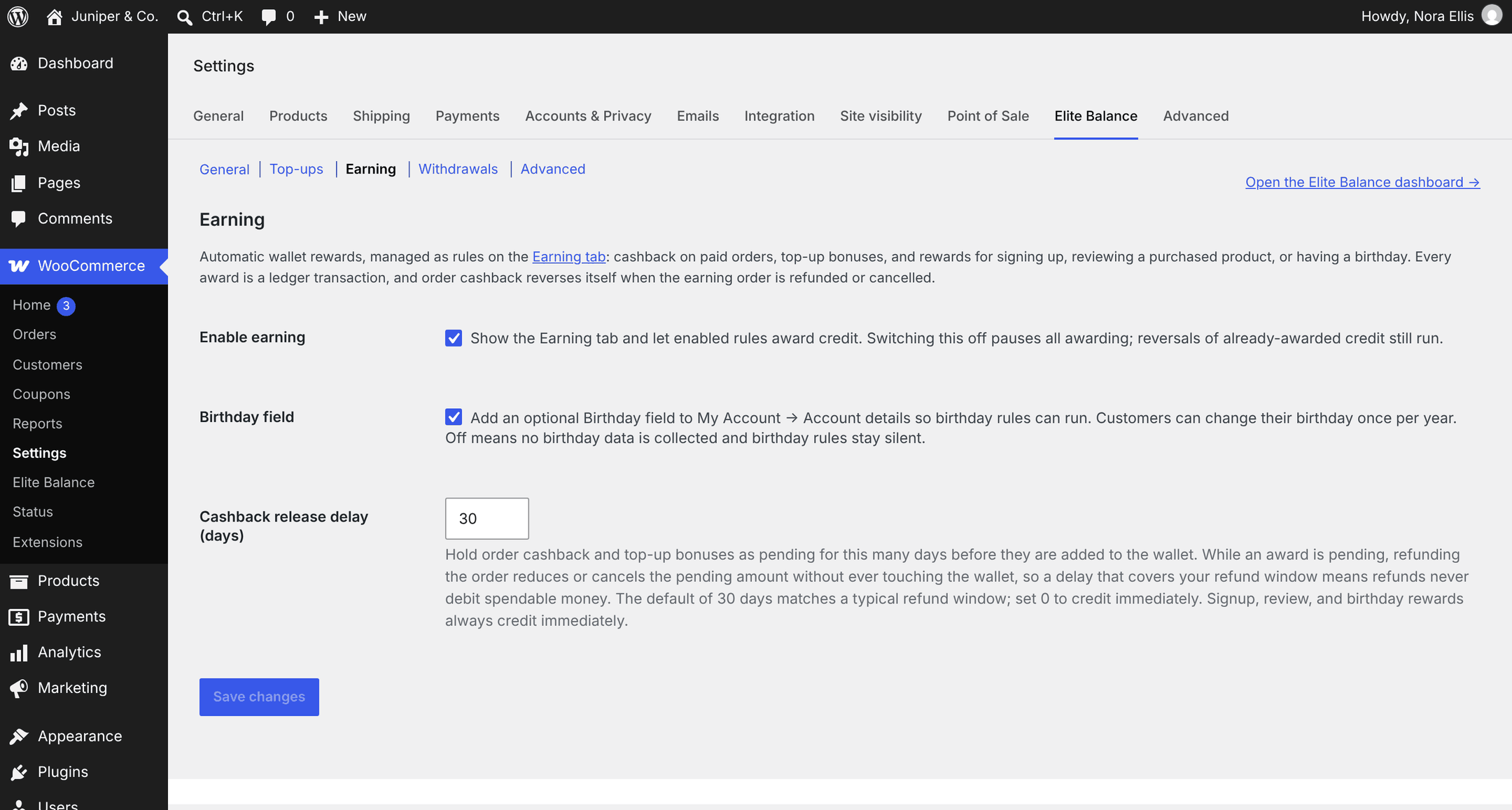
↑ Back to topThe earning settings are on WooCommerce > Settings > Elite Balance > Earning.
| Setting | Default | What it does |
|---|---|---|
| Enable earning | On | Shows the Earning tab and lets enabled rules award credit. Switching it off pauses all awarding. Reversals of credit already awarded still run, and pending rewards are still added when their date comes. |
| Birthday field | Off | Adds an optional Birthday field to My Account > Account details, so birthday rules can run. Off means no birthday data is collected and birthday rules stay silent. See The birthday field. |
| Cashback release delay (days) | 30 | How many days order cashback and top-up bonuses stay pending before they are added to the wallet. From 0 to 90. Set 0 to credit at once. Signup, review and birthday rewards always credit at once. See Pending rewards and the release delay. |
The Earning tab under WooCommerce > Elite Balance shows while earning is on, or while any rule exists. So after you switch earning off, your rules and their history stay reachable, with the notice “Earning is switched off in the settings. The rules below are kept, but nothing awards while it is off; reversals of already-awarded credit still run.”
The Earning tab
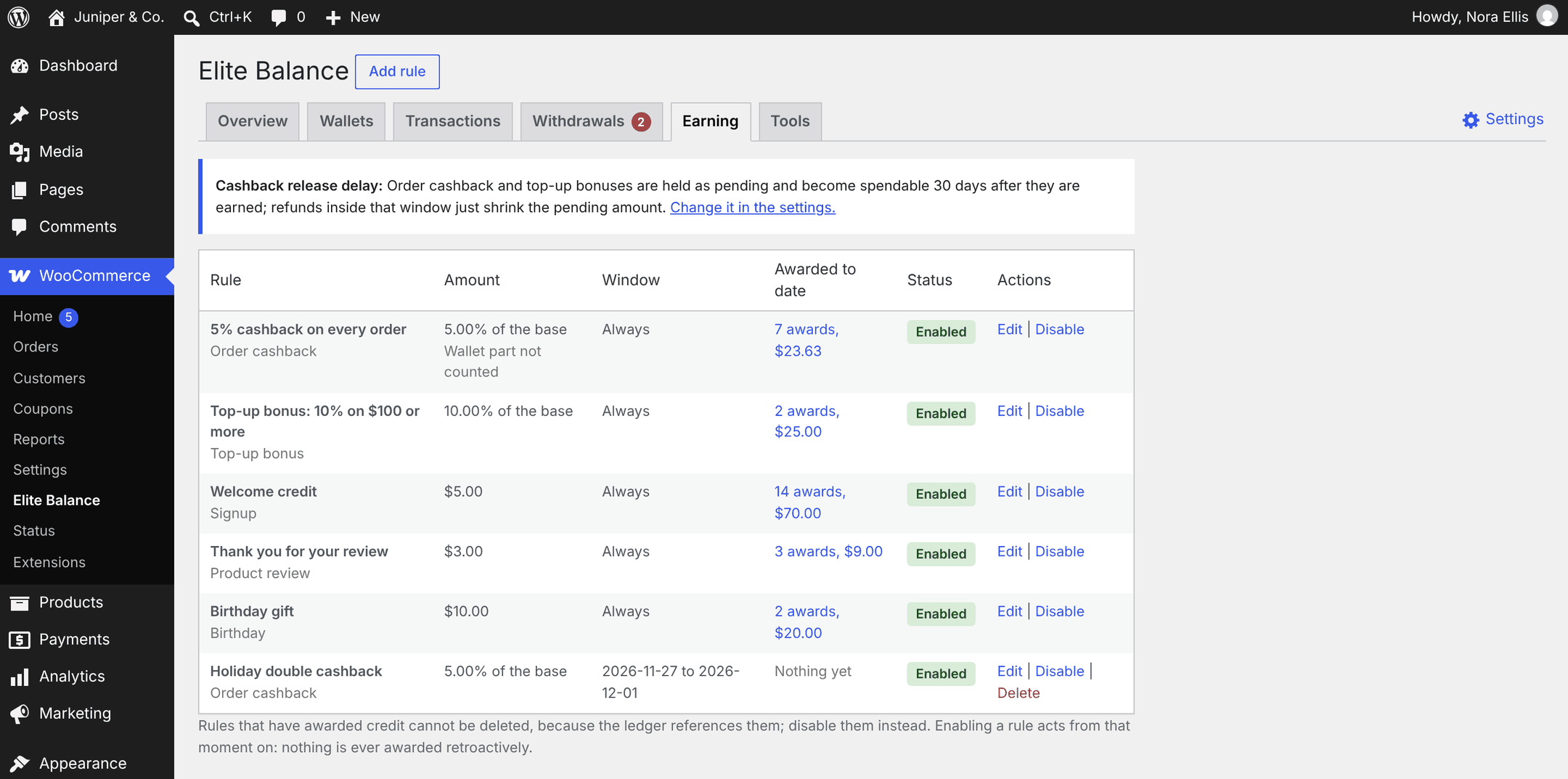
↑ Back to topOpen WooCommerce > Elite Balance > Earning. From top to bottom it shows:
- Cashback release delay: a line stating the delay in effect, with a Change it in the settings. link.
- Reversals that could not fully recover: only when a reversal fell short (see Reversals).
- A warning when a birthday rule is enabled but the Birthday field setting is off.
- The rules list.
The rules list has these columns:
| Column | Shows |
|---|---|
| Rule | The rule’s label, with the trigger under it (Order cashback, Top-up bonus, Signup, Product review or Birthday). |
| Amount | A fixed amount such as $5.00, or a percentage such as “5.00% of the base”. Order cashback rules that leave out the wallet-paid part also show Wallet part not counted. |
| Window | Always, “From 2026-11-27”, “Until 2026-12-01”, or “2026-11-27 to 2026-12-01”. |
| Awarded to date | The number of awards and their total, for example “7 awards, $23.63”, linked to the Transactions tab filtered to this rule. Nothing yet when the rule has not awarded. |
| Status | Enabled or Disabled. |
| Actions | Edit, Disable or Enable, and Delete for rules that never awarded. |
Creating a rule
↑ Back to top- Go to WooCommerce > Elite Balance > Earning and click Add rule next to the page heading. (The Overview tab also has an Add an earning rule quick action. When no rule exists yet, the form is already open.)
- Enter a Label.
- Choose the Trigger. The form then shows only the fields that apply to that trigger.
- Set the Amount, then any conditions, the campaign window and the behavior options described below.
- Click Add rule. When editing, the button is Save changes.
You see “The earning rule was saved.” If something is wrong, you see “The earning rule was not saved.” with the reason, for example “Every earning rule needs a label.”, “A percentage cannot exceed 100.”, “Campaign window dates must be real dates in YYYY-MM-DD form.” or “The campaign window cannot end before it starts.”
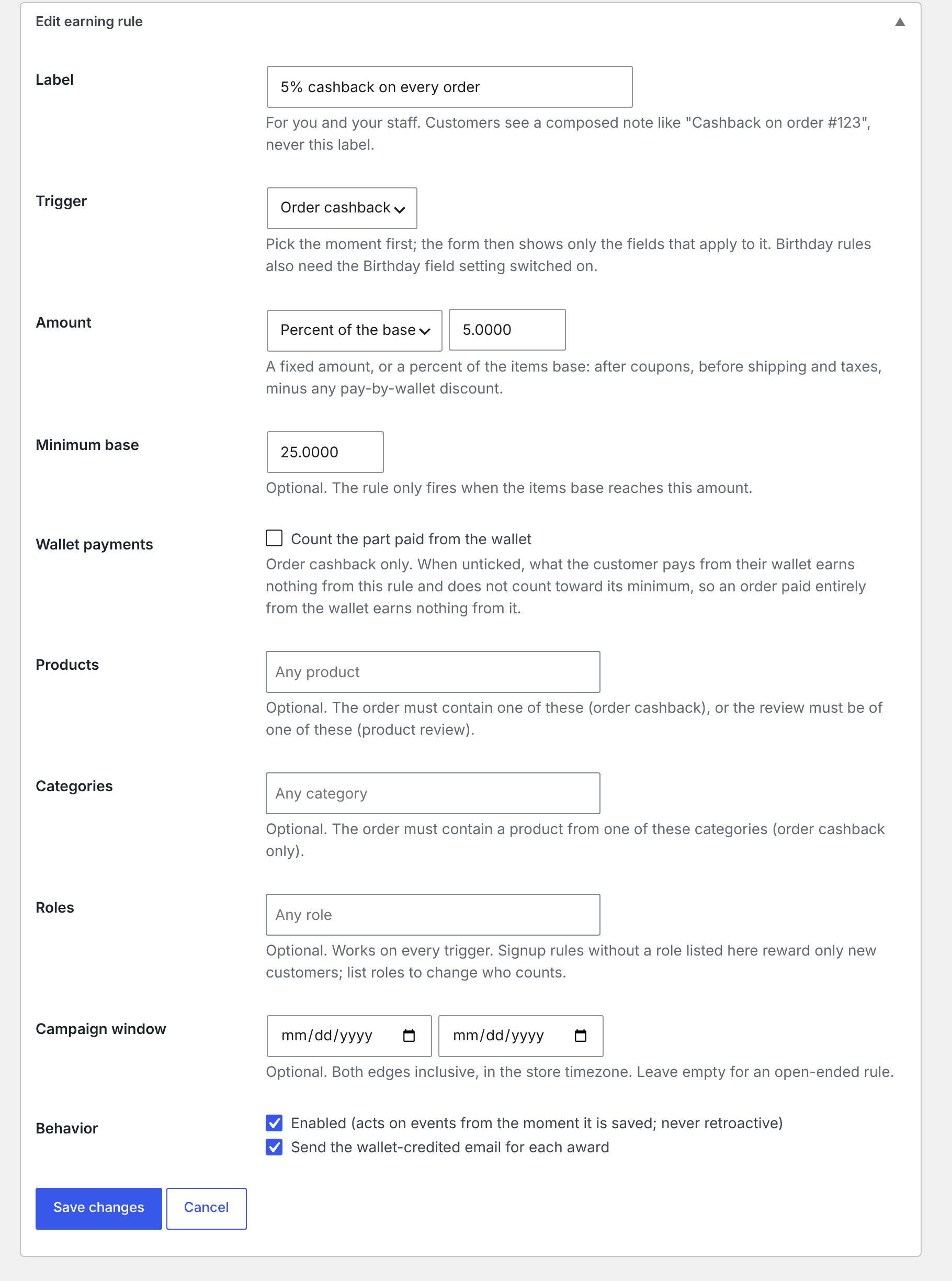
| Field | Applies to | What it does |
|---|---|---|
| Label | All triggers | For you and your staff. Customers never see it; they see a note composed by the plugin, like “Cashback on order #123”. |
| Trigger | All triggers | The moment that earns the reward. See Triggers. |
| Amount: Fixed amount or Percent of the base | Percent only for order cashback and top-up bonus | The reward. See Amount types. |
| Minimum base | Order cashback, top-up bonus | Optional. The rule only fires when the base reaches this amount. |
| Wallet payments: Count the part paid from the wallet | Order cashback | Ticked by default. Untick it so the part of an order paid from the wallet earns nothing from this rule. See Count the part paid from the wallet. |
| Products | Order cashback, product review | Optional. The order must contain one of these products (or variations), or the review must be of one of them. |
| Categories | Order cashback | Optional. The order must contain a product from one of these categories. |
| Roles | All triggers | Optional. The customer must have one of these roles. Signup rules without roles reward only new customers (the Customer role). |
| Campaign window | All triggers | Optional start and end dates. See Campaign windows. |
| Behavior: Enabled (acts on events from the moment it is saved; never retroactive) | All triggers | Ticked by default on a new rule. Unticked saves the rule switched off. |
| Behavior: Send the wallet-credited email for each award | All triggers | Ticked by default on a new rule. See Emails for rewards. |
Note: A condition that cannot apply to the chosen trigger is dropped when you save, so a leftover selection can never stop a rule from firing. For example, products chosen on a rule you then switch to Signup are removed.
Triggers
↑ Back to topOrder cashback
↑ Back to top- When: the first time an order is paid: when the payment method confirms payment, or the order moves to Processing or Completed. Each rule awards once per order.
- Base: the order’s items total after coupons, without shipping, taxes or fees, minus any pay-by-wallet discount on the order.
- Who: customers with an account. Guest orders and wallet top-up orders never earn order cashback.
- Conditions: minimum base, products, categories, roles, campaign window, and Count the part paid from the wallet.
- Customer sees: a Cashback entry with the note “Cashback on order #123” (after the release delay, if one is set).
Example: a rule of 5% with a minimum base of 50. An order with $80.00 of items after coupons, $10.00 shipping and $8.00 tax earns 5% of $80.00, which is $4.00.
Note: Cash on delivery orders move to Processing when they are placed, so they earn cashback at that moment, before the cash is collected. A release delay that covers your delivery and return time keeps that cashback pending until then.
Top-up bonus
↑ Back to top- When: a paid top-up is credited to the wallet. Each rule awards once per top-up order.
- Base: the credited top-up amount.
- Conditions: minimum base, roles, campaign window.
- Customer sees: a Cashback entry with the note “Top-up bonus on order #39”. See Top-ups (Add Funds).
Signup
↑ Back to top- When: a user account is created: at checkout, through My Account registration, or by you in wp-admin or by an import. Each rule awards once per account.
- Who: without a Roles condition, only accounts with the Customer role, so staff accounts and plain WordPress subscribers stay out. Add roles to change who counts.
- Conditions: roles, campaign window. The amount is always fixed.
- Customer sees: a Reward entry with the note “Welcome reward for creating your account”.
Product review
↑ Back to top- When: a product review is approved, either posted already approved or approved later from moderation. Each approved review earns once per rule.
- Who: logged-in customers who bought the product they review (WooCommerce’s verified owner check). Guest reviews never earn.
- Conditions: products (only reviews of these products earn), roles, campaign window. The amount is always fixed.
- Customer sees: a Reward entry with the note “Reward for your review of Hand-Thrown Vase”.
- Deleting or unapproving the review later does not take the reward back. Debit it by hand with a reason if needed.
Birthday
↑ Back to top- When: a background task runs once a day and rewards customers whose stored birthday is today, in the store time zone. Each rule awards at most once per customer per calendar year.
- Needs: the Birthday field setting on, and a birthday the customer entered on My Account > Account details.
- February 29 birthdays are rewarded on February 28 in years without a February 29.
- Conditions: roles, campaign window. The amount is always fixed. Unlike signup rules, birthday rules without roles reward every account with a birthday.
- Customer sees: a Reward entry with the note “Birthday reward”.
Amount types
↑ Back to top- Fixed amount: the same amount every time, in the store currency. The only choice for signup, review and birthday rules, because they have no base amount.
- Percent of the base: for order cashback and top-up bonuses. Up to 100. The result is rounded to your store’s number of decimals (half away from zero), so 5% of $58.50 is $2.93.
Conditions
↑ Back to topA rule fires only when every condition it has matches. Empty conditions match everything.
| Condition | Order cashback | Top-up bonus | Signup | Product review | Birthday |
|---|---|---|---|---|---|
| Minimum base | Yes | Yes | No | No | No |
| Count the part paid from the wallet | Yes | No | No | No | No |
| Products | Yes | No | No | Yes | No |
| Categories | Yes | No | No | No | No |
| Roles | Yes | Yes | Yes | Yes | Yes |
| Campaign window | Yes | Yes | Yes | Yes | Yes |
- Products: the order needs at least one of the listed products. You can pick variations too; an order matches through either the product or the variation.
- Categories: the order needs at least one product in one of the listed categories.
- Roles: the customer needs at least one of the listed roles.
Campaign windows
↑ Back to topA campaign window limits a rule to a date range, for example a double cashback weekend. Both dates are optional and both are included, in the store time zone. The window is checked on the day the event happens: the day the order is paid, the top-up is credited, the account is created, the review is approved or the birthday scan runs.
A rule whose window has ended keeps the Enabled status; it simply stops matching. Disable it if you want the list to show that it is over.
Count the part paid from the wallet
↑ Back to topNew in 1.1.0, on order cashback rules. It decides whether money the customer spends from their wallet earns cashback again.
- Ticked (the default): the whole order counts, however it was paid.
- Unticked: only the part paid with other methods counts. The base is reduced in proportion, and the Minimum base is judged on the reduced base too. An order paid entirely from the wallet earns nothing from the rule. The rules list shows Wallet part not counted.
Example: an order with $100.00 of items (no shipping or tax) is paid $40.00 from the wallet and $60.00 by card. A 5% rule with the box unticked uses a base of $60.00 and awards $3.00. With a minimum base of 75, it awards nothing, because $60.00 is below 75.
Rules created before 1.1.0 keep counting the wallet part, so upgrading never changes what your store pays out. Refunds still reverse such a reward in proportion to the share of the whole order that is refunded.
Emails for rewards
↑ Back to topWith Send the wallet-credited email for each award ticked, the customer gets the Wallet credited email when the reward reaches the wallet (for pending rewards, on release, not when they are earned), as long as that email is enabled under WooCommerce > Settings > Emails. The same option controls the Wallet debited email when the rule’s cashback is reversed. Unticked, the rule’s awards and reversals send no wallet email. See Wallet Emails.
Pending rewards and the release delay
↑ Back to topOrder cashback and top-up bonuses can be refunded away. The Cashback release delay (days) setting (default 30) keeps them pending for that many days, so a refund inside your return window only shrinks a pending number and never takes spendable money back from a wallet. Signup, review and birthday rewards are not linked to an order and always credit at once.
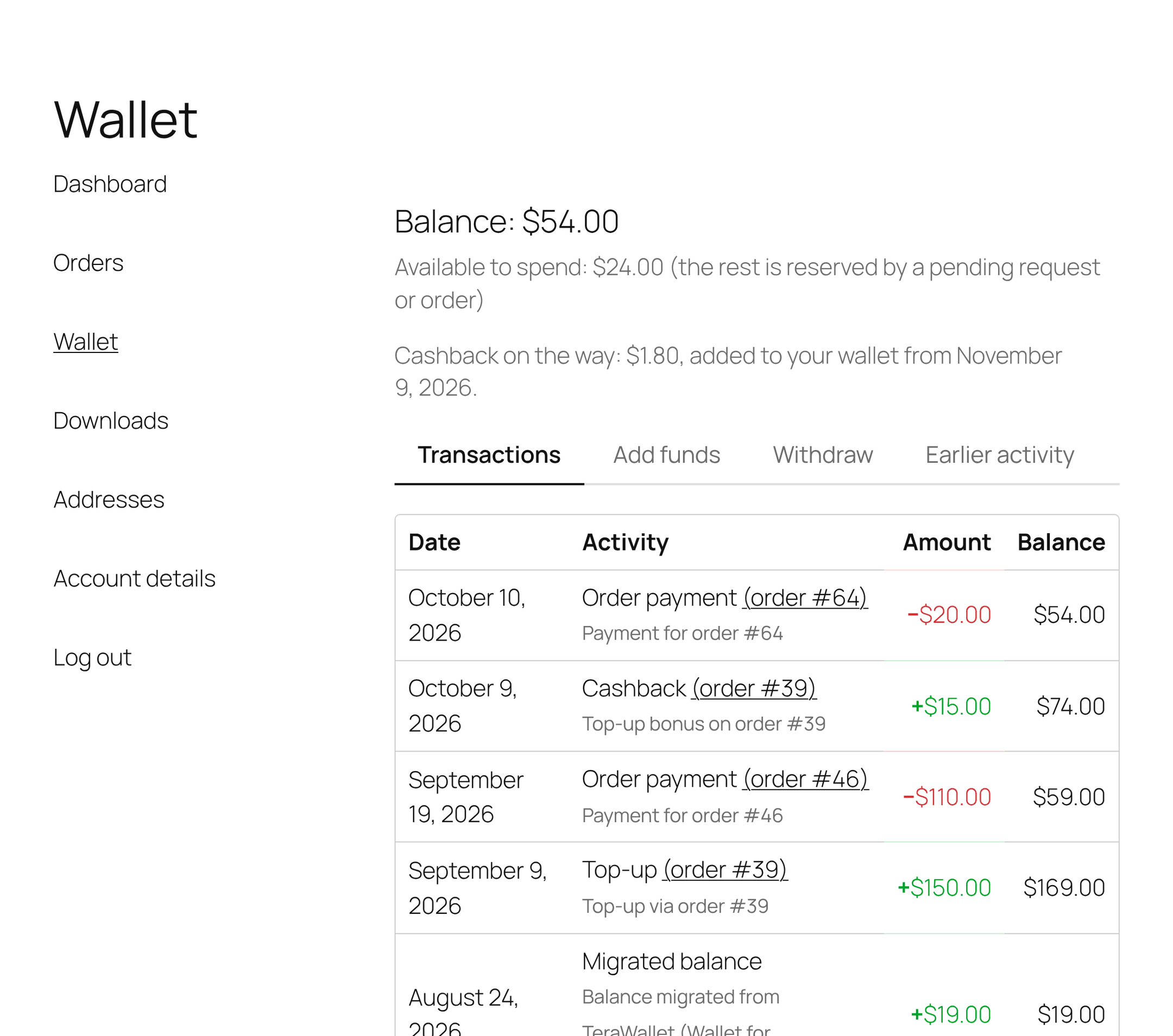
While a reward is pending:
- Nothing is in the wallet yet. The order gets the note “Elite Balance: $4.00 earned (rule: 5% cashback on every order), pending until November 9, 2026. A refund before then reduces or cancels the pending amount without touching the wallet.”
- The customer sees a line under their balance on My Account > Wallet: “Cashback on the way: $1.80, added to your wallet from November 9, 2026.” It reads “Top-up bonus on the way” for top-up bonuses, and “Rewards on the way” when both kinds are pending. The amount is the total pending and the date is the earliest release date.
- The rule’s Awarded to date counter does not count it yet.
When the date arrives, a background task (it runs every hour) credits the remaining amount to the wallet. The order note reads “Elite Balance: $4.00 credited to the customer’s wallet (rule: …)”, the email goes out if the rule sends it, and the counter goes up.
- Pending rewards are still added if you later disable the rule, delete it, or switch earning off. The reward was already earned.
- Changing the delay only affects rewards earned after the change. Rewards already pending keep their original date.
- Set the delay to 0 to credit rewards the moment they are earned. The Earning tab then says “Awards are credited the moment they are earned (the release delay is set to 0).”
Reversals
↑ Back to topOrder cashback undoes itself when the order that earned it is refunded or cancelled:
- Partial refund, cashback pending: the pending amount shrinks in proportion. No wallet movement.
- Partial refund, cashback credited: the proportional part is taken back as a Reward reversal transaction (note “Reversal of the reward on order #123”), once per refund.
- Order cancelled or set to Refunded: everything that remains is reversed, and anything pending is cancelled.
The proportion depends on how the refund was entered:
- By item line: the refunded item totals divided by the base the cashback was calculated on. Refunds of shipping or tax lines only change nothing.
- As an amount only (the Refund amount box, or Refund to wallet): the refunded amount divided by everything the customer paid for the order, including any wallet part. This is new in 1.1.0; earlier versions left cashback untouched on amount-only refunds.
If the customer already spent the cashback, Elite Balance takes back what the available balance covers and stops at zero; wallets never go negative. The order gets the note “Elite Balance: $X of the reward could not be reversed because the wallet balance was already spent. Review the customer’s wallet and debit manually with a reason if appropriate.” The case is listed:
- on the Earning tab, in Reversals that could not fully recover, with When, Order, Customer and Not recovered columns, a Dismiss link per row and Dismiss all;
- on the Overview tab, in Needs attention: “1 reward reversal could not fully recover the awarded credit.” with Review on the Earning tab.
Review each case, and if recovery is right, debit the customer’s wallet by hand with a reason. A release delay that covers your refund window makes these cases rare.
Other details:
- Reversals run even when the rule is disabled or earning is switched off, and even when the wallet is locked.
- Top-up bonuses: a pending bonus is cancelled when the top-up order is set to Cancelled or Refunded. Partial refunds do not change it, and a credited bonus is never reversed automatically.
- Signup, review and birthday rewards are never reversed automatically.
- Refunds and their effect on the order are covered in Refunds to Wallet.
Never retroactive
↑ Back to topA rule only rewards events that happen after it was enabled. Enabling a rule never looks back at past orders, reviews or accounts.
- For order cashback, the order’s payment time counts. An order paid before the rule was enabled does not earn, even if its status changes afterwards.
- Disabling and enabling a rule starts a new period. Events from the time it was off are never rewarded later.
- Editing a rule that stays enabled keeps its start time.
Awarded to date and the ledger
↑ Back to topThe Awarded to date column counts each reward when its money reaches the wallet (pending rewards count on release). Reversals do not lower it. It is a quick summary; the ledger is the full record.
Click the counter to open WooCommerce > Elite Balance > Transactions filtered to that rule, with its awards and reversals. In every transactions list, the Reference column names the rule behind a reward, linked to the same filter. See Managing Wallets.
Disabling, enabling and deleting rules
↑ Back to top- Disable stops the rule at once: “The rule was disabled. Already-awarded credit stays in the ledger and still reverses on refunds.”
- Enable starts it again from that moment: “The rule was enabled. It acts on events from this moment on; nothing is awarded retroactively.”
- Edit changes the rule and keeps its counters.
- Delete is offered only for rules that never awarded anything: “The rule was deleted. The ledger is untouched.” A rule that has awarded is referenced by the ledger, so it cannot be deleted (“That rule has already awarded credit, so the ledger references it. Disable it instead of deleting.”). Disable it instead; its history and drill-down keep working.
The birthday field
↑ Back to topWooCommerce has no birthday field, so Elite Balance adds its own when you tick Birthday field under WooCommerce > Settings > Elite Balance > Earning.
- Customers see an optional Birthday date field on My Account > Account details, with the hint “Optional. Used for birthday rewards; it can be changed once per year.”
- The date must be real, not in the future and not before 1900. Otherwise the customer sees an error such as “The birthday cannot be in the future.”
- A customer can set, change or clear their birthday once every 365 days, so nobody moves their birthday around to collect rewards. Entering it the first time counts as that change. A second change inside that time shows “The birthday can only be changed once per year.”
- With the setting off, the field is hidden, no birthday data is collected, and birthday rules award nothing. If a birthday rule is enabled while the field is off, the Earning tab warns you.
For developers
↑ Back to top- Awards use the transaction types
cashback(order cashback and top-up bonus) andreward(signup, review, birthday); reversals useearn_reversal. Each carriesrule_idin its meta. - Idempotency keys:
earn:{rule}:order:{order_id},earn:{rule}:topup:{order_id},earn:{rule}:signup:{user_id},earn:{rule}:review:{comment_id},earn:{rule}:birthday:{user_id}:{year}. rb_elite_balance_earn_base(filter): the order cashback base.rb_elite_balance_earn_wallet_paid(filter, 1.1.0): how much of an order was paid from the wallet, used by rules that do not count the wallet part.rb_elite_balance_earn_awarded(action): a reward was credited. Not fired for pending records or replays.rb_elite_balance_earn_deferred(action): a reward was recorded as pending.rb_elite_balance_earn_reversed(action): a reward was (partly) reversed.rb_elite_balance_pending_release_batch(filter): how many orders one release run processes (default 200).rb_elite_balance_birthday_field_label(filter): the birthday field label.
The pending line uses the template myaccount/pending-cashback.php (version 1.1.0, with the new $args['kind'] value cashback, topup_bonus or mixed). See Developer Reference.