
Elite Balance adds ten emails to WooCommerce: five about wallet balances and five about withdrawals. This page lists each one, who receives it, exactly when it is sent and when it is not, and how to change its text. It is for store owners and shop managers; template overrides for developers are at the end.
The ten emails
↑ Back to top| Recipient | Enabled by default | Sent when | |
|---|---|---|---|
| Wallet credited | The customer | Yes | Funds are added to the wallet. |
| Wallet debited | The customer | Yes | Funds are removed from the wallet by an adjustment or a reward reversal. |
| Wallet low balance | The customer | No | A debit takes the balance below your threshold. |
| Wallet credit expiring soon | The customer | Yes | A few days (7 by default) before unspent credit expires. Only while store credit expiry is on. |
| Wallet balance low before renewal | The customer | Yes | A few days (3 by default) before a subscription renewal paid from the wallet that the balance will not cover. Only while WooCommerce Subscriptions is active. |
| Withdrawal request received | The customer | Yes | The customer opens a withdrawal request. |
| New withdrawal request (staff) | Your team (Recipient(s), default: the site admin email) | Yes | A customer opens a withdrawal request. |
| Withdrawal transferred | The customer | Yes | Staff mark a withdrawal request transferred. |
| Withdrawal rejected | The customer | Yes | Staff reject a withdrawal request. |
| Withdrawal request cancelled (staff) | Your team (Recipient(s), default: the site admin email) | No | A customer cancels their own withdrawal request. |
The five withdrawal emails only matter once withdrawals are enabled. See Withdrawals.
Edit an email
↑ Back to top- Go to WooCommerce > Settings > Emails.
- Find the email by its title (for example Wallet credited) and open it.
- Change the settings you need, then click Save changes.
Every wallet email is also linked from WooCommerce > Settings > Elite Balance > General, in the Emails section.
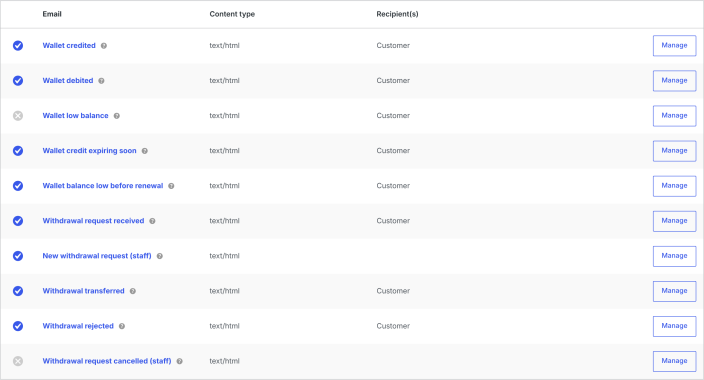
Elite Balance emails under WooCommerce > Settings > Emails (the rest of WooCommerce’s list is hidden in this picture).
Each email has WooCommerce’s standard settings (the enable switch, subject, email heading, additional content, and email type) plus these Elite Balance fields:
| Setting | Default | What it does |
|---|---|---|
| Email body | The built-in text for that email (see below) | The main message, placed right under the heading. Supports the placeholders listed below. Leave it empty to use the built-in text. |
| From name (optional) | Empty | Sender name for this email only. Empty uses the store’s sender name. |
| From address (optional) | Empty | Sender address for this email only. Empty uses the store’s sender address. |
| Recipient(s) | The site admin email | Only on New withdrawal request (staff) and Withdrawal request cancelled (staff). Comma-separated addresses. |
| Balance threshold | 10 | Only on Wallet low balance. The email is sent when a debit takes the balance below this amount. An empty, zero, or invalid value uses 10. |
| Days before | 7 / 3 | Only on Wallet credit expiring soon (default 7, 1 to 90) and Wallet balance low before renewal (default 3, 1 to 30). How many days before the expiry date or the renewal date the email goes out. |
Placeholders
↑ Back to topPlaceholders work in the subject, the heading, and the email body.
| Placeholder | Available in | Replaced with |
|---|---|---|
{site_title} |
All emails | Your site title. |
{amount} |
All emails | Wallet emails: the amount added or removed. Expiring soon: the total expiring. Low balance before renewal: the renewal total. Withdrawal emails: the requested amount. |
{date} |
Wallet credit expiring soon, Wallet balance low before renewal | The first expiry date, or the renewal date. |
{shortfall} |
Wallet balance low before renewal | How much the customer needs to add. |
{balance} |
Wallet credited, Wallet debited, Wallet low balance, Wallet credit expiring soon, Wallet balance low before renewal | The balance right after the transaction. In the expiring soon email, the current balance; in the low balance before renewal email, the balance available by the renewal date. |
{method} |
All withdrawal emails | The payout method’s title. |
{customer} |
New withdrawal request (staff), Withdrawal request cancelled (staff) | The customer’s display name. |
{net}, {fee}, {reference} |
Withdrawal transferred | The amount you sent, the fee, and the transfer reference. |
{reason} |
Withdrawal rejected | The rejection reason you chose. |
Built-in text
↑ Back to top| Default subject | Default heading | Default body | |
|---|---|---|---|
| Wallet credited | Funds were added to your wallet at {site_title} | Funds added to your wallet | Good news: {amount} was added to your wallet. Your balance is now {balance}. |
| Wallet debited | Funds were deducted from your wallet at {site_title} | Funds deducted from your wallet | {amount} was deducted from your wallet. Your balance is now {balance}. |
| Wallet low balance | Your wallet balance is running low at {site_title} | Your wallet balance is low | Just a heads up: your wallet balance is down to {balance}. |
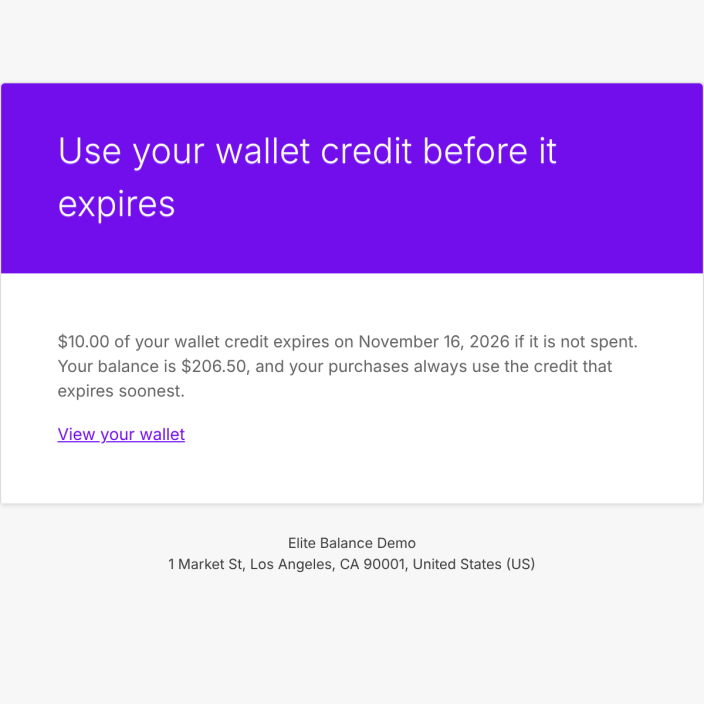
| Wallet credit expiring soon | Your wallet credit at {site_title} expires soon | Use your wallet credit before it expires | {amount} of your wallet credit expires on {date} if it is not spent. Your balance is {balance}, and your purchases always use the credit that expires soonest. |
| Wallet balance low before renewal | Add funds to your wallet before your {site_title} renewal | Your wallet balance is low | Your subscription renews on {date} for {amount}, paid from your wallet. Your wallet balance available by then is {balance}, so please add at least {shortfall} before that date to keep your subscription active. |
| Withdrawal request received | We received your withdrawal request at {site_title} | Withdrawal request received | We received your request to withdraw {amount} via {method}. The amount is reserved from your wallet while we process it, and we will email you as soon as it is done. |
| New withdrawal request (staff) | [{site_title}] New withdrawal request: {amount} | New withdrawal request | {customer} requested a withdrawal of {amount} via {method}. The funds are reserved; review the request and complete or reject it from the withdrawals queue. |
| Withdrawal transferred | Your withdrawal from {site_title} is on its way | Withdrawal completed | Your withdrawal of {amount} via {method} is done. We sent {net} after a fee of {fee}. The transfer reference is {reference}. |
| Withdrawal rejected | About your withdrawal request at {site_title} | Withdrawal request rejected | Your withdrawal request for {amount} via {method} was not completed, and the full amount is available in your wallet again. Reason: {reason} |
| Withdrawal request cancelled (staff) | [{site_title}] Withdrawal request cancelled: {amount} | Withdrawal request cancelled | {customer} cancelled their withdrawal request of {amount} via {method}. The reserved funds are available to them again; there is nothing to pay out. |
Under the body, every email has a link: View your wallet on the wallet emails, the expiring soon email and the customer withdrawal emails (to My Account > Wallet, or its Withdraw tab), View your wallet and add funds on the low balance email, Add funds to your wallet and View your subscription on the low balance before renewal email, and Open the withdrawals queue on the staff emails (to the request in wp-admin).
The Wallet credited and Wallet debited emails also show the transaction’s note when it was written by the system, such as “Top-up via order #60” or “Cashback on order #38”. Notes and reasons typed by staff are never included.
When each email is sent
↑ Back to topWallet credited
↑ Back to topSent for every credit to a customer’s wallet:
- Manual credits from the wallet screen or the Edit user screen, when Email the customer (when the wallet emails are enabled) is ticked (it is ticked by default).
- Bulk credits and CSV imports, when Notify the customers by email (when the wallet emails are enabled) is ticked (it is unticked by default).
- Refunds to the wallet and top-ups.
- Cashback and rewards from earning rules, when the rule’s Send the wallet-credited email for each award box is ticked. With a release delay, the email is sent when the cashback is added to the wallet, not when the order is placed.
- Credits made with WP-CLI or the developer API.
- Not for a top-up refund reversed to the wallet, which is recorded silently with an order note.
Wallet debited
↑ Back to topSent for debits that are not order payments or withdrawals:
- Manual debits from the wallet screen or the Edit user screen, when Email the customer is ticked.
- Bulk debits and CSV import debits, when Notify the customers by email is ticked.
- Reward reversals (cashback taken back after a refund or cancellation), when the earning rule’s email box is ticked.
- Debits made with WP-CLI or the developer API.
Wallet low balance
↑ Back to topOff by default. Turn it on and set the Balance threshold on its email screen. It is sent when a debit crosses the threshold: the balance was at or above the threshold before the debit and is below it after. A customer whose balance stays below the threshold is not emailed again on each purchase; they get another email only after their balance goes back above the threshold and drops below it again.
Unlike the debited email, it considers every kind of debit, including wallet payments at checkout and withdrawals, because spending is when balances run low. It is not sent for a debit made with the email box unticked.
Wallet credit expiring soon
↑ Back to topOn by default, and only sent while store credit expiry is on. A daily check sends each customer one email listing every credit that expires within Days before (7 by default) and was not announced yet, with their balance. Each credit is announced once for its date; if staff extend the date, it is announced again before the new date. See Store Credit Expiry.
Wallet balance low before renewal
↑ Back to topOn by default, and only listed while WooCommerce Subscriptions is active. A daily check sends it Days before (3 by default) a renewal of a subscription paid fully from the wallet when the balance available by the renewal date will not cover it, once per subscription and renewal date. Subscriptions with wallet first never get it, because the card pays the rest. Credit that will expire before the renewal date is not counted. See Paying Subscription Renewals from the Wallet.
Withdrawal emails
↑ Back to top- Withdrawal request received and New withdrawal request (staff): both sent when a customer submits a request.
- Withdrawal transferred: sent when staff mark the request transferred, in the admin or with WP-CLI.
- Withdrawal rejected: sent when staff reject the request, in the admin or with WP-CLI.
- Withdrawal request cancelled (staff): off by default. When on, sent to your team when a customer cancels their own pending request.
- No email is sent when a request is moved to processing, and the customer gets no email when they cancel a request themselves.
- Payout details are never included in any email, including the staff notification. Staff read them on the request’s screen.
When no email is sent
↑ Back to top- Order payments: paying an order fully or partly from the wallet never sends Wallet debited. WooCommerce’s own order emails already cover the purchase.
- Migrations: importing balances from another wallet plugin never emails customers.
- Expired credit: credit that expires sends no Wallet debited email. The expiring soon email warns customers beforehand.
- Top-up refunds: taking a refunded top-up back out of the wallet sends no Wallet debited email; WooCommerce’s refund email covers it.
- Withdrawals: the debit made when a withdrawal is transferred does not send Wallet debited; the Withdrawal transferred email, with fee, net amount, and reference, replaces it.
- Unticked notify boxes: an adjustment, bulk operation, or CSV import with the email box unticked sends no wallet email at all, low balance included.
- Repeats: a repeated action (a double click, a refreshed form, a retried background task) never sends a second email, because the transaction or request change only happens once.
- Disabled emails: an email switched off in its settings is never sent, and customers without a valid email address on their account receive nothing.
Tip: If emails seem to be missing, first check that the email is enabled, then check the email box on the action you took. If both are fine, test your site’s mail delivery with an email log plugin, since Elite Balance sends through WooCommerce’s normal mailer.
Template overrides
↑ Back to topFor layout changes beyond the editable text, copy a template from the plugin’s templates/emails/ folder into your theme. The theme copy wins.
| Template | Used by | Copy to | Version |
|---|---|---|---|
emails/wallet-credited.php |
Wallet credited (HTML) | yourtheme/woocommerce/emails/wallet-credited.php |
0.5.0 |
emails/plain/wallet-credited.php |
Wallet credited (plain text) | yourtheme/woocommerce/emails/plain/wallet-credited.php |
0.5.0 |
emails/wallet-debited.php |
Wallet debited (HTML) | yourtheme/woocommerce/emails/wallet-debited.php |
0.5.0 |
emails/plain/wallet-debited.php |
Wallet debited (plain text) | yourtheme/woocommerce/emails/plain/wallet-debited.php |
0.5.0 |
emails/low-balance.php |
Wallet low balance (HTML) | yourtheme/woocommerce/emails/low-balance.php |
0.5.0 |
emails/plain/low-balance.php |
Wallet low balance (plain text) | yourtheme/woocommerce/emails/plain/low-balance.php |
0.5.0 |
emails/expiring-soon.php |
Wallet credit expiring soon (HTML) | yourtheme/woocommerce/emails/expiring-soon.php |
1.2.0 |
emails/plain/expiring-soon.php |
Wallet credit expiring soon (plain text) | yourtheme/woocommerce/emails/plain/expiring-soon.php |
1.2.0 |
emails/renewal-low-balance.php |
Wallet balance low before renewal (HTML) | yourtheme/woocommerce/emails/renewal-low-balance.php |
1.2.0 |
emails/plain/renewal-low-balance.php |
Wallet balance low before renewal (plain text) | yourtheme/woocommerce/emails/plain/renewal-low-balance.php |
1.2.0 |
emails/withdrawal-notification.php |
All five withdrawal emails (HTML) | yourtheme/woocommerce/emails/withdrawal-notification.php |
0.8.0 |
emails/plain/withdrawal-notification.php |
All five withdrawal emails (plain text) | yourtheme/woocommerce/emails/plain/withdrawal-notification.php |
0.8.0 |
The email templates live in the woocommerce/emails/ folder of your theme, like WooCommerce’s own emails. The plugin’s other templates (the wallet page, the withdraw form) use yourtheme/elite-balance/ instead; see Customer Wallet Page, Block and Shortcode.
The five withdrawal emails share one template. To give one of them different markup, branch on $email->id in your copy. The variables each template receives:
- Wallet templates:
$email_heading,$body(placeholders already applied),$amount_display,$balance_display,$note(the customer-visible note),$wallet_url,$additional_content,$sent_to_admin,$plain_text,$email. - Withdrawal template:
$email_heading,$body,$action_url,$action_label,$additional_content,$sent_to_admin,$plain_text,$email.
Note: Each template has a version in its header comment. After updating Elite Balance, compare your copies with the bundled templates.
For developers
↑ Back to topThe emails are standard WC_Email classes in the RoundBorders\EliteBalance\Emails namespace, registered through woocommerce_email_classes. Use the ID to link straight to an email’s settings: admin.php?page=wc-settings&tab=email§ion=<id>.
| Class | Mailer key | Email ID |
|---|---|---|
WalletCredited |
RB_Elbal_Wallet_Credited |
rb_elbal_wallet_credited |
WalletDebited |
RB_Elbal_Wallet_Debited |
rb_elbal_wallet_debited |
LowBalance |
RB_Elbal_Low_Balance |
rb_elbal_low_balance |
ExpiringSoon |
RB_Elbal_Expiring_Soon |
rb_elbal_expiring_soon |
RenewalLowBalance |
RB_Elbal_Renewal_Low_Balance |
rb_elbal_renewal_low_balance (registered only while WooCommerce Subscriptions is active) |
WithdrawalRequested |
RB_Elbal_Withdrawal_Requested |
rb_elbal_withdrawal_requested |
NewWithdrawalRequest |
RB_Elbal_New_Withdrawal_Request |
rb_elbal_new_withdrawal_request |
WithdrawalTransferred |
RB_Elbal_Withdrawal_Transferred |
rb_elbal_withdrawal_transferred |
WithdrawalRejected |
RB_Elbal_Withdrawal_Rejected |
rb_elbal_withdrawal_rejected |
CancelledWithdrawalRequest |
RB_Elbal_Cancelled_Withdrawal_Request |
rb_elbal_cancelled_withdrawal_request |
- The wallet emails extend
WalletEmailand are sent from therb_elite_balance_transaction_createdaction. The withdrawal emails extendWithdrawalEmailand are sent fromrb_elite_balance_withdrawal_requested,rb_elite_balance_withdrawal_transferred,rb_elite_balance_withdrawal_rejectedandrb_elite_balance_withdrawal_cancelled. The expiring soon and low balance before renewal emails are sent by daily background checks (rb_elbal_expiry_noticesandrb_elbal_renewal_low_balance);rb_elite_balance_expiry_notice_daysandrb_elite_balance_low_balance_notice_daysfilter their Days before. rb_elite_balance_email_skipped_typesfilters the transaction types that never send Wallet credited or Wallet debited (defaulthold_capture,migration,withdrawal).- A transaction whose meta contains
notifyset tonosends no wallet email. rb_elite_balance_customer_note_typesandrb_elite_balance_customer_notecontrol which notes reach customers, including in these emails.
See Developer Reference.