


You can use the data your store is already collecting to make better decisions around sales, products, customers and marketing and then add in analytics tools when you need a deeper level of insight.
Start with the question you’re trying to answer. Are sales up or down? Which are the products that people are coming back to? Has the promotion actually worked in terms of getting new customers? Each of those questions will take you to the right report or the right tool.
If you’re running your store on WooCommerce you’ve got a huge amount of data available to you in the form of the built in reports. They’ll give you a good general feel for how your store is performing. You’ll only need to go beyond that when you’re looking for insights that the reports themselves can’t provide.
Different ecommerce analytics tools for different questions
↑ Back to topThe best way to work out how to keep growing is to track what’s going on in and around your store. You need to know what’s working and what’s not. Different platforms will give you insight into different facets of the business.
Sales dip and you want to know which products sold less? That’s where your store’s sales reports come in. You’ll also want to know where the customers dropped off prior to purchase which is where your website behaviour data comes in.
WooCommerce reports show you what happens in your store
↑ Back to topThe data on your orders, products, and customers lets you make better decisions. WooCommerce’s built-in reporting takes that data and presents it in a format you can use to track sales trends and investigate changes in your store’s performance.
Here are a few questions those reports answer…
What’s driving store sales?
The Orders report and the Products report are the two reports you’ll want to look at first to get a sense of what’s going on in your store.
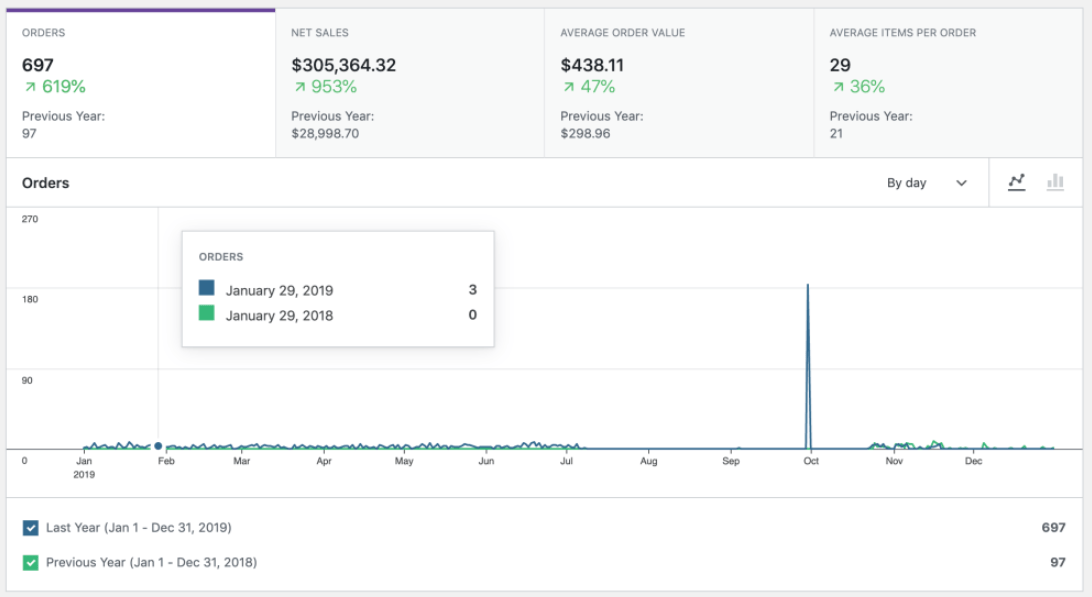
The Orders report allows you to see how sales have varied over a particular date range and enables you to compare that to the same period in the prior month. It’s a useful report for looking at order count, net sales and average order value all in one go.
More orders don’t necessarily equate to more revenue. Last month 100 orders generated $5k in net sales (i.e. $50 per order on average). This month we’ve had 125 orders and the same $5k in net sales (i.e. $40 per order). We’re processing 25% more purchases, and we’re not making any more revenue. Are our customers buying cheaper products, buying less per order, or receiving larger discounts?
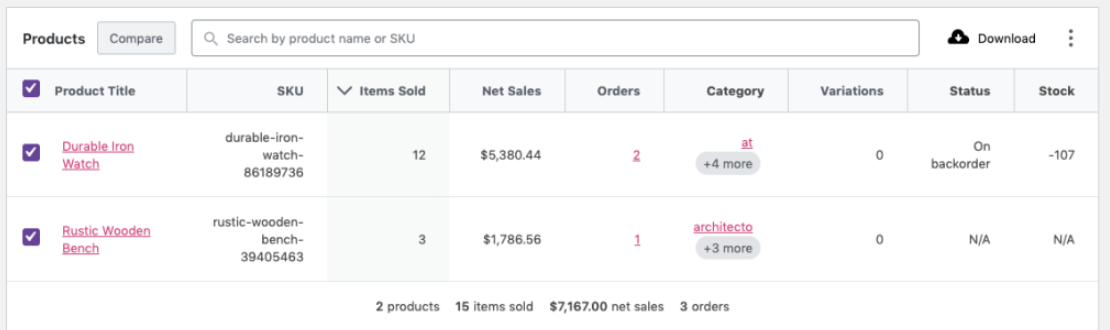
The Products Report will tell you which items are driving those results. Sort by Items Sold to identify your volume leaders and sort by Net Sales to see which are the top performers in terms of revenue. Your volume best seller may not be your revenue best seller.
Compare individual products over the same period to see what’s changed. If the higher-priced bestseller is declining while the cheaper items are rising, that could explain the drop in average order value and point you to a specific product to review.
What’s reducing your take-home revenue?
Are you giving up too much of your sales to discounts or refunds? The Revenue Report shows how those deductions affect your net sales. Compare periods to see whether discounts or refunds are taking a larger share of gross sales.
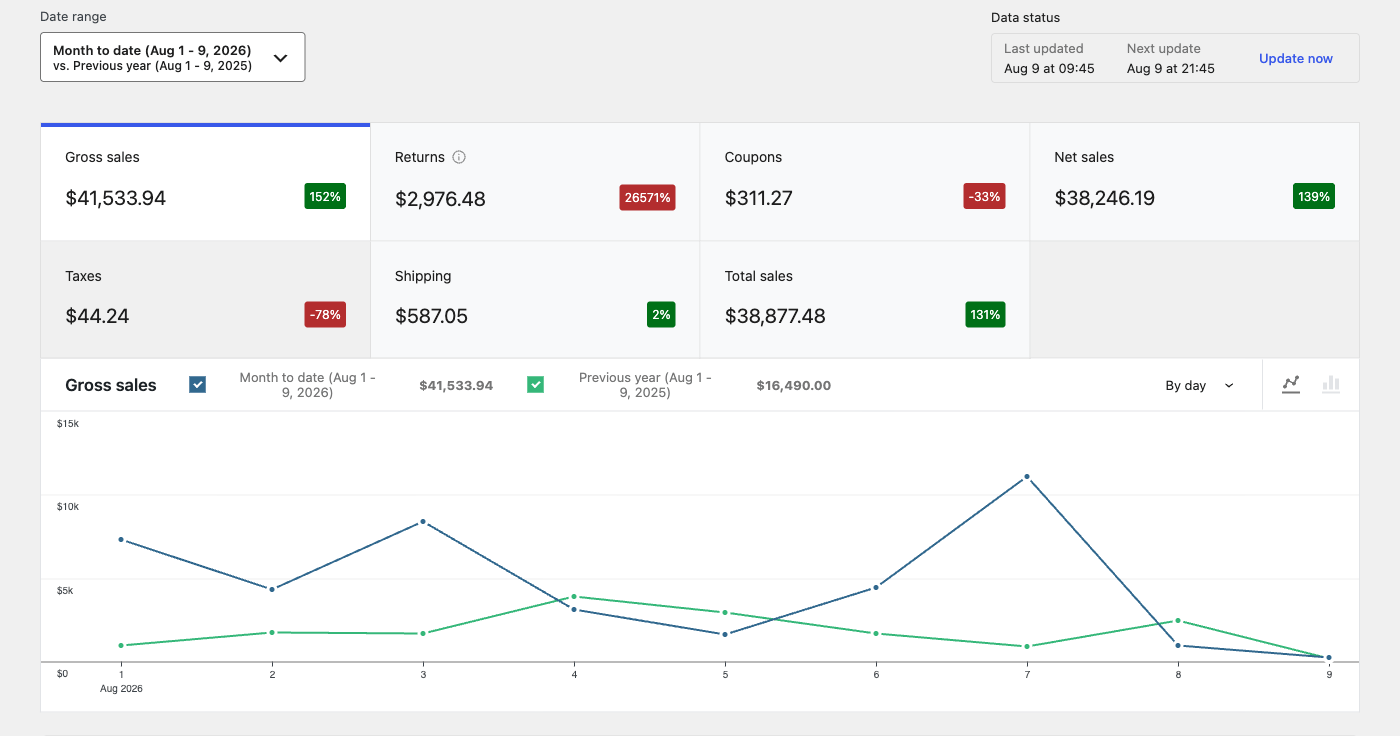
Follow whichever number deserves attention. If coupon discounts are climbing, the Coupons Report shows which codes account for the spending. Decide whether those offers are producing the results you intended, such as larger orders or first-time purchases.
If refunds are increasing, use the Orders Report to look for patterns in refunded orders. Repeated refunds involving the same product are a reason to check its description, quality, or fulfillment history. The report helps you narrow the investigation, and you can ask customers for feedback to learn more.
Remember that net sales aren’t profit. You still need to account for product costs and operating expenses.
Who’s buying from your store?
Built-in WooCommerce reporting lets you dive into specific buying behaviors for customer groups and individuals. The Customers Report shows each customer’s order count, total spend, average order value (AOV), and location. It includes guest buyers who use the same email as well as registered customers, so you can identify repeat shoppers even when they haven’t created an account.
Use filters to identify customer groups, such as repeat buyers, high spenders, or shoppers in a particular region. Combine those criteria and ask more specific questions.
For example, a group that places several orders with a lower AOV could be the right segment to promote a relevant product bundle. Your biggest repeat spenders could be people you can ask to give testimonials. These patterns help you decide which customers to learn from and how to make your offers more relevant.
What should you restock?
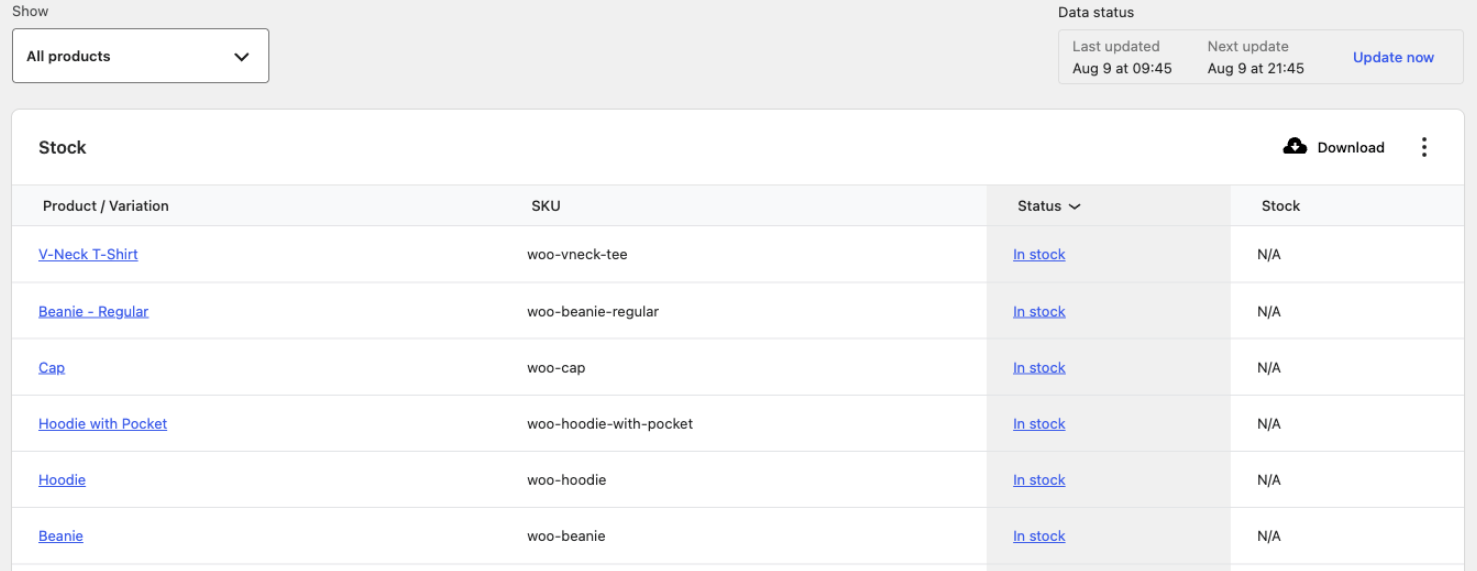
The Stock Report gives you inventory insights. Compare that with sales trends in your Products Reports to prioritize timely replenishment. A bestseller running low needs attention sooner than a slow-moving item, especially if your supplier takes weeks to deliver.
What channels are producing revenue?
You’re putting time and money into attracting customers. Understanding which efforts bring in orders, attract new buyers, and generate repeat business helps you decide where to focus.
The free WooCommerce Analytics extension goes beyond built-in reports, grouping orders by channel, source, campaign, and device. (Note that this extension currently supports single-currency stores.)
Use WooCommerce Analytics to compare net sales, average order value, new and repeat customers, refunds, and coupon usage across those groups.
Does email bring back existing buyers while organic search attracts first-time customers? Does a paid campaign generate plenty of orders but rely heavily on discounts? Those answers help you evaluate the kind of business each channel brings in.
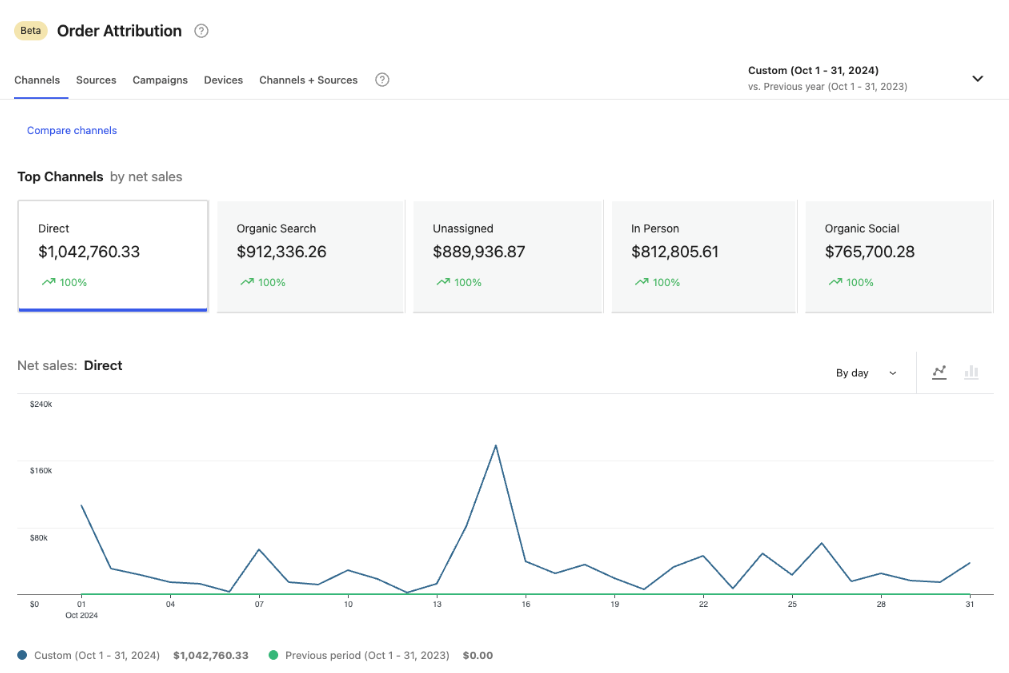
The reports use last-touch attribution, giving credit to the source that brought the shopper to your store for the purchasing visit. This shows which sources receive credit for orders, but remember that earlier marketing efforts also influence buying decisions.
Google Analytics shows you what happens before the purchase
↑ Back to topHow do shoppers find your store, what catches their interest, and what happens between arrival and checkout? Google Analytics 4 (GA4) connects acquisition and website behavior with purchase activity, helping you understand both successful shopping journeys and missed opportunities.
Like WooCommerce Analytics, GA4 also offers purchase attribution. The Traffic acquisition report lets you compare traffic sources and campaigns alongside engagement and sales. Look at how often visits lead to purchases, rather than judging a campaign solely by how many people it brings to your site.
Connect WooCommerce with GA4 for better reporting
WooCommerce and GA4 work well together when you need to investigate a change.
The free Google Analytics for WooCommerce integration sends ecommerce events — such as product views, cart additions, checkout starts, and purchases — to GA4 after you configure them. That gives you website behavior data to examine alongside the WooCommerce order records.
Suppose that the Products Report shows falling sales for a bestseller. GA4 can show you whether fewer shoppers are viewing the product page or whether views remain steady while cart additions decline. That distinction helps you decide whether to focus on attracting shoppers or improving the product page and offer.
Google’s Purchase journey report shows how shoppers move from product views to cart additions, checkout, and purchase. Comparing mobile and desktop journeys, for example, can reveal a checkout drop-off that deserves testing on your phone.
Consent choices and tracking limitations affect what GA4 captures, so use WooCommerce as your reference for recorded sales rather than expecting identical totals on the two platforms.
Extensions add ecommerce analytics depth
↑ Back to topAs your business questions get more complex, WooCommerce offers specific analytics extensions to help you find answers.
Stores using WooCommerce Subscriptions want to track signups, renewals, cancellations, and recurring revenue, and Analytics for WooCommerce Subscriptions helps you do that.
Imagine a store that sells subscriptions for baby products. New signups are steady, but recurring revenue isn’t growing. Analytics for WooCommerce Subscriptions lets the merchant compare signups, renewals, and cancellations by subscription product to see where customers are leaving.
To understand your customers better, Customer Analytics for WooCommerce goes well beyond the standard filters to track retention and repeat purchases over time.
Our baby products store could track customers who made their first purchase during our spring promotion and see how many came back in subsequent months. That would let the merchant assess repeat purchase rates and decide whether the store needs further marketing activity.
Which products are the biggest contributors after you’ve covered their cost? The built-in Cost of Goods Sold feature lets you record product and variation costs. For profitability reporting by product or category, you can use the separate Cost of Goods for WooCommerce extension, which lets you enter product costs and compare them against sales.
The baby store may well find that their best selling diaper packs are the ones which bring in the most revenue, whereas their lower selling nursery accessories are the ones which actually generate the most gross profit. That would give them a good reason to look again at which products they’re promoting and which ones they’re discounting. These reports reflect the product costs that you’ve entered, you’d still need to factor in all the other costs before you get to net profit.
When to use a dedicated ecommerce analytics platform
↑ Back to topIf you’re regularly putting together reports to answer questions about customers, products, and costs, an analytics platform can save you time and bring all that information together.
Metorik is another such platform. It integrates with WooCommerce and offers a suite of features for profitability, CLV, retention, subscription reporting, and forecasting. It also has a dashboard to monitor multiple stores.
While there is some overlap with the specialist extensions, the benefit is having them all in one place with flexible filters to drill down into specific customer or product groups.
Consider this option if report assembly is going to be a regular job for you, if you operate multiple stores or if your queries cut across different areas of the business. You won’t need this level of tooling on day one.
Start with the questions you need answered today
↑ Back to topThere’s a massive amount of ecommerce data out there to wade through, and at times it can feel like you’re drinking from a fire hose. Don’t try to take it all in at once.
First list the questions you need to answer and prioritise them. Then figure out where the data is. Here’s a simple framework to follow:
| Big picture question | Analytics source |
| What is happening in my store and which sources are producing orders? | WooCommerce reporting + WooCommerce Analytics |
| How are people finding my store and what are they doing before they buy? | Google Analytics |
| Are there specific metrics or types of analysis I’m missing? | WooCommerce extensions |
| Are my questions getting more complex across customers, costs, forecasting, or multiple stores? | A dedicated platform like Metorik |
Open Analytics → Overview in your WooCommerce dashboard and choose a date range to examine. Pick one question to start. Use the answer to make a business decision, and let the next question guide whether you need another analytics tool.

About


Great insights! Data analytics is crucial for WooCommerce store owners to understand customer behavior, optimize sales strategies, and enhance the shopping experience. By leveraging data-driven decisions, businesses can improve conversions and retention rates. Also, integrating customized email marketing can further boost engagement. If you’re looking for a way to enhance your WooCommerce emails, check out this powerful Email Customizer and Designer to create personalized, high-converting emails
Great Read!