



Before you ship your first package, you need to make 5 core decisions: fulfillment models, rates, carriers, packaging, and returns. Getting these right early means your shipping setup grows with your store instead of getting rebuilt every time it does.
1. Choose your fulfillment model
↑ Back to topYour fulfillment method dictates your daily operations and your profit margins. Stores typically use 1 of 3 models, moving from manual setups to automated partnerships as order volumes grow.
Model 1: Dropshipping
With dropshipping, you list products on your site, and a supplier manufactures and ships each item directly to your customers. You do not store physical inventory. Your profit is the difference between your retail price and what the supplier charges you.
To manage dropshipping inside WooCommerce, use 1 of these 4 extensions:
- Dropshipping for WooCommerce by OPMC ($79/year): The official platform extension. It manages packing slips, tracks supplier inventory, and integrates directly with AliExpress and Amazon Affiliates.
- Syncee Premium Dropshipping: A collective marketplace that connects your store to vetted suppliers across the US, UK, EU, Canada, and Australia.
- CJDropshipping: A free-to-use extension where you pay per order. It includes US warehouse storage options and private labeling services.
- Spocket: Connects your storefront to US and EU suppliers offering 2 to 5-day shipping times. This option carries a higher per-product cost but allows you to offer predictable delivery dates.
Whichever extension you choose, enable automatic order forwarding and place a physical test order before opening your store to the public. Because supplier inventory fluctuates, configure your extension to sync price and stock data at a high frequency.
Connect a backup supplier to your top-selling products so your store remains active if your primary supplier runs out of stock or changes prices unexpectedly. Both AliDropship and DSers allow you to link multiple suppliers to a single SKU for this purpose.
Model 2: In-house fulfillment
Packing orders yourself keeps your initial margins high and gives you total control over unboxing quality. Because this requires daily manual labor, use these 4 workflows to keep your packing schedule efficient:
- Batch your packing. Do not pack orders individually as they arrive. Set 1 dedicated block of time each day to process everything at once.
- Build a dedicated packing station. Keep boxes, tape, shipping labels, and packing filler in 1 permanent location so you never waste time hunting for supplies.
- Standardize box sizes. Limit your inventory to 3 or 4 box sizes that accommodate most product combinations.
- Print labels in bulk. Use WooCommerce Shipping to purchase and print batches of labels directly from your desk, which secures discounted commercial carrier rates automatically.
When your store scales to roughly 1,000 orders per month, look at outsourcing to a third-party logistics company (3PL) to reclaim your time.
See how this route paid off for Boost Oxygen.
Model 3: Third-party logistics (3PL) partnerships
A 3PL company manages your warehousing, packing, and outbound shipping. You ship your inventory to their facility in bulk, and their staff fulfills individual orders as customers buy from your site. You pay per-order service fees instead of funding warehouse leases and packing staff.
ShipStation for WooCommerce acts as a centralized shipping software rather than a physical warehouse. It consolidates orders from WooCommerce and other marketplaces into 1 dashboard to automate bulk label printing for your in-house team or private warehouse.
ShipBob is a physical fulfillment network that integrates directly with WooCommerce. Orders sync automatically from your store. When a customer buys an item, ShipBob picks, packs, and ships it from its closest regional warehouse. This distributed network allows you to offer 2-day shipping across most of the US.
If you ship fewer than 1,000 orders a month, in-house fulfillment generally costs less than 3PL service fees. Above 1,000 monthly orders, the volume carrier discounts and time savings provided by a 3PL offset the per-order costs.
Before signing a contract with a 3PL provider, verify these 6 operational metrics in writing:
- Which carriers do they use, and can you use your own negotiated volume rates?
- What is their verified order accuracy rate?
- What is their daily cutoff time for same-day shipping?
- What are their peak-season capacity limits and holiday surcharges?
- What are the financial penalties if they miss their Service Level Agreement (SLA)?
- What is the contract length, and what are the exit terms for removing your inventory?
2. Decide on shipping carriers and rates
↑ Back to topWhen configuring your checkout shipping options, prioritize 1 initial goal: simplicity, conversion lift, or absolute cost accuracy.
Flat rate shipping (best for simplicity)
Flat rate shipping is the fastest setup for new stores. You charge a fixed price per item, a flat fee per order, or rates based on simple weight brackets. While you might lose or gain a small amount of money on individual shipments, the costs balance out across total order volume. This model also provides clear, upfront pricing that prevents checkout confusion.
Free shipping (best for conversions)
Removing shipping fees lowers cart abandonment, but the operational costs remain your responsibility. If your average order value is $60 and shipping costs you $8, you must add that $8 to your base product pricing or accept a lower profit margin on the sale.
To protect your margins while driving sales, combine flat-rate fees with a free shipping threshold (such as free shipping on orders over $75). This approach incentivizes larger cart sizes and remains simple to manage.
Live carrier rates (best for accuracy)
As your order volume grows, small discrepancies in estimated shipping costs reduce your net margins. With live rates, WooCommerce fetches real-time pricing from carriers like USPS, FedEx, or UPS during checkout. Customers pay the exact cost based on the total weight, box dimensions, and delivery destination.
Live rates protect you from undercharging on heavy or oversized items. They require more initial configuration within your WP Admin, but the cost accuracy protects high-volume stores from shipping deficits. The WooCommerce extension library offers automated live-rate calculators for all major regional carriers.
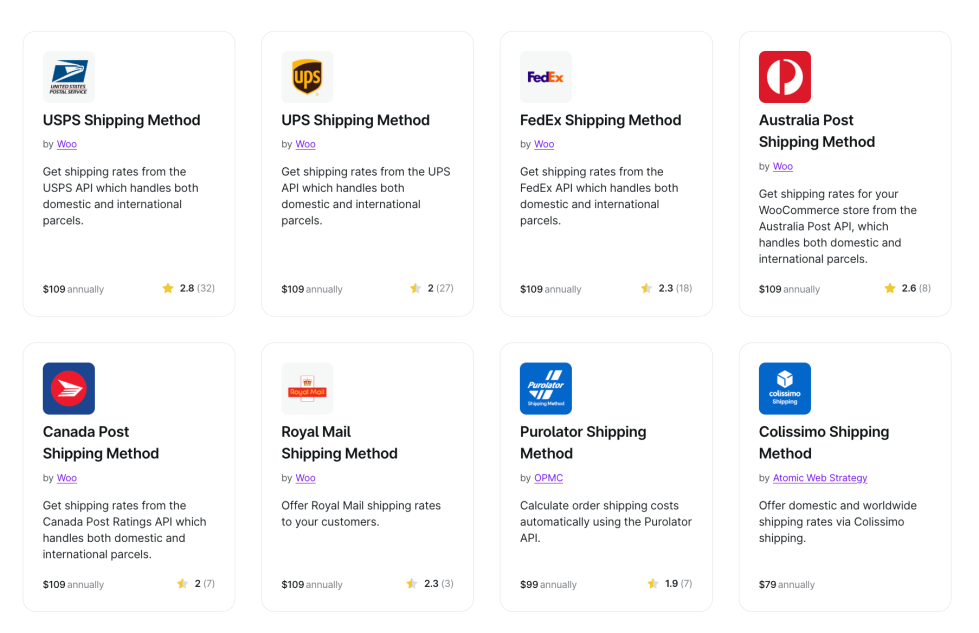
Not sure how to calculate rates? The WooCommerce extension library includes automated live rate calculators for all major carriers.
Carrier selection
Choose 1 or 2 reliable regional carriers. In the US, merchants standardly pair USPS for lightweight packages under 1 pound with UPS or FedEx for larger, time-sensitive shipments. Offer 2 distinct delivery speeds at checkout: standard shipping for price-conscious buyers and expedited shipping for urgent orders.
If your inventory features complex combinations of weight, distance, and product classes, use the table rate shipping extension to map out custom conditional rules.
3. Standardize your packaging
↑ Back to topCarriers price large packages using dimensional weight formulas. This means a lightweight but bulky item can cost the same to ship as a heavy anchor. Always use the smallest box or poly mailer that safely accommodates the product.
For fragile items or liquids, use protective materials like bubble wrap, foam inserts, or shrink wrap. While these materials add a small amount to your box dimensions, they cost significantly less than processing a damaged return.
The box on a customer’s doorstep is the first time they physically touch your brand. Branded packaging, a thank-you note, or tissue paper in your brand colors don’t require a big budget — and they can turn a first-time buyer into a repeat customer. You don’t need all of it. Pick one thing that feels like your store.
Managing HAZMAT Requirements
Shipping regulators enforce hazardous materials policies strictly. If your product catalog includes lithium batteries, aerosols, perfume, nail polish, or CO2 cartridges, your shipments fall into regulated HAZMAT categories.
The physical rule is simple: do not pack items from different HAZMAT categories inside the same box. A laptop power bank and a can of aerosol dry shampoo cannot share a package.
When printing labels via WooCommerce Shipping, the software prompts you to select the correct HAZMAT classification at checkout. This automates your manifest paperwork, leaving your team to focus entirely on isolating the items during physical packing. When in doubt, ship the items in separate boxes.
4. Set your tracking and returns policy
↑ Back to topOnce your shipment is in transit, you still have a job to do: Keep buyers informed and provide excellent customer service.
Customers should never have to ask where their order is or when it will arrive. The best way to handle this is to include tracking information on the customer account page and in either a post-purchase or shipping notification email. This will set clear expectations and lead to fewer support tickets that your team has to handle.
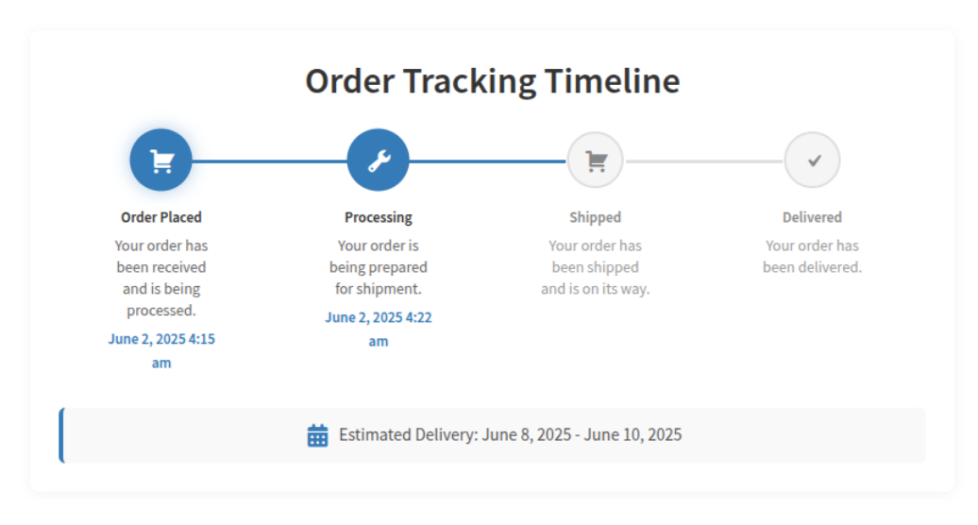
Use an extension like Shipment and Order Tracking for WooCommerce to generate a shipping status short code that you can add to any page you’d like. From there, you can customize the tracking page with blocks, then link to it from post-purchase emails and the customer account area for straightforward access.
Define in your return policy who pays for return shipping, and under what circumstances, before you need to enforce it. Have a process for generating return labels ready before your first customer request.
5. Configure your shipping settings in WooCommerce
↑ Back to topWooCommerce handles zones, classes, and base rates natively without requiring external extensions for standard business models.
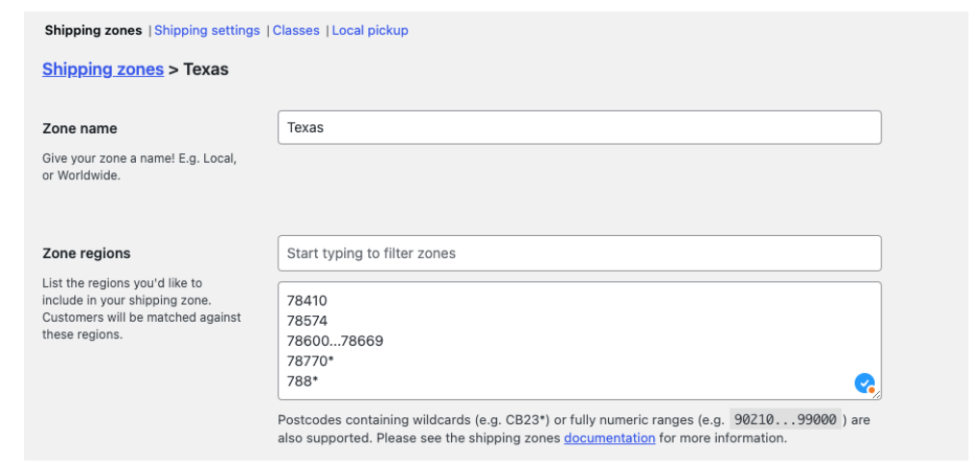
- Shipping Zones: Group geographic regions — by country, state, or zip code — to control what customers pay based on their location.
- Shipping Classes: Group products by their physical profiles. Create classes for fragile items, oversized cargo, or hazardous materials so the correct surcharges apply automatically during checkout.
Review the official WooCommerce shipping documentation for step-by-step setup instructions. For advanced store configurations, install these specific extensions:
- WooCommerce Shipping: Best for US-based businesses. It provides built-in label printing, automated return label generation, and discounted carrier rates inside your store dashboard.
- ShipStation for WooCommerce: Built for high-volume, multi-channel storefronts that need to unify orders from multiple marketplaces.
- Table Rate Shipping: Configures complex, conditional shipping rules based on item counts, weight brackets, and delivery distances.
- WooCommerce Dropshipping: Connects directly to external suppliers to automate packing slip notifications and stock level syncs.
Put your shipping plan into action
↑ Back to topSelect your primary carrier, fulfill your initial batch of orders, and check what it actually costs you. Your rates and carrier choices will shift as you learn what works for your products, customers, and margins. The important thing is starting with a setup you can run consistently.

About


Need more informatio, thanks
Hi, Rana – thanks for commenting. Could you expand a little on the specific information you’re looking for? This will help us direct you to the correct place.
It’s worth mentionong that we have several other recent posts around shipping too:
Thanks!
Why does the price figure increase when I put two decimal places? This is something heavy. Thank you
Hi Hernan! Are you using default shipping functionality or an extension? Please feel free to reach out to customer support for more individualized help. Get support
Great breakdown! Having the right ecommerce shipping strategy really does make a difference. Whether you’re fulfilling in-house, dropshipping, or using a 3PL, it’s all about balancing cost, control, and customer experience. I also appreciate the reminder to factor in delivery zones and carrier options — especially when thinking about international expansion. Thanks for the helpful insights!
Thanks, Sam! Glad to hear it was helpful!
Angesagt
Subscription churn: Turn retention insights into recurring revenue growth
By Tim Crepeau •
Scaling ecommerce: Growing sales without losing margin
By Shubert Koong •
Build multiple WooCommerce stores on a single WordPress installation
By James Kemp •
Never miss a beat — join our mailing list
Please enter a valid email.
View our privacy policy. You can unsubscribe anytime. We track email opens and clicks for measurement and optimization purposes.
There was an error subscribing; please try again later.
Thanks for subscribing!
Emails will be sent to
You're already subscribed!
Emails are sent to