
When your most popular product sells out on Black Friday, but your store keeps taking orders, that’s the real nightmare before Christmas.
Peak season is also peak time for sleepless nights for ecommerce teams, and inventory synchronization failures are the root of plenty of that tossing and turning. Not only can inaccurate inventory numbers cost you sales, but you’ll also find yourself sending out an awkward oversell apology email to disappointed shoppers.
Auditing your inventory ahead of Black Friday and Cyber Monday is smart, but an audit only helps if you can trust the numbers. Before sales jump across multiple channels, you need to establish a single source of truth.
You know your inventory numbers. Do your systems agree?
↑ Volver al principioAs sales channels and order volumes multiply during BFCM, so does the risk of trusting the wrong number. Peak season preparations happen in connected systems just as much as your warehouses.
Inventory issues in the middle of the holiday shopping season typically show up when ecommerce systems don’t agree with each other.
For example, your website doesn’t know what’s being sold on Amazon marketplace and your brick-and-mortar storefronts are working off their own numbers. This is the perfect setup for a holiday inventory disaster.
Run a SKU sync test before Black Friday
As part of your mid-year inventory audit, choose three SKUs to test from purchase through fulfillment. Identify a best seller, a low-stock item, and a product sold through multiple channels. Then record the available inventory shown in WooCommerce, your POS, your ERP or WMS, and marketplace listings.
Place a controlled test order through each major sales channel. Note the time of purchase and which event causes inventory to decrease. Was it order placement, payment, fulfillment, or another status change? Watch every connected system and record how long it takes the new quantity to appear.
Run the test in reverse, too. Cancel or refund an order and confirm that inventory is restored everywhere it should be. If you accept backorders, bundles, or partial fulfillments, test those workflows as well.
The slowest update is your oversell window. If WooCommerce updates immediately but a marketplace feed takes several hours, that lag is where peak-season orders can outrun your available stock. If an update still depends on a spreadsheet, manual entry, or staff message, document the handoff and assign someone to own it until you find a way to automate it.
Your ERP, WMS, or dedicated inventory platform should act as the single source of truth. Every other system should either read from it or send inventory-changing events back to it automatically.
How WooCommerce connects the full picture
↑ Volver al principioWhile your ecommerce website shouldn’t serve as the source of truth for inventory in a growing operation, it remains an important connection point. WooCommerce exchanges order, product, and stock data with the ERP, WMS, POS, or inventory platform that holds the full picture.
There are native solutions inside of WooCommerce that keep an eye on inventory. Turn on low-stock notifications for best sellers so your team gets an early warning before inventory runs out. But while low-stock notifications warn you that a problem is coming, they won’t fix disconnected systems.
You can use native APIs and established integrations to tie your WooCommerce store to the rest of your systems. For example, NetSuite is a market leader in enterprise resource planning. An integration between NetSuite and WooCommerce enables syncing in both directions.
That means NetSuite knows what’s being sold on the website and WooCommerce has access to actual inventory numbers updated as frequently as every hour.
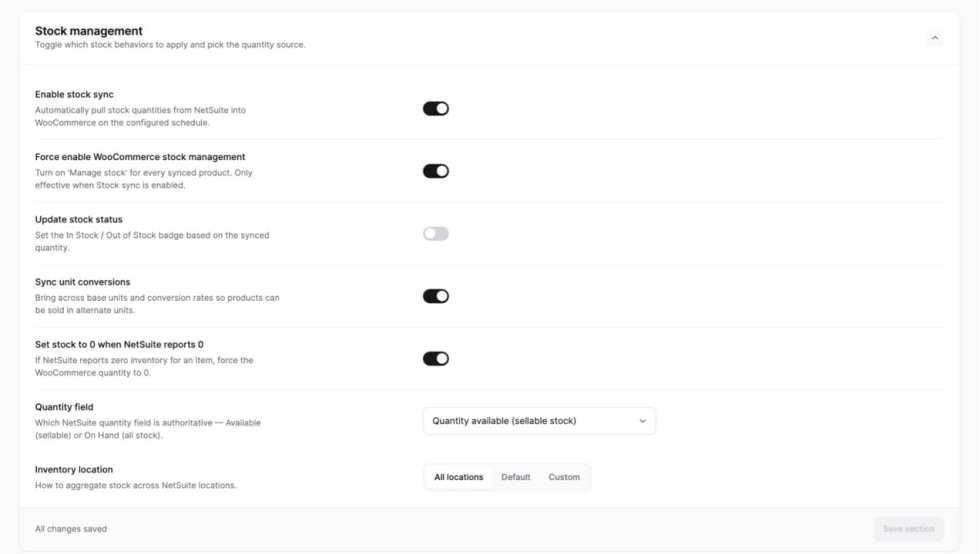
WooCommerce doesn’t need to own your master inventory record to stay up-to-date. The REST API and webhooks allow an ERP, WMS, or inventory platform to read and update product and order data as stock moves.
Your inventory audit tells you which connections need attention. If physical sales aren’t reaching your website, connect your POS. If marketplace quantities lag behind, use a multichannel sync tool. If your ERP holds the master inventory record, connect WooCommerce directly to that system instead of creating another manual handoff.
NetSuite Integration for WooCommerce can send website orders to your ERP while returning updated inventory to WooCommerce. Square for WooCommerce keeps online and brick-and-mortar sales and inventory aligned.
For marketplaces, tools like M2E Multichannel Connect or Multichannel for WooCommerce distribute stock updates and bring marketplace orders back into the connected operation. That includes everything from Amazon, Temu, and Walmart to TikTok Shop.
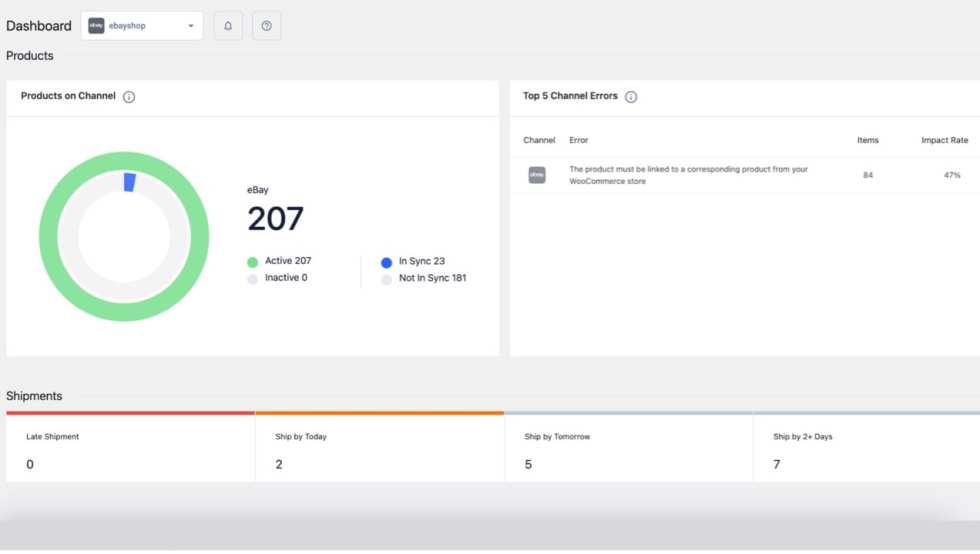
Because it’s part of the open source WordPress ecosystem, a key advantage of WooCommerce is that you can build connections around the tools you have now, as well as the systems you’ll grow into in the future.
What connected inventory looks like as you grow
↑ Volver al principioConnected inventory doesn’t look the same for every merchant. It’s a register talking to a website; it’s a warehouse that ships the second an order lands; or it’s TikTok orders finding their way into the same system as everything else.
Here’s what these look like in practice:
Scratch Pet Food automates warehouse fulfillment
The founders of Australia’s Scratch Pet Food had warehouse integration set up from day one thanks to a connection with their WooCommerce website. When pet owners make a purchase or a subscription renews, the order and all pertinent information travel together.
“An order comes in and we don’t touch a thing. We have a manufacturer who makes the food to our recipe, orders get sent straight to the warehouse, and they ship it.”
Mike Halligan, Cofounder, Scratch
Smooth warehouse integration was an important part of choosing local partners. Scratch specifically chose a local warehouse that could integrate with their website and order tracking systems to enable automation.
Every manual handoff brings the potential for delays, missed updates, and inventory discrepancies. By choosing partners that could connect directly with WooCommerce, Scratch built a fulfillment process that could grow alongside them.
Dan-O’s connects social selling to its inventory system
You’ll find Dan-O’s Seasoning on store shelves in Walmart and Kroger, but the brand also sells direct to consumers through a WooCommerce-powered website. Their spice mixes make for great stocking stuffers. So, BFCM is an important season.
Social selling helps drive DTC sales for Dan-O’s. In fact, the brand credits TikTok with driving awareness and popularizing their products. One video featuring their founder earned more than four million views. Going viral like that can drive sudden spikes in orders.
Dan-O’s sells direct through their WooCommerce store, alongside Amazon and Walmart marketplaces and 40,000 retail locations. Every online channel they sell through feeds Brightpearl, the inventory system that holds their full picture, and Brightpearl syncs order information back to WooCommerce automatically.
Rather than reconciling each channel separately, the connected stack keeps orders flowing back to the system responsible for the full inventory picture.
“WooCommerce allowed us to go from something as simple as we needed in the beginning to a full-size, customizable site. It gave us the flexibility that we wouldn’t get with Shopify or another platform.”
Ryan Fertig, Senior Marketing Activation Director, Dan-O’s Seasoning
What to ask your team before peak season
↑ Volver al principioBefore order volume climbs, make sure your team knows which system holds your true available inventory. When an item sells through one channel, do the others update automatically or is someone still moving data by hand?
When was the last time you confirmed that the stock shown online matched what was actually available in your warehouse?
Then consider what happens when something breaks. If a marketplace feed stops updating or a warehouse sync fails, will your team know immediately, or only after customers begin ordering products you can’t fulfill?
Trace one best seller through every system now. Find the gaps before peak season does, so your team enjoys the holidays instead of writing apology emails.


About