
Product comparison
Subscription includes
Support
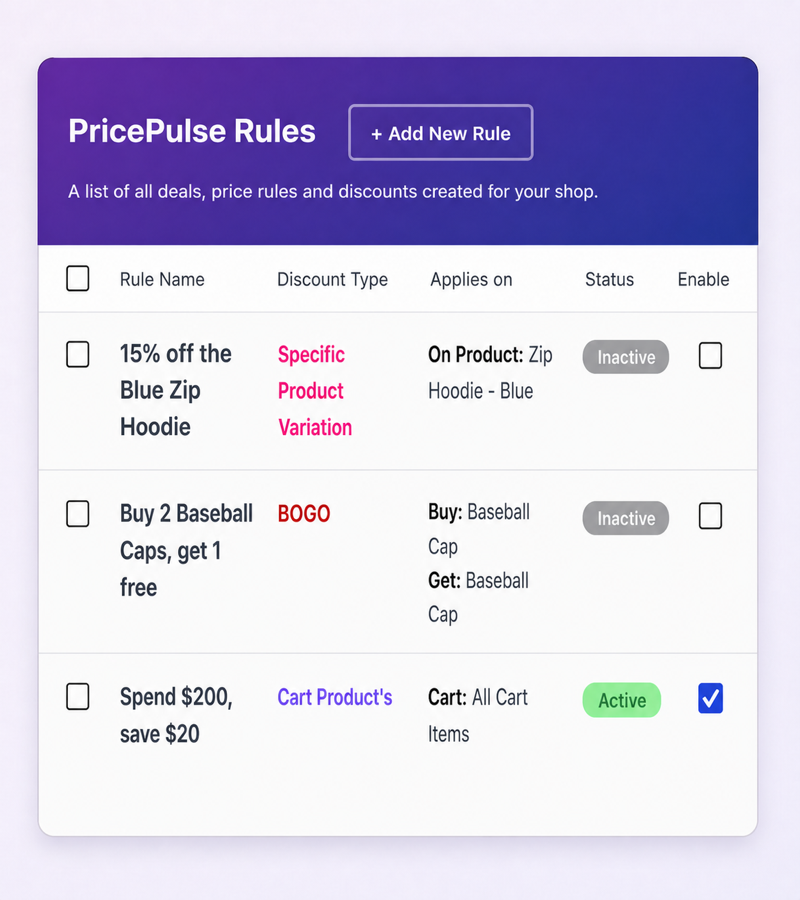
PricePulse adds dynamic pricing and discount rules to WooCommerce. You build a rule: what it applies to (a product, a category, a variation, the whole cart), how much comes off, who qualifies, and when it runs. From then on the discount looks after itself. Prices change on the shop and product pages with the original struck through, the cart recalculates as its contents change, and the discount disappears the moment a rule stops matching.
There are no codes for shoppers to copy, type, or lose at checkout. Nineteen rule types cover product, category, tag, attribute, and variation discounts, storewide sales, tiered and bulk quantity pricing, BOGO and Buy X Get Y deals, cart and cheapest-item discounts, payment and shipping method offers, and rewards for first, nth, and repeat orders.
Most stores run promotions one of two ways: editing sale prices by hand, or distributing coupon codes and hoping shoppers use them. WooCommerce dynamic pricing replaces both. A PricePulse pricing rule watches the store and applies its discount automatically: when a rule matches, the price is already reduced on the shelf, and when it stops matching, the original price comes back. Nobody edits products for a weekend sale, and nobody abandons a cart hunting for a discount code.
Your existing WooCommerce coupons keep working exactly as before. PricePulse adds settings that control how a coupon combines with an automatic discount, covered further down this page.
Five rule types target the catalog directly:
Variations inherit their parent product’s categories and tags, so a category or tag rule covers the variations of every matching variable product without extra setup. Each rule can be a percentage, a fixed amount, or a flat per-item amount, and can exclude products that already have a sale price. How to Discount Products, Categories and Tags covers each type step by step.
An All Products rule runs a storewide sale from a single screen: set the discount, optionally schedule start and end dates, and every price in the store updates at once, then returns when the sale ends. Multiple Categories does the same for a chosen group of categories.
Multiple Products has a mode worth knowing about: it can require every listed product together, so “Get 50% off when you buy all 3 products” only applies when all three are in the cart. That is a bundle discount without creating a separate bundle product; your catalog stays as it is. See How to Discount Multiple Products or Your Whole Store.
Tiered rules price by quantity, on a single product or across a category:
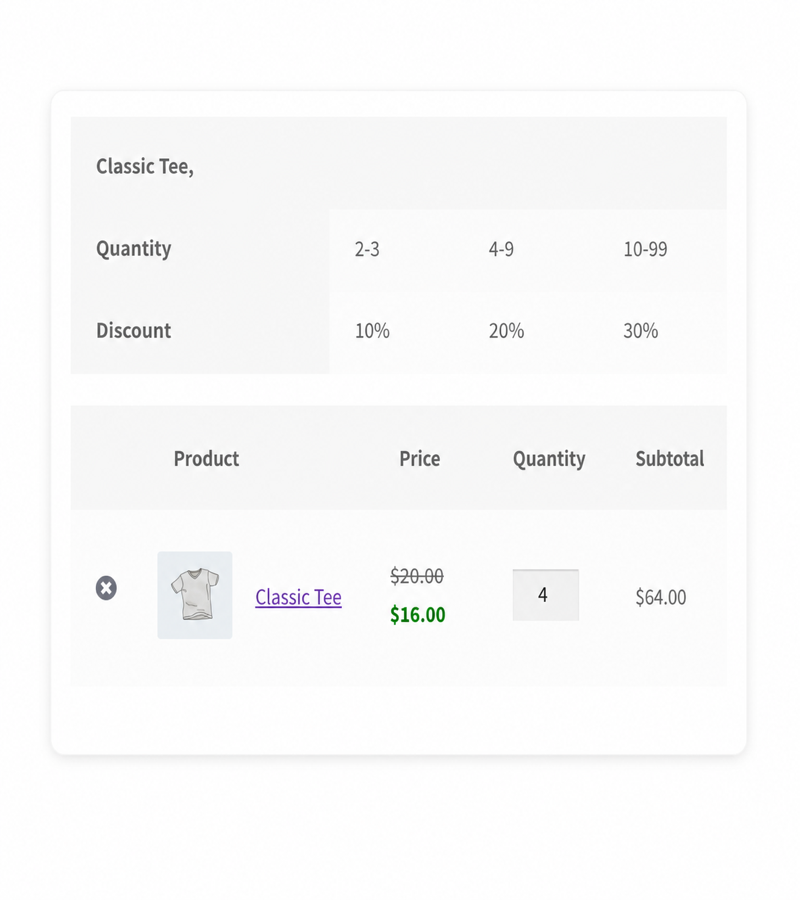
Each band can be a percentage, a fixed amount, or a flat amount per unit, and tiers work on the variations of variable products. Shoppers see the quantity breaks in an offer table before they commit, which is what makes buy-more-save-more pricing work: the next discount level is visible while they decide. Volume discount, bulk discount, price by quantity: merchants call this pricing by different names, and PricePulse builds all of them with the same two rule types, one for products and one for categories. Setup is in How to Set Up Bulk and Tiered Quantity Discounts.
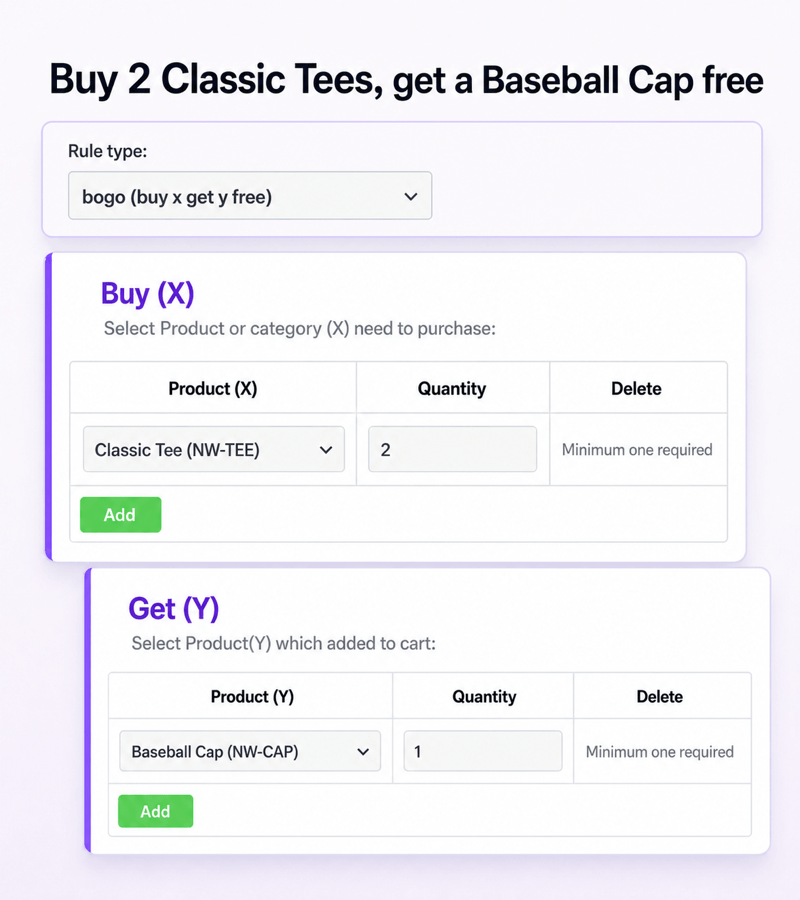
The BOGO rule type builds buy one get one free and every variant of it: you choose what has to be bought (a product or a category, with a quantity) and which product is given free. The two sides do not have to match, so “buy 2 t-shirts, get a cap free” is the same one-minute setup as “buy one, get one free”.
The free gift is added to the cart automatically as soon as the order qualifies, and removed automatically if the shopper drops below the qualifying quantity. The offer repeats per complete set: on a Buy 2 Get 1 rule, four qualifying items add two gifts. There is also a per-rule option that stops coupon codes being applied to the products in a BOGO offer, so a discount code cannot stack on top of the deal. The walkthrough is in How to Set Up a Buy One Get One Free (BOGO) Offer.
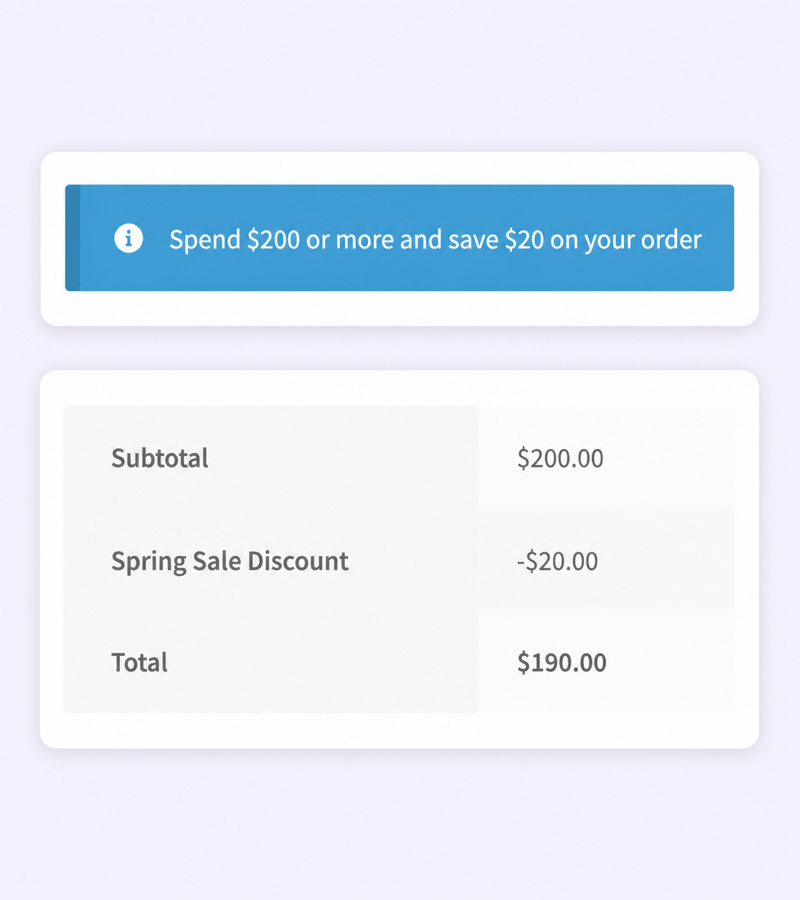
A Cart rule discounts the order once conditions are met: spend $100, save $10, or 5% off any order of six items or more. Thresholds can be built on cart value or quantity, and the offer message can tell shoppers how close they are.
The Least Amount Product rule, the cheapest item discount, targets the lowest-priced eligible product in the cart. It is how you run “buy 3, get the cheapest one half price” style promotions without touching individual product prices. Both are in How to Set Up Cart and Cheapest Item Discounts.
A payment method rule rewards the gateway you would rather receive: 5% off for direct bank transfer, or a small discount for cash on delivery where that suits your margins. The discount appears as its own labeled line at checkout and recalculates the moment the shopper switches gateway, so the totals are always honest. A shipping method rule does the same for the delivery choice.
PricePulse only ever discounts here. It does not add payment surcharges or checkout fees; if you want to charge extra for a payment method, that is a different kind of plugin. Details are in How to Discount by Payment or Shipping Method.
Four rule types reward the people behind the orders:
On top of that, every rule in PricePulse can be restricted to a user role, to guests only, or to all customers, so role based discounts are one dropdown on any rule type rather than a separate system. Scenarios are in How to Reward Repeat Customers.
Sooner or later two rules cover the same product. PricePulse makes the outcome a setting instead of a surprise:
Every rule also has a Maximum Discount field that caps the amount it can take off; leave it at 0 and the rule is uncapped. The full behavior, with worked examples, is in PricePulse General Settings.
PricePulse does not generate coupon codes. Discounts apply on their own, and your existing WooCommerce coupons continue to work beside them. What you control is the interaction: by default a coupon and a PricePulse discount are each calculated from the original price, and a setting switches coupons to compound on the already-discounted price instead. A second setting makes the same choice separately for fixed-amount coupons. Nothing changes on your store until you decide it should.
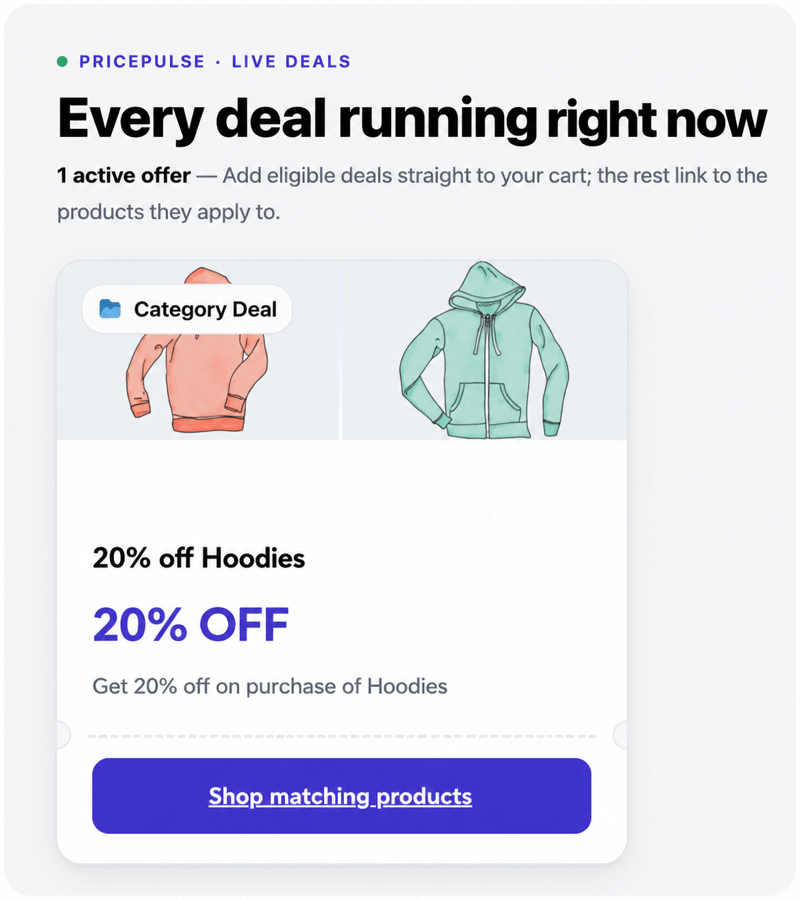
A discount only sells if people can see it:
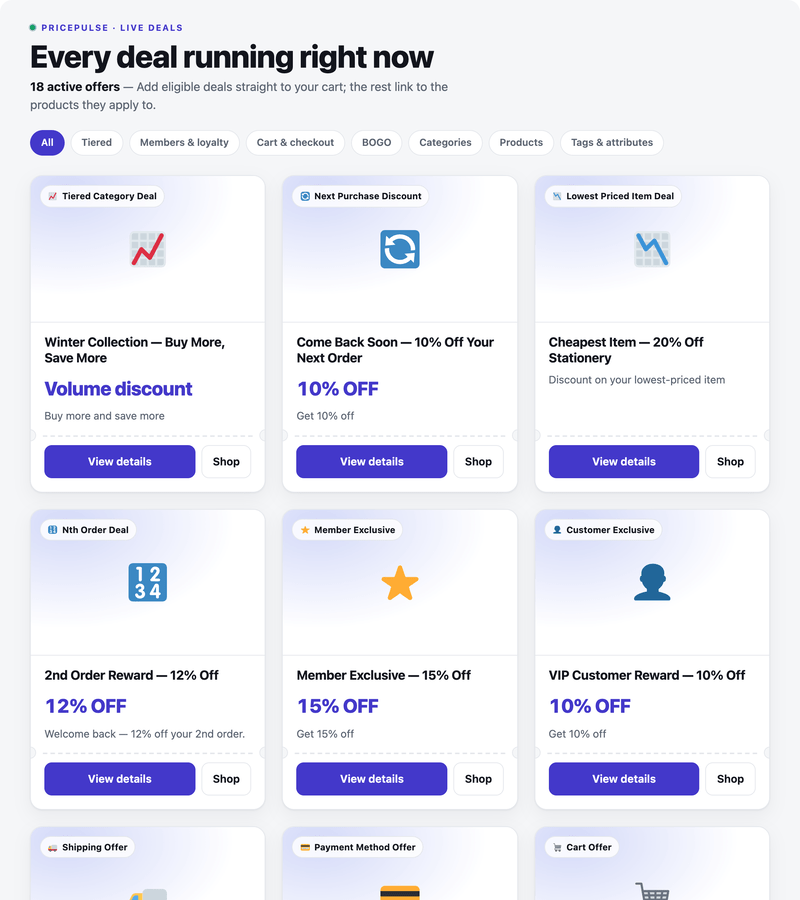
[rtwwdrp_pp_offers]) builds a page listing every live offer with filter chips by offer family, one-click add to cart, and colors you pick to match your theme.The live demo linked on this page shows the offers page running on a real store. Display setup is in How to Show Offers on Your Store and PricePulse Offers Page Shortcode.
Every scenario above is a single rule (or one rule plus one setting), and all of them are covered step by step in the documentation.
Before release, every PricePulse version runs WooCommerce’s own Quality Insights Toolkit. Version 2.0.0 passed the activation, security, malware, and PHP compatibility checks (PHP 7.4 through 8.5), the WooCommerce API suite (265 tests) and the end-to-end suite (138 tests) on WordPress 7.0.2 and WooCommerce 11.0.
The first rule takes a few minutes, and the documentation walks through every rule type with worked examples.
You decide in the settings. First Matched Rule applies only the highest-priority matching rule (the lowest priority number wins). All Matched Rules lets every eligible rule take part, and the Overlapping Discount Calculation setting controls the maths: Combined Percentage, Sequential, Highest Discount Only, or Lowest Discount Only.
Yes. By default the coupon and the discount are each calculated from the original price. A setting switches coupons to compound on the discounted price instead, and a second setting makes that choice separately for fixed-amount coupons. A per-rule BOGO option can also stop coupons applying to the products in that offer.
No. PricePulse applies discounts automatically, with no code for the shopper to enter. Your existing WooCommerce coupons keep working, and the settings control how the two combine.
Yes. Discounts calculate and display in the block-based cart and checkout as well as the classic shortcode pages. Block carts show the original price struck through beside the discounted price, and rule-based lines such as a payment-method discount update when the shopper changes their selection.
Yes. The plugin declares HPOS compatibility and reads customer order history through the WooCommerce order APIs rather than querying database tables directly.
Yes. Rules can target variable products or individual variations, and variations inherit the categories and tags of their parent product, so a category or tag rule also covers the variations of matching products.
Yes. Each rule has an option to exclude products with an active sale price. Leave it off and the rule treats sale items like any other product.
Yes. Every rule has a Maximum Discount field that limits the discount amount. Enter a value to cap it, or leave it at 0 for no upper limit.
Yes. Every rule can be limited to a chosen user role, to guests only, or to all users. There is also a Specific Customer rule type that works from a list of email addresses, and Plus Member automatically rewards customers who pass an order-count or spend threshold.
Yes. Choose what has to be bought (a product or category, with a quantity) and which product is given free; they do not have to match. The free product is added to the cart automatically when the order qualifies, removed if it stops qualifying, and the offer repeats per complete set: on Buy 2 Get 1, four qualifying items add two gifts.
Yes. The Least Amount Product rule targets the lowest-priced eligible product in the cart, which is how promotions like "buy 3, get the cheapest half price" are built.
Yes. Nth Order rules trigger on a chosen order number, including the first order, and only successful orders count (completed and processing). Next Purchase rules give a customer a discount on their following order, once or repeatedly.
Extension information
Quality Checks
Countries







