
Four PricePulse rule types decide who gets a discount from who the customer is, or from what they have bought before: Next purchase discount, Nth Order Reward, Specific Customer and Plus Member. Between them they cover every way a store rewards repeat customers: a thank-you for ordering, a milestone reward such as a first order discount or a coupon for the next visit, a private price for a named account, and a members’ tier.
The fields every rule shares are described in Discount Rule Fields.
Order history belongs to a customer account, so none of these rules can recognize a returning guest. Someone who checks out as a guest every time is always on their first order and never a member. If loyalty offers matter to your store, encourage account creation at checkout.
Next Purchase Discount
↑ Back to topGives a customer a discount on their next order once they have completed a qualifying one. It is the straightforward way to turn a first purchase into a second.
- Discount based on – Percentage discount or Flat discount.
- Minimum product purchase to apply rule – how many items the qualifying order must contain.
- Minimum amount spent (subtotal amount) – how much it must be worth.
- Minimum order done by customer – how many orders they must already have placed.
- Repeat this offer on every next order – tick to make the reward permanent. Left unticked, it is used once and then gone.
Example. A 10% rule with Minimum amount spent of 100. A customer buys a $100 Premium Hoodie and pays the full amount — the reward is for next time. Once that order reaches Completed, their next basket carries Customer Loyalty Bonus −$10.00, bringing a second $100 order to $90.00. With Repeat this offer on every next order left unticked, the third order pays full price again.
Eligibility arrives when the qualifying order reaches Completed, not when it is placed. A customer who orders and comes straight back will not see the discount until you have completed the first order.
What the shopper sees. Nothing on the first visit. On the next one, a discount line named Customer Loyalty Bonus in the cart and at checkout. This label is fixed for this rule type; the editable Discount Label field belongs to the cart, payment and shipping rules.
Nth Order Discount
↑ Back to topRewards a milestone — the first order, or the third, or every fifth. Choose the Nth Order Reward rule type; its Reward type decides how the milestone is rewarded. Left at Discount on that order, the rule reduces a product’s price on the milestone order itself rather than adding a discount line, so you also choose what it applies to. To send a coupon for the next visit instead, see Nth Order Reward Coupons.
- Reward type – Discount on that order, the default and how every rule created before version 2.1.0 behaves, or Coupon for a later order.
- Offer on order – First order or Nth order.
- Nth order number – which order earns it. Shown once you choose Nth order.
- Order number upto – the end of a range, so the offer can cover orders 3 to 5 rather than order 3 alone.
- Discount on – Product or Category, then the product or category itself.
- Repeat this offer on next order – tick to make the milestone recur.
- Conditions – this rule type offers all six condition kinds.
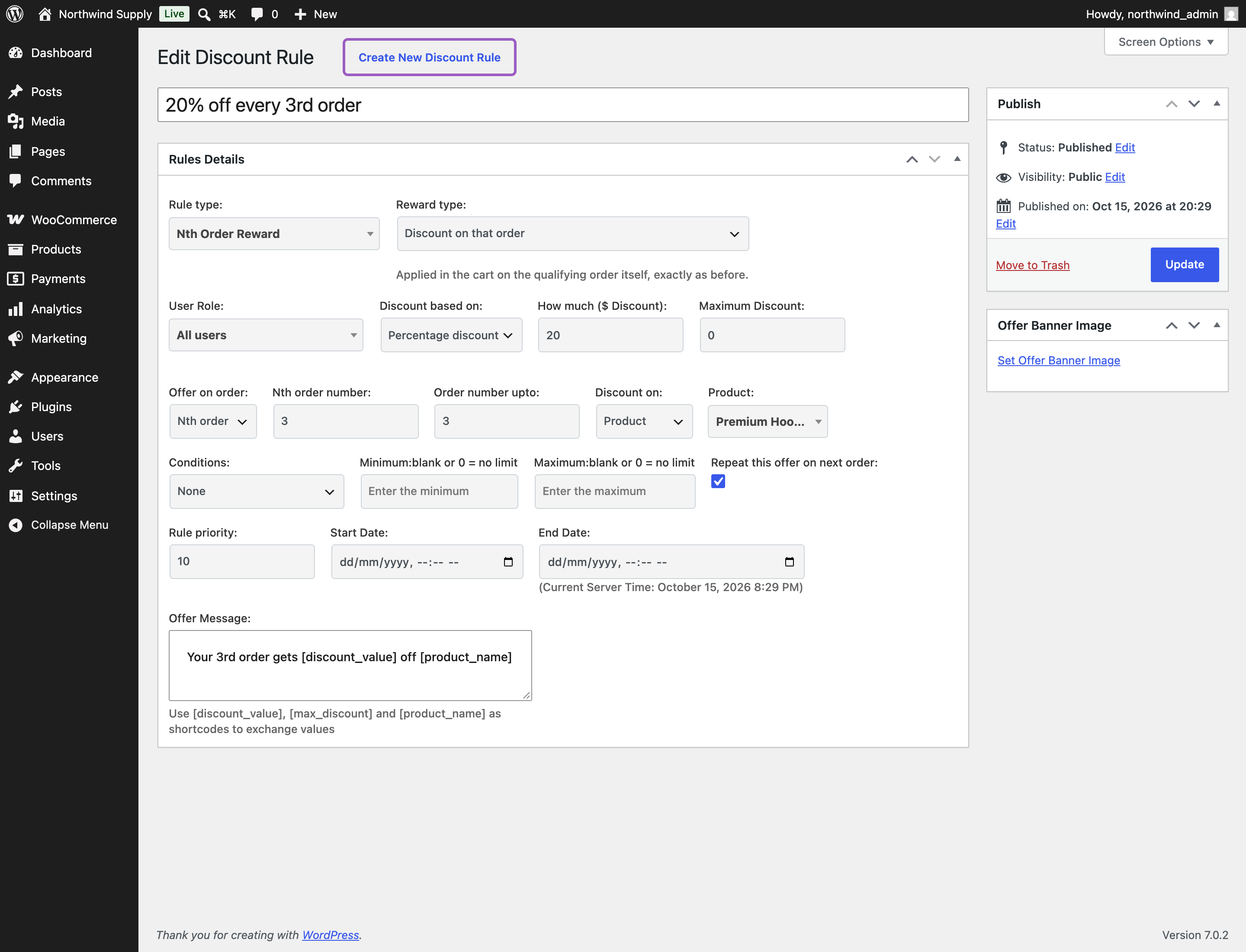
Example. A 20% rule set to Nth order with Nth order number 3, Order number upto 3, and Discount on the Premium Hoodie. A customer with two completed orders is on their third, so the $100 hoodie costs $80.00 while a $20 Classic Tee in the same basket stays at $20.00 — the rule names one product. Once that order is placed, their fourth basket returns the hoodie to $100.00.
Only successful orders count toward the number — completed and processing — so canceled, failed, refunded, and pending orders do not push a customer past a milestone.
What the shopper sees. For a qualifying customer, the reduced price on the product page, in the cart and at checkout, exactly as an ordinary product discount. Customers who are not at the milestone see the normal price.
Which orders count toward an Nth Order Reward?
↑ Back to topOnly paid orders: those that have reached Processing or Completed. Cancelled, failed, refunded, pending and on-hold orders never move a customer toward a milestone, and guest orders are not counted at all, because order history belongs to an account. Orders are numbered in the order they are paid, so an older order paid after a newer one is counted after it.
Nth Order Reward Coupons
↑ Back to topSet Reward type to Coupon for a later order and the milestone order is charged in full. Once it is paid — it reaches Processing or Completed — PricePulse creates a single-use WooCommerce coupon locked to the customer’s email address, emails it, and shows it on the order confirmation page, in My Account and, if you choose, in the cart and at checkout. The rule sets the coupon’s type and amount, what it applies to, how many days it stays valid, a minimum spend, a code prefix and whether it can be combined with other coupons.
The setup steps, every coupon field, the email, which orders count and what happens to a coupon when its order is cancelled or refunded are in How to Send a Next Order Coupon Automatically.
Specific Customer
↑ Back to topGives a discount to named customers, chosen by email address. Use it for a trade account, a long-standing customer or a goodwill gesture, without creating a coupon code that could be shared.
- User Emails – one or more customer email addresses. Matching ignores capitalization.
- Discount based on – Percentage discount or Flat discount.
- Conditions – as well as Cart Total Quantity and Cart Total Value, this rule type can test order history: Purchased Amount, Purchased Product Quantity, Monthly Purchased Amount and Monthly Purchased Product Quantity.
Example. A 10% rule naming one customer’s email. Signed in as that customer, a basket holding a $100 Premium Hoodie carries Just for You Discount −$10.00 and a total of $90.00. The same basket as a guest, or as any other customer, is $100.00 with no discount line and no offer message anywhere. A Maximum Discount of 5 would cap the line at −$5.00.
The four order-history conditions make this rule type useful beyond named individuals. Monthly Purchased Amount with a minimum, for instance, gives a standing discount to customers who spend above a level each month, and withdraws it when they do not.
What the shopper sees. A discount line named Just for You Discount in the cart and at checkout. This label is fixed for this rule type.
Plus Member
↑ Back to topGives members a standing discount on products or categories you choose — a simple membership tier without a separate membership plugin.
- Discount for (Product/ Category) – whether the discount covers products or categories.
- Select Products or Select Categories – what members get the discount on. Both lists offer an All products / All categories entry for a members’ discount across the store.
- Discount based on – Percentage discount or Flat discount.
- Minimum product purchase to apply rule and Minimum amount spent (subtotal amount) – optional basket thresholds.
Example. A 20% rule on All products. A customer who is not a member pays $100.00 for the Premium Hoodie. Tick their Plus Member box and the same basket becomes $80.00, carried through to checkout. A guest is never a member.
Who Counts as a Member
↑ Back to topMembership has two doors, and a customer needs only one of them.
- By hand. Go to: Users > All Users and tick the customer’s Plus Member box. This is the reliable way to run a small members’ scheme.
- Automatically. The Plus Member sub-tab under WooCommerce > PricePulse > Rules Configuration sets criteria — account age, allowed roles, minimum previous orders, minimum spend, minimum products bought. A customer meeting them is treated as a member.
Where several criteria are filled in, a customer must satisfy all of them. Leave a criterion blank and it is not applied; leave the whole tab blank and nobody becomes a member automatically, which is the default.
Fill in only one automatic criterion and every customer who matches it becomes a member. A single low threshold — one previous order, say — can quietly turn your members’ price into your normal price. Check the criteria tab before publishing a Plus Member rule.
What the shopper sees. Members see reduced prices in the catalog, on product pages, in the cart and at checkout, exactly like any other product discount. Everyone else sees your normal prices.
Which One to Reach For
↑ Back to top- To get a second order out of a first — Next purchase discount.
- To celebrate a milestone, or to welcome a first-time buyer — Nth Order Reward, as a discount on that order or as a coupon that brings them back.
- For named accounts, or a discount that follows spending over time — Specific Customer.
- For a standing members’ price — Plus Member.
If a rule does not behave as you expect, the PricePulse FAQ lists the usual causes.

