
Common questions about PricePulse. If your question is not here, the pages linked from the documentation home cover each feature in detail.
Getting Started
↑ Back to topWhat do I need in order to use PricePulse?
↑ Back to topWordPress 6.5 or later, WooCommerce 6.0 or later, and PHP 7.0 or later. WooCommerce must be active — PricePulse will not run without it.
Do customers need a coupon code?
↑ Back to topNo. PricePulse discounts apply automatically as soon as a cart matches a rule. There is no code to advertise and nothing for the shopper to type. The one exception is deliberate: an Nth Order Reward rule can email a customer a single-use coupon for a later order, which they enter at checkout like any WooCommerce coupon. See How to Send a Next Order Coupon Automatically.
Where do I find the plugin after installing it?
↑ Back to topUnder WooCommerce > PricePulse. That screen has three sections: Dynamic Rules for your rules, Rules Configuration for store-wide settings, and Help.
Discount Types
↑ Back to topWhat types of discount can I create?
↑ Back to topNineteen rule types in total. They cover single products, several products, whole categories, tags, attributes and individual variations; store-wide discounts; quantity-based tiered pricing; buy-one-get-one offers; cart totals and cheapest-item offers; payment and shipping method discounts; and rewards based on a customer’s order history or membership, including a coupon for a later order.
How do I create a buy-one-get-one offer?
↑ Back to topUse the bogo (buy x get y free) rule type. You set both quantities and both products, so it also covers “buy two, get one free” and offers where the free item is something else entirely. See How to Setup BOGO for WooCommerce.
What is dynamic pricing in WooCommerce?
↑ Back to topDynamic pricing means the price a shopper pays is worked out from rules rather than fixed on the product. The same product can cost less when bought in quantity, when a customer belongs to a particular group, or during a sale — without you editing the product itself. PricePulse applies those rules automatically at cart time.
Does WooCommerce have bulk pricing built in?
↑ Back to topNo. WooCommerce has no native quantity or bulk pricing, which is why it needs an extension. PricePulse adds it with the Tiered rule on Product and Tiered rule on Category rule types.
How do I offer a free gift with a purchase?
↑ Back to topUse the bogo (buy x get y free) rule type and choose a different product as the reward. The gift is added to the cart automatically at zero when the shopper qualifies. Setting the same product in both halves gives a conventional buy one get one free offer instead.
Can I set up wholesale pricing for trade customers?
↑ Back to topYes, in two ways that combine well. Restrict a rule to a user role such as Wholesale Customer so only those accounts see the price, and use tiered rules so the rate improves with volume. See How to Set Up Bulk and Tiered Quantity Discounts.
Can I set bulk pricing that improves with quantity?
↑ Back to topYes, with Tiered rule on Product or Tiered rule on Category. You define bands — 2 to 3 items at 10% off, 4 to 9 at 15%, and so on — measured either by quantity or by amount spent. See How to Set Up Bulk and Tiered Quantity Discounts.
Can I offer a discount for a particular payment or shipping method?
↑ Back to topYes. Payment discount rewards a chosen gateway — useful for steering customers towards a method that costs you less — and Shipping discount reduces delivery cost, optionally above a spend threshold. See How to Discount by Payment or Shipping Method.
Can I reward repeat customers?
↑ Back to topYes, in several ways: a discount on a customer’s first or nth order, a single-use coupon emailed once that order is paid, a reward saved for their next purchase, a discount for named email addresses, or a standing member discount. See How to Reward Repeat Customers and How to Send a Next Order Coupon Automatically.
Can I discount the cheapest item in every pair, or every third item?
↑ Back to topYes — a Least amount product discount rule with Apply the discount to set to The cheapest items of every group of N, repeating as the cart grows. Group size 2 at 50% gives the cheaper item of every pair half price; group size 3 at 100% is three for two. See Repeating Cheapest Item Deals.
How Discounts Combine
↑ Back to top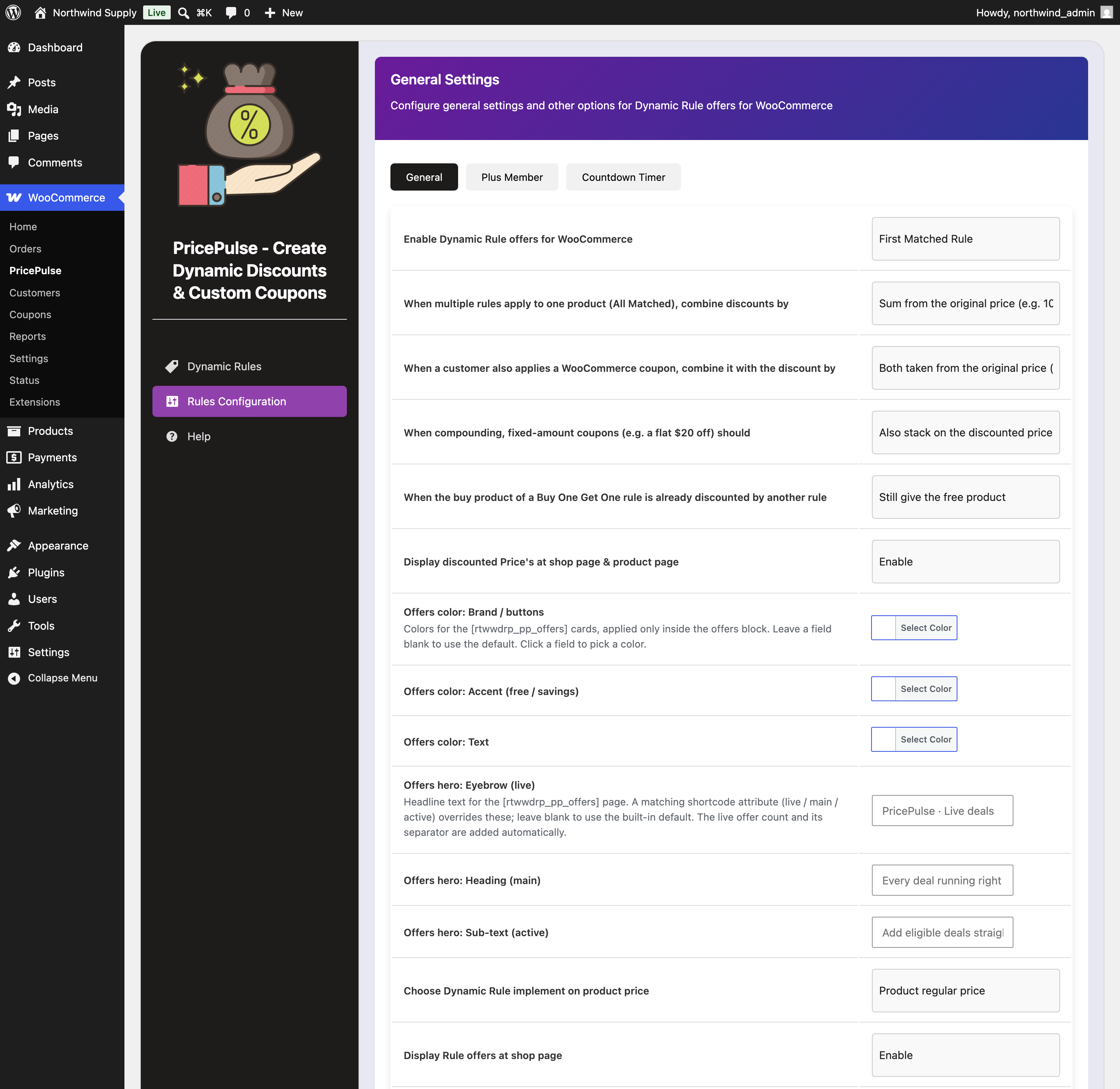
What happens when more than one rule matches the same product?
↑ Back to topYour store decides. Set to First Matched Rule, only the rule with the lowest priority number applies. Set to All Matched Rules, every matching rule applies and the Overlapping Discount Calculation setting decides how they combine: Combined Percentage, Sequential / Compounded, Highest Discount Only or Lowest Discount Only. See How Matching Rules Combine.
Which rule wins when priorities differ?
↑ Back to topThe lowest number wins. A rule with priority 1 beats one with priority 10.
Can a customer use a WooCommerce coupon as well as a discount?
↑ Back to topYes, and you control how the two combine. By default the coupon and the discount are each worked out from the original price. You can instead have the discount apply to what is left after the coupon, and decide separately whether flat-amount coupons take part. See PricePulse General Settings. A reward coupon issued by an Nth Order Reward rule is marked for individual use unless you untick that on the rule, so it cannot be combined with another coupon code; your automatic discounts still apply alongside it.
Can I stop discounts applying to products that are already on sale?
↑ Back to topYes. Tick Exclude products that are already on sale on the rule. It appears on the rule types that change product prices, and skips any product with a WooCommerce sale price so your discount does not stack on a markdown you have already made.
Can I limit how much a single discount takes off?
↑ Back to topYes — use Maximum Discount on the rule. It is most useful with percentage discounts on expensive products. A 10% rule on a $100 product normally saves $10; with Maximum Discount set to 5 the shopper pays $95.00, because the ceiling limits the saving rather than the price.
Leave it blank or enter 0 for no limit; zero means “no cap”, not “no discount”. The ceiling applies to the price advertised in your catalog as well as the one charged at the till, so the two always agree.
Why will my tiered category rule not save?
↑ Back to topMaximum Discount is a required field on Tiered rule on Category, and the form will not submit while it is empty. The rule is left as a draft with none of its settings and never appears in your rules list. Enter 0 if you do not want a ceiling.
The tiered product editor has no such field, which is why the two screens behave differently.
Why is my tiered rule saving less than I expected?
↑ Back to topCheck Discount based on. Percentage discount and Flat discount apply to every unit, so the saving grows with the quantity, but Fixed discount takes the tier’s amount off the line only once — a tier of 10 saves $10 on two units and $10 on five. If nothing is discounted at all, check that the quantity in the basket falls inside one of the bands you defined, and remember that under First Matched only the highest-priority matching rule applies.
If that is not it, check that the quantity in the cart line actually falls inside one of your bands — a band of 2–3 does nothing to a single item — and remember that quantity is counted per cart line rather than across the whole rule.
Compatibility
↑ Back to topDoes it work with the Cart and Checkout Blocks?
↑ Back to topYes. Discounted prices and named discount lines appear in the block cart and checkout as well as the classic ones, and a payment method discount updates when the shopper changes method.
The difference is in the extra furniture PricePulse draws around the classic cart, which the Cart block has no place for: the You Saved row, the offer message strip above the cart table, and the tier table shown by Display Tier Offer on cart Page. Prices, free BOGO lines and named discount lines are unaffected — a shopper pays the same either way. See Classic Cart and Cart Blocks.
Is it compatible with High-Performance Order Storage?
↑ Back to topYes. PricePulse declares compatibility with HPOS and reads order history through the WooCommerce order API, so it works whether or not you have HPOS switched on.
Does it work with variable products?
↑ Back to topYes. Variations inherit their parent’s categories and tags, so a category or tag rule covers every variation. To discount one variation only, use Specific Product Variation or Product Attribute.
Troubleshooting
↑ Back to topWhy is my discount not applying?
↑ Back to topWork through these in order:
- Is the rule enabled? Check the Enable checkbox in the rules list.
- Do its dates include today?
- Does the shopper match its User Role? A rule set to a named role never applies to guests.
- Does the cart meet the rule’s Conditions?
- Is another rule winning on priority? Under First Matched Rule, only one applies.
- Is the product already on sale, with Exclude products that are already on sale ticked?
Why does my multiple-product rule do nothing?
↑ Back to topCheck Condition on cart products. Set to And, every selected product must be in the cart before any of them is discounted — so a cart with only some of them gets nothing. Set it to Or if each product should be discounted on its own.
Why is my BOGO offer not adding the free item?
↑ Back to topCheck whether another rule already discounts the qualifying product, and what When the buy product of a Buy One Get One rule is already discounted by another rule is set to. If it is set to skip the offer, a store-wide or category discount touching that product prevents the free item.
Also confirm the free product is purchasable and in stock — an out-of-stock reward cannot be added.
Why do prices look right in the cart but not in the catalog?
↑ Back to topDisplay discounted Price’s at shop page & product page is switched off. Set it to Enable to show reduced prices while shoppers browse.
Why does a shopper see something like “[from]” in an offer message?
↑ Back to topThat token is not supported where the message is being shown. The offers page understands fewer tokens than the cart and product pages, and leaves the rest as typed. See Tokens on the Offers Page.
Why do loyalty discounts never trigger for some customers?
↑ Back to topBecause they are checking out as guests. Order history belongs to a customer account, so a shopper without one is always on their first order. Only orders that reached Completed or Processing are counted.
Why did a customer not receive a reward coupon?
↑ Back to topUsually because the order that should earn it is not yet paid, or did not qualify. A coupon is created only when the order reaches Processing or Completed, only for a customer with an account, and only when the order is the milestone the rule names and meets its conditions. Open the order: PricePulse records every coupon it issues in the order notes, and the code also appears on the customer’s order page in My Account > Orders.
If the coupon was issued but the email did not arrive, check that PricePulse reward coupon is enabled under WooCommerce > Settings > Emails, then send it again with Resend PricePulse reward coupon email from the order actions. The whole flow is in How to Send a Next Order Coupon Automatically.
What happens to my rules if I delete the plugin?
↑ Back to topNothing, unless you ask for them to be removed. The setting When this plugin is deleted, remove all of its data defaults to keeping everything. It applies only when the plugin is deleted, never when it is deactivated, and your products, orders and coupons are never touched either way.
Questions and Feedback
↑ Back to topHave a question before you buy? Please fill out this pre-sales form.
Already purchased and need some assistance? Get in touch with the developer.

