Aktive Installationen
10K+
Product comparison
Das Abonnement beinhaltet
Support

The Name Your Price plugin lets you be flexible in what price you are willing to accept for selected products. You can suggest a price to your customers and optionally enforce a minimum acceptable price, or you can leave it entirely in the hands of the customer!
You can also use this plugin to accept donations, make your products available to a broader audience, gather information on how much customers are willing to pay, or take variable amounts for other reasons such as bill payment.
Setup is simple for a wide range of use cases right “out of the box!” Once you’ve created your product, tick the checkbox marked Name Your Price, and you’ll have the option to enter minimum, maximum, and suggested prices.
Our documentation also extends step-by-step help and options to customize for many additional use cases, including compatibility with several other plugins. Find that information here.
Plus, our new Name Your Price version 3.0 features an upgraded user experience (UX) and full accessibility to screen readers.
Name Your Price is a versatile sales tool!
Many sites leverage it to facilitate donations, subscription payments, and even easy online bill pay with variable amounts (such as by invoice), subscription payments, and donations.
Raise more funds by empowering donors to give at the level that’s right for them, with or without a suggested donation amount.
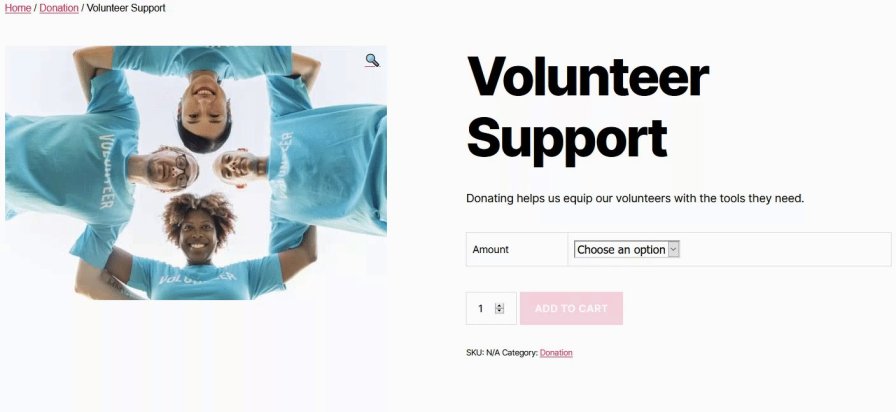
When paired with the WooCommerce Subscriptions plugin, Name Your Price also facilitates customized recurring donations, allowing donors to set the amount and even the cadence of their gift (under your parameters).
Ready to set yours up? Our step-by-step donations setup guide walks through the full configuration, from price fields to customizing your donation form text.
Use Name Your Price to collect payments, making it easy for clients and customers to pay invoices and custom amounts right on your own site!

Name Your Price works with a variety of product types, including:
Plus it’s compatible with a wide range of WooCommerce.com plugins, including:
Find more specific information about compatibility and integrations here.
Yes. Name Your Price adds a price field to the product page, and the rest runs through your normal WooCommerce cart and checkout. Your payment gateways, tax settings and order emails work the same as for any other product.
Yes, for each product. Show a suggested amount, set a minimum and a maximum, or leave the amount entirely to the customer. You can also hide the minimum while still enforcing it.
Yes, with WooCommerce Subscriptions. The amount the customer chooses repeats on the schedule you set, which suits recurring donations and memberships. If you allow it, subscribers can change their amount later from their account.
Yes. Create a payment product, and customers enter the amount they owe. To collect an invoice or account number as well, add a field with Product Add-Ons. See the Pay your bill guide.
Simple and variable products, simple and variable subscriptions, Product Bundles, Composite Products, Mix and Match Products and WooCommerce Deposits. Booking products aren't supported. See Compatibility and Integrations for the full list.
Yes. The label, button text and other wording are set under WooCommerce > Settings > Name Your Price.
No. The amount the customer enters is what they pay at checkout. There's no offer or approval step.
The documentation covers setup, settings and common questions. If you need more, contact the Name Your Price team through your WooCommerce.com account, before or after you buy.
Kategorien
Extension information
Quality Checks
Works with
Länder
Anforderungen