
NOTE
This product is no longer available on WooCommerce.com. This document has been left available for existing users, but will no longer be updated.
Customer History for WooCommerce observes how customers browse your WooCommerce store, keeping a full purchase history log and calculating the total customer lifetime value.
Installation
↑ Back to top- Download the .zip file from your WooCommerce account.
- Go to: WordPress Admin > Plugins > Add New and Upload Plugin with the file you downloaded with Choose File.
- Install Now and Activate the extension.
More information at: Install and Activate Plugins/Extensions.
Setup and Configuration
↑ Back to topInclude Customer History in Admin Emails
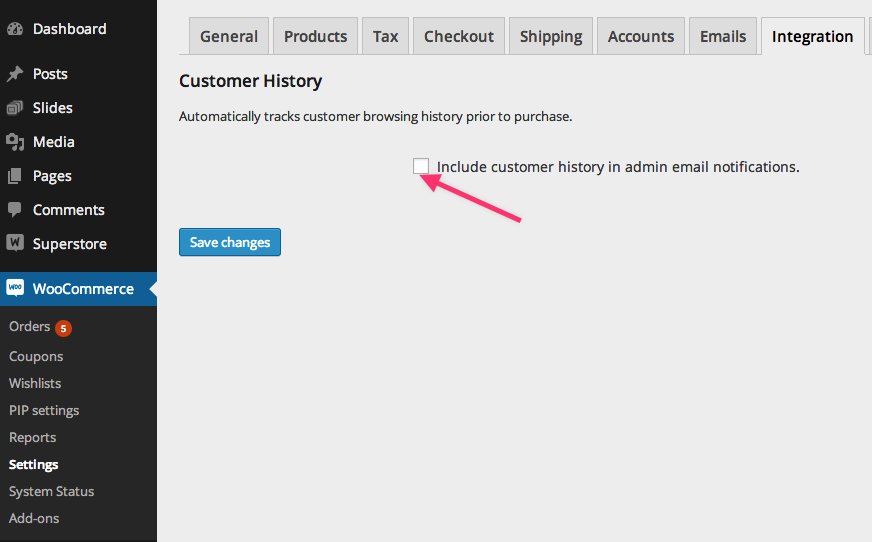
↑ Back to topIf you are looking to get a better idea of what each of your customers are doing via email, go to WooCommerce > Settings > Integration and tick the Include customer history in admin email notifications checkbox.
Usage
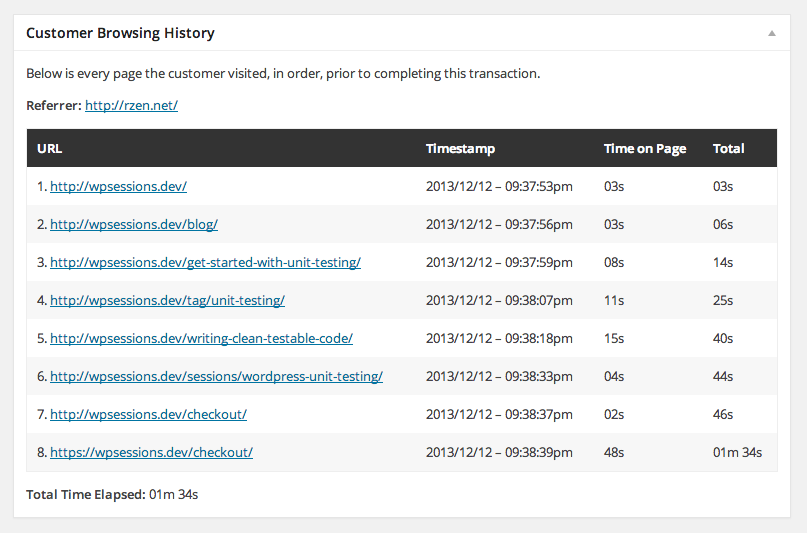
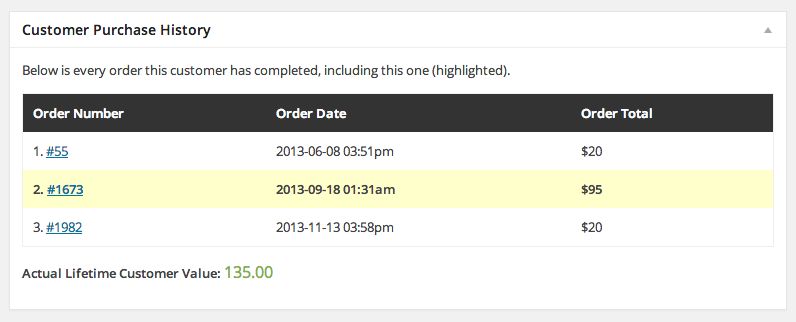
↑ Back to topTo view a customer’s browsing history and total lifetime value, go to WooCommerce > Orders and scroll to the Customer Browsing History and Customer Purchase History boxes. Click the Order Number to view the data.
Questions & Support
↑ Back to topHave a question before you buy? Please fill out this pre-sales form.
Already purchased and need some assistance? Get in touch the developer via the Help Desk.