
The WooCommerce Subscriptions Compatibility feature in the Order Delivery Date Pro for WooCommerce plugin allows you to automatically assign delivery dates for subscription products, including renewal orders.
This feature works based on the subscription interval (weekly, monthly, etc.) configured in the WooCommerce Subscriptions plugin, ensuring that delivery dates are scheduled accurately for every renewal cycle.
This is especially useful for stores offering recurring deliveries such as groceries, vegetables, or subscription boxes, where consistent and accurate scheduling is critical.
Prerequisites
↑ Back to topBefore using this feature, ensure the following plugins are installed and activated:
- WooCommerce Subscriptions
- Product Delivery Date Pro for WooCommerce
How to Enable Subscription Compatibility
↑ Back to topTo use this feature, navigate to:
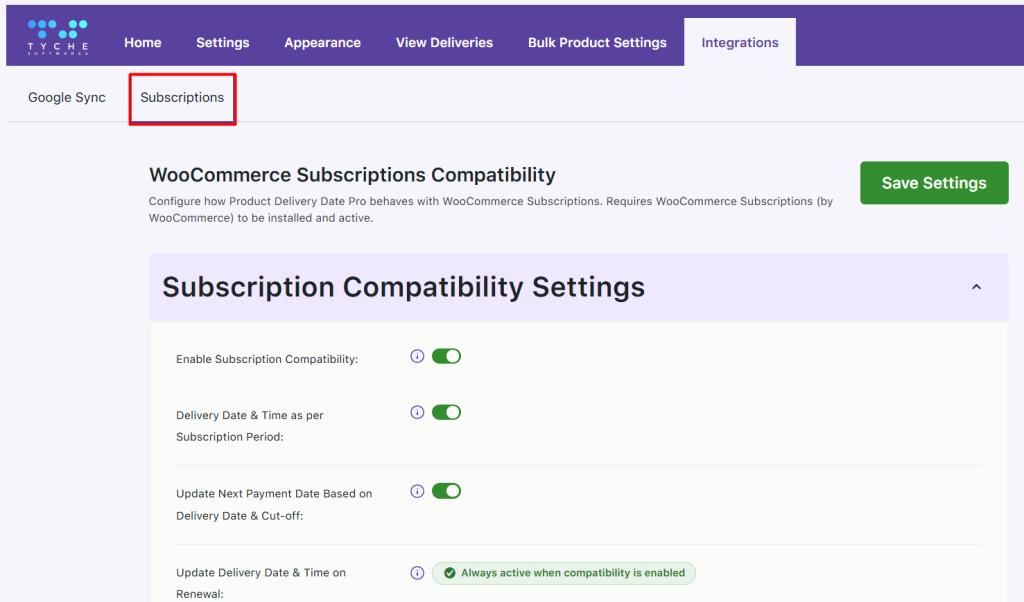
Product Delivery Date → Integrations → Subscriptions
Here, you will find the following options.
Enable Subscription Compatibility: -When you enable Subscription Compatibility, it acts as a master setting that activates all subscription-related behaviors in the plugin.
Delivery Date & Time as per Subscription Period:-This option ensures that customers can only select delivery dates within their billing cycle. For example, if the product is a weekly subscription, the calendar will display only the next 7 days instead of showing an extended future calendar.
Update Next Payment Date Based on Delivery Date & Cut-off: This setting recalculates the subscription’s next payment date based on the selected delivery date and the subscription interval. The payment date is further adjusted based on cut-off times and minimum preparation time
Update Delivery Date & Time on Renewal: Automatically assigns the next valid delivery date for renewal orders based on subscription schedule and delivery rules such as preparation time, cut-off, holidays, and availability. Lockout limits and charges are updated accordingly.
Schedule Delivery Dates for Subscription Products
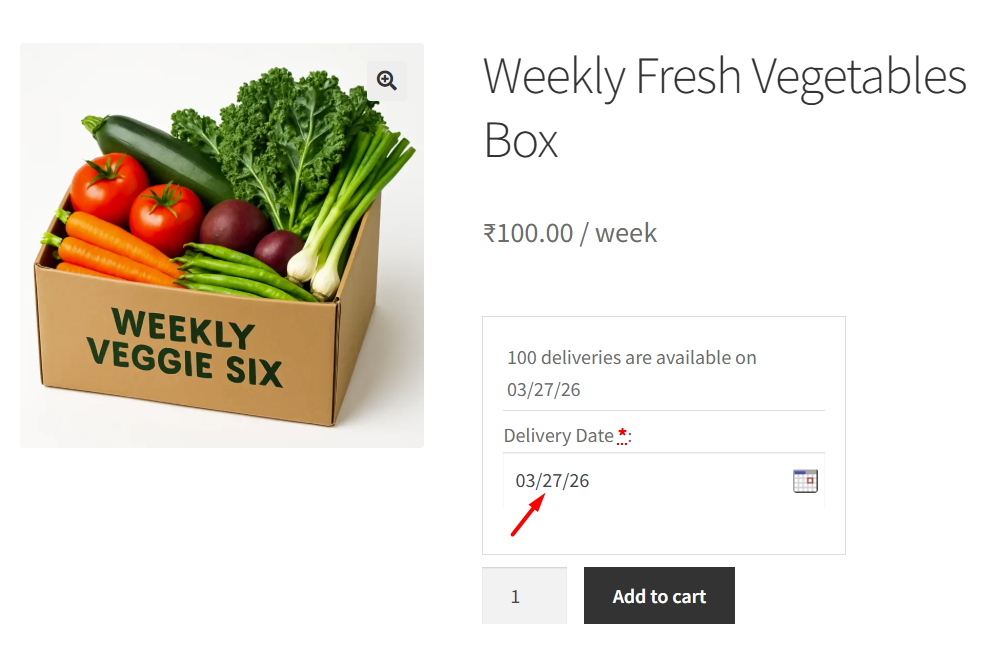
↑ Back to topTo understand how this works, let’s walk through a complete example of a weekly subscription:
- Today’s date: March 25, 2026
- Product: Weekly Fresh Vegetables Box Subscription
- Customer selects March 27, 2026 as the delivery date
- Subscription interval: 1 week
When the customer visits the product page, the delivery calendar displays only the upcoming 7 days (weekly subscription). This ensures delivery dates are chosen only within the current billing cycle.
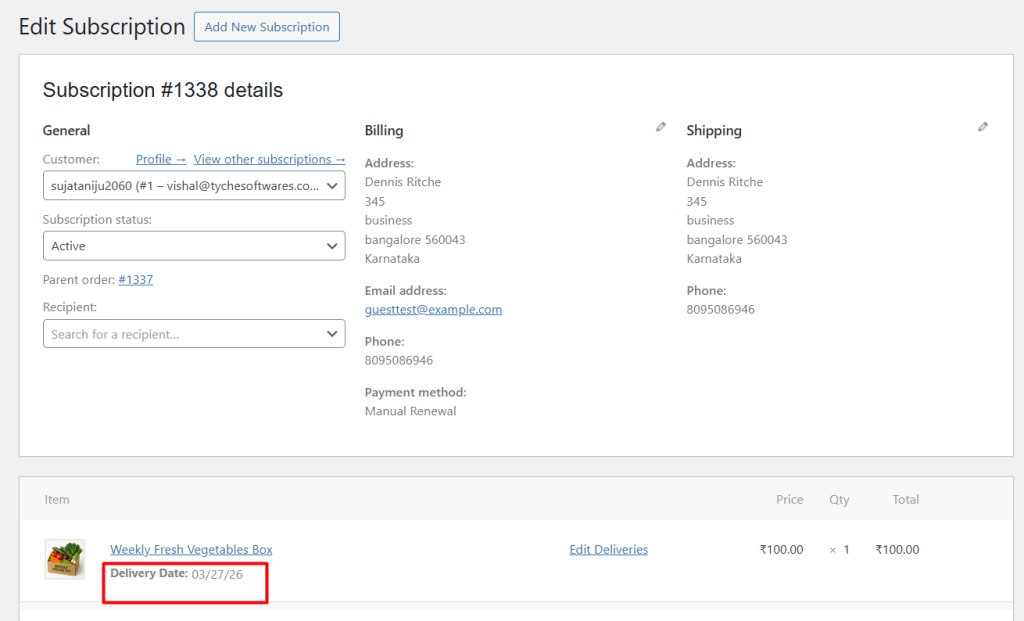
After selecting March 27, 2026, the customer places the order. The selected delivery date is saved along with the subscription.
How Delivery Dates are Assigned for Renewal Orders
↑ Back to topWhen the subscription reaches its next billing cycle, WooCommerce Subscriptions automatically creates a renewal order. For example, in this case, if the order is placed on March 27, 2026, the renewal occurs on April 3, 2026. At this point, the plugin automatically determines the next delivery date based on these factors:
- Previous delivery date (March 27)
- Subscription billing schedule (1 week)
- Minimum delivery time
- Cut-off times
- Holidays / blackout dates (April 3rd)
- Weekends / non-working days
- Lockout limits
- Charges per delivery date and time
To understand this better, let’s consider one of these rules—holidays.
Assume that certain dates are configured as holidays. For example, April 3 is marked as a holiday, as shown below.
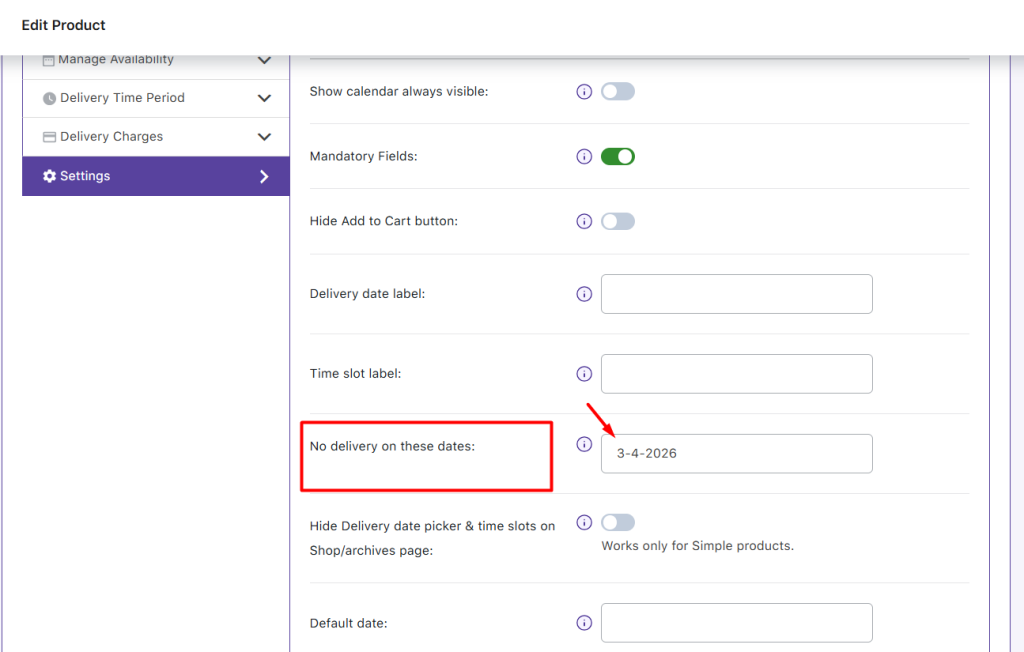
Now, if a customer selects March 27, 2026 as the delivery date and places the order, the plugin calculates the next delivery date based on the previous delivery date and the subscription interval when the renewal order is generated. If the calculated date falls on a non-working day or a holiday, it is skipped and the next available date is considered.
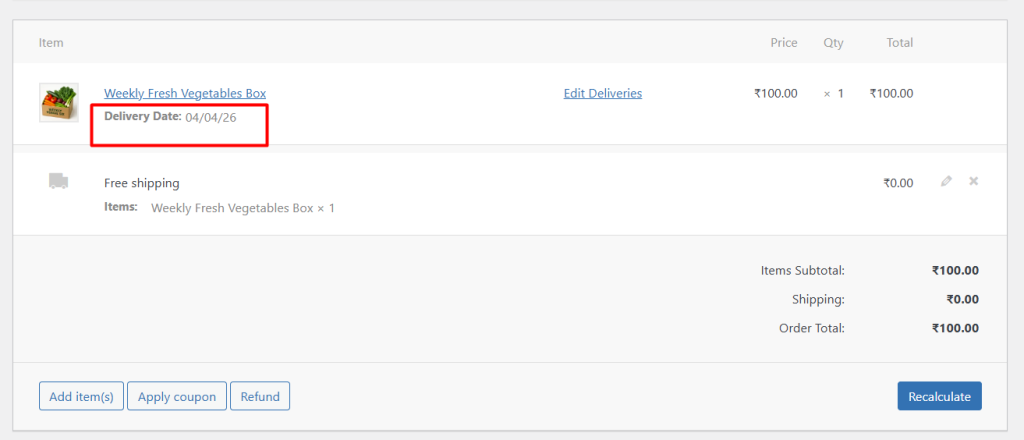
Similarly, if the delivery slot for a particular date is already fully booked, that date is also ignored. This process continues until a valid date is found.
Payment Date Adjustment Based on Delivery Schedule
The automatic adjustment of the next payment date based on delivery scheduling is controlled by the “Update Next Payment Date Based on Delivery Date & Cut-off” setting. When enabled, the plugin recalculates the next payment date using the selected delivery date, subscription interval, cut-off times, and minimum preparation time.
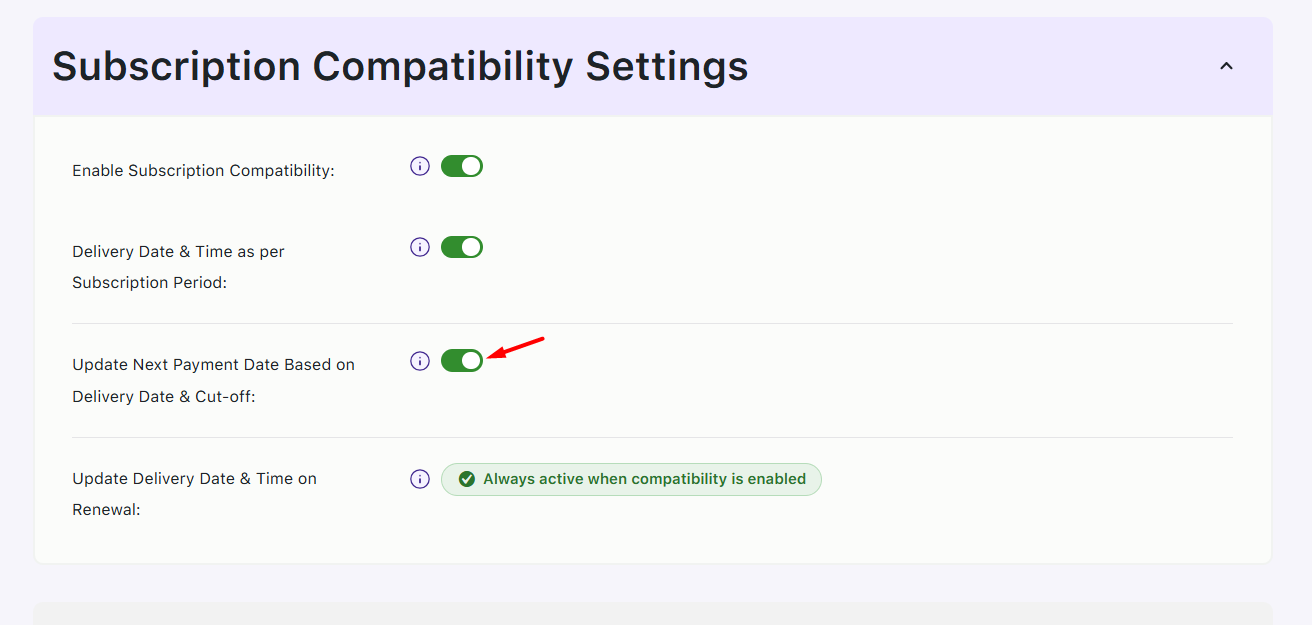
This ensures that there is always sufficient time to prepare and fulfill the order before the scheduled delivery.
case1: When the Minimum Delivery time is not set
Example:
- Selected delivery date: March 27, 2026
- Subscription interval: 1 week
Since the “Update Next Payment Date Based on Delivery Date & Cut-off” setting is enabled, the plugin automatically schedules the next payment. The next payment date will be April 3, 2026, which is exactly one billing cycle (7 days) after the selected delivery date.
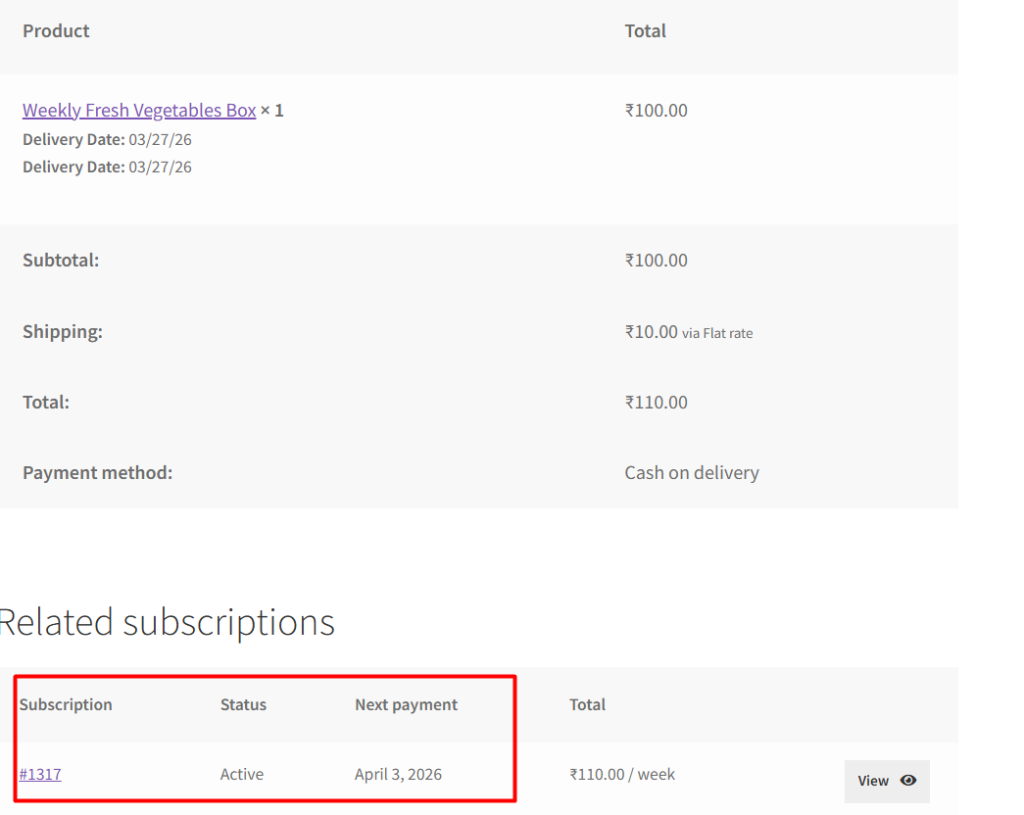
case1: When the Minimum Delivery time is set
Example:
- Selected delivery date: March 27, 2026
- Subscription interval: 1 week
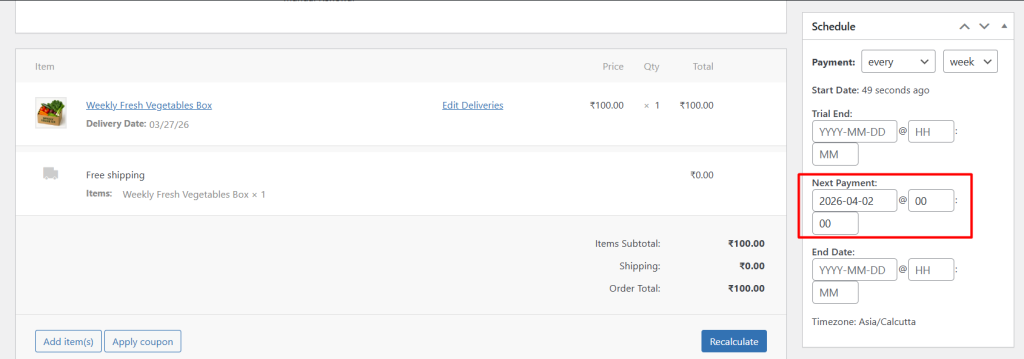
- Minimum delivery time: 24 hours
The next payment date is scheduled for April 2, 2026, ensuring sufficient preparation time before the renewal order’s delivery on April 3, 2026.
The WooCommerce Subscriptions Compatibility feature ensures that product-level delivery dates for subscription and renewal orders are automatically scheduled based on subscription rules and real-time availability. By handling delivery calculations, validations, and adjustments automatically, it eliminates manual effort, prevents scheduling conflicts, and ensures every order is delivered on time.