
SensAI can look up WooCommerce order status in chat without sending order details to OpenAI.
How it works
↑ Back to topWhen a visitor asks about their order, SensAI detects that intent (without sending order numbers or emails to OpenAI) and starts a short local guided flow:
- Asks for the order number
- Asks for the email used at checkout (or confirms the email from the visitor form / logged-in account)
- Looks up the order on your store with WooCommerce
- Replies with status, date, items, total, and tracking when available
After a successful lookup, shipping or status follow-ups (for example “when will my items ship?”) reuse that same order for about 30 minutes. The assistant does not ask for the number again. If tracking is not on the order yet, the reply says so and repeats the current status. A different number in a later message starts a new lookup. “I want to check another order” with no number asks for the new number. Cancel forgets the last order.
Visitors can enter the number as 25683, #25683, or order #25683. The word “order” by itself is not treated as an order number. If the first message already includes a number, SensAI uses it instead of asking again.
Order number, email, and order data stay on your WordPress site. They are not sent to OpenAI. OpenAI may translate the guided prompts into the visitor’s language (templates only, never order details).
Enable or disable
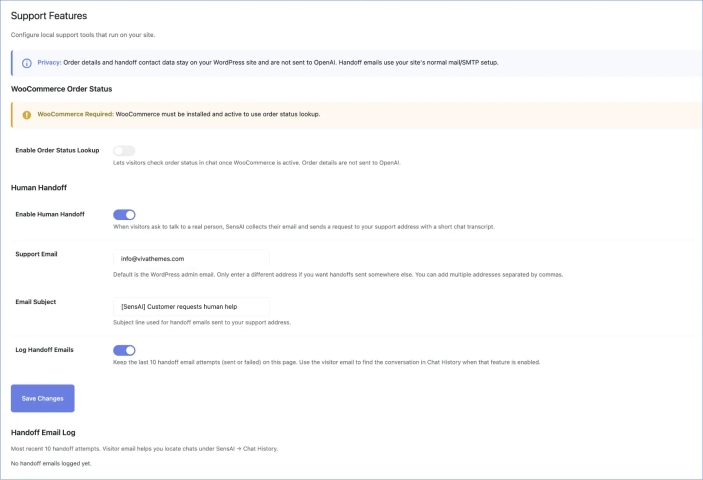
↑ Back to topGo to SensAI > Support Features > WooCommerce order status.
- The section is always visible.
- If WooCommerce is not active, the setting is disabled with a note.
- When WooCommerce is active, order status lookup is enabled by default. You can turn it off anytime.
Privacy
↑ Back to topSensAI only returns limited order information (status, date, items, total, tracking if present). It does not show full addresses, payment details, or other orders for that email.
Language
↑ Back to topGuided prompts follow the visitor’s language when needed. Order numbers and emails are never included in that translation request.
Cancel
↑ Back to topDuring the flow, a Cancel chip appears under the assistant message. Visitors can tap it or type cancel at any step to leave the order lookup.
Troubleshooting
↑ Back to top- Confirm WooCommerce is active and the setting is enabled.
- Custom / sequential order numbers are supported when WooCommerce (or an order-number plugin) exposes them via the order number.
- Failed lookups after several attempts ask the visitor to contact support.