Smart Coupons provide a powerful, “all-in-one” solution for gift cards, store credits, discount coupons, and vouchers extending the core functionality of WooCommerce coupons.
Sometimes, you may want to share the coupon code on your website, to deal sites and your affiliates, in banners, in email or social media so that users can apply it to claim the discount.
This doc article explains how you can copy the coupon code from the coupons list page.
How to copy the coupon code
↑ Back to top- Navigate to WordPress Admin panel -> Marketing -> Coupons.
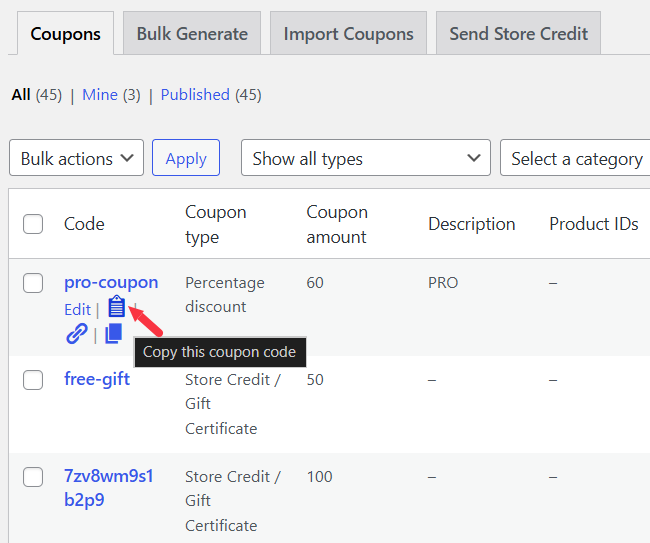
- Hover over the coupon you would like to share.
- Click the copy icon as shown in the screenshot.
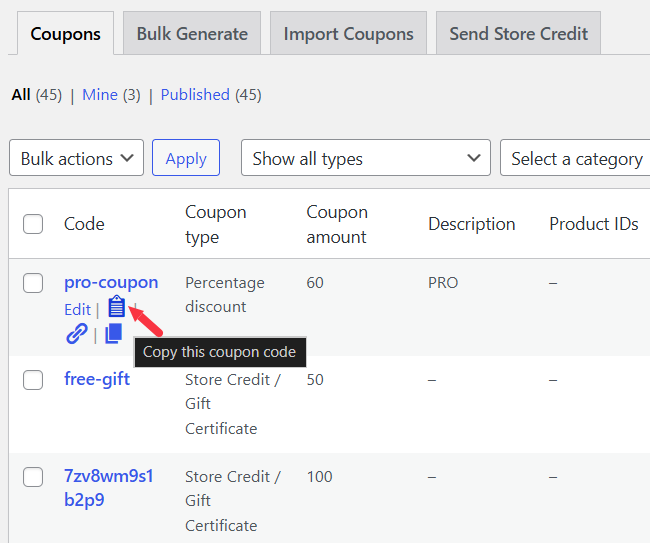
- This will automatically copy the coupon code to your clipboard.
- You can paste it wherever you like, on any page of your website, in your newsletter content, or anywhere else as needed.