
When WooCommerce is your Sync Setting, WooCommerce is the source of truth for your product catalog. Product data you manage in WooCommerce — names, prices, descriptions, images, and categories — syncs automatically to Square. Inventory is still pulled from Square hourly to capture point-of-sale transactions.
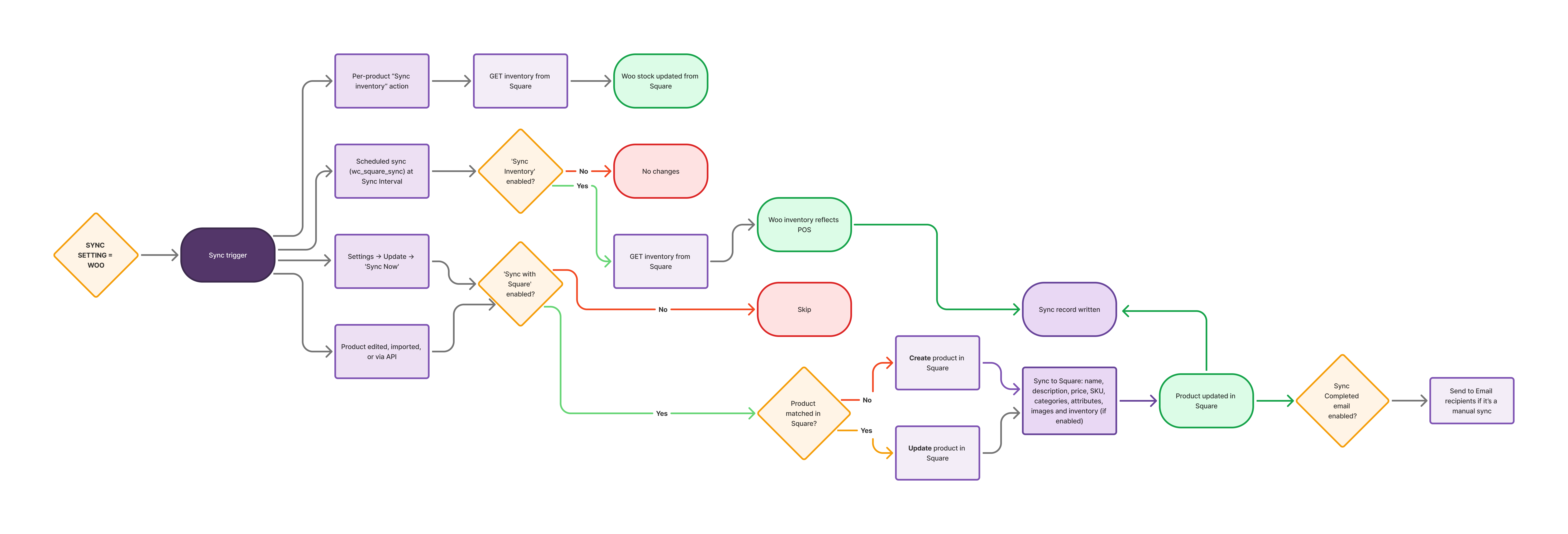
Configure WooCommerce-to-Square Sync
↑ Back to topGo to WooCommerce > Settings > Square to configure the following settings.

- Sync Settings: Set to WooCommerce. Product names, prices, descriptions, images, and categories sync from WooCommerce to Square.
- Sync Inventory: When enabled, WooCommerce inventory changes are pushed to Square. WooCommerce also checks Square on a schedule so that in-person sales reduce your online stock. That check runs only for products with Sync with Square ticked, and applies only a count Square can confirm.
- Sync Interval: How often WooCommerce syncs product data with Square.
What Gets Synced
↑ Back to topWhen WooCommerce is the Sync Setting, the following product data sync from WooCommerce to Square on every automatic or manual sync:
| Data | Notes |
|---|---|
| Product Name | Syncs to the item name in Square. |
| Price | Syncs as the base price in Square. If the product has a Sale Price set in WooCommerce, the sale price is sent as the base price in Square. |
| Description | Syncs to the item description in Square. Square’s API enforces a 4,095 character limit so descriptions exceeding this cause a sync error for that product. If a description is not syncing, check its length and review WooCommerce > Status > Logs. |
| Product Image | Syncs to the item image in Square. |
| Product Category | Syncs to Square. As of v5.1.0, multiple categories are supported. All WooCommerce categories with existing Square mappings are synced. The first mapped category is set as the Square reporting category. |
| Inventory Count | Syncs when “Sync Inventory” is enabled. WooCommerce also checks Square at the Sync Interval, so that sales made in person or on other channels are reflected in your online stock. This check runs only for products with Sync with Square ticked, and applies only counts Square can confirm. Your stock is accurate as of the last check rather than instantly. During a manual sync, WooCommerce does not read back the stock counts it has just sent to Square in the same run, because Square can take a moment to record them. Products that already existed in Square are still checked, which is what keeps sales made on other channels reflected. |
| SKU | Used to match products between WooCommerce and Square. Both must have the same SKU. |
Important: When using WooCommerce as the Sync Setting, do not manually update product data in Square. Changes made in Square will be overwritten by WooCommerce on the next sync.