
Affiliate for WooCommerce plugin helps you to add, manage affiliates, and track performance from a single place – commissions, sales, payouts, leaderboard, etc. Earn money without hard work. Increase your brand outreach, and get potential customers.
This doc explains how to use the Pending Payouts dashboard to review outstanding commissions, scheduled automated payments, and payout methods.
What is the Pending Payouts Dashboard?
↑ Back to topThe Pending Payouts Dashboard is your central hub for seeing unpaid and upcoming payouts.
It shows you exactly which affiliates are owed money, how they want to be paid (their payout method), and how much you need to pay them.
How to access the dashboard
↑ Back to topTo view your pending payouts, log into your WordPress admin area and go to: WooCommerce > Affiliates > Pending Payouts.
Understanding the dashboard
↑ Back to top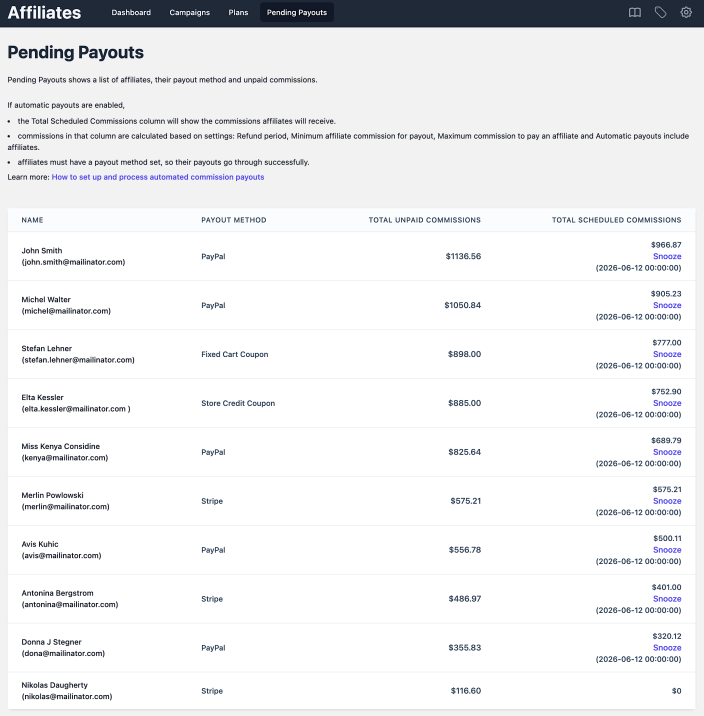
When you open the dashboard, you will see a list of your affiliates. The columns you see will depend on whether you use Manual or Automated Payouts.
Here is a breakdown of what each column means:
| Column name | What it shows |
|---|---|
| Name | The affiliate’s name and their registered email address. |
| Payout Method | How the affiliate has chosen to receive their money (e.g., PayPal, Stripe, Store Credit Coupon, etc). |
| Total Unpaid Commission | The total outstanding amount the affiliate has earned but has not yet been paid. |
| Total Scheduled Commissions | (Only visible if Automatic Payouts is enabled). Shows the exact amount scheduled for the next automated payment for the affiliates who are selected for automated payouts. |
More about Total Scheduled Commissions:
On top of showing the amount scheduled for the next automated payment, this column also shows the exact date and time the payment will be processed.
And a Snooze button – if you want to delay any specific affiliate’s payment until the next automated cycle.
How the scheduled commissions are calculated:
The amount of the total scheduled commission is calculated based on the following settings:
- Refund period
- Minimum affiliate commission for payout
- Maximum commission to pay an affiliate
- Automatic payouts include affiliates
How to pay affiliates
↑ Back to topYou have three options for paying your affiliates:
- Automated payouts: Let the system handle payments for you on a set schedule. This ensures timely payments and boosts affiliate morale – learn more.
- Integrated manual payouts (within the plugin): Review the amounts in the Total Unpaid Commission column and process the payments from the plugin manually using any of the integrated payout methods mentioned here, which will directly send the payout to their account.
- Record Keeping (Manual payouts – outside the plugin): Review the amounts in the Total Scheduled Commissions column and process the payments yourself outside of the system using any payout method, and keep the record in the plugin by following the steps mentioned here.
FAQs
↑ Back to top1. Why can’t I see the Total Scheduled Commissions column?
↑ Back to topThis column only appears if you have Automatic Payouts enabled in your settings. If you pay affiliates manually, you will only see the Total Unpaid Commissions column.
2. What happens when I click Snooze?
↑ Back to topClicking Snooze skips the upcoming automated payment for that specific affiliate. Their scheduled commission will roll over and be paid during the next scheduled payment cycle (usually the following month).
3. Why is the scheduled commission amount lower than the unpaid commission amount?
↑ Back to topThe scheduled amount is calculated based on the Refund period, Minimum affiliate commission for payout, and Maximum commission to pay an affiliate settings.
The amount will be lower if certain sales are still within your refund period, if the affiliate has not reached your minimum payout threshold, or if their unpaid commission exceeds your maximum payout limit.
4. How do affiliates set their payout method?
↑ Back to topAffiliates can set or update their default payout method anytime from their dashboard.
Feature request
↑ Back to topHave a feature request or enhancement suggestion for Affiliate For WooCommerce? Submit a request or send it to us from here.

