
Affiliate for WooCommerce plugin helps you to add, manage affiliates, and track performance from a single place – commissions, sales, payouts, leaderboard, etc. Earn money without hard work. Increase your brand outreach, and get potential customers.
You can test the plugin on our live demo.
The Affiliate Manager – Summary Email keeps store owners and affiliate managers informed about the overall affiliate program’s performance.
It shows a monthly snapshot of key metrics such as revenue generated from affiliates, commission payouts, new affiliates, referrals, conversions, etc.
How to enable or disable the affiliate manager summary email?
↑ Back to topThis email notification is enabled by default.
- Go to WordPress admin > WooCommerce > Settings > Emails.
- Search Affiliate Manager – Summary Email in the list and click the Manage button.
- Click on the Enable this email notification checkbox next to Enable/Disable to enable or disable it.
- Click Save changes.
On the same page, you will also be able to manage other options like the following:
- Subject: Customize the email subject line.
- Email Heading: Customize the main heading inside the email.
- Additional Content: Add extra notes, tips, or special information for your affiliate manager.
What does the affiliate manager summary email include?
↑ Back to top- Revenue – Total revenue from affiliate sales.
- Total Order Value – Overall order amount for the entire store.
- Orders: Total – Total number of orders received store-wide.
- Orders: Affiliate – Number of orders received through affiliate referral.
- Paid Commissions – Total commission amount paid to affiliates.
- Unpaid Commissions – Pending commission amounts.
- New Approved Affiliates – Number of affiliates approved.
- Pending Affiliates – Number of affiliates awaiting approval.
- Top Performing Affiliates – Five top performing affiliates.
- Top Converting URLs – The referral links that achieved the highest conversion rates.
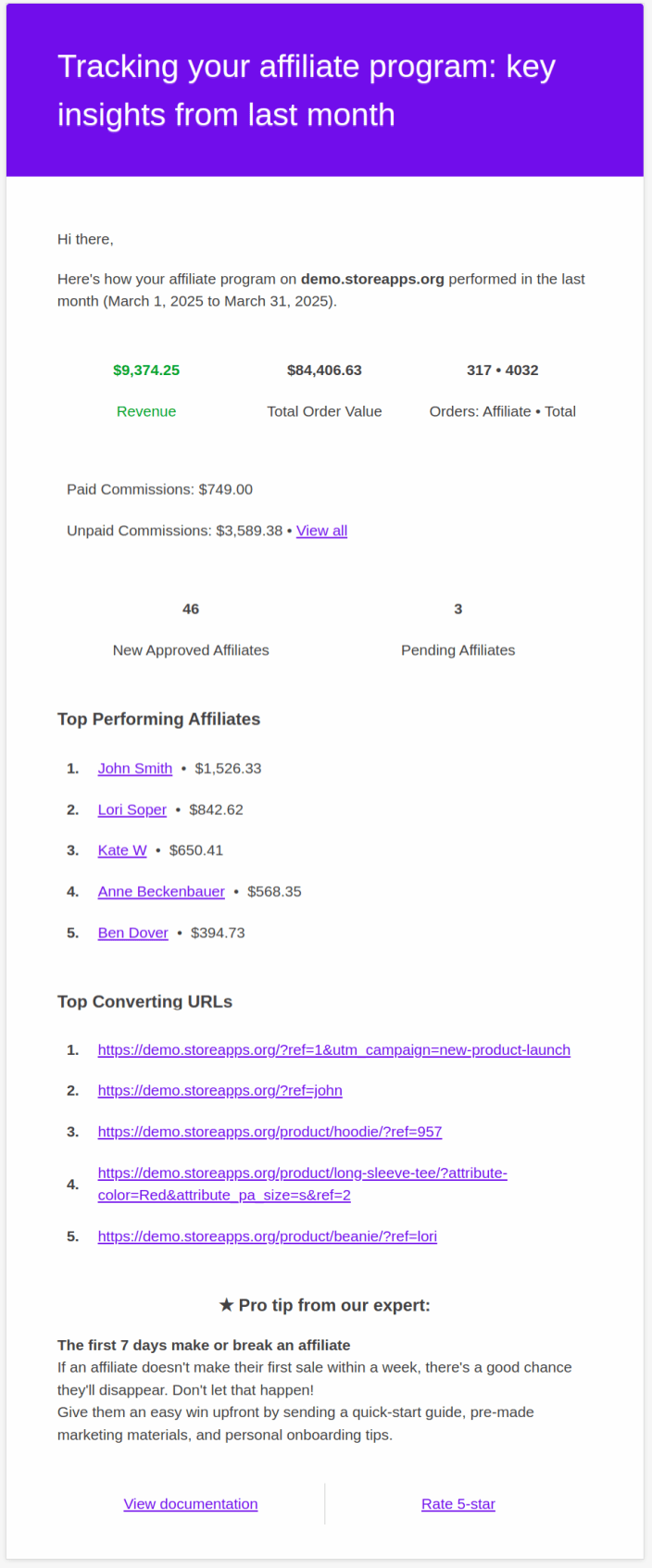
Note: You can customize the contents of the summary email by overriding the template as explained in this documentation.
Delivery, timing, and best practices
↑ Back to top- The affiliate manager summary email is sent automatically on the first day of each month at 01:00 PM based on your site’s timezone.
- For reliable delivery, ensure your WordPress site is sending emails through a reputable SMTP provider (learn more).
- Review each summary to spot trends, reward your strongest affiliates, and take prompt action where improvements are needed.
FAQ
↑ Back to top1. Who receives the affiliate manager summary email?
↑ Back to topThe email is sent to the store admin and the affiliate manager’s email address (If configured in the Affiliate manager email setting).
2. Can I change the time when the email is sent?
↑ Back to topBy default, it sends on the first day of each month at 1:00 PM (in your site’s timezone). To allow customization, you can submit a feature request below.
Feature Request
↑ Back to topHave a feature request or enhancement suggestion for Affiliate For WooCommerce? Submit it from here: Submit a feature request.

