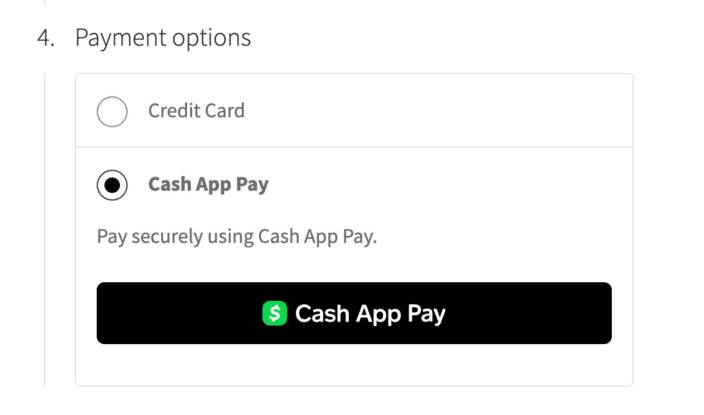
WooCommerce Square provides Cash App Pay payment method to your WooCommerce store. Cash App Pay allows you to accept payments directly on your store, with customers being able to pay using their Cash App account.
Please note that Cash App Pay is currently supported only when both the store and customer location is in the United States and the currency is USD.
Enabling Square Gift Cards
↑ Back to topTo configure the Cash App Pay payment gateway, navigate to WooCommerce > Settings > Payment > Cash App Pay (Square). You can customize the following settings:
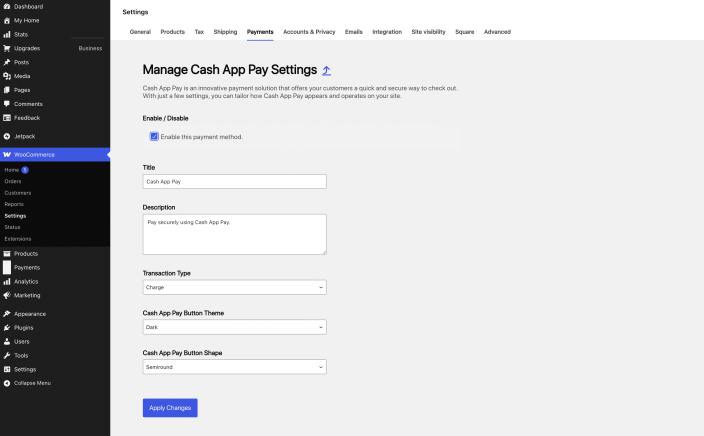
- Enable/Disable: Enable to allow customers to use this gateway at checkout.
- Title: Determine how the gateway should be labeled for customers at checkout and on the order received page.
- Description: The text shown under the title during checkout. Limited HTML is allowed.
- Transaction Type: Choose between Charge and Authorization as the transaction type.
- Cash App Pay Button Theme: Changes the theme of the Cash App Pay button. Options include Dark and Light.
- Cash App Pay Button Shape: Changes the shape of the Cash App Pay button. Options include Semiround and Round.
Customer Experience with Cash App Pay
↑ Back to topOnce the Cash App Pay payment method is configured, it will be listed among the available payment methods on the checkout and order pay page and customers will be able to pay using their Cash App account.
The Cash App payments method can only seen on the checkout page and not on the cart and product pages like other digital wallets.
Important note: Cash App Pay cannot be stored as a “stored payment method” against a customer’s account, so a new Cash App transaction will be required with every order. Certain product types that use tokenization for future charges cannot currently be purchased with Cash App Pay, such as subscription products (created via the Woo Subscriptions extension) and Pre-Orders “Charge Upon Release” products (created via the WooCommerce Pre-Orders extension). When these products are in the cart, the Cash App Pay payment method will not be shown.