
Setting up real-time WooCommerce Telegram Notifications is one of the most effective ways for online store owners and fulfillment teams to respond instantly when a customer completes a purchase.
In modern e-commerce, waiting for transactional emails or constantly refreshing your WordPress admin dashboard creates operational bottlenecks, delays order processing, and risks missed sales.
While default WooCommerce order emails have been the industry standard for over a decade, deliverability issues, spam filters, and overcrowded inboxes frequently cause critical order alerts to be delayed or overlooked.
By connecting your store directly to Telegram via a dedicated bot, you gain a private, high-speed notification channel that delivers rich order details to your phone, desktop, or team chat in under 500 milliseconds.
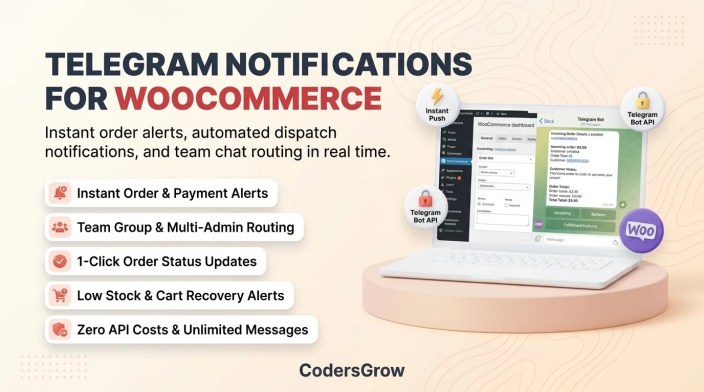
Figure 1: Automating WooCommerce Telegram notifications for real-time order alerts, team routing, and status updates.
Why WooCommerce Telegram Notifications Beat Email Alerts
↑ Back to topEvery minute saved in order fulfillment directly impacts customer satisfaction and repeat purchase rates. Relying exclusively on email for store operations exposes your business to several critical friction points that modern messaging apps easily solve:
- Instant Push Delivery Without Delay: Standard WordPress transactional emails rely on server-side WP-Cron or third-party SMTP relays, which can experience queue delays of 5 to 15 minutes during peak shopping hours. Telegram push notifications trigger within milliseconds via the official Telegram Bot API.
- Zero Ongoing Messaging or SMS Costs: Unlike SMS gateways like Twilio that charge per message across international borders, Telegram notifications are 100% free with no per-message fees or monthly API billing thresholds.
- Multi-User Team Group Dispatch: Instead of managing complex email forwarding rules, you can invite your Telegram bot into dedicated staff groups (such as
#warehouse-dispatchor#customer-support). Your entire team receives synchronized order updates instantly. - Rich Markdown Formatting & Inline Actions: Telegram messages support bold headers, itemized lists, emoji indicators, and interactive inline buttons that allow store managers to update WooCommerce order statuses directly inside the chat app.
Core Alerts You Should Automate via Telegram
↑ Back to topA comprehensive notification strategy covers more than just new purchases. To run an agile e-commerce operation, your store should be configured to broadcast multiple event triggers:
- New Order Placed & Payment Received: Receive customer name, phone number, shipping address, order total, payment method, and itemized product breakdown immediately after checkout.
- Low Stock & Out of Stock Warnings: Prevent overselling by triggering instant inventory alerts the moment a product or variation inventory drops below your minimum stock threshold.
- Abandoned Cart Recovery: Get notified when shoppers abandon high-value carts so your sales team can initiate proactive recovery workflows.
- Order Status Transitions: Automatically broadcast status changes (Processing, Completed, On Hold, Cancelled) so warehouse dispatchers know exactly when to print shipping labels.
- Customer Order Notes: Ensure special delivery instructions or custom engraving requests are immediately flagged to packing personnel.
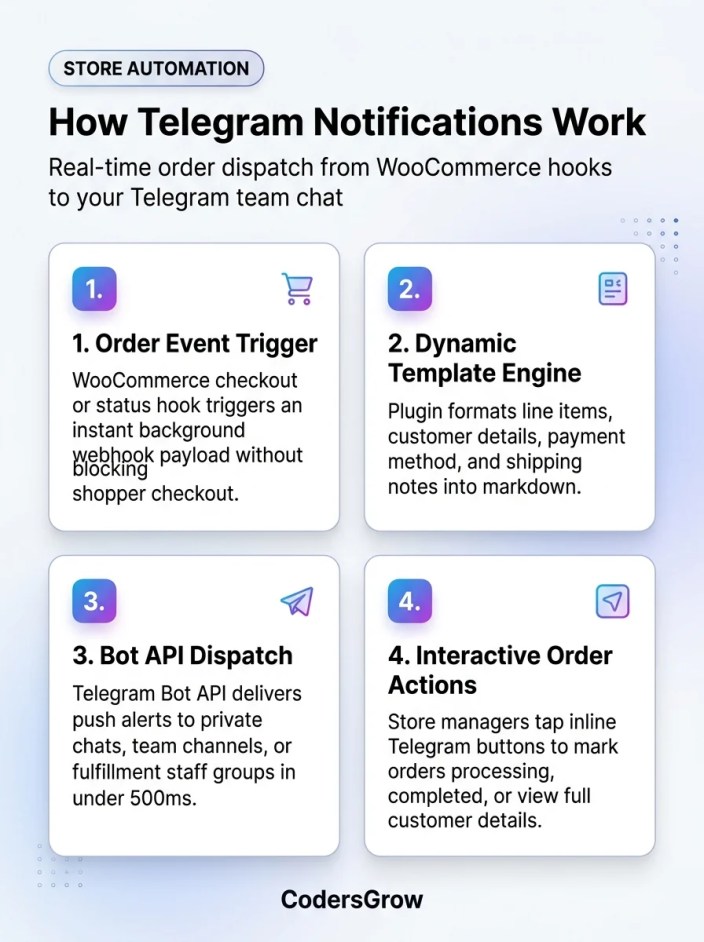
Figure 2: Architecture of WooCommerce Telegram notifications dispatching webhook triggers to team channels and interactive bots.
Step-by-Step Setup: WooCommerce Telegram Notifications with NotifyStore
↑ Back to topTo implement seamless store alerts without writing custom PHP code or maintaining fragile webhook scripts, we will use NotifyStore – Smart Store Alerts for WooCommerce, an HPOS-certified store automation plugin officially listed on the WooCommerce Marketplace.
Step 1: Create Your Telegram Bot via @BotFather
↑ Back to topTelegram makes bot creation straightforward through its official bot management tool:
- Open the Telegram app and search for
@BotFather. - Send the command
/newbot. - Enter a display name for your store bot (e.g., MyStore Alerts Bot).
- Choose a unique username ending in “bot” (e.g., mystore_orders_bot).
- BotFather will generate an HTTP API Token (e.g.,
123456789:ABCdefGhIJKlmNoPQRsTUVwxyZ). Copy this token securely.
Step 2: Obtain Your Telegram Chat ID or Group ID
↑ Back to topYour bot needs to know where to deliver the alerts:
- For Personal Alerts: Open Telegram, search for
@userinfobot, press Start, and copy your numeric Id. Send a quick “hello” message to your newly created bot so it has permission to message you. - For Team Group Alerts: Create a Telegram group for your store staff, add your new bot as a member, and add
@RawDataBottemporarily to capture the group’s negative Chat ID (e.g.,-1001234567890).
Step 3: Install & Activate NotifyStore
↑ Back to topFrom your WordPress dashboard, navigate to Plugins → Add New, upload the NotifyStore extension package, and activate it. The plugin adds a unified NotifyStore management console directly inside your WooCommerce admin menu.
Step 4: Connect the Telegram Gateway
↑ Back to topNavigate to NotifyStore → Settings → Telegram:
- Paste your Bot Token into the designated API credential field.
- Enter your Chat ID or Group ID in the recipient routing field.
- Click Send Test Notification. Within seconds, your Telegram client will chime with a verified confirmation ping.
- Enable the specific triggers you wish to receive, such as New Order, Order Status Changed, Low Stock, and Out of Stock.
Step 5: Customize Your Notification Template
↑ Back to topNotifyStore includes a flexible template builder featuring dynamic placeholder variables. You can customize the message layout to include the exact operational data your warehouse requires:
📦 *New Order #{order_id} Received!*
👤 *Customer:* {billing_first_name} {billing_last_name}
💰 *Total:* {order_total} ({payment_method_title})
📍 *Shipping to:* {shipping_city}, {shipping_country}

🛒 *Items:*
{order_items}

📝 *Customer Note:* {customer_note}
Managing Orders Interactively from Telegram
↑ Back to topOne of the biggest advantages of setting up modern woocommerce telegram notifications through NotifyStore is two-way interactive management. Rather than simply acting as a passive readout, each Telegram order alert can display dynamic inline buttons:
- Mark as Processing: Acknowledge that the order is being picked and packed.
- Mark as Completed: Signal immediate dispatch to your team and trigger customer fulfillment emails automatically.
- View in Admin: Direct 1-click deep link to the order screen in your WordPress dashboard.
Furthermore, NotifyStore features an innovative Email-to-Telegram Support Bridge. If a customer replies to an order confirmation email, the inbound message is captured via IMAP and forwarded straight to your Telegram team chat. Store operators can reply directly to the Telegram message, and NotifyStore automatically dispatches an outbound SMTP email back to the customer—allowing complete mobile support without opening an email client.
Best Practices for Store Alert Security & Team Routing
↑ Back to topWhen broadcasting e-commerce data to mobile messaging platforms, keep these production standards in mind:
- Protect Customer Privacy: Only include customer details necessary for operational fulfillment in shared team groups. NotifyStore allows you to mask sensitive billing fields or route comprehensive receipts exclusively to private admin chats.
- Separate Channels by Function: Use dedicated Telegram channels for high-volume notifications like cart abandonments or inventory logs, keeping your primary order channel uncluttered for urgent fulfillment tasks.
- Verify High-Performance Order Storage (HPOS) Compatibility: Ensure your notification plugins fully support WooCommerce HPOS and asynchronous background processing so that webhook dispatch never impacts customer checkout latency. Detailed architecture guidelines are available in the NotifyStore Documentation.
Frequently Asked Questions
↑ Back to topAre WooCommerce Telegram notifications free to send?
↑ Back to topYes. Telegram provides open, unlimited access to its Bot API without per-message charges, subscription tiers, or international SMS delivery fees. You only need a free Telegram account and a compatible integration plugin like NotifyStore.
Can I send notifications to a Telegram group with multiple team members?
↑ Back to topYes. You can add your Telegram bot to any group chat or broadcast channel. Every team member added to the group will receive live order alerts simultaneously, making it ideal for warehouse, kitchen, or support dispatch teams.
Will Telegram notifications slow down my store’s checkout speed?
↑ Back to topNo. When properly architected, order alerts are dispatched asynchronously via non-blocking HTTP requests after WooCommerce commits the order transaction. Your shoppers experience zero checkout delay or checkout page freezing.
Can I manage order statuses directly from the Telegram chat?
↑ Back to topYes. With NotifyStore’s interactive inline action buttons, store administrators can transition orders between Pending, Processing, On Hold, and Completed directly from the Telegram conversation without logging into the WordPress admin panel.
Streamline Your Store Operations Today
↑ Back to topReal-time order visibility is essential for scaling an efficient e-commerce business. By integrating automated woocommerce telegram notifications into your daily workflow, you eliminate fulfillment delays, keep your entire team synchronized, and provide prompt service to every customer.
Ready to automate your store alerts? Explore NotifyStore – Smart Store Alerts for WooCommerce on CodersGrow or visit the official WooCommerce Marketplace listing to get started today.

