
Add Multiple Variations to Cart allows your customers to select multiple product variations and add them to the cart in a single click.
Back-End Usage (Admin Side)
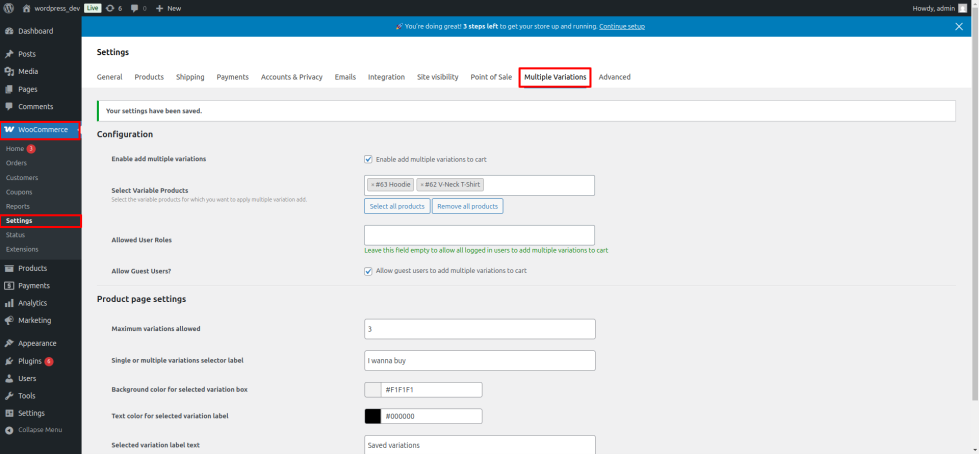
↑ Back to topGo to WooCommerce → Settings → Add Multiple Variations to Cart to configure settings.
- Enable or disable the feature entirely.
- Choose which products this feature applies to.
- Decide which user roles can use it (registered users, guests).
- Set the maximum number of variations a customer can add at once.
- Customize design (buttons, list style, colors).
- Click “Save Changes” to apply settings.
Front-End Usage (Customer Side)
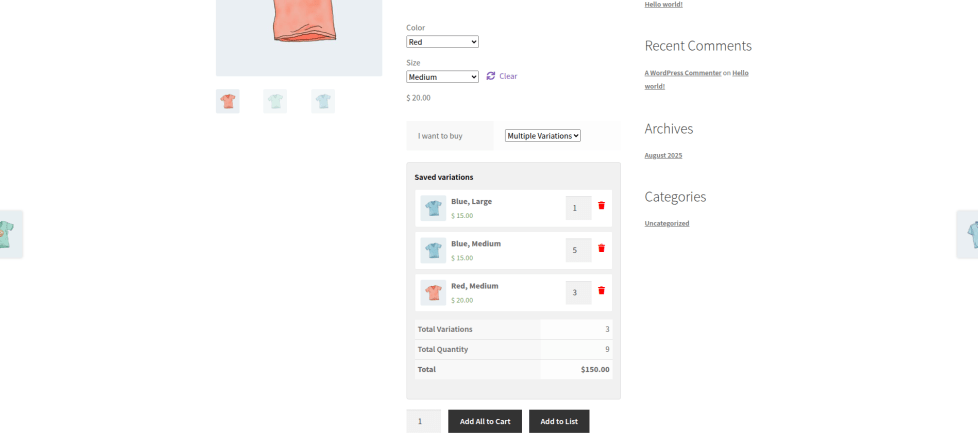
↑ Back to topStep 1: Choose Single or Multiple Variations.
- Single Variation → normal WooCommerce behavior.
- Multiple Variations → allows adding many variations to a list.
Step 2: Select Variations.
- Two buttons appear: Add to List and Add All to Cart.
Step 3: Add Variations to List.
- Click “Add to List” for each variation you want.
Step 4: Modify the List.
- Change the quantity of any variation.
- Remove any variation if needed.
Step 5: Add All to Cart.
- Click “Add All to Cart” to add all selected variations at once.
FAQs
↑ Back to topHelp customers by answering commonly asked questions.
Can users modify quantities or remove variations before adding them to the cart?
Yes, users can add variations to a temporary list where they can adjust quantities or remove items before finalizing the purchase.
Can the plugin be enabled for specific products only?
Absolutely. Admins have full control to enable or disable the feature globally or for selected products.

