
Country Based Product Restriction for WooCommerce allows store owners to control product purchases using a powerful combination of country and user role rules.
- Restrict product purchases by selected countries
- Assign allowed user roles for each selected country
- Only matching country + role users can purchase
- Block purchases if country matches but role is not allowed
- Optional guest purchase control by country
- Hide price and Add to Cart for restricted users
- Automatic customer country detection via IP
Installation
↑ Back to topTo start using a product from WooCommerce.com, you can use the “Add to store” functionality on the order confirmation page or the My subscriptions section in your account.
- Navigate to My subscriptions.
- Find the Add to store button next to the product you’re planning to install.
- Follow the instructions on the screen, and the product will be automatically added to your store.
Alternative options and more information at:
Managing WooCommerce.com subscriptions.

Setup and Configuration
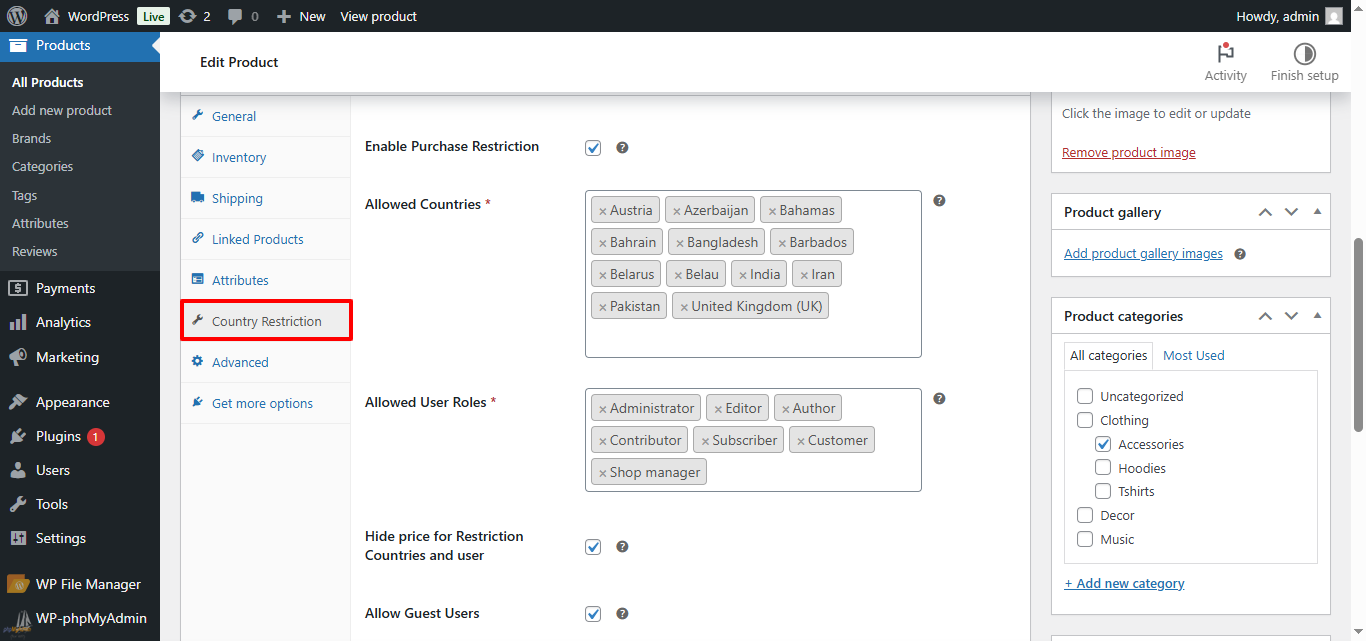
↑ Back to topGo to: Products → Edit Product → Country Restriction tab
From here you can control all restriction settings.
- Enable Purchase Restriction
- Checking this option activates restriction rules.
- Unchecking it makes the product work normally (no restrictions).
- Select Allowed Countries
- Use the Select2 dropdown to choose countries.
- Only customers from selected countries can purchase.
- Example: Select Pakistan, UAE → only users from these countries can buy.
- Select Allowed User Roles
- Choose which roles are allowed to purchase.
- Example: Customer, Subscriber → only these roles can buy.
- Allow Guest Users (Optional)
- Checked → Guests (not logged in) can purchase if their country is allowed.
- Unchecked → Login is required to purchase.
- Hide price for Restriction Countries and User (Optional)
- Enable → Restricted users will not see the price.
- Helps prevent confusion and unwanted inquiries.
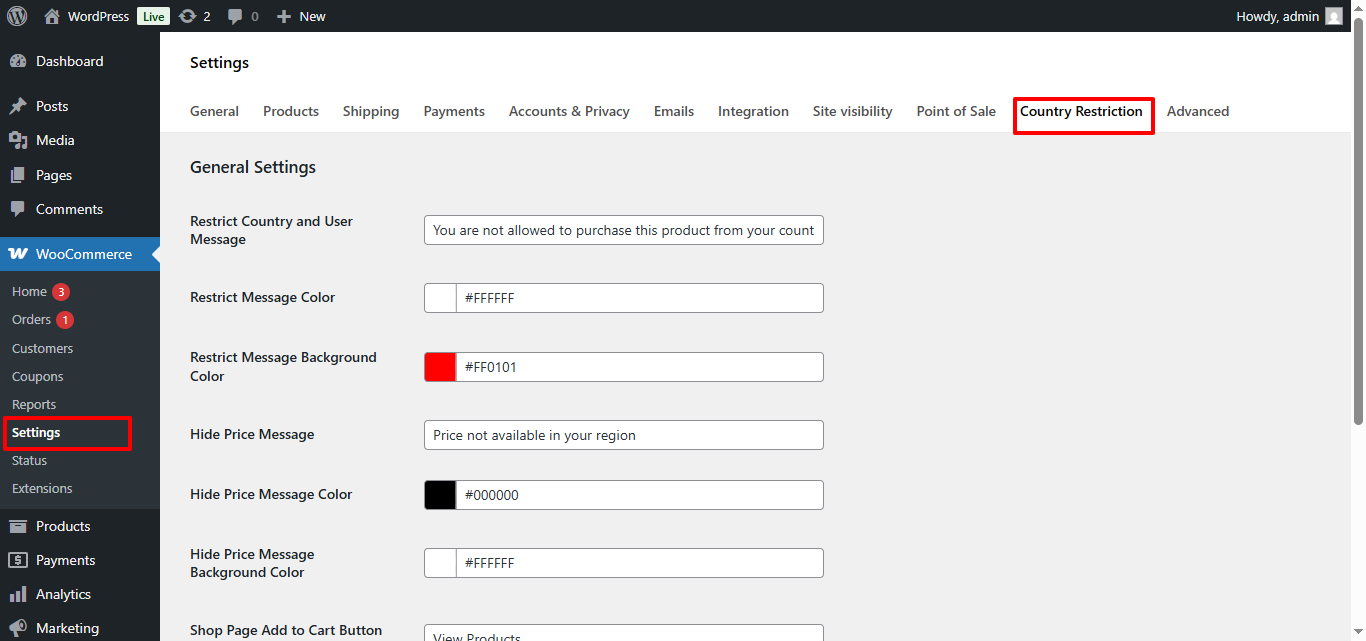
WooCommerce → Country Restriction Settings
↑ Back to topUse this settings tab to control global messages, colors, and button behavior for restricted users.
- Restrict Country and User Message
This message appears when a user from a restricted country or role tries to purchase a product. - Restrict Message Color
Sets the text color of the restriction message shown to blocked users. - Restrict Message Background Color
Controls the background color of the restriction notice to make it more visible. - Hide Price Message
Message displayed when the price is hidden for restricted users. - Hide Price Message Color
Sets the text color of the hidden price message. - Hide Price Message Background Color
Controls the background color of the hidden price notice. - Shop Page Add to Cart Button Text
Customize the button text shown on the shop page for restricted products. - Button Text Color
Sets the text color of the custom shop button. - Button Background Color
Controls the background color of the shop page button for better visibility and branding.
Best Use Cases
↑ Back to topThis plugin is best suited for stores that need controlled product access and region-based selling.
- Improve store professionalism with clear restriction messages
- Sell products only in selected countries
- Restrict purchases to specific user roles
- Control product access for wholesale or B2B customers
- Hide prices from users who are not allowed to buy
- Require login for restricted or members-only products
- Manage region-based compliance and licensing restrictions
- Prevent orders from unsupported shipping locations
- Offer exclusive products to selected customers
FAQs
↑ Back to top
Can I apply restrictions to specific products only?
Yes. Restrictions are applied per product, allowing you to control availability individually.
Is this plugin suitable for wholesale or B2B stores?
Absolutely. This plugin is ideal for wholesale, B2B, regional distributors, and stores that need controlled product access by location and user role.
Does this plugin affect site performance?
No. The plugin uses lightweight logic and WooCommerce’s built-in geolocation, ensuring minimal performance impact.