Installation
↑ Back to top1. Download the Hide Add to Cart and price.zip file from your WooCommerce account.
2. Go to WordPress Admin > Plugins > Add New and Upload Plugin.
3. Click on Choose File to upload the file you downloaded.
4. Install Now and Activate the extension
Configuration
↑ Back to topAfter you have installed and activated the Plugin, go to WooCommerce > Hide Price. Here you can create multiple rules for Hide Add to Cart and price. You can also manage already created rules in this section.
To add a new rule you need to configure the following:
Rule Title: Write the title for the rule.
Rule Settings:
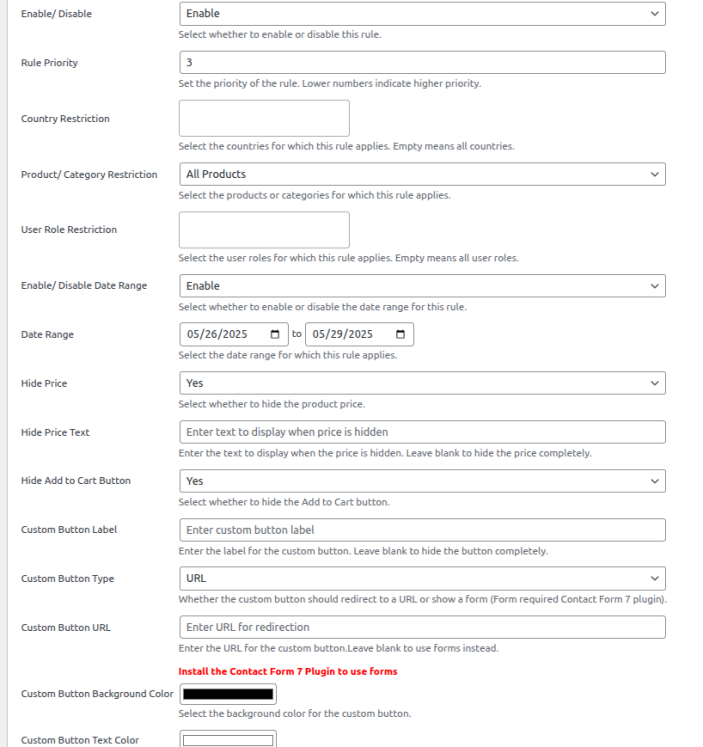
↑ Back to top- Enable / Disable: Select whether to enable or disable this rule.
- Rule Priority: Set the priority of the rule. Lower numbers indicate higher priority.
- Country Restriction: Select the countries for which this rule applies. Empty means all countries.
- Product / Category Restriction: Choose products or categories for which this rule applies.
- Include / Exclude: Select whether to include or exclude the selected products/categories
- User Role Restriction: Select the user roles for which this rule applies. Empty means all user roles.
- Enable / Disable Date Range: Select whether to enable or disable the date range for this rule.
- Date Range: Select the date range for which this rule applies.
- Hide Price: Select whether to hide the product price.
- Hide Price Text: Enter the text to display when the price is hidden. Leave blank to hide the price completely.
- Hide Add to Cart Button: Select whether to hide the Add to Cart button.
- Custom Button Label: Enter the label for the custom button. Leave blank to hide the button completely.
- Custom Button Type: Enter the button type i.e. URl or Form (for form it requires contact form 7 activated)
- Custom Button URL: Enter the URL for the custom button. Leave blank to hide the button completely.
- Custom Button Background Color: Choose background color for the custom button
- Custom Button Text Color: Set the text color for the custom button.