
The N-Genius Online by Network extension for WooCommerce enables you to accept payments via the N-Genius payment gateway.
N-Genius™ is a next-generation payment platform designed to support merchants with innovative, scalable, and secure payment solutions. Built by Network International, one of the leading payment service providers in the region, N-Genius™ enables you to accept card payments, local wallets, and more – all while meeting the highest security and compliance standards.
Whether you’re launching a new store or scaling your existing eCommerce business, the N-Genius™ integration ensures fast, flexible, and secure payment processing tailored for merchants in the Middle East, Africa, and beyond.
Key Benefits:
↑ Back to top- Multiple Payment Options – Accept major credit and debit cards (Visa, Mastercard, American Express), mobile wallets (Apple Pay, Samsung Pay, Google Pay), and region-specific methods — all through a single gateway.
- Security First – Fully PCI DSS compliant, with 3D Secure support to ensure every transaction is protected.
- Local Currency Support – Accept payments in your local currency with support for multi-currency and dynamic currency conversion.
- Multiple pay‑link options – Generate and share Pay By Link and OneLink for fixed or variable amounts; share via social and messaging channels for easy remote payments (events, donations, invoicing).
- Flexible integrations – Choose Hosted Payment Pages, Web SDK, Direct API, Mobile SDKs (iOS/Android/hybrid), plugins, or Virtual Terminal to match your technical resources and desired checkout experience.
- Simplified operations and insights – User-friendly merchant portal and dashboards centralize payment management and provide transaction visibility for reconciliation and reporting.
- Security and fraud protection – Built‑in risk management and advanced fraud prevention tools to protect customers and merchants during online transactions.
- Local 24×7 support – Dedicated regional support across the Middle East and Africa to help resolve issues and keep operations running smoothly.
Installation
↑ Back to topTo start using the N-Genius Online by Network plugin, you can use the “Add to store” functionality on the order confirmation page or the My subscriptions section in your account.
- Navigate to the N-Genuis Online plugin
- Find the Add to store button next to the product you’re planning to install.
- Follow the instructions on the screen, and the product will be automatically added to your store.
Setup and Configuration
↑ Back to top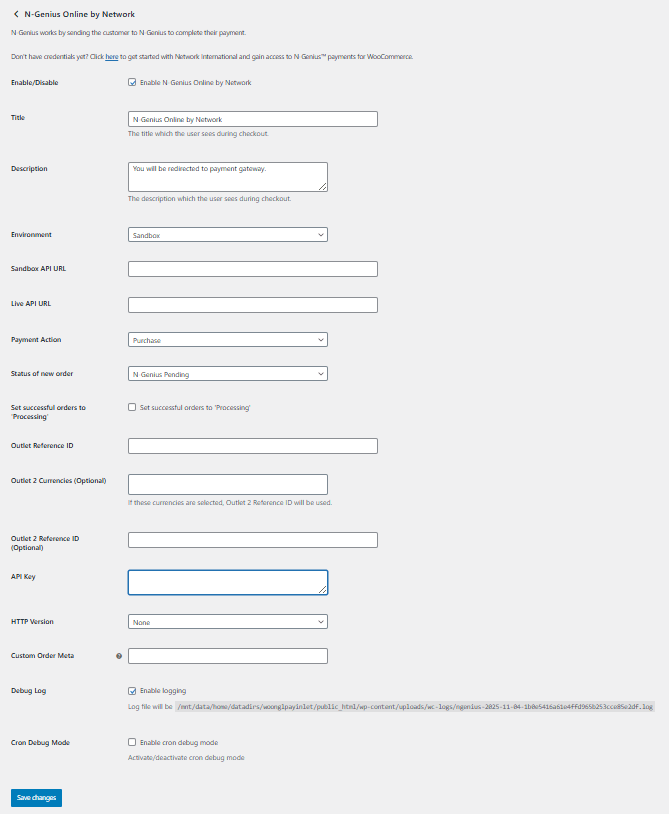
Getting started
↑ Back to topTo set up your store with N-Genius Online by Network:
- Go to N‑Genius Online Payment Gateway → Settings to configure
- Title (display label),
- Environment (Sandbox/Live),
- Payment Action (Authorize / Sale / Purchase),
- API URL(s),
- Currency & Outlet ID (add up to 3),
- Hosted Payment Page API Key,
- HTTP Version,
- Optional: Order Meta, Debug options.
Once configured, click Save and start transacting!
Troubleshooting
↑ Back to topKnown errors and how to solve them.
| Issue | Cause | Solution |
|---|---|---|
| Bad token request | Invalid API Key or wrong environment | Check your keys and plugin environment |
| Access Denied | Incorrect Outlet ID | Verify Outlet configuration |
| No payment method available | Currency mismatch | Ensure currency matches Outlet config |
| Invalid configuration | API Key format error | Remove extra characters, re-enter key |

