
WooCommerce Restrict Product Purchase lets you define smart purchase restrictions in your store based on:
- User roles (e.g. only wholesalers can buy)
- Specific selected individual user
- Specific products or categories
- Fixed quantity limits
- Custom messages shown on product, cart, and checkout pages
It’s a powerful way to control how users interact with your products and who can buy them under what conditions.
How to Activate the Plugin & Start Using It
↑ Back to topInstall the Plugin
↑ Back to top- Go to your WordPress Dashboard.
- Navigate to Plugins → Add New → Upload Plugin.
- Upload the plugin
.zipfile. - Click Install Now and then Activate.

Access Purchase Restriction Settings
↑ Back to topOnce activated:
- Go to WooCommerce → Purchase Restriction tab in the WordPress admin panel.
You’ll see three sections:
Manage Rules – view, edit, or delete your existing rules.

When creating a restriction rule, you can now choose whether it applies to user roles or specific individual users, allowing precise control over who can purchase restricted products.

General Settings – customize error messages for product, cart, and checkout pages.
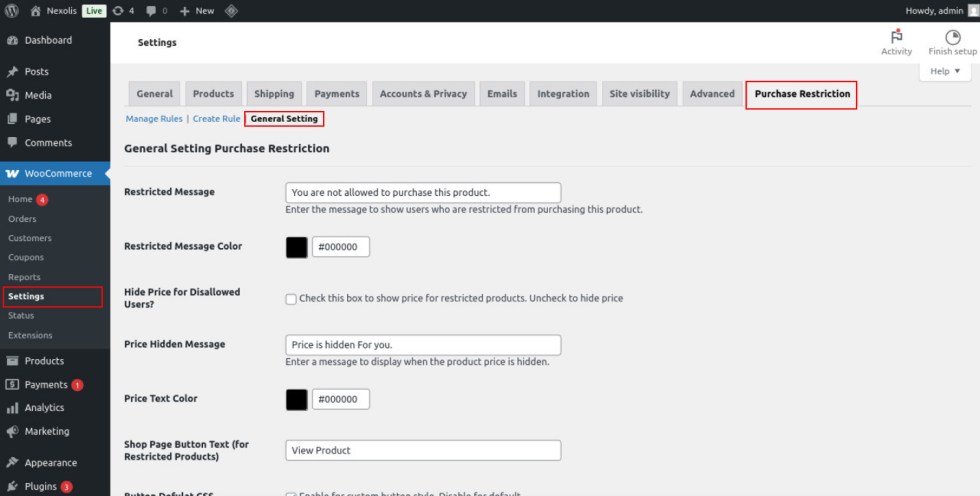
From here, you can create your first rule and control exactly who can buy what, and how!
Benefits of Restrict Product Purchase for WooCommerce
↑ Back to top- Restrict product purchase by user roles (e.g., customer, wholesaler, subscriber)
- Apply restrictions to specific products or entire categories
- Set exact quantity rules for add to cart (e.g., minimum quantity)
- Hide “Add to Cart” and quantity input for unauthorized users
- Show custom error messages on product, cart, and checkout pages
- Simple and clean admin interface with Select2 dropdowns
- Manage and create rules easily using dedicated tabs
- Works perfectly for wholesale, B2B, and membership stores
- Compatible with most WooCommerce themes and user role plugins
- Improves user experience by guiding users with friendly messages
- Helps prevent invalid orders and enforces business rules
- Control purchases for specific individual users in addition to user roles.

