
Big News! 🎉 Coming soon in Elementor Connector: Unlock the Shipping Locations Pro Elementor widget! Show the available shipping zones or a list of locations on the front-end using Elementor.
Overview
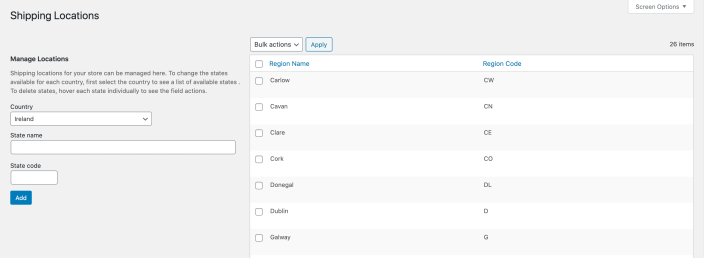
↑ Back to topShipping Locations Pro is an extension for WooCommerce that gives shop owners & administrators access to the full list of states/locations for all countries (rather than just a selected few). These states, in turn, can be further customised to meet the exact shipping requirements of the business without needing postcodes/zipcodes.
In summary, Shipping Locations Pro focuses on the following:
- Provides an interface to create/edit/customize shipping locations (i.e. states/regions)
- Gives full access to all states for all countries used in WooCommerce
- Allows custom states to be used in shipping zones
- Provides an easier checkout experience for customers by loading states in a dropdown field
Installation
↑ Back to topOnce you’ve purchased Shipping Locations Pro, you can download the plugin from your confirmation email or WooCommerce account. To install it, follow these steps:
- Go to Plugins > Add New > Upload
- Select the ZIP file you just downloaded
- Click Install Now, and then Activate
Once you’ve installed and activated the plugin, navigate to WooCommerce > Shipping Locations to customize the available states on a per country bases. To use these states in a shipping zone, navigate to WooCommerce > Settings > Shipping > Shipping Zones
More information at: Installing and Managing Plugins.
Documentation Overview
↑ Back to topStore Owner’s Guide
Use Cases
- Conditional shipping for states in Northern Ireland
- Configuring taxes for Spain’s Canary Islands
- Brexit and Northern Ireland Shipping Zones
FAQ & Feedback
- Frequently Asked Questions
- Feedback & Suggestions
Troubleshooting & Support
↑ Back to topPurchased Shipping Locations Pro and need assistance? If you’ve found an issue:
- Ensure you have the latest versions of all extensions and themes. Go to WooCommerce > System Status to check for plugin updates and other important information that may require your attention.
- Rule out a plugin conflict: Turn off all plugins except WooCommerce and WooCommerce Shipping Locations Pro. If the issue is resolved, find the plugin that triggers it by re-activating plugins one by one.
- Rule out a theme conflict. Activate Storefront, or a default WordPress theme such as TwentyTwenty and check if the issue still occurs. If it doesn’t, please contact your theme author(s).
- Read the most Frequently Asked Questions for possible solutions.
- Use the WooCommerce Self Service Guide.
If you followed these steps but the issue persists, get in touch with us via the Help Desk!

