
This guide covers styling the card fields of Advanced Card Processing in WooCommerce PayPal Payments with CSS.
Note:
This is a Developer level doc. If you are unfamiliar working with code and resolving potential conflicts, we recommend you work with a Woo Agency Partner for larger projects, or find a WooCommerce developer on Codeable for smaller customizations. We are unable to provide support for customizations under our Support Policy.
Style the card fields with CSS
↑ Back to topThe card fields follow your active theme’s styles by default. To change how they look, add CSS that targets these selectors:
| Field | Selector |
|---|---|
| Button wrapper | #ppcp-hosted-fields |
| Button | #ppcp-dcc-order-button |
| Card number | #ppcp-credit-card-gateway-card-number |
| Expiry | #ppcp-credit-card-gateway-card-expiry |
| CVV | #ppcp-credit-card-gateway-card-cvc |
| Save your Credit Card checkbox | #ppcp-credit-card-vault |
For the CSS properties PayPal supports, see PayPal’s supported CSS properties.
Example
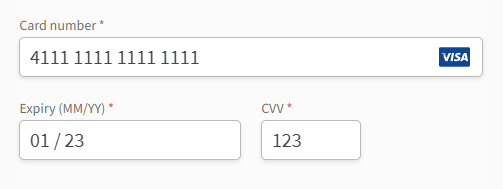
↑ Back to topThis example gives the card number, expiry, and CVV fields a white background, a light border, rounded corners, and a soft shadow. Add it to your site’s Additional CSS or your child theme’s stylesheet:
#ppcp-credit-card-gateway-card-number,
#ppcp-credit-card-gateway-card-expiry,
#ppcp-credit-card-gateway-card-cvc {
  background-color: #ffffff !important;
  border: 1px solid #bbbbbb !important;
  border-radius: 5px !important;
  box-shadow: 0 2px 4px 0 rgba(0, 0, 0, 0.1) !important;
  height: 40px !important;
  padding: 0 10px !important;
}
Note:
If your changes don’t show in the Customizer preview, save them and reload the checkout page. Your theme’s styles may also need !important to override, as in the example.
Questions and support
↑ Back to topDo you still have questions and need assistance?
- Get in touch with a Happiness Engineer via our Help Desk. We provide support for extensions developed by and/or sold on WooCommerce.com, and Jetpack/WordPress.com customers.
- If you are not a customer, we recommend finding help in the WooCommerce support forum or hiring a Woo Agency Partner. These are trusted agencies with a proven track record of building highly customized, scalable online stores. Learn more about Woo Agency Partners.