
Use this setup when nearby deliveries should be free, but longer deliveries should be charged only for the distance beyond the free range.
Before you begin
↑ Back to top- Add Distance Rate Shipping to the shipping zone that covers the delivery area.
- Decide the free delivery distance and the price per mile, kilometer, or minute.
- Use the same unit in both rules so the calculation stays predictable.
Create the free local rule
↑ Back to top- Go to WooCommerce > Settings > Shipping > Shipping zones.
- Select the shipping zone that contains the Distance Rate Shipping method.
- Select Edit for the Distance Rate Shipping method.
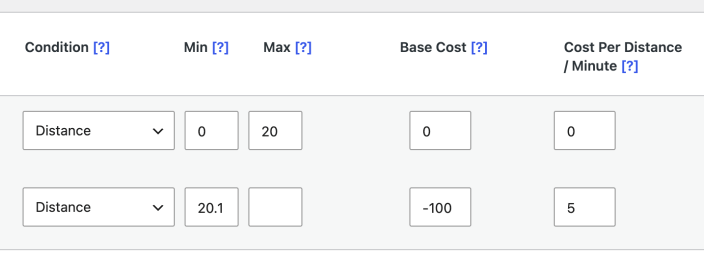
- In Distance Rate Rules, add a rule for the free local range.
- Set Condition to Distance.
- Set Min to 0.
- Set Max to the end of the free range. For example, enter 20 for the first 20 miles or kilometers.
- Set Base Cost and Cost Per Distance / Minute to 0.
Create the paid distance rule
↑ Back to top- Add a second Distance Rate rule.
- Set Condition to Distance.
- Set Min just above the free range. For a free range of 0 to 20, use 20.1.
- Leave Max blank, or enter the farthest distance you want to deliver to.
- Set Cost Per Distance / Minute to the amount to charge for each unit. For example, enter 5 to charge $5 per mile, kilometer, or minute.
- Set Base Cost to a negative amount that offsets the free range. Multiply the free range by the per-unit cost. For a 20-unit free range at $5 per unit, enter -100.
- Select Save changes.
The finished rules look like this:
Example calculation
↑ Back to topFor a 30-mile delivery at $5 per mile with the first 20 miles free, Distance Rate Shipping calculates the second rule as 30 x 5 – 100. The customer is charged $50, which covers only the 10 miles beyond the free range.
Test the rules
↑ Back to top- Test one address inside the free range and confirm the Distance Rate Shipping cost is 0.
- Test one address beyond the free range and confirm the charge reflects only the distance after the free range.
- If your store charges tax on shipping, confirm the final checkout total includes the expected tax behavior.

