>Westpac PayWay API for WooCommerce is a payment gateway that allows you to use Westpac PayWay API as a credit card processor, to accept Visa and Mastercard by default, and optionally American Express and Diners Club after further activation by Westpac. It works with both the WooCommerce Checkout block and the classic checkout, and supports refunds and WooCommerce Subscriptions.
*Note: Another extension is available if you wish to use the NET (Westpac-hosted direct post) integration.
Find out more about Westpac PayWay and the different integration types at: https://www.payway.com.au/core/AboutView
Requirements
↑ Back to top- An active Westpac account with the PayWay Classic API module enabled
- An SSL certificate
- AUD set as your store currency
Installation
↑ Back to topTo start using a product from WooCommerce.com, you can use the “Add to store” functionality on the order confirmation page or the My subscriptions section in your account.
- Navigate to My subscriptions.
- Find the Add to store button next to the product you’re planning to install.
- Follow the instructions on the screen, and the product will be automatically added to your store.
Alternative options and more information at:
Managing WooCommerce.com subscriptions.
Setup and Configuration
↑ Back to topWestpac PayWay
↑ Back to top- Enter your Westpac PayWay administration tool (http://payway.com.au) and click on the gear icon at the top left of the page where your client ID is to go to the Settings page.
- Check that you have PayWay Classic API listed under PayWay Modules. If you don’t, then you’ll need to get in touch with PayWay to have them enable the module on your account. Otherwise, click the PayWay Classic API link.
- Click on Security in the menu on the left.
- Note your customer.UserName and customer.Password for later.
- Add your server IP address to the API Security Access List. Your server IP is displayed on the configuration page for the gateway in the WordPress Dashboard. You can also use a wildcard IP address (eg. “123.123.123.0/24” allows all IP addresses from 123.123.123.0 to 123.123.123.255).
- Click on Certificate in the menu on the left.
- Choose PHP from the API Technology dropdown and click Go.
- Click on Download PHP Certificate and make note of the expiry date above it.
Westpac PayWay on your site
↑ Back to top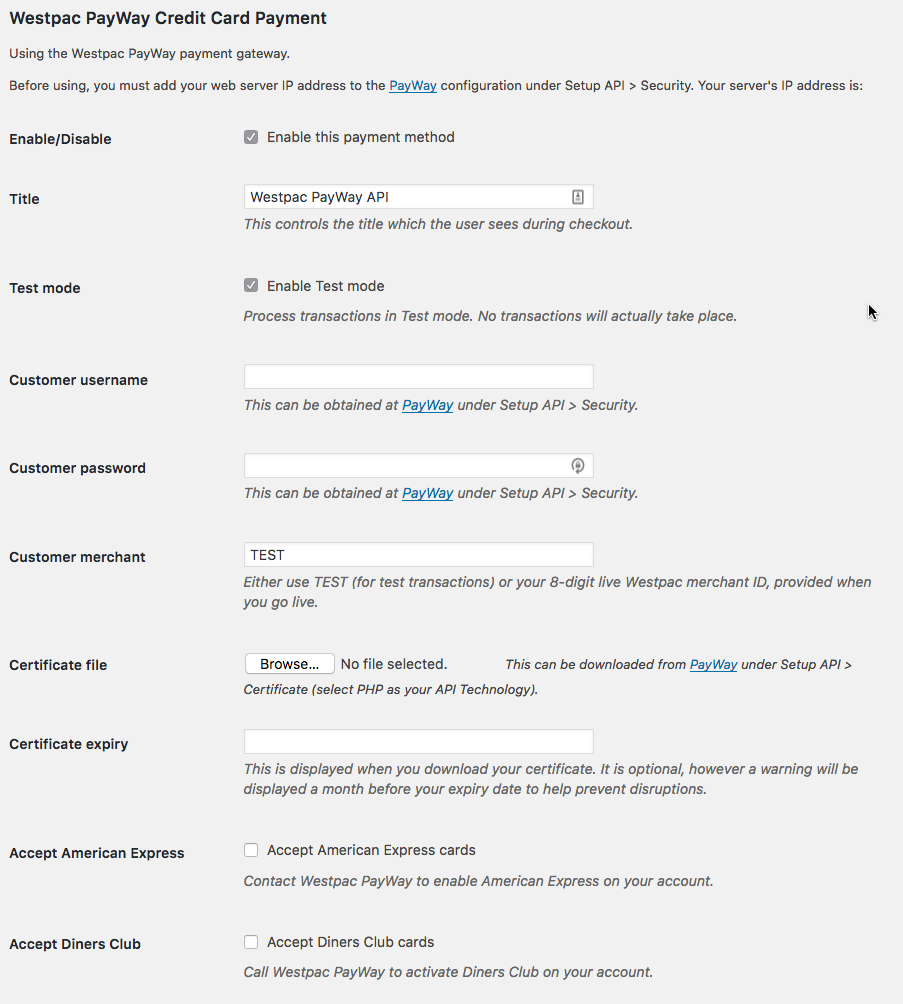
- Go to: WooCommerce > Settings > Payments > Westpac PayWay API.
- Enter and select your options:
- Tick to “Enable this payment method”.
- The “Title” option allows you to determine what your customers will see this payment option displayed as. You might choose for this to be something like “Westpac PayWay” or “Credit card”.
- The “Enable Test mode” option allows you to test transactions with this payment gateway to ensure your details are correct.
- Enter your “Customer username” and “Customer password” as provided by the Westpac PayWay administration tool.
- Leave the “Customer merchant” field as TEST while testing, and replace it with the value provided by Westpac once you go live.
- Upload the PHP Certificate you downloaded to the “Certificate file” field.
- Optionally (but recommended), add your “Certificate expiry” date in the field provided.
- If you have arranged with PayWay to accept American Express or Diners Club, tick these boxes to advise customers they can use these card types on the payment screen.
- Save changes.
The payment method won’t show at checkout until the customer username, password, merchant and certificate file are all set. The certificate is stored in a protected folder on your server.
Questions & Support
↑ Back to topCheckout block and classic checkout
↑ Back to topThe extension works with both the WooCommerce Checkout block and the classic checkout. No extra setup is needed: the card fields appear automatically in whichever checkout your store uses.
Refunds
↑ Back to topYou can issue full or partial refunds from the order screen using Refund via Westpac PayWay API. Orders placed with test mode enabled can’t be refunded through the extension.
WooCommerce Subscriptions
↑ Back to topWith WooCommerce Subscriptions active, the extension supports automatic renewal payments, payment method changes by customers and store managers, and suspending, cancelling and reactivating subscriptions. The customer’s card is saved securely at Westpac PayWay, not on your site.
Logs
↑ Back to topLogs are available in WooCommerce > Status > Logs under woo_westpac_api and woo_westpac_api_ccapi. Card details are masked in the logs.
Developer filters
↑ Back to topTo use different PayWay accounts for different orders, the following filters receive the setting value and the order ID: payway_api_customer_username, payway_api_customer_password, payway_api_customer_merchant and payway_api_certificate_file.
Troubleshooting
↑ Back to topPayments fail with “Unknown Customer IP Address”
Your server IP address hasn’t been added to the API Security Access List in PayWay. The correct IP address is displayed on the configuration page for the gateway in the WordPress Dashboard.
“Your Westpac merchant certificate is going to expire” notice
Download a new PHP certificate from PayWay, upload it in the gateway settings, and update the certificate expiry date.
Have a question before you buy? Please fill out this pre-sales form.
Already purchased and need some assistance? Get in touch with the developer via the Help Desk.