
Easily apply additional fees or discounts on the cart page based on the customer’s country. This plugin gives you full control over country-specific pricing adjustments in your WooCommerce store.
Installation
↑ Back to topTo start using a product from WooCommerce.com, you can use the “Add to store” functionality on the order confirmation page or the My subscriptions section in your account.
- Navigate to My subscriptions.
- Find the Add to store button next to the product you’re planning to install.
- Follow the instructions on the screen, and the product will be automatically added to your store.
Alternative options and more information at:
Managing WooCommerce.com subscriptions.

How to Configure the Plugin
↑ Back to topAfter activation, a new tab appears under:
WooCommerce > Country Surcharge
This section has two sub-tabs:
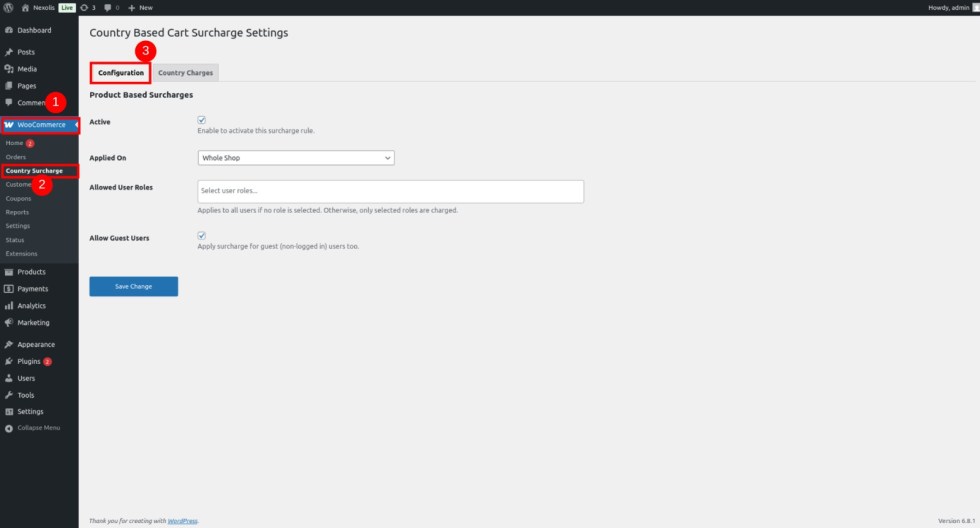
Configuration
↑ Back to topEnable or disable the plugin
Choose rule scope: Whole Shop, Specific Products, or Categories
Use Select2 fields to pick products or categories
Select allowed user roles
Choose whether to allow rules for guest users
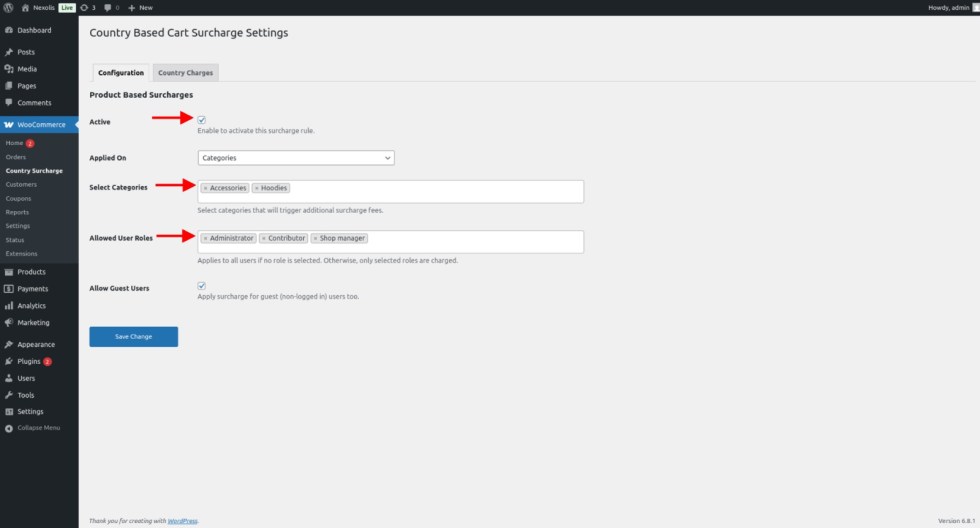
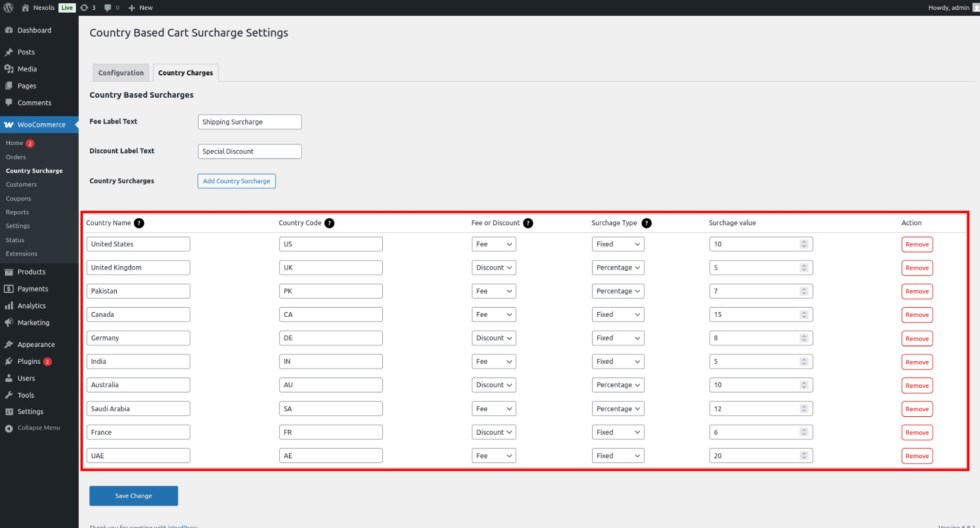
Country Charges
↑ Back to topSet custom labels for fee and discount
Add multiple rules
For each rule, enter:
Country Name (e.g., Pakistan, United States)
Country Code (e.g., PK, US)
Choose between Fee or Discount
Select Fee Type: Fixed or Percentage
Set the Value
Rules can be added, edited, or removed easily
How It Works on Cart and Checkout
↑ Back to topOnce the plugin is configured:
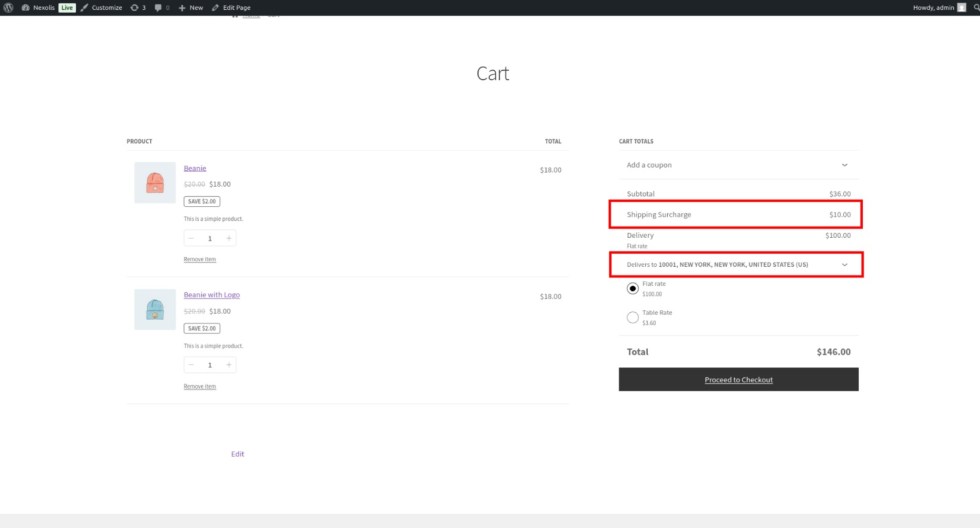
When a user adds a product to the cart and visits the cart or checkout page, the plugin checks their billing/shipping country.
If a matching rule exists, the corresponding fee or discount is automatically applied based on the configuration.
Shipping Surcharge
If a user from the US adds products to their cart, and a rule is set to add a $10 surcharge, it will appear in the cart total as “Shipping Surcharge: $10
Shipping Discount
If a user from the United Kingdom adds products to their cart, and a rule is set to offer a $10 shipping discount, it will appear in the cart total as “Shipping Discount: -$10”

Benefits
↑ Back to top- Tailor pricing based on country-specific logistics or tax policies
- Encourage or discourage purchases from specific regions
- Offer discounts for targeted countries as a marketing strategy
- Gain full flexibility and control over international pricing
Why Choose Country Based Cart Surcharge for WooCommerce?
↑ Back to top- Complete Control Over Pricing: Set location-based fees or discounts to manage international pricing effortlessly.
- Flexible Rule Creation: Apply rules on specific products, categories, or the whole shop based on user roles and countries.
- Boost Conversions & Profit: Offer targeted discounts or handle logistic-based surcharges easily to optimize conversions.
- User Role & Guest Targeting: Apply rules for logged-in users or allow discounts for guests too.
- Automatic Application: No manual setup at checkout—plugin applies rules automatically based on the customer’s country.
- Custom Label Support: Use your own labels for “Fee” and “Discount” to match your store’s branding.

