
Einvoicing Pro allows your WooCommerce store to generate legally compliant e-invoices in Factur-X, UBL, ZUGFeRD, and Xrechnung formats — with premium invoice templates for a professional, branded look.
Built for store owners who need to comply with European and international e-invoicing regulations, Einvoicing Pro offers premium invoice models that elevate your brand while keeping you fully compliant.
Key Features
↑ Back to topPremium Invoice Models — Choose from professionally designed invoice templates that match your brand identity. Customize colors, layouts, and styling for a polished, professional appearance.
Multiple E-Invoice Formats — Generate invoices in Factur-X, UBL, ZUGFeRD, and Xrechnung formats to meet compliance requirements across Europe and beyond.
Visual Invoice Designer — Use the native WordPress Customizer to add your logo, company details, VAT number, registration info, and customize header and footer sections with a live preview.
Smart Email Attachments — Choose which WooCommerce emails include invoice attachments: order confirmation, processing, completed, and more.
Sequential Invoice Numbering — Automatically generate unique, sequential invoice numbers with customizable format, prefix, suffix, and starting number. Supports yearly reset.
Bulk Download — Select multiple orders and download all invoices in a single ZIP package directly from the WooCommerce orders list.
Error Handling & Logging — Automatic admin email notifications if an invoice fails to generate, plus detailed WooCommerce logging for easy troubleshooting.
Multilingual — Includes translations for French, German, and Spanish out of the box.
Installation
↑ Back to topTo start using a product from WooCommerce.com, you can use the “Add to store” functionality on the order confirmation page or the My subscriptions section in your account.
- Navigate to My subscriptions.
- Find the Add to store button next to the product you’re planning to install.
- Follow the instructions on the screen, and the product will be automatically added to your store.
Alternative options and more information at:
Managing WooCommerce.com subscriptions.
Setup and Configuration
↑ Back to topGetting started
↑ Back to topTo set up your store with Einvoicing Pro:
- Go to: WooCommerce > Settings > Einvoicing.
- Enable e-invoicing by ticking the checkbox.
- Enter your company details: name, address, VAT number, and registration information.
- Select your preferred e-invoice format (Factur-X, UBL, ZUGFeRD, or Xrechnung), or just select PDF if you don’t need e-invoice format yet.
- Save changes.
Visual Invoice Designer
↑ Back to topThe Invoice Designer is powered by the native WordPress Customizer, giving you a familiar live-preview interface.
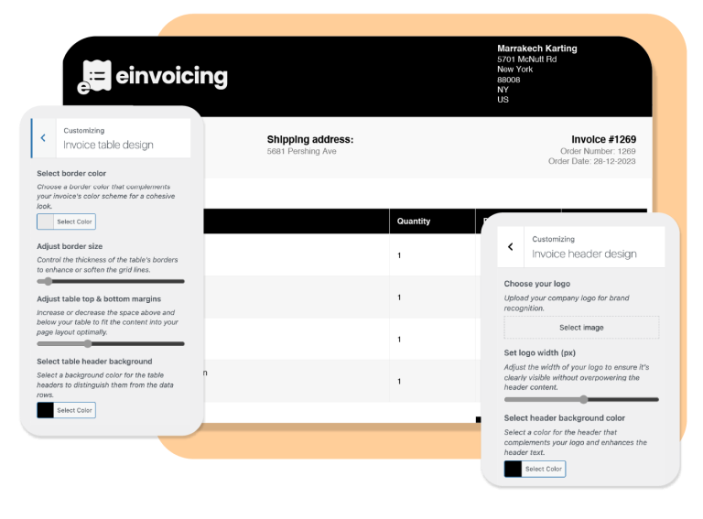
You can access it two ways: go to WooCommerce > Settings > Einvoicing and click “Customize Invoice”, or navigate directly to WooCommerce > Invoice Customizer in the left sidebar.
From there you can:
- Ready-to-Use designs — Pick a starting template: Black, Corporate Classic, Modern Minimalist, or Elegant Professional.
- Fields visibility — Toggle display of the client phone number, client email, and invoice date (shown instead of order date).
- Global style options — Set the background color, font family, and font size applied across the entire invoice.
- Invoice header design — Upload your logo and configure the header layout.
- Invoice details design — Customize how billing, shipping, and order information is displayed.
- Invoice table design — Adjust the style of the line-items table (columns, colors, borders).
- Customer notes section — Show or hide and style the customer-facing notes area.
- Invoice footer design — Customize footer text, legal mentions, and layout.
Choosing a Base Template
Four ready-to-use designs are available: Black, Corporate Classic, Modern Minimalist, and Elegant Professional. In the customizer left panel, go to Ready-to-Use designs, select a template from the dropdown, and click Load Template to apply it as your starting point.
Global Style Options
The Global Style Options panel lets you set a background color, choose a font family, and adjust font size — giving all your invoices a consistent, on-brand appearance. Every change is reflected instantly in the live preview before you save.
Email Attachments
↑ Back to topUnder the Einvoicing settings, select which WooCommerce order emails should automatically include the invoice as a PDF attachment. Options include order confirmation, processing, completed, and custom order status emails.
Invoice Numbering
↑ Back to topConfigure your invoice numbering under the Einvoicing settings tab. You can set a custom prefix (e.g., “INV-“), suffix, starting number, and choose whether numbers reset each year.
Usage
↑ Back to topOnce configured, invoices are generated automatically when orders move to “processing” or “completed” status. Invoices are attached to the relevant WooCommerce emails and can also be downloaded individually from each order page, or in bulk from the orders list using the “Download Invoices” bulk action.
Troubleshooting
↑ Back to topInvoice not generating: Ensure e-invoicing is enabled under WooCommerce > Settings > Einvoicing. Check that your company details are filled in completely. Review the WooCommerce logs (WooCommerce > Status > Logs) for detailed error messages.
Invoice not attached to emails: Verify that the correct email types are selected in the Einvoicing settings. Also confirm that your WooCommerce email system is working properly by checking WooCommerce > Settings > Emails.
Format validation errors: If you receive validation errors for a specific e-invoice format, ensure all required fields (VAT number, company registration, address) are complete in your settings.
FAQs
↑ Back to topCommonly asked questions about Einvoicing Pro.
What e-invoice formats does Einvoicing Pro support?
Einvoicing Pro supports Factur-X, UBL (Universal Business Language), ZUGFeRD, and Xrechnung formats. These cover compliance requirements across the EU, Germany, France, and many other countries.
Do I need any additional plugins for e-invoicing compliance?
No. Einvoicing Pro is a complete solution — it handles e-invoice generation, PDF creation, email attachments, and format compliance all in one plugin. No additional plugins are required.
Is Einvoicing Pro compatible with my country's e-invoicing regulations?
Einvoicing Pro supports the most widely adopted international e-invoicing standards (Factur-X, UBL, ZUGFeRD, Xrechnung). These formats are accepted across the European Union and many other regions. If you are unsure which format your country requires, check with your local tax authority.

